
- React - Home
- React - Introduction
- React - Roadmap
- React - Installation
- React - Features
- React - Advantages & Disadvantages
- React - Architecture
- React - Creating a React Application
- React - JSX
- React - Components
- React - Nested Components
- React - Using Newly Created Components
- React - Component Collection
- React - Styling
- React - Properties (props)
- React - Creating Components using Properties
- React - props Validation
- React - Constructor
- React - Component Life Cycle
- React - Event management
- React - Creating an Event−Aware Component
- React - Introduce Events in Expense Manager APP
- React - State Management
- React - State Management API
- React - Stateless Component
- React - State Management Using React Hooks
- React - Component Life Cycle Using React Hooks
- React - Layout Component
- React - Pagination
- React - Material UI
- React - Http Server
- React - Http client programming
- React - Form Programming
- React - Forms
- React - Controlled Component
- React - Uncontrolled Component
- React - Formik
- React - Conditional Rendering
- React - Lists
- React - Keys
- React - Routing
- React - Redux
- React - Animation
- React - Bootstrap
- React - Map
- React - Table
- React - Managing State Using Flux
- React - Testing
- React - CLI Commands
- React - Building and Deployment
- React - Example
- Hooks
- React - Introduction to Hooks
- React - Using useState
- React - Using useEffect
- React - Using useContext
- React - Using useRef
- React - Using useReducer
- React - Using useCallback
- React - Using useMemo
- React - Custom Hooks
- React Advanced
- React - Accessibility
- React - Code Splitting
- React - Context
- React - Error Boundaries
- React - Forwarding Refs
- React - Fragments
- React - Higher Order Components
- React - Integrating With Other Libraries
- React - Optimizing Performance
- React - Profiler API
- React - Portals
- React - React Without ES6 ECMAScript
- React - React Without JSX
- React - Reconciliation
- React - Refs and the DOM
- React - Render Props
- React - Static Type Checking
- React - Strict Mode
- React - Web Components
- Additional Concepts
- React - Date Picker
- React - Helmet
- React - Inline Style
- React - PropTypes
- React - BrowserRouter
- React - DOM
- React - Carousel
- React - Icons
- React - Form Components
- React - Reference API
- React Useful Resources
- React - Quick Guide
- React - Cheatsheet
- React - Axios CheatSheet
- React - Useful Resources
- React - Discussion
React - useDebugValue Hook
The useDebugValue hook is a React tool that displays custom labels and values for custom hooks in the React DevTools. This is very handy for debugging and providing more information about our own hooks.
Syntax
useDebugValue(value, formatFn);
Parameters
value − This is the value that we want to display. It can be any JavaScript value, like a text, integer, or object, or it can also be a function.
formatFn − This is a function that takes a value as an argument and returns a string representing the label or description of the item. We can also add a custom label to the value.
Return Value
The hook useDebugValue returns nothing.
Reference
To display a readable debug value we can call useDebugValue at the top level of our custom Hook −
import { useDebugValue, useState } from 'react';
function useCounter() {
   const [count, setCount] = useState(0);

   // Display the count and a status message
   useDebugValue(count, (count) => `Count: ${count}, Status: ${count === 0 ? 'Empty' : 'Not Empty'}`);

   const increment = () => setCount(count + 1);
   const decrement = () => setCount(count - 1);
   return { count, increment, decrement };
}
Examples
We can use this hook in two different ways. First we can use it by adding a label to a custom Hook and secondly we can use it by deferring formatting of a debug value. So we will see both the options one by one.
Example − Adding a label to a custom Hook
To display a readable debug value we will call useDebugValue at the top level of our custom Hook.
import { useDebugValue } from 'react';

function signInStatus() {
   // ...
   useDebugValue(isSignIn ? 'SignIn' : 'Signout');
}
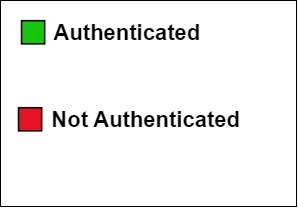
In this example we will show a custom label using the useDebugValue hook as per the authentication status of the user.
useAuthStatus.js
import { useDebugValue } from "react";

export function useAuthStatus() {
   const isAuthenticated = checkAuthentication();

   // Use the useDebugValue hook
   useDebugValue(isAuthenticated ? "Authenticated" : "Not Authenticated");

   return isAuthenticated;
}
function checkAuthentication() {
   // Checking authentication status of the user
   return Math.random() < 0.5; // Authentication status will be False
   // return Math.random() > 0.5; // Authentication status will be True
}
App.js
 import { useAuthStatus } from "./useAuthStatus.js";

function AuthStatusComponent() {
   const isAuthenticated = useAuthStatus();
   return (
      <div>
         <h1>{isAuthenticated ? "Authenticated" : "Not Authenticated"}</h1>
      </div>
   );
}

export default function App() {
   return <AuthStatusComponent />;
}
Output
Example − Deferring debug value formatting
As a second parameter to useDebugValue hook, we can also specify a formatting function.
The useDateValue custom hook in the below example combines the useDebugValue hook with the formatDateString formatting method. This removes the need to use toDateString() on the Date variable for each render. This technique makes the code more efficient. The formatDateString method is only called when the component is examined because of the useDebugValue hook.
useDateValue.js
import { useDebugValue } from 'react';

export function useDateValue(date) {
   // Define a formatting function that formats the Date value
   const formatDateString = (date) => date.toDateString();

   // Use the useDebugValue hook with the formatting function
   useDebugValue(date, formatDateString);
   return date;
}
App.js
import { useDateValue } from './useDateValue.js';

function DateComponent() {
   const currentDate = useDateValue(new Date());
   return (
      <div>
         <h1>Current Date: {currentDate.toDateString()}</h1>
      </div>
   );
}

export default function App() {
   return <DateComponent />;
}
Output
Current Date: Wed Oct 11 2023
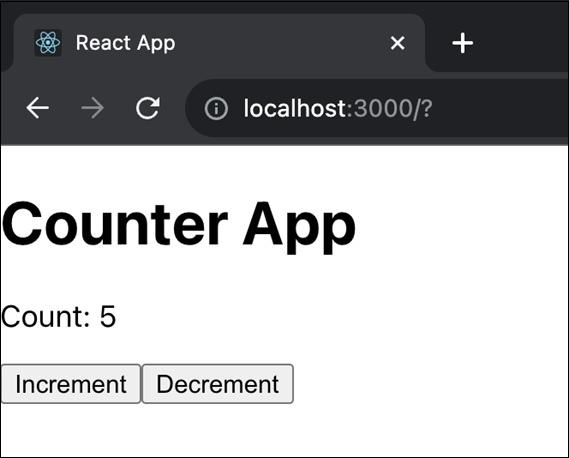
Example − Counter App
So we can add useDebugValue to display the count in a more informative way when debugging. The useDebugValue hook is useful for providing additional information about the value of a custom hook or component during debugging.
App.js
import React, { useState, useDebugValue } from 'react';

function App() {
   const [count, setCount] = useState(0);
   const increment = () => {
      setCount(count + 1);
   };
   const decrement = () => {
      setCount(count - 1);
   };

   // Display the count value in a more informative way for debugging
   useDebugValue(`Count: ${count}`);

   return (
      <div>
         <h1>Counter App</h1>
         <p>Count: {count}</p>
         <button onClick={increment}>Increment</button>
         <button onClick={decrement}>Decrement</button>
      </div>
   );
}
export default App;
Output
Note
The useDebugValue hook is a useful tool for helping developers understand and debug their own code. However, it is important to use it carefully and to be aware of its limitations. It is a tool in our tools that we should use carefully to avoid problems and make our code simpler to deal with.
