
- React - Home
- React - Introduction
- React - Roadmap
- React - Installation
- React - Features
- React - Advantages & Disadvantages
- React - Architecture
- React - Creating a React Application
- React - JSX
- React - Components
- React - Nested Components
- React - Using Newly Created Components
- React - Component Collection
- React - Styling
- React - Properties (props)
- React - Creating Components using Properties
- React - props Validation
- React - Constructor
- React - Component Life Cycle
- React - Event management
- React - Creating an Event−Aware Component
- React - Introduce Events in Expense Manager APP
- React - State Management
- React - State Management API
- React - Stateless Component
- React - State Management Using React Hooks
- React - Component Life Cycle Using React Hooks
- React - Layout Component
- React - Pagination
- React - Material UI
- React - Http Server
- React - Http client programming
- React - Form Programming
- React - Forms
- React - Controlled Component
- React - Uncontrolled Component
- React - Formik
- React - Conditional Rendering
- React - Lists
- React - Keys
- React - Routing
- React - Redux
- React - Animation
- React - Bootstrap
- React - Map
- React - Table
- React - Managing State Using Flux
- React - Testing
- React - CLI Commands
- React - Building and Deployment
- React - Example
- Hooks
- React - Introduction to Hooks
- React - Using useState
- React - Using useEffect
- React - Using useContext
- React - Using useRef
- React - Using useReducer
- React - Using useCallback
- React - Using useMemo
- React - Custom Hooks
- React Advanced
- React - Accessibility
- React - Code Splitting
- React - Context
- React - Error Boundaries
- React - Forwarding Refs
- React - Fragments
- React - Higher Order Components
- React - Integrating With Other Libraries
- React - Optimizing Performance
- React - Profiler API
- React - Portals
- React - React Without ES6 ECMAScript
- React - React Without JSX
- React - Reconciliation
- React - Refs and the DOM
- React - Render Props
- React - Static Type Checking
- React - Strict Mode
- React - Web Components
- Additional Concepts
- React - Date Picker
- React - Helmet
- React - Inline Style
- React - PropTypes
- React - BrowserRouter
- React - DOM
- React - Carousel
- React - Icons
- React - Form Components
- React - Reference API
- React Useful Resources
- React - Quick Guide
- React - Cheatsheet
- React - Axios CheatSheet
- React - Useful Resources
- React - Discussion
React - isCompositeComponent() method
React JS is all about dividing our app into smaller components, and each of these components has its own lifecycle. React provides built-in methods that we can use at different stages in a components life.
In React JS, the isCompositeComponent() method is basically used to check if an instance is a user-defined component. It helps us find whether a particular element is a custom component created by the developer or not. So we can say that it helps us find out if a particular part of our app is a component we have created or not.
Syntax
isCompositeComponent(instance)
Parameters
instance − This is the element that we want to check. This method is used to check that an element or component instance is a user-defined component or not. So we can check any React element or component instance to see if it is a custom component or built-in.
Return Value
It returns a boolean value, true if the provided element is a user-defined component, false otherwise.
Example - Simple React App
Now, we will create a simple React app that shows how we can use this method. We will create a basic component called App and use isCompositeComponent() in it.
App.js
import React from 'react';
import { isCompositeComponent } from 'react-dom/test-utils';

// Define App Component
const App = () => {

   // Function to show isCompositeComponent()
   function myFunction() {
      var a = isCompositeComponent(el);
      console.log("It is an element :", a);
   }
   const el = <div>
   <h1>element</h1>
   </div>

   // Return our JSX code
   return (
      <div>
         <h1>React App to show isCompositeComponent method</h1>
         <button onClick={myFunction}>Click me !!</button>
      </div>
   );
}

export default App;
Output
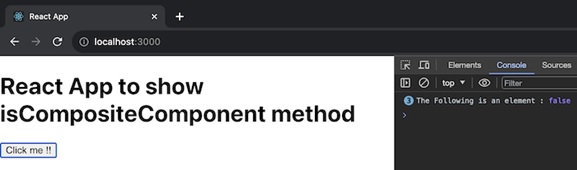
In the code, we saw a simple component called App. There is a function in this component named myFunction that uses isCompositeComponent() to figure out that the el element is a user-defined component. When we click the Click me!! button, the outcome is logged in the console.
Example - Checking a Composite Component
This app consists of a simple functional component named FunctionalComponent. The main App component renders a button that, when clicked, checks whether FunctionalComponent is a composite component using the isCompositeComponent() method.
App.js
import React from 'react';
import { isCompositeComponent } from 'react-dom/test-utils';

const FunctionalComponent = () => {
   return <div>Hello from FunctionalComponent!</div>;
};
const App = () => {
   function checkComponent() {
      const isComposite = isCompositeComponent(<FunctionalComponent />);
      console.log("Is FunctionalComponent a composite component?", isComposite);
   }
   return (
      <div>
         <h1>React App to show isCompositeComponent method</h1>
         <button onClick={checkComponent}>Check FunctionalComponent</button>
      </div>
   );
};

export default App;
Output
Example - Checking Another Composite Component
This app features a simple class component named ClassComponent. The main App component renders a button that, when clicked, checks whether ClassComponent is a composite component using the isCompositeComponent() method.
App.js
import React, { Component } from 'react';
import { isCompositeComponent } from 'react-dom/test-utils';

class ClassComponent extends Component {
   render() {
      return <div>Hello from ClassComponent!</div>;
   }
}
const App = () => {
   function checkComponent() {
      const isComposite = isCompositeComponent(<ClassComponent />);
      console.log("Is ClassComponent a composite component?", isComposite);
   }
   return (
      <div>
         <h1>React App to show isCompositeComponent method</h1>
         <button onClick={checkComponent}>Check ClassComponent</button>
      </div>
   );
};

export default App;
Output
Summary
The isCompositeComponent() method is useful for figuring out whether a specific element of our React app is a component we created. For user-defined elements, it returns true, otherwise, it returns false.
