
- OS - Home
- OS - Overview
- OS - History
- OS - Evolution
- OS - Functions
- OS - Components
- OS - Structure
- OS - Architecture
- OS - Services
- OS - Properties
- Process Management
- Processes in Operating System
- States of a Process
- Process Schedulers
- Process Control Block
- Operations on Processes
- Process Suspension and Process Switching
- Process States and the Machine Cycle
- Inter Process Communication (IPC)
- Remote Procedure Call (RPC)
- Context Switching
- Threads
- Types of Threading
- Multi-threading
- System Calls
- Scheduling Algorithms
- Process Scheduling
- Types of Scheduling
- Scheduling Algorithms Overview
- FCFS Scheduling Algorithm
- SJF Scheduling Algorithm
- Round Robin Scheduling Algorithm
- HRRN Scheduling Algorithm
- Priority Scheduling Algorithm
- Multilevel Queue Scheduling
- Lottery Scheduling Algorithm
- Starvation and Aging
- Turn Around Time & Waiting Time
- Burst Time in SJF Scheduling
- Process Synchronization
- Process Synchronization
- Solutions For Process Synchronization
- Hardware-Based Solution
- Software-Based Solution
- Critical Section Problem
- Critical Section Synchronization
- Mutual Exclusion Synchronization
- Mutual Exclusion Using Interrupt Disabling
- Peterson's Algorithm
- Dekker's Algorithm
- Bakery Algorithm
- Semaphores
- Binary Semaphores
- Counting Semaphores
- Mutex
- Turn Variable
- Bounded Buffer Problem
- Reader Writer Locks
- Test and Set Lock
- Monitors
- Sleep and Wake
- Race Condition
- Classical Synchronization Problems
- Dining Philosophers Problem
- Producer Consumer Problem
- Sleeping Barber Problem
- Reader Writer Problem
- OS Deadlock
- Introduction to Deadlock
- Conditions for Deadlock
- Deadlock Handling
- Deadlock Prevention
- Deadlock Avoidance (Banker's Algorithm)
- Deadlock Detection and Recovery
- Deadlock Ignorance
- Resource Allocation Graph
- Livelock
- Memory Management
- Memory Management
- Logical and Physical Address
- Contiguous Memory Allocation
- Non-Contiguous Memory Allocation
- First Fit Algorithm
- Next Fit Algorithm
- Best Fit Algorithm
- Worst Fit Algorithm
- Buffering
- Fragmentation
- Compaction
- Virtual Memory
- Segmentation
- Paged Segmentation & Segmented Paging
- Buddy System
- Slab Allocation
- Overlays
- Free Space Management
- Locality of Reference
- Paging and Page Replacement
- Paging
- Demand Paging
- Page Table
- Page Replacement Algorithms
- Second Chance Page Replacement
- Optimal Page Replacement Algorithm
- Belady's Anomaly
- Thrashing
- Storage and File Management
- File Systems
- File Attributes
- Structures of Directory
- Linked Index Allocation
- Indexed Allocation
- Disk Scheduling Algorithms
- FCFS Disk Scheduling
- SSTF Disk Scheduling
- SCAN Disk Scheduling
- LOOK Disk Scheduling
- I/O Systems
- I/O Hardware
- I/O Software
- I/O Programmed
- I/O Interrupt-Initiated
- Direct Memory Access
- OS Types
- OS - Types
- OS - Batch Processing
- OS - Multiprogramming
- OS - Multitasking
- OS - Multiprocessing
- OS - Distributed
- OS - Real-Time
- OS - Single User
- OS - Monolithic
- OS - Embedded
- Popular Operating Systems
- OS - Hybrid
- OS - Zephyr
- OS - Nix
- OS - Linux
- OS - Blackberry
- OS - Garuda
- OS - Tails
- OS - Clustered
- OS - Haiku
- OS - AIX
- OS - Solus
- OS - Tizen
- OS - Bharat
- OS - Fire
- OS - Bliss
- OS - VxWorks
- Miscellaneous Topics
- OS - Security
- OS Questions Answers
- OS - Questions Answers
- OS Useful Resources
- OS - Quick Guide
- OS - Useful Resources
- OS - Discussion
System Calls in Operating System
A program cannot directly access hardware or operating system resources. So when it needs to read a file, create a process or interact with a device it sends a request to the operating system to perform the task for it. This request is made through a system call.
What are System Calls?
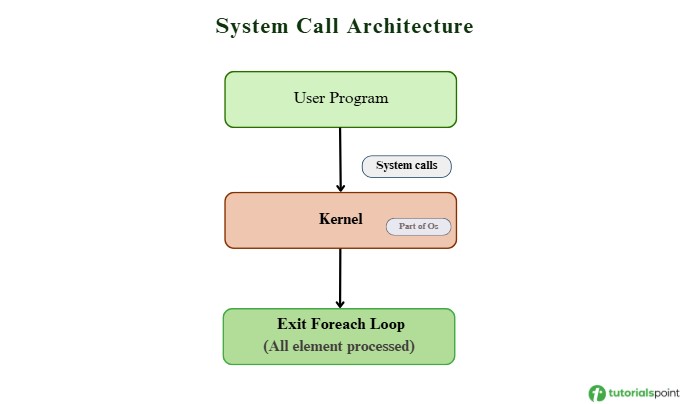
A system call is the interface that connects a user program with the operating system. When the user wants to give an instruction to the operating system then they do it through system calls. Or a user program can access the kernel which is a part of the operating system through system calls.
It is a programmatic way in which a computer program requests a service from the kernel of the operating system.
It is represented as follows −
User Mode and Kernel Mode
A computer works in the following two modes −
- User Mode is where normal applications run with limited access and cannot use hardware or the protected memory of the operating system.
- Kernel Mode is where the OS runs with full access to all hardware and system resources.
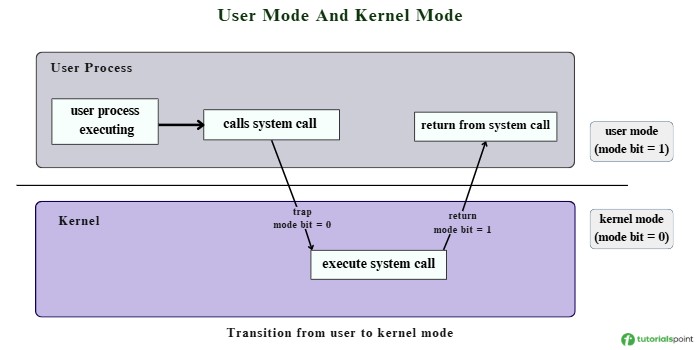
The processor switches between user mode and kernel mode depending on the type of code that is running.
The switch to kernel mode happens when an application requests help from the operating system through an interrupt or a system call. In user mode the mode bit is set to 1, and when a program needs hardware resources it must make a system call to the kernel.
Through a system call, the processor moves to kernel mode, the OS performs the required hardware-related work and then the processor returns to user mode. The program enters kernel mode only when hardware access is needed.
User applications cannot access hardware directly for security reasons, so whenever they need I/O or memory they request the operating system through system calls.
How Does a System Call Work?
When a program makes a system call, the process follows a clear sequence. The program asks the operating system for help, the OS does the work in kernel mode, and then the program continues running. Here is how the system call process works step by step.
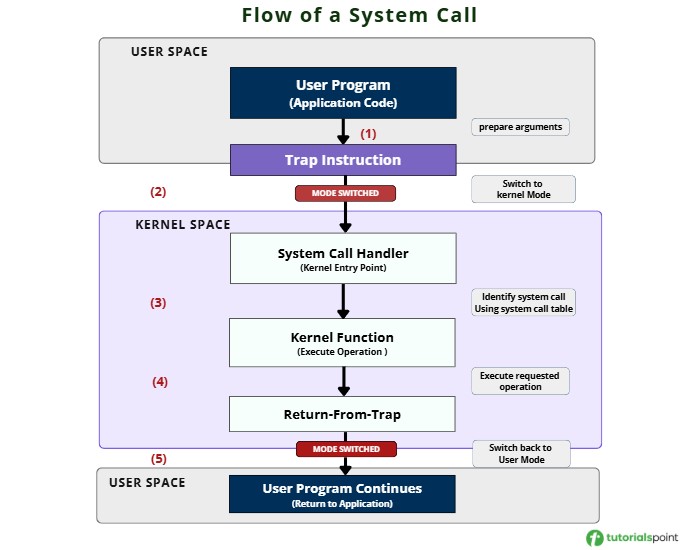
Step 1: Preparation
First, the application prepares the information needed for the system call. These values are placed in processor registers or memory so the operating system can access them easily.
Step 2: Trap Instruction
Next, the application runs a trap instruction that tells the processor that the program now needs the help of the operating system.
Step 3: Mode Switch
As soon as the trap instruction executes, the processor switches from user mode to kernel mode. At the same time, it saves the current state of the program (registers and program counter) so it can return to the same point later. Control is then passed to a fixed location inside the operating system known as the system call handler.
Step 4: System Call Dispatch
Inside the system call handler, the operating system checks the system call number to identify which service the program is requesting. The OS maintains a table that connects each system call number to the correct internal function. Using this table, the handler calls the right kernel function.
Step 5: Execution
The kernel function now runs with full access to the hardware. It begins by checking whether the arguments given by the program are valid. If everything looks correct, the OS performs the requested task such as reading a file, writing to disk or allocating memory.
Step 6: Return
After the operation is complete, the kernel prepares a return value for the program. Then it runs a return-from-trap instruction, which switches the processor back to user mode and restores the program's previous state. The program now continues running with the result of the system call.
Example: How a System Call Works
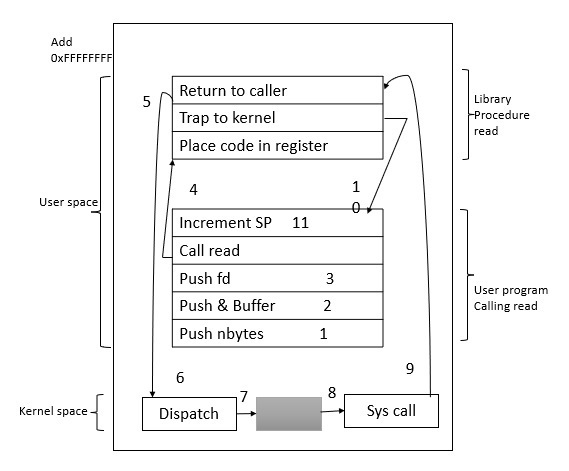
Let us see the step by step of how the system call mechanism works with example.
Step 1 − A process running in user mode wants to read data from a file. Since it cannot access hardware directly, it must execute a trap instruction to transfer control to the operating system.
Step 2 − The read operation in system call requires three parameters: the file descriptor, the pointer to the buffer and the number of bytes to read.
Step 3 − The user program calls the function −
count = read(fd, buffer, nbytes);
Step 4 − The parameters are pushed onto the stack or stored in registers.
Step 5 − The library procedure for read() is called. This procedure helps set up the system call.
Step 6 − Inside the library procedure, the system call number for read() is placed in a register so the operating system knows which system call is being requested.
Step 7 − Then to switch from user mode to kernel mode, the program executes a TRAP instruction. This shifts control to a fixed entry point inside the kernel.
Step 8 − The kernel starts executing after the TRAP. It checks the system call number and dispatches the request to the correct system call handler using a system call table (step 7).
Step 9 − The system call handler for read() now runs inside the kernel and performs the actual work.
Step 10 − After the operation is complete, control returns to the user-space library procedure at the instruction following the TRAP (step 9).
Step 11 − The library procedure then returns to the user program in the normal way that function calls return (step 10).
The following illustration shows how all the above steps work in the system call mechanism −
Types of System Calls
There are six main types of system calls. Each type is explained below.
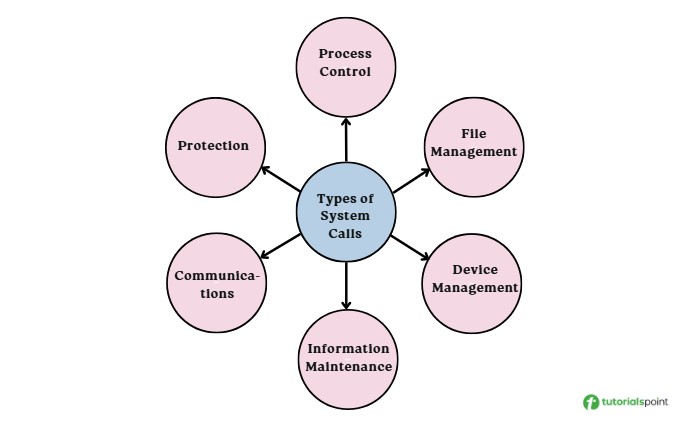
Process Control System Calls
Process control system calls manage how processes are created, executed, and terminated. They help the OS control the complete lifecycle of a process.
Following are the main operations of process control system calls −
- Create process / terminate process − Start a new process or end a running process (e.g., fork(), exit()).
- Load / execute: − Load a program into memory and run it (e.g., exec()).
- Get / set process attributes − Get or change process details like priority or execution time (e.g., getpriority(), setpriority()).
- Wait event / signal event − Make a process wait for an event or signal an event (e.g., wait(), signal()).
- Allocate / free memory − Allocate memory for a process or free memory when done (e.g., malloc(), free()).
For example, when you run a program, the shell uses fork() to create a new process and exec() to run the program, then it uses wait() to pause until the program finishes.
File Management System Calls
File management system calls are responsible for file manipulation such as creating a file, reading a file, writing into a file etc.
Following are the main operations of file management system calls −
- Create file / delete file − Create new files or delete existing ones (e.g., create(), delete()).
- Open / close − Open files for access and close them when done (e.g., open(), close()).
- Read / write / reposition − Read file data, write file data, or move the file pointer (e.g., read(), write(), lseek()).
- Get / set file attributes − Access or modify file properties like permissions, size, or timestamps (e.g., stat(), chmod()).
For example, a text editor uses open() to access a file, read() to load its content, write() to save the changes, and close() when the work is finished.
Device Management System Calls
Device management system calls are responsible for device manipulation such as reading from device buffers, writing into device buffers etc.
Following are the main operations of device management system calls −
- Request device / release device − Request a device to use it and release it after use (e.g., request_device(), release_device()).
- Read / write device data − Read data from a device or write data to it (e.g., read(), write()).
- Get / set device attributes − Get or change device settings (e.g., ioctl()).
- Attach / detach devices − Attach a device or detach it (e.g., attach(), detach()).
Information Maintenance System Calls
Information maintenance system calls manages system related information and transfer data between the OS and user programs.
- Get / set time or date − Retrieve or update the system time and date (e.g., time(), stime()).
- Get / set system data − Access or modify system information like OS version, memory, or disk space (e.g., uname(), sysinfo()).
- Get / set process attributes − Get or change details about running processes (e.g., getpid(), setpriority()).
- Dump memory − Save memory content for debugging (e.g., dump()).
For example, a program uses time() to get the current system time, and a system monitor uses process information calls to show CPU or memory usage.
Communication System Calls
Communication system calls support interprocess communication and handle creating or deleting communication connections.
Following are the key operation of the process flow −
- Create / delete connection − Create communication links or remove them (e.g., socket(), close()).
- Send / receive messages − Send messages or receive messages between processes (e.g., send(), recv()).
- Create / access shared memory − Create shared memory or access it (e.g., shmget(), shmat()).
- Transfer status information − Share simple status or control information (e.g., msgctl(), semctl()).
The IPC model for communication includes two approaches −
- Message Passing − Processes exchange data using functions like send() and receive().
- Shared Memory − Processes create and access a common memory region using functions like mmap().
For example, a client process may use pipe() to communicate with a server, or two processes may use mmap() to share memory for faster data exchange.
Protection System Calls
Protection system calls control access to system resources and make sure only authorized users or programs can use them. They manage permissions for resources like files, directories, and devices.
Following are the key operation of the process flow −
- Get / set permissions − Get file permissions or change them (e.g., chmod()).
- Change ownership − Change who owns the file (e.g., chown()).
- Set default permissions − Set default permissions for new files (e.g., umask()).
- Allow / deny access − Allow access or block access to resources (e.g., allow_user(), deny_user()).
Examples of Windows and UNIX System Calls
The list below shows system calls in Windows and their equivalent system calls in UNIX.
| Category | Windows System Calls | Unix System Calls |
|---|---|---|
| Process Control |
CreateProcess() ExitProcess() WaitForSingleObject() |
fork() exit() wait() |
| File Management |
CreateFile() ReadFile() WriteFile() CloseHandle() SetFileSecurity() InitializeSecurityDescriptor() SetSecurityDescriptorGroup() |
open() read() write() close() chmod() umask() chown() |
| Device Management |
SetConsoleMode() ReadConsole() WriteConsole() |
ioctl() read() write() |
| Information Management |
GetCurrentProcessID() SetTimer() Sleep() |
getpid() alarm() sleep() |
| Communication |
CreatePipe() CreateFileMapping() MapViewOfFile() |
pipe() shmget() mmap() |
| Protection |
SetFileSecurity() InitializeSecurityDescriptor() SetSecurityDescriptorGroup() |
chmod() umask() chown() |
Common System Calls and Their Uses
Following are some of the most commonly used system calls in an operating system.
The open() System Call
The open() system call is used when a program wants to access a file. When the file is opened, the operating system gives the program a file descriptor, which works like a small ID that the program uses whenever it needs to read from or write to that file.
The read() System Call
The read() system call is used when a program wants to take data out of a file. To do this, the program tells the OS which file to read using the file descriptor, where the data should be stored using a buffer, and how many bytes it wants to read.
The write() System Call
The write() system call is used when a program wants to store data into a file or device. The program provides the file descriptor, a buffer containing the data, and the number of bytes to write, and the operating system handles the rest.
The close() System Call
The close() system call is used to terminate access to a file system. Using this system call means that the file is no longer required by the program and so the buffers are flushed, the file metadata is updated and the file resources are de-allocated.
The wait() System Call
The wait() system call is used by a parent process to pause until its child process finishes execution. When wait() is called, the parent process is suspended, and it continues only after the child process has completed. Once the child finishes, the operating system returns control to the parent along with the child's exit status.
The fork() System Call
The fork() system call is used to create a new process. When a process calls fork(), the operating system creates a second process called the child process. After the call, both the parent and the child continue execution from the next instruction. The child process receives a return value of 0, and the parent process receives the process ID of the child, which helps the two processes identify their roles.
The exit() System Call
The exit() system call is used to terminate a process and return a status code (0 for success or a non-zero value for an error) to the invoking process.
The kill() System Call
The kill() system call is used by the operating system to send a termination signal to a process that urges the process to exit or stop, but it can also send other control signals depending on the requirement.
Conclusion
To conclude, system calls act as the interface between user programs and the operating system, enabling programs to request OS-level services. The processor moves between user mode and kernel mode to handle these requests safely. We also studied the working steps of system calls, their types, and commonly used system calls.
