
- OS - Home
- OS - Overview
- OS - History
- OS - Evolution
- OS - Functions
- OS - Components
- OS - Structure
- OS - Architecture
- OS - Services
- OS - Properties
- Process Management
- Processes in Operating System
- States of a Process
- Process Schedulers
- Process Control Block
- Operations on Processes
- Process Suspension and Process Switching
- Process States and the Machine Cycle
- Inter Process Communication (IPC)
- Remote Procedure Call (RPC)
- Context Switching
- Threads
- Types of Threading
- Multi-threading
- System Calls
- Scheduling Algorithms
- Process Scheduling
- Types of Scheduling
- Scheduling Algorithms Overview
- FCFS Scheduling Algorithm
- SJF Scheduling Algorithm
- Round Robin Scheduling Algorithm
- HRRN Scheduling Algorithm
- Priority Scheduling Algorithm
- Multilevel Queue Scheduling
- Lottery Scheduling Algorithm
- Starvation and Aging
- Turn Around Time & Waiting Time
- Burst Time in SJF Scheduling
- Process Synchronization
- Process Synchronization
- Solutions For Process Synchronization
- Hardware-Based Solution
- Software-Based Solution
- Critical Section Problem
- Critical Section Synchronization
- Mutual Exclusion Synchronization
- Mutual Exclusion Using Interrupt Disabling
- Peterson's Algorithm
- Dekker's Algorithm
- Bakery Algorithm
- Semaphores
- Binary Semaphores
- Counting Semaphores
- Mutex
- Turn Variable
- Bounded Buffer Problem
- Reader Writer Locks
- Test and Set Lock
- Monitors
- Sleep and Wake
- Race Condition
- Classical Synchronization Problems
- Dining Philosophers Problem
- Producer Consumer Problem
- Sleeping Barber Problem
- Reader Writer Problem
- OS Deadlock
- Introduction to Deadlock
- Conditions for Deadlock
- Deadlock Handling
- Deadlock Prevention
- Deadlock Avoidance (Banker's Algorithm)
- Deadlock Detection and Recovery
- Deadlock Ignorance
- Resource Allocation Graph
- Livelock
- Memory Management
- Memory Management
- Logical and Physical Address
- Contiguous Memory Allocation
- Non-Contiguous Memory Allocation
- First Fit Algorithm
- Next Fit Algorithm
- Best Fit Algorithm
- Worst Fit Algorithm
- Buffering
- Fragmentation
- Compaction
- Virtual Memory
- Segmentation
- Paged Segmentation & Segmented Paging
- Buddy System
- Slab Allocation
- Overlays
- Free Space Management
- Locality of Reference
- Paging and Page Replacement
- Paging
- Demand Paging
- Page Table
- Page Replacement Algorithms
- Second Chance Page Replacement
- Optimal Page Replacement Algorithm
- Belady's Anomaly
- Thrashing
- Storage and File Management
- File Systems
- File Attributes
- Structures of Directory
- Linked Index Allocation
- Indexed Allocation
- Disk Scheduling Algorithms
- FCFS Disk Scheduling
- SSTF Disk Scheduling
- SCAN Disk Scheduling
- LOOK Disk Scheduling
- I/O Systems
- I/O Hardware
- I/O Software
- I/O Programmed
- I/O Interrupt-Initiated
- Direct Memory Access
- OS Types
- OS - Types
- OS - Batch Processing
- OS - Multiprogramming
- OS - Multitasking
- OS - Multiprocessing
- OS - Distributed
- OS - Real-Time
- OS - Single User
- OS - Monolithic
- OS - Embedded
- Popular Operating Systems
- OS - Hybrid
- OS - Zephyr
- OS - Nix
- OS - Linux
- OS - Blackberry
- OS - Garuda
- OS - Tails
- OS - Clustered
- OS - Haiku
- OS - AIX
- OS - Solus
- OS - Tizen
- OS - Bharat
- OS - Fire
- OS - Bliss
- OS - VxWorks
- Miscellaneous Topics
- OS - Security
- OS Questions Answers
- OS - Questions Answers
- OS Useful Resources
- OS - Quick Guide
- OS - Useful Resources
- OS - Discussion
What is Buffering in Operating System
In an operating system, when fast components like the CPU work with slow devices such as disks or printers, the CPU often has to wait for data to be processed. To reduce this waiting time, the operating system uses buffering so the work can continue without any pause.
Buffering is used in batch processing, file transfers, disk I/O, printing and many other areas where data moves at different speeds. Let's understand how buffering works and the different types it provides.
What is Buffering?
Buffering is the process of temporarily storing data in a reserved area of memory called a buffer while it moves from a sender (producer) to a receiver (consumer). The buffer holds the data until the receiving device or process is ready, allowing devices or processes with different speeds to work together smoothly.
Main Purpose of Buffering
The main purpose of buffering is to handle the speed differences between fast and slow devices or processes by temporarily storing data. It allows input and output operations to run at the same time as task execution, so data moves smoothly without delays, interruptions, or loss.
How Does Buffering Work?
Buffering works by storing data temporarily in a memory buffer. When the sender sends data, it is placed into the buffer immediately, without waiting for the CPU. The CPU then takes the data from the buffer and processes it block by block. This allows the sender and the CPU to work smoothly without stopping each other.
Below we can see the image showing how buffer works −
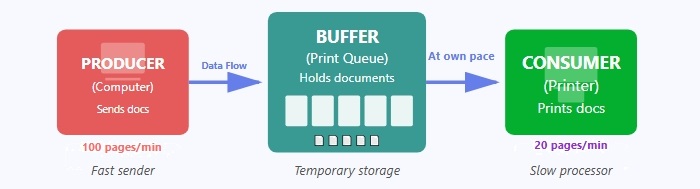
Here, the computer sends documents faster than the printer can print them. The buffer stores these documents temporarily so the computer doesn't have to wait, and the printer takes them from the buffer and prints them at its own slower speed.
Reasons of Buffering
Following are the three major reasons for buffering in operating systems −
- Buffering creates a synchronization between two devices having different processing speed. For example, if a hard disc (supplier of data) has high speed and a printer (accepter of data) has low speed, then buffering is required.
- Buffering is also required in cases where two devices have different data block sizes.
- Buffering is required to support copy semantics so the data goes to the buffer and the application continues its work without waiting for I/O to finish.
Advantages of Buffering
The following are the main advantages of buffering −
- Buffering reduces the number of I/O operations required to access data.
- Buffering reduces the amount of time for that processes have to wait for the data.
- Buffering improves the performance of I/O operations as it allows data to be read or written in large blocks instead of 1 byte or 1 character at a time.
- Buffering can improve the overall performance of the system by reducing the number of system calls and context switches required for I/O operations.
- Buffering prevents data loss when devices or processes operate at different speeds.
Limitations of Buffering
Buffering also has some limitations, which include the following −
- Large buffers consume more memory, which can reduce overall system performance.
- Buffering can introduce delays between receiving data and processing it.
- In real-time systems, buffering may cause synchronization issues because data is not processed immediately.
Types for Buffering
There are three types of buffering techniques in operating system. They are as follow −
Let us discuss each type of buffering technique in detail.
Single Buffering
Single buffering is the simplest buffering method where only one buffer exists between the producer and consumer. The system allocates one buffer in memory to temporarily hold data during transfer operations.
How Does Single Buffering Work?
When a process requests data, the operating system reads one block of data from the input device into the buffer in the main memory. After that, the process reads the data from the buffer. Once the process finishes reading, the input device again fills the buffer with the next block of data. Because there is only one buffer, the process and the device have to wait for each other.
Example
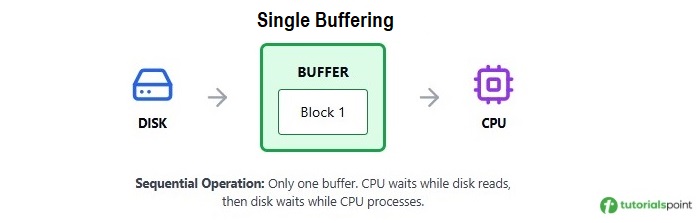
Let's understand single buffering with an example of reading data from a disk −
Step 1 − Disk reads Data Block 1 into the buffer.
Step 2 − CPU processes Data Block 1 from the buffer.
Step 3 − After the buffer becomes free, the disk reads Data Block 2 into the same buffer.
Step 4 − CPU processes Data Block 2 from the buffer.
In this process, both CPU and disk work one after the other because only one buffer is available.
Advantages of Single Buffering
Following are the main advantages of single buffering −
- Very easy to implement and uses very little memory.
- Gives better performance than no buffering because producer and consumer can work partially in parallel.
- Reduces the number of I/O operations compared to systems without a buffer.
Disadvantages of Single Buffering
Following are the main disadvantages of single buffering −
- Parallel processing is limited because only one buffer is available.
- The producer must stop producing data when the buffer becomes full and wait until the consumer reads the data.
- The consumer must stop consuming data when the buffer becomes empty and wait until the producer fills the buffer.
- Overall system speed decreases due to frequent waiting between CPU and I/O.
- Not suitable for high-performance or real-time applications where continuous data flow is required.
Double Buffering
Double buffering is a buffering technique that uses two memory buffers so that data input and data processing happen at the same time. While one buffer is being filled by the producer, the other buffer is simultaneously read or processed by the consumer.
How Does Double Buffering Work?
The system maintains two buffers, let's call them Buffer A and Buffer B. When the producer fills Buffer A, the consumer can simultaneously process data from Buffer B. Once Buffer A is full and Buffer B is empty, the buffers swap roles and the cycle continues.
Example
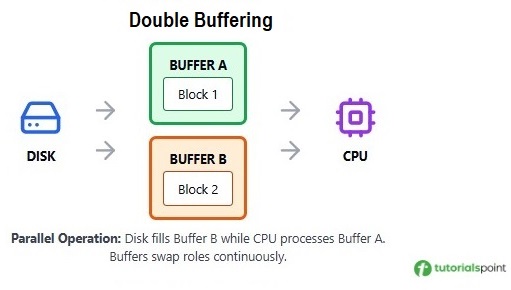
Let's understand double buffering with an example of reading data from a disk −
- Time T1 − Disk reads Data Block 1 into Buffer A.
- Time T2 − Disk reads Data Block 2 into Buffer B while CPU processes Block 1 from Buffer A.
- Time T3 − Disk reads Data Block 3 into Buffer A while CPU processes Block 2 from Buffer B.
- Time T4 − Disk reads Data Block 4 into Buffer B while CPU processes Block 3 from Buffer A.
This cycle makes sure the disk and CPU do not wait for each other.
Advantages of Double Buffering
Following are the main advantages of double buffering −
- Allows true parallel operation between the producer and the consumer.
- Increases overall data transfer by switching between two buffers.
- Reduces waiting time for both the producer and the consumer.
- Avoids delays in systems like video, audio, and gaming where fast processing is required.
Disadvantages of Double Buffering
Following are the main disadvantages of double buffering −
- Increases memory usage because two buffers need to be stored.
- Involves more complex management and synchronization.
- May still cause short waiting periods during buffer switching.
Circular Buffering (Ring Buffer)
Circular buffering (ring buffer or cyclic buffer) is a buffering technique that uses a fixed-size set of buffers arranged in a circular structure. The last buffer connects back to the first, creating a continuous loop. The producer writes data using a write pointer and the consumer reads data using a read pointer, and both pointers move around the ring independently.
Key Features of Circular Buffering
Here are the main features to understand about circular buffering −
- Fixed size structure − The buffer has a predefined number of slots that never change. It reuses the same memory space without resizing throughout its operation.
- Two independent pointers − The producer uses a write pointer and the consumer uses a read pointer. Both pointers move in a circular manner through the buffer.
- Wraparound mechanism − When a pointer reaches the last buffer, it automatically jumps back to the first buffer. This avoids shifting or rearranging data.
- FIFO principle − Circular buffers follow the First-In-First-Out rule. The data that enters first is the data that gets processed first.
- Clear buffer states − The buffer can be empty, full, or partially filled. It is empty when both pointers are at the same position, full when the write pointer reaches the position just before the read pointer, and partially filled when it has some data and some free space.
- No data movement − Data stays exactly where it is written. Only the pointers move, which makes circular buffering fast and efficient.
How Does Circular Buffering Work?
Following are the steps of how a circular buffer operates −
- Initial stage − At the beginning, both the read pointer and write pointer point to the same location, usually the first buffer slot, which means the buffer is empty.
- Writing data (Producer Operation) − The producer writes data at the write pointer's position and then moves the write pointer to the next slot. If it reaches the end, it wraps around to the beginning.
- Reading data (Consumer Operation) − The consumer reads data from the read pointer's position and then moves the read pointer forward. It also wraps around when it reaches the end.
- Continuous operation − Both producer and consumer continue their operations independently. The producer keeps writing into free slots, and the consumer keeps reading from filled slots, maintaining continuous data flow.
- Buffer full condition − The buffer becomes full when moving the write pointer would make it equal to the read pointer. At this point, the producer must wait until the consumer reads some data and frees space.
- Buffer empty condition − The buffer becomes empty when the read pointer catches up to the write pointer. In this case, the consumer must wait until the producer adds new data.
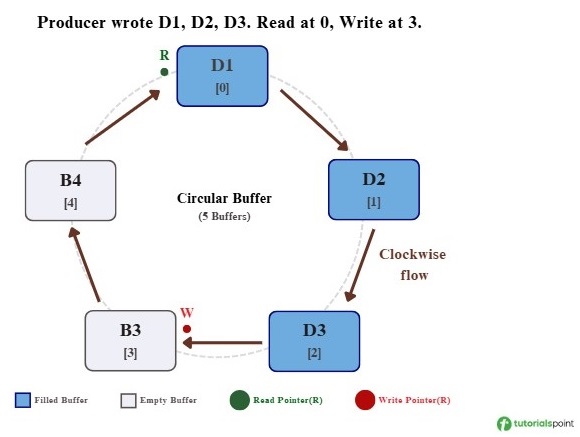
Let me explain with a simple example using a circular buffer that has five slots −
Step 1: Initial State − Both the Read (R) pointer and the Write (W) pointer are at position 0. No data has been written yet, so the buffer is empty.
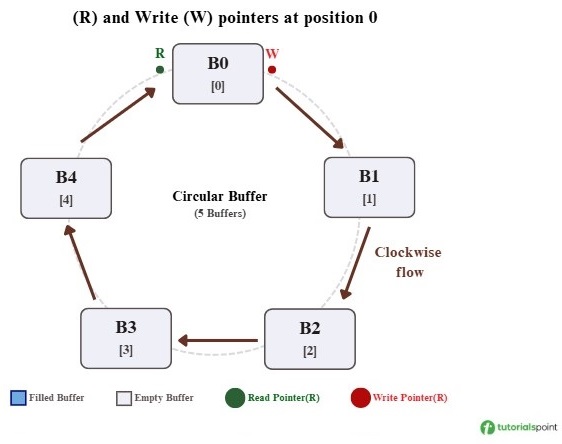
Step 2: Producer Writes 3 Blocks − The producer writes D1, D2, and D3 into the first three buffer positions. The Read pointer stays at position 0, and the Write pointer moves to position 3.
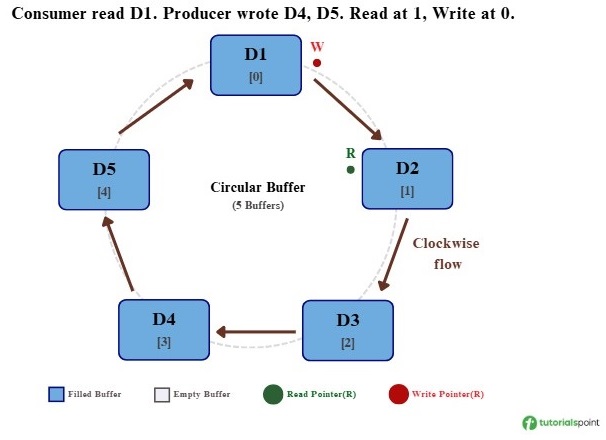
Step 3: Consumer Reads 1, Producer Writes 2 − The consumer reads D1, so the Read pointer moves to position 1. At the same time, the producer writes D4 and D5, so the Write pointer moves to position 4 and will wrap to position 0 next.
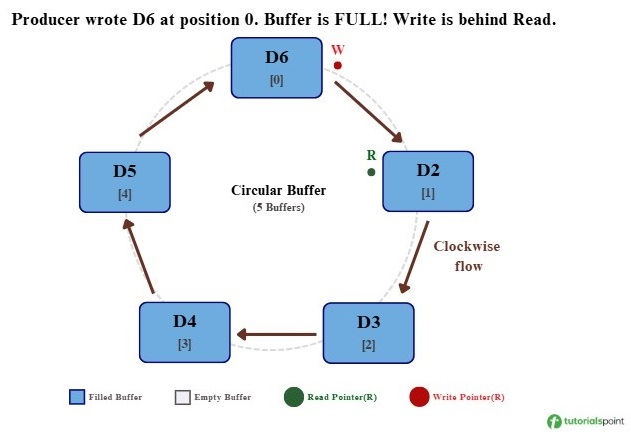
Step 4: Producer Writes 1 More (Wraparound) − The producer writes D6 at position 0 after wrapping around. Now the Write pointer is just one position behind the Read pointer, which indicates that the buffer is full.
Advantages of Circular Buffering
Following are the main advantages of circular buffering −
- It works very well for continuous data streams such as audio, video, sensors, and network data.
- It uses memory efficiently because the buffer size is fixed and reused without fragmentation.
- Read and write operations are fast since they only involve moving pointers.
- It handles speed differences between the producer and consumer by using extra buffer slots.
- It avoids data shifting or copying, which reduces CPU overhead.
- It provides predictable and stable performance, which is useful in real-time systems.
Disadvantages of Circular Buffering
Following are the main disadvantages of circular buffering −
- The buffer size is fixed, so a small buffer can cause data loss and a large buffer can waste memory.
- Managing read and write pointers requires careful logic and can be complex.
- If the producer is too fast, unread data may get overwritten (overrun).
- If the consumer is too fast, it may run out of data and need to wait (underrun).
- Full and empty states can look the same, so extra logic is needed to differentiate them.
- It uses more memory than single buffering because multiple slots are reserved in advance.
- It follows FIFO order only, so handling high-priority data is not possible.
Buffering Performance Comparison
Let's understand the performance impact of different buffering techniques with a simple example. Assume we need to transfer 10 blocks of data from the disk to the CPU, where −
- Disk read time per block: 10 ms
- CPU processing time per block: 8 ms
Without Buffering
The CPU waits for the disk to read each block.
Total time = 10 x (10 ms + 8 ms) = 180 ms
CPU and disk work one after the other with no overlap.
With Single Buffering
Some overlap occurs, but it is limited because only one buffer is available.
Total time ≈ 10 x max(10 ms, 8 ms) + initial delay ≈ 110 ms
CPU and disk work together partially, but waiting still happens.
With Double Buffering
Two buffers allow almost parallel operation after the first setup.
Total time ≈ max(10 x 10 ms, 10 x 8 ms) = 100 ms
Once both buffers are active, CPU and disk run almost fully in parallel.
With Circular Buffering
Multiple buffers support continuous data flow and handle speed variations smoothly.
Total time ≈ 100 ms (often more stable than double buffering)
The extra buffers store the data for a moment when one side becomes slow, so the CPU and disk don't have to wait immediately.
This comparison shows that multiple buffering is better for heavy I/O tasks because it reduces waiting time and keeps data moving smoothly.
Conclusion
Buffering is important in operating systems because it reduces waiting time and helps avoid data loss when devices work at different speeds. It also helps the CPU and I/O devices keep moving data without constant interruptions. Overall, buffering supports faster and more reliable data handling in modern systems.
