
- OS - Home
- OS - Overview
- OS - History
- OS - Evolution
- OS - Functions
- OS - Components
- OS - Structure
- OS - Architecture
- OS - Services
- OS - Properties
- Process Management
- Processes in Operating System
- States of a Process
- Process Schedulers
- Process Control Block
- Operations on Processes
- Process Suspension and Process Switching
- Process States and the Machine Cycle
- Inter Process Communication (IPC)
- Remote Procedure Call (RPC)
- Context Switching
- Threads
- Types of Threading
- Multi-threading
- System Calls
- Scheduling Algorithms
- Process Scheduling
- Types of Scheduling
- Scheduling Algorithms Overview
- FCFS Scheduling Algorithm
- SJF Scheduling Algorithm
- Round Robin Scheduling Algorithm
- HRRN Scheduling Algorithm
- Priority Scheduling Algorithm
- Multilevel Queue Scheduling
- Lottery Scheduling Algorithm
- Starvation and Aging
- Turn Around Time & Waiting Time
- Burst Time in SJF Scheduling
- Process Synchronization
- Process Synchronization
- Solutions For Process Synchronization
- Hardware-Based Solution
- Software-Based Solution
- Critical Section Problem
- Critical Section Synchronization
- Mutual Exclusion Synchronization
- Mutual Exclusion Using Interrupt Disabling
- Peterson's Algorithm
- Dekker's Algorithm
- Bakery Algorithm
- Semaphores
- Binary Semaphores
- Counting Semaphores
- Mutex
- Turn Variable
- Bounded Buffer Problem
- Reader Writer Locks
- Test and Set Lock
- Monitors
- Sleep and Wake
- Race Condition
- Classical Synchronization Problems
- Dining Philosophers Problem
- Producer Consumer Problem
- Sleeping Barber Problem
- Reader Writer Problem
- OS Deadlock
- Introduction to Deadlock
- Conditions for Deadlock
- Deadlock Handling
- Deadlock Prevention
- Deadlock Avoidance (Banker's Algorithm)
- Deadlock Detection and Recovery
- Deadlock Ignorance
- Resource Allocation Graph
- Livelock
- Memory Management
- Memory Management
- Logical and Physical Address
- Contiguous Memory Allocation
- Non-Contiguous Memory Allocation
- First Fit Algorithm
- Next Fit Algorithm
- Best Fit Algorithm
- Worst Fit Algorithm
- Buffering
- Fragmentation
- Compaction
- Virtual Memory
- Segmentation
- Paged Segmentation & Segmented Paging
- Buddy System
- Slab Allocation
- Overlays
- Free Space Management
- Locality of Reference
- Paging and Page Replacement
- Paging
- Demand Paging
- Page Table
- Page Replacement Algorithms
- Second Chance Page Replacement
- Optimal Page Replacement Algorithm
- Belady's Anomaly
- Thrashing
- Storage and File Management
- File Systems
- File Attributes
- Structures of Directory
- Linked Index Allocation
- Indexed Allocation
- Disk Scheduling Algorithms
- FCFS Disk Scheduling
- SSTF Disk Scheduling
- SCAN Disk Scheduling
- LOOK Disk Scheduling
- I/O Systems
- I/O Hardware
- I/O Software
- I/O Programmed
- I/O Interrupt-Initiated
- Direct Memory Access
- OS Types
- OS - Types
- OS - Batch Processing
- OS - Multiprogramming
- OS - Multitasking
- OS - Multiprocessing
- OS - Distributed
- OS - Real-Time
- OS - Single User
- OS - Monolithic
- OS - Embedded
- Popular Operating Systems
- OS - Hybrid
- OS - Zephyr
- OS - Nix
- OS - Linux
- OS - Blackberry
- OS - Garuda
- OS - Tails
- OS - Clustered
- OS - Haiku
- OS - AIX
- OS - Solus
- OS - Tizen
- OS - Bharat
- OS - Fire
- OS - Bliss
- OS - VxWorks
- Miscellaneous Topics
- OS - Security
- OS Questions Answers
- OS - Questions Answers
- OS Useful Resources
- OS - Quick Guide
- OS - Useful Resources
- OS - Discussion
Process States and the Machine Cycle
Process States are about how the OS manages its programs, and the Machine Cycle is about how the CPU works internally. They are closely connected. The CPU's machine cycle is what makes each process move from one state to another, and the way processes behave affects what the CPU does next.
What are Process States?
Process states describe what a process is currently doing or what stage of execution it is in. A process doesn't run in one straight line from start to finish. It moves through different conditions depending on what the CPU is doing, what resources it needs, and whether it's waiting for something. The operating system constantly watches these states so it can decide which process should run, which should wait, and which should be created or destroyed.
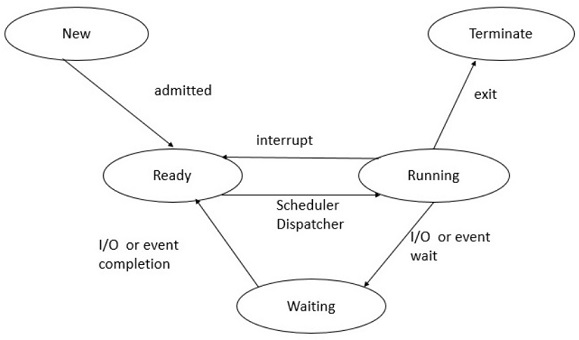
There are basically five major process states −
The New State
In the New state, the process is about to be created. The program exists in secondary storage (like a hard disk or SSD), and the OS decides to load it and begin preparing it for execution. Nothing is running yet and this is simply the early stage where the OS says, "Okay, this one is next."
The New state is important because the OS performs several checks like −
- Does the system have enough memory? Is the program valid?
- Is the user allowed to run it? Only after these checks does the process move forward.
The Ready State
Once a process is created, it goes into the Ready state. This means the process is now fully loaded into RAM and is waiting for the CPU to pick it. It's like standing in line and the process is prepared, it just hasn't been called yet. Multiple processes can be in the ready state at the same time, forming what we call a ready queue .
The OS's scheduler decides which ready process gets the CPU next, based on scheduling algorithms. These decisions happen many times per second.
The Running State
This is the exciting part and the Running state means the CPU has chosen this process, and its instructions are actively being executed. The process uses the CPU's machine cycle (fetch, decode, execute, store) repeatedly. The process will stay in this state until −
- It finishes execution, or
- It needs to wait for something, or
- The scheduler preempts it (forces it to pause).
Only one process per CPU core can be in the running state at a time. If you have a quad-core processor, you can have up to four running processes at once.
The Waiting (or Blocked) State
A process enters the Waiting state when it needs something that is not immediately available. For example −
- Waiting for user input,
- Waiting for data from a disk,
- Waiting for another process to release a resource,
- Waiting for a critical section to be unlocked.
While waiting, the process cannot use the CPU, so the OS moves it aside and lets other processes run. This makes the system feel fast and responsive even when many tasks are happening in the background.
The Terminated State
In the Terminated state, the process has finished its work or has been forcefully killed. Its Process Control Block (PCB) is deleted, memory is freed, and all resources are released.
These states are not static and a process constantly moves back and forth between them, depending on what the CPU and operating system decide.
What is Machine Cycle?
The machine cycle is the heart of CPU operation. It's a tiny sequence of steps the CPU repeats millions or billions of times per second. Every instruction that a program runs goes through this cycle. It is what makes processes alive and active. Even the simplest process with a single instruction depends on this cycle.
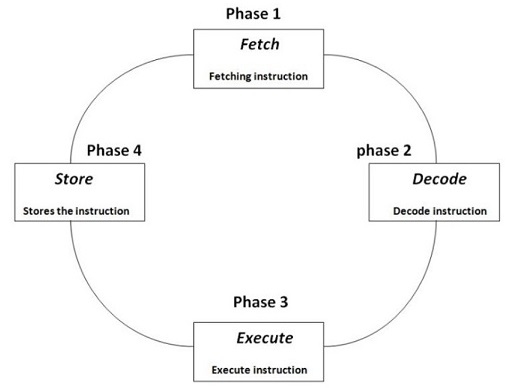
The machine cycle includes four main steps −
Fetch
The control unit retrieves the next instruction from main memory. The location of this instruction is stored in the program counter (PC) . This step is like the CPU asking, "Okay, what do I need to do next?"
Decode
The instruction goes into the instruction register, where the CPU interprets what it means. The decoder checks the operation (add, compare, jump, load, etc.) so the CPU knows exactly what needs to be executed. It's the CPU reading and understanding the instruction.
Execute
The CPU performs the required operation −
- If it's a calculation, the ALU (Arithmetic Logic Unit) handles it.
- If it's a memory request, the CPU communicates with RAM.
- If it's a branch, the program counter changes accordingly.
Every instruction must eventually pass through this stage.
Store
Some instructions produce a result that needs to be saved and either in a register or in memory. After storing the result, the program counter moves to the next instruction, and the cycle repeats again and again.
This simple cycle do fetching, decoding, executing, store and it is the foundation of all processing.
The Relationship Between Process States and the Machine Cycle
Now comes the most interesting part: how process states and the machine cycle are connected . They may seem like separate concepts where one belongs to operating systems, and one belongs to CPU architecture, but they depend on each other deeply.
1. Processes move between states because of the machine cycle
Every instruction a running process executes must go through the machine cycle. If an instruction needs memory access that is slow, the CPU notices it cannot finish immediately, so the OS changes the process state to Waiting . If the CPU finishes a burst of execution, the OS may move it back to Ready . All of these decisions are possible only because the CPU's machine cycle constantly fetches and executes instructions.
2. The machine cycle only runs for the process in the Running state
Only the process currently in the Running state uses the machine cycle. A process in Ready or Waiting cannot execute instructions, so it does not use the cycle. This is why the OS must switch processes or otherwise only one program would ever get CPU time.
3. Process switching interrupts the machine cycle
When the OS decides to switch processes, it interrupts the CPU. The machine cycle pauses for the current process and resumes for the next one. This is what we call a context switch .
During this switch −
- The CPU saves the state of the current process,
- The OS loads the next process's state into the CPU,
- The machine cycle starts executing instructions for the new process.
4. Waiting state is created because the machine cycle cannot proceed
When an instruction inside the machine cycle demands something slow (like disk access or user input), the CPU detects that it cannot continue executing the instruction immediately. Because the CPU cannot waste time waiting, the OS moves the process to the Waiting state and gives the CPU to someone else.
5. Processes re-enter the Ready state when the machine cycle is available again
The moment a waiting process gets what it needs, it becomes ready to execute again. But it still needs an available machine cycle, which means waiting for the CPU to pick it up. This is why Ready state exists and processes wait politely for their turn to use the machine cycle.
6. Termination occurs after the machine cycle completes the final instruction
A process reaches the Terminated state only after the machine cycle finishes executing its last instruction. Without the machine cycle, no process could ever complete its work.
In Simple Words −
- The machine cycle runs the instructions.
- Process states describe what stage the process is in while those instructions are being handled.
A process moves between states, while the CPU cycles through instructions. Together, they make multitasking possible.
Conclusion
Process states and the machine cycle work hand in hand. The machine cycle drives the execution of instructions, while process states help the operating system manage which programs run, which wait, and which finish. Understanding both gives you a clear and friendly picture of how modern computers juggle so many tasks without feeling slow or confused.
