
- OS - Home
- OS - Overview
- OS - History
- OS - Evolution
- OS - Functions
- OS - Components
- OS - Structure
- OS - Architecture
- OS - Services
- OS - Properties
- Process Management
- Processes in Operating System
- States of a Process
- Process Schedulers
- Process Control Block
- Operations on Processes
- Process Suspension and Process Switching
- Process States and the Machine Cycle
- Inter Process Communication (IPC)
- Remote Procedure Call (RPC)
- Context Switching
- Threads
- Types of Threading
- Multi-threading
- System Calls
- Scheduling Algorithms
- Process Scheduling
- Types of Scheduling
- Scheduling Algorithms Overview
- FCFS Scheduling Algorithm
- SJF Scheduling Algorithm
- Round Robin Scheduling Algorithm
- HRRN Scheduling Algorithm
- Priority Scheduling Algorithm
- Multilevel Queue Scheduling
- Lottery Scheduling Algorithm
- Starvation and Aging
- Turn Around Time & Waiting Time
- Burst Time in SJF Scheduling
- Process Synchronization
- Process Synchronization
- Solutions For Process Synchronization
- Hardware-Based Solution
- Software-Based Solution
- Critical Section Problem
- Critical Section Synchronization
- Mutual Exclusion Synchronization
- Mutual Exclusion Using Interrupt Disabling
- Peterson's Algorithm
- Dekker's Algorithm
- Bakery Algorithm
- Semaphores
- Binary Semaphores
- Counting Semaphores
- Mutex
- Turn Variable
- Bounded Buffer Problem
- Reader Writer Locks
- Test and Set Lock
- Monitors
- Sleep and Wake
- Race Condition
- Classical Synchronization Problems
- Dining Philosophers Problem
- Producer Consumer Problem
- Sleeping Barber Problem
- Reader Writer Problem
- OS Deadlock
- Introduction to Deadlock
- Conditions for Deadlock
- Deadlock Handling
- Deadlock Prevention
- Deadlock Avoidance (Banker's Algorithm)
- Deadlock Detection and Recovery
- Deadlock Ignorance
- Resource Allocation Graph
- Livelock
- Memory Management
- Memory Management
- Logical and Physical Address
- Contiguous Memory Allocation
- Non-Contiguous Memory Allocation
- First Fit Algorithm
- Next Fit Algorithm
- Best Fit Algorithm
- Worst Fit Algorithm
- Buffering
- Fragmentation
- Compaction
- Virtual Memory
- Segmentation
- Paged Segmentation & Segmented Paging
- Buddy System
- Slab Allocation
- Overlays
- Free Space Management
- Locality of Reference
- Paging and Page Replacement
- Paging
- Demand Paging
- Page Table
- Page Replacement Algorithms
- Second Chance Page Replacement
- Optimal Page Replacement Algorithm
- Belady's Anomaly
- Thrashing
- Storage and File Management
- File Systems
- File Attributes
- Structures of Directory
- Linked Index Allocation
- Indexed Allocation
- Disk Scheduling Algorithms
- FCFS Disk Scheduling
- SSTF Disk Scheduling
- SCAN Disk Scheduling
- LOOK Disk Scheduling
- I/O Systems
- I/O Hardware
- I/O Software
- I/O Programmed
- I/O Interrupt-Initiated
- Direct Memory Access
- OS Types
- OS - Types
- OS - Batch Processing
- OS - Multiprogramming
- OS - Multitasking
- OS - Multiprocessing
- OS - Distributed
- OS - Real-Time
- OS - Single User
- OS - Monolithic
- OS - Embedded
- Popular Operating Systems
- OS - Hybrid
- OS - Zephyr
- OS - Nix
- OS - Linux
- OS - Blackberry
- OS - Garuda
- OS - Tails
- OS - Clustered
- OS - Haiku
- OS - AIX
- OS - Solus
- OS - Tizen
- OS - Bharat
- OS - Fire
- OS - Bliss
- OS - VxWorks
- Miscellaneous Topics
- OS - Security
- OS Questions Answers
- OS - Questions Answers
- OS Useful Resources
- OS - Quick Guide
- OS - Useful Resources
- OS - Discussion
Operating System - Batch Processing
A batch processing operating system is one of the earliest types of operating systems (used in the 1950s and 1960s) that does not interact with the computer directly. Meaning, there is no user interface or any other method for the user to interact with the computer directly.
Read this chapter to learn more about batch processing operating systems, its working, advantages, disadvantages, and examples.
- What is Batch Processing Operating System?
- Working of Batch OS
- Key Features of Batch OS
- Advantages of Batch OS
- Disadvantages of Batch OS
- Examples of Batch OS
What is Batch Processing Operating System?
A batch processing operating system is a type of operating system in which similar jobs are grouped together and executed sequentially without any manual intervention. Here, the user does not interact with the computer directly. Instead, the jobs are prepared and submitted to the computer operator. It then groups similar jobs into batches and processes them one after another.
Why it is used?
The main purpose of a batch processing operating system is to reduce system setup time. In early computers, setting computer for a specific programming language took a lot of time. If a set of user want to run FORTRAN job and another set want to run COBOL job, then the computer operator will group all FORTRAN jobs into one batch and COBOL jobs into another batch. This way, the computer needs to be set up only once for each programming language.
User 1: Job 1 (FORTRAN)
User 2: Job 2 (COBOL)
User 3: Job 3 (FORTRAN)
User 4: Job 4 (COBOL)

Batch 1: Job 1, Job 3 (FORTRAN)
Batch 2: Job 2, Job 4 (COBOL)
Working of Batch Processing Operating System
In a batch processing operating system, the user prepares the job on an offline device like punch cards or magnetic tape and submits it to the computer operator. The computer operator then groups similar jobs into batches based on their requirements. The image below shows the architecture of a batch processing operating system −
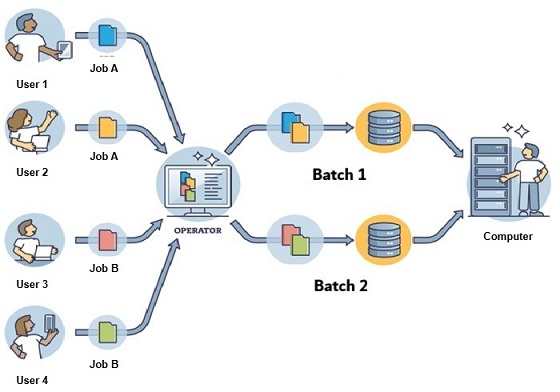
In the above image,
- Users − Users are the programmers who prepare the jobs on offline devices and submit them to the computer operator.
- Computer Operator − The computer operator collects jobs from users, and groups similar jobs into batches based on their requirements.
- Batch Monitor − The batch monitor is a program that manages the execution of batches. It loads each job from the batch into memory, executes it, and then moves to the next job in the batch.
- Output − After the execution of each job, the output is generated and sent to the respective users.
Key Features of Batch Processing Operating System
Some of the key features of a batch processing operating system include the following −
- In batch processing operating systems, there is no direct interaction between the user and the computer. The jobs are prepared offline and submitted to the computer operator for processing. Because of this, program will terminate in the case of any error, and the user will have to resubmit the job after correcting the error.
- Batch processing operating systems follow the FIFO (First In, First Out) principle. Meaning, the job arrived first will be executed first. The batch monitor loads each job from the batch into memory in the order they were submitted and executes them one after another.
- In batch processing operating systems, a special language called Job Control Language (JCL) is used to instruct the batch monitor about how to execute a job. This is similar to how we use command line in modern operating systems to execute programs.
JCL commands like JOB, EXEC, and DD are used to define the job, specify the program to be executed, and define the input/output files respectively.
Advantages of Batch Processing Operating System
Some of the advantages of using a batch processing operating system are −
- Simple Design − Batch processing operating systems are considered as the simplest type of operating system. They do not require complex user interfaces or interaction mechanisms.
- Reduce Setup Time − Batch processing reduces system setup time by grouping similar jobs together.
- Less Hardware Requirements − Batch processing operating systems require less hardware resources compared to modern operating systems. This is because there is no need for interactive user interfaces or real-time processing capabilities.
Disadvantages of Batch Processing Operating System
Some of the disadvantages of using a batch processing operating system are −
- No User Interaction − In batch processing operating systems, there is no direct interaction between the user and the computer. This can lead to delays in job execution and error correction.
- Long Turnaround Time − Since jobs are executed sequentially, the turnaround time for job completion can be long depending on the number of jobs in the batch.
- Inefficient Resource Utilization − During the IO operations of one job, the CPU is not running other jobs. This can lead waste of CPU time.
- Hard To Debug − In case of any error during job execution, the entire job may need to be resubmitted after correcting the error. This can make debugging difficult and time-consuming.
Examples of Batch Processing Operating System
Some examples of batch processing operating systems are −
- IBM's OS/360
- UNIVAC's EXEC II
- CDC's SCOPE
- Burroughs MCP
Conclusion
The principle behind batch processing operating systems is to group similar jobs together and execute them sequentially without any manual intervention. The main purpose of this OS is to reduce system setup time and optimize resource utilization in early computers. However, the lack of user interaction and long turnaround times are some of the significant drawbacks of this type of operating system.
