
- OS - Home
- OS - Overview
- OS - History
- OS - Evolution
- OS - Functions
- OS - Components
- OS - Structure
- OS - Architecture
- OS - Services
- OS - Properties
- Process Management
- Processes in Operating System
- States of a Process
- Process Schedulers
- Process Control Block
- Operations on Processes
- Process Suspension and Process Switching
- Process States and the Machine Cycle
- Inter Process Communication (IPC)
- Remote Procedure Call (RPC)
- Context Switching
- Threads
- Types of Threading
- Multi-threading
- System Calls
- Scheduling Algorithms
- Process Scheduling
- Types of Scheduling
- Scheduling Algorithms Overview
- FCFS Scheduling Algorithm
- SJF Scheduling Algorithm
- Round Robin Scheduling Algorithm
- HRRN Scheduling Algorithm
- Priority Scheduling Algorithm
- Multilevel Queue Scheduling
- Lottery Scheduling Algorithm
- Starvation and Aging
- Turn Around Time & Waiting Time
- Burst Time in SJF Scheduling
- Process Synchronization
- Process Synchronization
- Solutions For Process Synchronization
- Hardware-Based Solution
- Software-Based Solution
- Critical Section Problem
- Critical Section Synchronization
- Mutual Exclusion Synchronization
- Mutual Exclusion Using Interrupt Disabling
- Peterson's Algorithm
- Dekker's Algorithm
- Bakery Algorithm
- Semaphores
- Binary Semaphores
- Counting Semaphores
- Mutex
- Turn Variable
- Bounded Buffer Problem
- Reader Writer Locks
- Test and Set Lock
- Monitors
- Sleep and Wake
- Race Condition
- Classical Synchronization Problems
- Dining Philosophers Problem
- Producer Consumer Problem
- Sleeping Barber Problem
- Reader Writer Problem
- OS Deadlock
- Introduction to Deadlock
- Conditions for Deadlock
- Deadlock Handling
- Deadlock Prevention
- Deadlock Avoidance (Banker's Algorithm)
- Deadlock Detection and Recovery
- Deadlock Ignorance
- Resource Allocation Graph
- Livelock
- Memory Management
- Memory Management
- Logical and Physical Address
- Contiguous Memory Allocation
- Non-Contiguous Memory Allocation
- First Fit Algorithm
- Next Fit Algorithm
- Best Fit Algorithm
- Worst Fit Algorithm
- Buffering
- Fragmentation
- Compaction
- Virtual Memory
- Segmentation
- Paged Segmentation & Segmented Paging
- Buddy System
- Slab Allocation
- Overlays
- Free Space Management
- Locality of Reference
- Paging and Page Replacement
- Paging
- Demand Paging
- Page Table
- Page Replacement Algorithms
- Second Chance Page Replacement
- Optimal Page Replacement Algorithm
- Belady's Anomaly
- Thrashing
- Storage and File Management
- File Systems
- File Attributes
- Structures of Directory
- Linked Index Allocation
- Indexed Allocation
- Disk Scheduling Algorithms
- FCFS Disk Scheduling
- SSTF Disk Scheduling
- SCAN Disk Scheduling
- LOOK Disk Scheduling
- I/O Systems
- I/O Hardware
- I/O Software
- I/O Programmed
- I/O Interrupt-Initiated
- Direct Memory Access
- OS Types
- OS - Types
- OS - Batch Processing
- OS - Multiprogramming
- OS - Multitasking
- OS - Multiprocessing
- OS - Distributed
- OS - Real-Time
- OS - Single User
- OS - Monolithic
- OS - Embedded
- Popular Operating Systems
- OS - Hybrid
- OS - Zephyr
- OS - Nix
- OS - Linux
- OS - Blackberry
- OS - Garuda
- OS - Tails
- OS - Clustered
- OS - Haiku
- OS - AIX
- OS - Solus
- OS - Tizen
- OS - Bharat
- OS - Fire
- OS - Bliss
- OS - VxWorks
- Miscellaneous Topics
- OS - Security
- OS Questions Answers
- OS - Questions Answers
- OS Useful Resources
- OS - Quick Guide
- OS - Useful Resources
- OS - Discussion
Operating System - Programmed I/O
Input/Output operations (I/O) are an important part of an operating system. I/O operations enable communication between the CPU and other devices. There are various I/O techniques like programmed I/O, interrupt I/O and direct memory access(DMA) out of which the programmed I/O is the simplest and most basic approach to data transfer.
What is Programmed I/O?
Programmed I/O is one of the simplest forms of I/O where the CPU has to do all the work. The I/O instructions are written in computer programs, where each data item transfer is initiated by a program instruction. CPU manages the data transfers between all the devices and memory. In the programmed I/O, CPU controls all aspects of the data transfer like, initiating I/O operations, continuously monitoring device status, transferring data between device and registers, moving data between registers and memory, determining when the operation is complete.
Programmed I/O can be used in various scenarios:
- In keyboards, it continuously checks for keypress.
- In mouse, it continuously checks for mouse position and button states.
- In printers, it continuously checks if the printer is ready.
- In disk drives, it continuously checks if the read/write head is in position.
How Programmed I/O Works?
The Programmed I/O follows a sequential pattern of various steps that are managed by the CPU. Here is an example of printing a string using a printer −
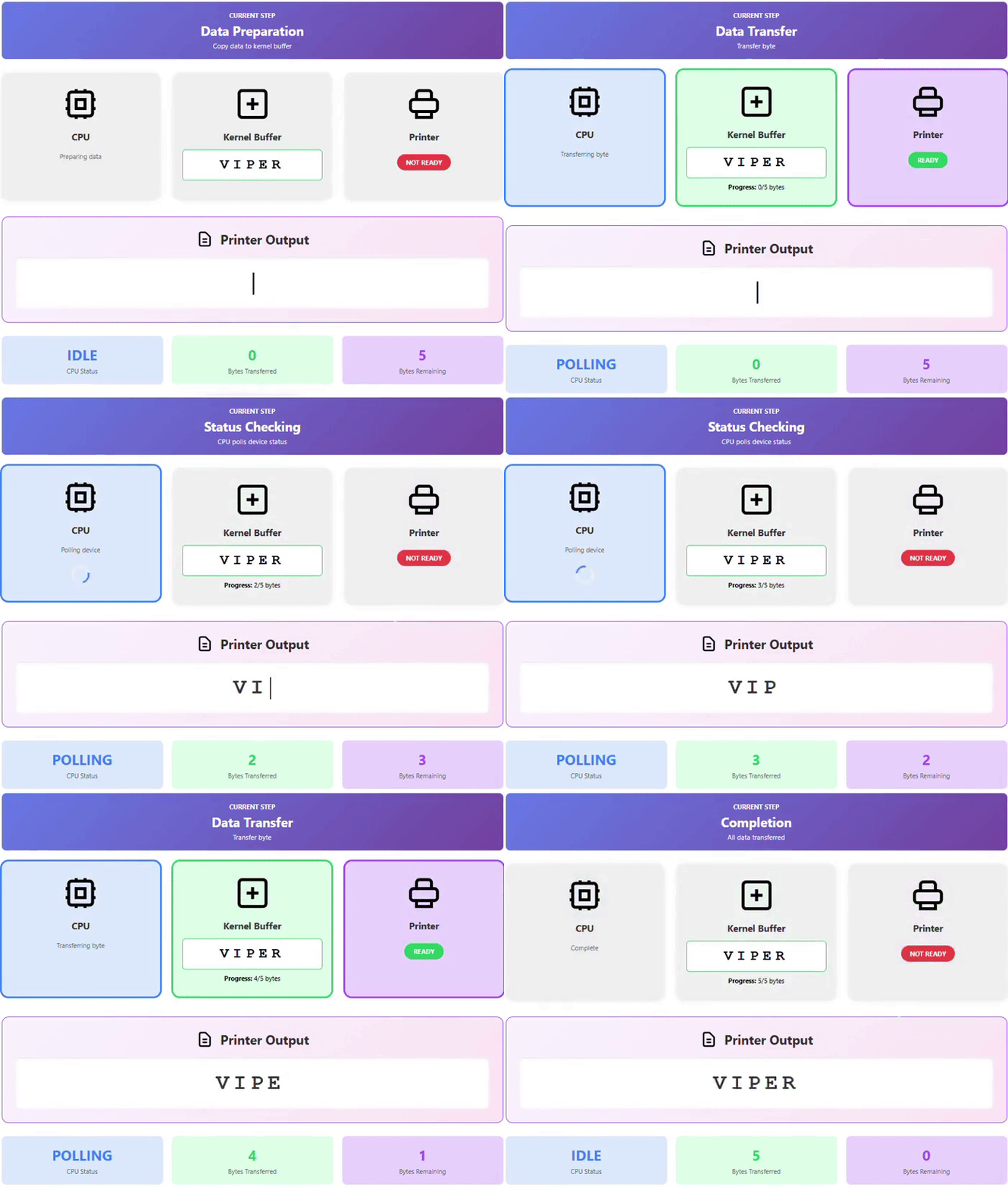
Step 1 − First an I/O operation is initiated by making a system call to open printer. The operating system checks if the printer is available and then grants access to printer or it will return an error if the printer is busy.
Step 2 − Then operating system copies the data that you want to transfer into a kernel buffer as shown in the above animation.
Step 3 − Then CPU continuously checks if the printer is ready(polling). In the above animation, it can be seen as CPU polling when printer is not ready.
Step 4 − Once the printer is ready, CPU transfers a single byte or word of data. The above animation demonstrates transferring single letter whenever the printer is ready.
Step 5 − The above two steps i.e., step 3 and 4 are repeated by CPU until the complete string is printed. CPU checks the status and then prints the string 1 byte/character at a time.
Polling is a method in which CPU continuously checks if a device is ready for the next operation. It keeps checking the device status in a loop. Due to this, the CPU remains busy until the device responds. This is also known as busy waiting.
I/O Commands in Programmed I/O
The primary commands in Programmed I/O are mentioned below −
Control Commands − Control commands are used to initialize the I/O device. It sets parameters like transfer modes, data formats, or device-specific settings.
Example RESET_DEVICE, SET_PARITY EVEN, ENABLE_FLOW_CONTROL, SPIN_UP, etc.
Test Commands − The test commands check status conditions of I/O components and devices. It checks if devices are switched on, if they are available, whether previous operations completed successfully, and if any errors occurred.
Example − TEST_READY, TEST_BUSY, TEST_DEVICE_PRESENT, TEST_SEEK_COMPLETE, TEST_DRIVE_READY, etc.
Read Commands − The read commands ask the I/O components to retrieve data from the device into an internal buffer. The data in input buffer is accessed by processor using the data bus.
Example READ_CHAR, READ_DATA_REGISTER, READ_SECTOR, READ_MOUSE_DATA, etc.
Write Commands − The write commands instruct I/O components to take data from the data bus. This data is transmitted to the output devices.
Example − WRITE_STRING, WRITE_BYTE, WRITE_PIXEL, WRITE_SECTOR, etc.
I/O Addressing Methods in Programmed I/O
In Programmed I/O, the CPU directly accesses registers and data ports to manage input/output operations. It can be implemented using two addressing methods −
- Memory-mapped I/O (MMIO)
- Port-mapped I/O (PMIO)
Memory-mapped I/O (MMIO)
The memory-mapped I/O maps the registers into the memory address space. Programs use read and write instructions to access devices. CPU uses regular load/store instructions to access I/O. It allows using standard memory manipulation instructions for I/O operations. For example: *(volatile int*)0xFFFF0000 = 1;
Port-mapped I/O (PMIO)
In port-mapped I/O, devices are accessed through a separate address space apart from main memory. Special CPU instructions (IN and OUT) in x86 architectures are used to read from and write to these I/O ports respectively. It was useful in early microprocessors as they had limited address spaces, and it preserved the main memory address range for actual memory.
Difference Between Memory-mapped I/O and Port-mapped I/O
Here are the differences between Memory-mapped I/O (MMIO) and Port-mapped I/O (PMIO) −
| Memory-mapped I/O | Port-mapped I/O |
|---|---|
| It shares the memory address space. | It has a separate I/O address space. |
| It has standard load/store instructions. | It has special I/O instructions (IN, OUT). |
| It is used in modern systems, ARM, RISC-V. | It is used in x86 systems, legacy devices. |
Advantages of Programmed I/O
The advantages of Programmed I/O are as follows −
- It is easy to understand and implement.
- The program flow is linear and deterministic. It makes debugging easier.
- No hardware like a DMA controller or advanced interrupt systems is required.
- It is useful when there is less data to transfer.
Disadvantages of Programmed I/O
Below are the disadvantages of Programmed I/O:
- In Programmed I/O, CPU remains busy throughout the entire I/O operation due to polling. So, it is inefficient for large data transfers as it can be seen in the animation.
- There is high latency.
- Limited concurrency as CPU remains busy in polling
- Inefficient use of resources.
- Less throughput.
Conclusion
Programmed I/O is the easiest and most basic approach for I/O operations in computer systems. It is simple and easy but there is CPU wastage due to polling as CPU remains busy continuously checking the state of devices. This chapter provided a detailed explanation of programmed I/O, real-world examples, its working, commands, addressing methods, advantages, and disadvantages of programmed I/O.
