
- OS - Home
- OS - Overview
- OS - History
- OS - Evolution
- OS - Functions
- OS - Components
- OS - Structure
- OS - Architecture
- OS - Services
- OS - Properties
- Process Management
- Processes in Operating System
- States of a Process
- Process Schedulers
- Process Control Block
- Operations on Processes
- Process Suspension and Process Switching
- Process States and the Machine Cycle
- Inter Process Communication (IPC)
- Remote Procedure Call (RPC)
- Context Switching
- Threads
- Types of Threading
- Multi-threading
- System Calls
- Scheduling Algorithms
- Process Scheduling
- Types of Scheduling
- Scheduling Algorithms Overview
- FCFS Scheduling Algorithm
- SJF Scheduling Algorithm
- Round Robin Scheduling Algorithm
- HRRN Scheduling Algorithm
- Priority Scheduling Algorithm
- Multilevel Queue Scheduling
- Lottery Scheduling Algorithm
- Starvation and Aging
- Turn Around Time & Waiting Time
- Burst Time in SJF Scheduling
- Process Synchronization
- Process Synchronization
- Solutions For Process Synchronization
- Hardware-Based Solution
- Software-Based Solution
- Critical Section Problem
- Critical Section Synchronization
- Mutual Exclusion Synchronization
- Mutual Exclusion Using Interrupt Disabling
- Peterson's Algorithm
- Dekker's Algorithm
- Bakery Algorithm
- Semaphores
- Binary Semaphores
- Counting Semaphores
- Mutex
- Turn Variable
- Bounded Buffer Problem
- Reader Writer Locks
- Test and Set Lock
- Monitors
- Sleep and Wake
- Race Condition
- Classical Synchronization Problems
- Dining Philosophers Problem
- Producer Consumer Problem
- Sleeping Barber Problem
- Reader Writer Problem
- OS Deadlock
- Introduction to Deadlock
- Conditions for Deadlock
- Deadlock Handling
- Deadlock Prevention
- Deadlock Avoidance (Banker's Algorithm)
- Deadlock Detection and Recovery
- Deadlock Ignorance
- Resource Allocation Graph
- Livelock
- Memory Management
- Memory Management
- Logical and Physical Address
- Contiguous Memory Allocation
- Non-Contiguous Memory Allocation
- First Fit Algorithm
- Next Fit Algorithm
- Best Fit Algorithm
- Worst Fit Algorithm
- Buffering
- Fragmentation
- Compaction
- Virtual Memory
- Segmentation
- Paged Segmentation & Segmented Paging
- Buddy System
- Slab Allocation
- Overlays
- Free Space Management
- Locality of Reference
- Paging and Page Replacement
- Paging
- Demand Paging
- Page Table
- Page Replacement Algorithms
- Second Chance Page Replacement
- Optimal Page Replacement Algorithm
- Belady's Anomaly
- Thrashing
- Storage and File Management
- File Systems
- File Attributes
- Structures of Directory
- Linked Index Allocation
- Indexed Allocation
- Disk Scheduling Algorithms
- FCFS Disk Scheduling
- SSTF Disk Scheduling
- SCAN Disk Scheduling
- LOOK Disk Scheduling
- I/O Systems
- I/O Hardware
- I/O Software
- I/O Programmed
- I/O Interrupt-Initiated
- Direct Memory Access
- OS Types
- OS - Types
- OS - Batch Processing
- OS - Multiprogramming
- OS - Multitasking
- OS - Multiprocessing
- OS - Distributed
- OS - Real-Time
- OS - Single User
- OS - Monolithic
- OS - Embedded
- Popular Operating Systems
- OS - Hybrid
- OS - Zephyr
- OS - Nix
- OS - Linux
- OS - Blackberry
- OS - Garuda
- OS - Tails
- OS - Clustered
- OS - Haiku
- OS - AIX
- OS - Solus
- OS - Tizen
- OS - Bharat
- OS - Fire
- OS - Bliss
- OS - VxWorks
- Miscellaneous Topics
- OS - Security
- OS Questions Answers
- OS - Questions Answers
- OS Useful Resources
- OS - Quick Guide
- OS - Useful Resources
- OS - Discussion
Process Suspension and Process Switching
Process suspension and process switching are two core ideas that silently power everything your operating system does. Even though it may look like your system is running many programs at the same time, that's not how the CPU actually works. The CPU focuses on one thing at a time but jumps between tasks so fast that it feels like true multitasking. The operating system decides who gets the CPU, who waits, who gets memory, and who needs to be paused for later. These decisions depend heavily on process suspension and process switching.
What is Process Suspension?
Process suspension takes place when the OS moves a process out of the main memory (RAM) and temporarily places it on disk. It usually happens when a process enters the blocked state. A blocked process can't continue because it's waiting, maybe waiting for an input, a file, or some event. Since it cannot do anything at that moment, keeping it in the RAM wastes space. So, the OS suspends it and frees up memory for other processes that need to run.
Whenever processes in the main memory enter the blocked state, the operating system may suspend one process by moving it into the Suspended state and transferring its information to disk. The free memory is then used to bring another process into the RAM.
RAM is one of the most important and limited resources in a computer. It allows fast access compared to disk storage. So, the OS must constantly decide which processes deserve to stay in RAM. Instead of permanently stopping tasks, the OS suspends them like gently placing them on a side shelf.
In basic OS diagrams, we usually see three main states −
- Ready state
- Running state
- Blocked state
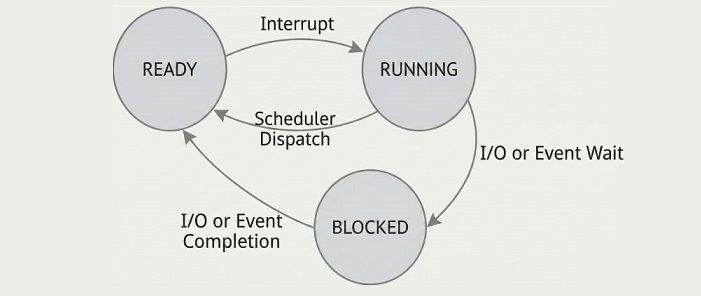
But real operating systems introduce another important state: the Suspended state. This extra layer makes the system more adjustable. Under heavy loads, the system cannot keep every blocked or ready process in RAM, so it suspends those that aren't immediately needed.
If a process is in the Ready state but cannot be brought into memory because RAM is full, the OS swaps out a blocked process into the Suspend queue.
This makes sense: Why keep a blocked process in memory when it can't do anything anyway? By suspending it, the OS frees space for a ready process that can actually run.
Once the blocked process becomes ready again, it doesn't immediately return to main memory. Instead, it moves into the Ready_Suspend state. This is why modern operating systems include two suspended states −
- Blocked_Suspend − The process is blocked and also not in memory.
- Ready_Suspend − The process is ready but hasn't been loaded into memory yet.
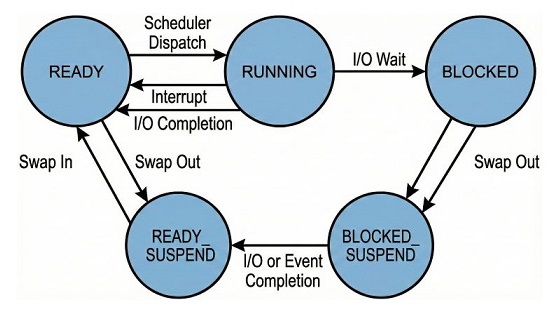
These extra states help the OS keep things organized. The process is not deleted or stopped permanently, it's simply parked outside RAM until the system has space for it again.
Why Do We Need Process Suspension?
Here are the main reasons operating systems use suspension −
- Swapping − This is one of the biggest reasons suspension exists. When too many programs are sitting in RAM and there isn't enough space for a new one that actually needs to run, the OS takes a process that isn't doing anything important at the moment and moves it to disk. It's just like clearing your desk by placing books you're not reading right now on a shelf. The process isn't gone; it's simply kept aside so the system can stay fast and responsive.
- Timing − Sometimes the operating system delays a process on purpose. Maybe the process has a lower priority, maybe a more urgent one needs the CPU first, or maybe the OS is waiting for the right time slot. Instead of letting that delayed process sit in RAM doing nothing, the OS suspends it. This keeps memory free and helps the system run tasks in a smoother order.
- Interactive user request − This happens when the user themselves chooses to pause a program. For example, pausing a download, stopping a video editing job, or putting a game on pause. When the user pauses something, the OS temporarily suspends that process so its memory and CPU time can be used elsewhere. The process stays safe and can be resumed exactly from where it was left.
- Parent process request − Some programs (parent processes) create other smaller programs (child processes). Sometimes, the parent may ask the OS to suspend the child temporarily. This can happen when the parent process is reorganizing work, waiting for some event, or needs the child to wait before continuing. Suspending the child keeps everything in sync and prevents mistakes or conflicts.
Overall, process suspension is about memory management. Instead of ending processes, the OS stores them safely, ensuring everything remains responsive even with limited RAM.
What is Process Switching?
Process switching takes place when the operating system decides that it's time to stop the currently running process and let another one use the CPU. Since the CPU can handle only one instruction stream at a time, the OS constantly rotates between processes to make sure everything feels smooth and responsive. This act of stopping one process and loading another is known as a context switch.
A context switch can occur at any moment. The OS doesn't wait for a process to finish its work. If something more important needs attention, or if a process gets blocked or delayed, the OS immediately takes control. It ensures that no single process hogs the CPU and every process gets a fair share of time.
Most of the time, process switching is triggered by something called an interrupt. Interrupts are like small nudges or taps on the OS's shoulder, signals that say, “Hey, something needs your attention right now.” These interruptions can come from hardware (like your keyboard or mouse), from timers inside the system, or even from software errors.
When an interrupt occurs, the OS instantly pauses what the CPU is doing, saves the current process state, and decides whether another process should run next.
There are two main types −
- Interrupt
- Trap
Why Do We Need Process Switching?
The main purpose of process switching is multitasking. A CPU can run only one process at a time, but context switching is what creates the illusion of running many tasks at once.
Without switching, your device would freeze whenever a single program became slow or blocked. Switching ensures fairness and responsiveness.
When Does a Process Switching Occur?
Process switching may occur when −
- Supervisor call − When a program asks the operating system to do something on its behalf, such as reading a file, writing data, or accessing hardware safely. Since the program cannot perform these actions directly, it requests the OS to step in. While the OS handles the request, the process might get blocked, and the CPU may be switched to another ready process. It's like asking a manager for help, and while the manager handles it, you wait aside.
- Trap− A trap occurs when a process hits an error or an unexpected condition during execution. Examples include trying to access invalid memory, dividing by zero, or executing an illegal instruction. When this happens, the OS immediately takes control to decide what to do next. The process may be stopped, moved to another state, or forced to terminate depending on the severity of the error. Think of it like a sudden emergency where the OS must step in instantly.
- Interrupt − Interrupts are caused by an external event that demands the OS's attention right away, such as keyboard input, mouse movement, incoming network data, or a timer signal. These events take place from outside the running process and can interrupt it at any moment. The OS pauses the running process, handles the interrupt, and may switch to another process once it is done. It's like someone tapping you on the shoulder to ask something important even while you're busy.
When any of these events occur, the OS saves the current process's information, pauses it, and switches to another process that is ready to run.
Steps to Perform a Process Switch
The OS performs several steps to switch processes −
- Save CPU context − Switching from user mode to kernel mode.
- Update PCB − Updating the Process Control Block of the current process.
- Move the PCB − Placing it into the appropriate queue.
- Select another process − The scheduler picks the next process.
- Update selected process − Preparing it for execution.
- Update memory structures − Ensuring correct memory mappings.
- Restore CPU context − Switching back to user mode for the new process.
Even though this seems like a lot, the CPU does all of this incredibly fast. Still, context switching has a cost because the OS must save and reload a lot of data.
Differences Between Process Suspension and Process Switching
Process Suspension
- The suspended process is not immediately available because it is stored on disk.
- It may or may not be waiting for an event.
- The process remains suspended until the OS decides to reload it.
Process Switching
- Also known as context switching.
- Involves saving all important process information.
- Restores CPU information for the next chosen process.
To put it simply − Process suspension is about memory, moving processes in and out of RAM. In contrast, Process switching is about CPU time, deciding who gets the CPU right now.
Conclusion
Process suspension and process switching work together to keep the system responsive, smooth, and capable of handling many tasks at once. They ensure your apps load quickly and your system doesn't freeze.
