
- OS - Home
- OS - Overview
- OS - History
- OS - Evolution
- OS - Functions
- OS - Components
- OS - Structure
- OS - Architecture
- OS - Services
- OS - Properties
- Process Management
- Processes in Operating System
- States of a Process
- Process Schedulers
- Process Control Block
- Operations on Processes
- Process Suspension and Process Switching
- Process States and the Machine Cycle
- Inter Process Communication (IPC)
- Remote Procedure Call (RPC)
- Context Switching
- Threads
- Types of Threading
- Multi-threading
- System Calls
- Scheduling Algorithms
- Process Scheduling
- Types of Scheduling
- Scheduling Algorithms Overview
- FCFS Scheduling Algorithm
- SJF Scheduling Algorithm
- Round Robin Scheduling Algorithm
- HRRN Scheduling Algorithm
- Priority Scheduling Algorithm
- Multilevel Queue Scheduling
- Lottery Scheduling Algorithm
- Starvation and Aging
- Turn Around Time & Waiting Time
- Burst Time in SJF Scheduling
- Process Synchronization
- Process Synchronization
- Solutions For Process Synchronization
- Hardware-Based Solution
- Software-Based Solution
- Critical Section Problem
- Critical Section Synchronization
- Mutual Exclusion Synchronization
- Mutual Exclusion Using Interrupt Disabling
- Peterson's Algorithm
- Dekker's Algorithm
- Bakery Algorithm
- Semaphores
- Binary Semaphores
- Counting Semaphores
- Mutex
- Turn Variable
- Bounded Buffer Problem
- Reader Writer Locks
- Test and Set Lock
- Monitors
- Sleep and Wake
- Race Condition
- Classical Synchronization Problems
- Dining Philosophers Problem
- Producer Consumer Problem
- Sleeping Barber Problem
- Reader Writer Problem
- OS Deadlock
- Introduction to Deadlock
- Conditions for Deadlock
- Deadlock Handling
- Deadlock Prevention
- Deadlock Avoidance (Banker's Algorithm)
- Deadlock Detection and Recovery
- Deadlock Ignorance
- Resource Allocation Graph
- Livelock
- Memory Management
- Memory Management
- Logical and Physical Address
- Contiguous Memory Allocation
- Non-Contiguous Memory Allocation
- First Fit Algorithm
- Next Fit Algorithm
- Best Fit Algorithm
- Worst Fit Algorithm
- Buffering
- Fragmentation
- Compaction
- Virtual Memory
- Segmentation
- Paged Segmentation & Segmented Paging
- Buddy System
- Slab Allocation
- Overlays
- Free Space Management
- Locality of Reference
- Paging and Page Replacement
- Paging
- Demand Paging
- Page Table
- Page Replacement Algorithms
- Second Chance Page Replacement
- Optimal Page Replacement Algorithm
- Belady's Anomaly
- Thrashing
- Storage and File Management
- File Systems
- File Attributes
- Structures of Directory
- Linked Index Allocation
- Indexed Allocation
- Disk Scheduling Algorithms
- FCFS Disk Scheduling
- SSTF Disk Scheduling
- SCAN Disk Scheduling
- LOOK Disk Scheduling
- I/O Systems
- I/O Hardware
- I/O Software
- I/O Programmed
- I/O Interrupt-Initiated
- Direct Memory Access
- OS Types
- OS - Types
- OS - Batch Processing
- OS - Multiprogramming
- OS - Multitasking
- OS - Multiprocessing
- OS - Distributed
- OS - Real-Time
- OS - Single User
- OS - Monolithic
- OS - Embedded
- Popular Operating Systems
- OS - Hybrid
- OS - Zephyr
- OS - Nix
- OS - Linux
- OS - Blackberry
- OS - Garuda
- OS - Tails
- OS - Clustered
- OS - Haiku
- OS - AIX
- OS - Solus
- OS - Tizen
- OS - Bharat
- OS - Fire
- OS - Bliss
- OS - VxWorks
- Miscellaneous Topics
- OS - Security
- OS Questions Answers
- OS - Questions Answers
- OS Useful Resources
- OS - Quick Guide
- OS - Useful Resources
- OS - Discussion
Operating System - Overview
An Operating System (OS) is an interface between a computer user and computer hardware. An operating system is a software which performs all the basic tasks like file management, memory management, process management, handling input and output, and controlling peripheral devices such as disk drives and printers.
An operating system is software that enables applications to interact with a computer's hardware. The software that contains the core components of the operating system is called the kernel.
The primary purposes of an Operating System are to enable applications (spftwares) to interact with a computer's hardware and to manage a system's hardware and software resources.
Some popular Operating Systems include Linux Operating System, Windows Operating System, VMS, OS/400, AIX, z/OS, etc. Today, Operating systems is found almost in every device like mobile phones, personal computers, mainframe computers, automobiles, TV, Toys etc.
Definitions
We can have a number of definitions of an Operating System. Let's go through few of them −
An Operting System is the low-level software that supports a computer's basic functions, such as scheduling tasks and controlling peripherals.
We can refine this definition as follows −
An operating system is a program that acts as an interface between the user and the computer hardware and controls the execution of all kinds of programs.
Following is another definition taken from Wikipedia −
An operating system (OS) is system software that manages computer hardware, software resources, and provides common services for computer programs.
Architecture
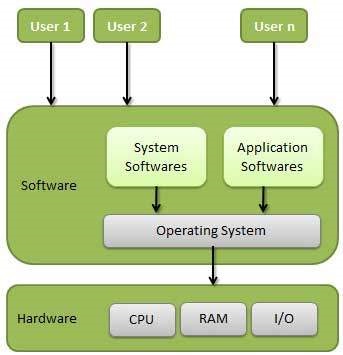
We can draw a generic architecture diagram of an Operating System which is as follows −
Functions of an Operating System
Following are some of important functions of an operating System.
- Memory Management
- Processor Management
- Device Management
- File Management
- Network Management
- Security
- Control over system performance
- Job accounting
- Error detecting aids
- Coordination between other software and users
Memory Management
Memory management refers to management of Primary Memory or Main Memory. Main memory is a large array of words or bytes where each word or byte has its own address.
Main memory provides a fast storage that can be accessed directly by the CPU. For a program to be executed, it must in the main memory. An Operating System does the following activities for memory management −
- Keeps tracks of primary memory, i.e., what part of it are in use by whom, what part are not in use.
- In multiprogramming, the OS decides which process will get memory when and how much.
- Allocates the memory when a process requests it to do so.
- De-allocates the memory when a process no longer needs it or has been terminated.
Processor Management
In multiprogramming environment, the OS decides which process gets the processor when and for how much time. This function is called process scheduling. An Operating System does the following activities for processor management −
- Keeps tracks of processor and status of process. The program responsible for this task is known as traffic controller.
- Allocates the processor (CPU) to a process.
- De-allocates processor when a process is no longer required.
Device Management
An Operating System manages device communication via their respective drivers. It does the following activities for device management −
- Keeps tracks of all devices. Program responsible for this task is known as the I/O controller.
- Decides which process gets the device when and for how much time.
- Allocates the device in the efficient way.
- De-allocates devices.
File Management
A file system is normally organized into directories for easy navigation and usage. These directories may contain files and other directions.
An Operating System does the following activities for file management −
- Keeps track of information, location, uses, status etc. The collective facilities are often known as file system.
- Decides who gets the resources.
- Allocates the resources.
- De-allocates the resources.
Other Important Activities
Following are some of the important activities that an Operating System performs −
- Security − By means of password and similar other techniques, it prevents unauthorized access to programs and data.
- Control over system performance − Recording delays between request for a service and response from the system.
- Job accounting − Keeping track of time and resources used by various jobs and users.
- Error detecting aids − Production of dumps, traces, error messages, and other debugging and error detecting aids.
- Coordination between other softwares and users − Coordination and assignment of compilers, interpreters, assemblers and other software to the various users of the computer systems.
