
- Data Comm & Networks Home
- DCN - Overview
- DCN - What is Computer Network
- DCN - Uses of Computer Network
- DCN - Computer Network Types
- DCN - Network LAN Technologies
- DCN - Computer Network Models
- DCN - Computer Network Security
- DCN - Components
- DCN - Connectors
- DCN - Switches
- DCN - Repeaters
- DCN - Gateways
- DCN - Bridges
- DCN - Socket
- DCN - Network Interface Card
- DCN - NIC: Pros and Cons
- DCN - Network Hardware
- DCN - Network Port
- Computer Network Topologies
- DCN - Computer Network Topologies
- DCN - Point-to-point Topology
- DCN - Bus Topology
- DCN - Star Topology
- DCN - Ring Topology
- DCN - Mesh Topology
- DCN - Tree Topology
- DCN - Hybrid Topology
- Physical Layer
- DCN - Physical Layer Introduction
- DCN - Digital Transmission
- DCN - Analog Transmission
- DCN - Transmission media
- DCN - Wireless Transmission
- DCN - Transmission Impairments
- DCN - Multiplexing
- DCN - Network Switching
- DCN - Circuit Switching
- DCN - Packet Switching
- DCN - Message Switching
- Data Link Layer
- DCN - Data Link Layer Introduction
- DCN - Data Link Control & Protocols
- DCN - RMON
- DCN - Token Ring Network
- DCN - Hamming Code
- DCN - Byte Stuffing
- DCN - Channel Allocation
- DCN - MAC Address
- DCN - Address Resolution Protocol
- DCN - Cyclic Redundancy Checks
- DCN - Error Control
- DCN - Flow Control
- DCN - Framing
- DCN - Error Detection & Correction
- DCN - Error Correcting Codes
- DCN - Parity Bits
- Network Layer
- DCN - Network Layer Introduction
- DCN - Network Addressing
- DCN - Routing
- DCN - Routing Table
- DCN - Internetworking
- DCN - Network Layer Protocols
- DCN - Routing Information Protocol
- DCN - Border Gateway Protocol
- DCN - OSPF Protocol
- DCN - Network Address Translation
- DCN - Network Address Translation Types
- Transport Layer
- DCN - Transport Layer Introduction
- DCN - Transmission Control Protocol
- DCN - User Datagram Protocol
- DCN - Congestion Control
- DCN - Open Loop Congestion Control
- DCN - Closed Loop Congestion Control
- DCN - Congestion Control Algorithms
- DCN - Token Bucket Algorithm
- DCN - TCP Tahoe Algorithm
- DCN - TCP Reno Algorithm
- DCN - TCP New Reno Algorithm
- DCN - TCP BIC Algorithm
- DCN - TCP CUBIC Algorithm
- DCN - TCP Service Model
- DCN - TLS Handshake
- DCN - TCP Vs. UDP
- Application Layer
- DCN - Session Layer
- DCN - Presentation Layer
- DCN - Application Layer Introduction
- DCN - Client-Server Model
- DCN - Application Protocols
- DCN - Network Services
- DCN - Virtual Private Network
- DCN - Load Shedding
- DCN - Optimality Principle
- DCN - Service Primitives
- DCN - Services of Network Security
- DCN - Hypertext Transfer Protocol
- DCN - File Transfer Protocol
- DCN - Secure Socket Layer
- Network Protocols
- DCN - ALOHA Protocol
- DCN - Pure ALOHA Protocol
- DCN - Sliding Window Protocol
- DCN - Stop and Wait Protocol
- DCN - Link State Routing
- DCN - Link State Routing Protocol
- Network Algorithms
- DCN - Shortest Path Algorithm
- DCN - Routing Algorithm
- DCN - Adaptive Routing Algorithms
- DCN - Non-Adaptive Routing Algorithms
- DCN - Leaky Bucket Algorithm
- Wireless Networks
- DCN - Wireless Networks
- DCN - Wireless LANs
- DCN - Wireless LAN & IEEE 802.11
- DCN - IEEE 802.11 Wireless LAN Standards
- DCN - IEEE 802.11 Networks
- Multiplexing
- DCN - Multiplexing & Its Types
- DCN - Time Division Multiplexing
- DCN - Synchronous TDM
- DCN - Asynchronous TDM
- DCN - Synchronous Vs. Asynchronous TDM
- DCN - Frequency Division Multiplexing
- DCN - TDM Vs. FDM
- DCN - Code Division Multiplexing
- DCN - Wavelength Division Multiplexing
- Miscellaneous
- DCN - Shortest Path Routing
- DCN - B-ISDN Reference Model
- DCN - Design Issues For Layers
- DCN - Selective-repeat ARQ
- DCN - Flooding
- DCN - E-Mail Format
- DCN - Cryptography
- DCN - Unicast, Broadcast, & Multicast
- DCN - Network Virtualization
- DCN - Flow Vs. Congestion Control
- DCN - Asynchronous Transfer Mode
- DCN - ATM Networks
- DCN - Synchronous Vs. Asynchronous Transmission
- DCN - Network Attacks
- DCN - WiMax
- DCN - Buffering
- DCN - Authentication
- DCN Useful Resources
- DCN - Quick Guide
- DCN - Useful Resources
- DCN - Discussion
Session Layer in OSI Model
Session Layer is the fifth layer of the OSI reference model. It is primarily responsible for establishing, managing, synchronizing, and terminating sessions between end-user application processes. In simple words, the session layer controls the conversation between two computers in a proper and disciplined way.
Whenever two systems want to communicate with each other for a certain period of time, a logical connection is created between them. This logical connection is known as a session. The session layer takes full responsibility of this session from the moment communication starts till it completely ends.
The session layer decides when the communication should begin, how data exchange should continue, and when it should be terminated. The session layer ensures that the communication does not become messy or uncontrolled.
What is a Session?
A session is a temporary logical relationship between two systems that allows them to exchange data. It is not a physical connection like a wire or cable. It exists only during the time when communication is active.
For example, when you log in to a website, a session is created between your computer and the server. The server remembers who you are, what pages you visited, and what actions you performed. When you log out or close the browser, the session ends automatically.
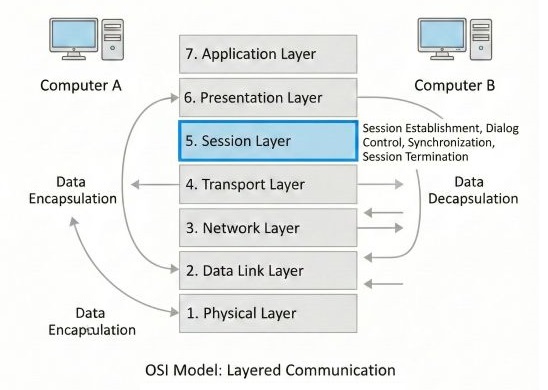
The session layer handles this complete process.
Session Layer and Its Importance
In computer networks, communication is not always short. Sometimes files of very large size are transferred, video calls continue for hours, or remote desktop sessions stay active for a long time. During such long communication, many problems can occur. There can be network failure, sudden power cut, system crash, or temporary disconnection.
If there is no proper session control, the entire communication may fail and need to restart from the beginning. It wastes a lot of time, bandwidth, and system resources. The session layer avoids this problem by keeping track of communication and allowing recovery from failures.
Functions of Session Layer
The session layer performs several important functions that make communication smooth and controlled. These functions are not visible to the user but are very important for long and complex data transfer.
Session Establishment
Before any data transfer begins, a session must be established. Session establishment means both systems agree to communicate with each other. During session establishment, the session layer creates the session, assigns a session identifier, and sets rules for communication. These rules define how data will flow and how long the session will remain active.
If session establishment fails, data transfer cannot start. It ensures that no data is sent without a proper communication agreement.
Session Maintenance
Once the session is established, it must be maintained throughout the communication. Session maintenance means keeping the session alive and monitoring its state.
The session layer keeps track of which system is currently sending data, which system is receiving data, and whether the connection is still active. If small interruptions occur, the session layer helps continue communication smoothly without restarting the whole process.
Session Termination
When communication is completed, the session must be closed properly. This process is called session termination. Proper session termination releases system resources, frees memory, and avoids confusion between communicating systems.
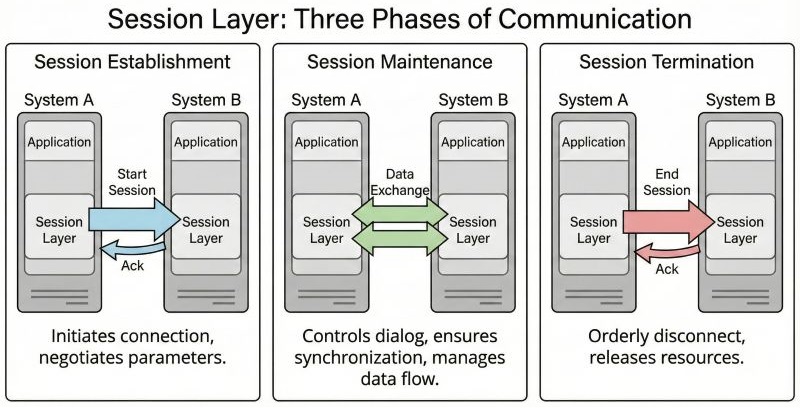
Session termination can be normal when a communication ends successfully, or abnormal when a communication ends due to an error or failure.
Dialog Control
One of the most important responsibilities of the session layer is dialog control. Dialog control defines how communication takes place between two systems. It decides the direction and flow of data during communication.
Based on the type of application and communication requirement, the session layer decides whether the communication will be half-duplex or full-duplex.
Half-Duplex Communication
In half-duplex communication, only one system can send data at a time. The other system must wait until the sender finishes sending data. This type of communication is useful where simultaneous data transfer is not required.
A common real-world example of half-duplex communication is walkie-talkie. When one person speaks, the other person listens, and both cannot speak at the same time.
Full-Duplex Communication
In full-duplex communication, both systems can send and receive data at the same time. There is no need to wait for the other system to finish. This mode of communication provides faster and more natural interaction between systems.
A common real-world example of full-duplex communication is a telephone call, where both people can talk and listen simultaneously.
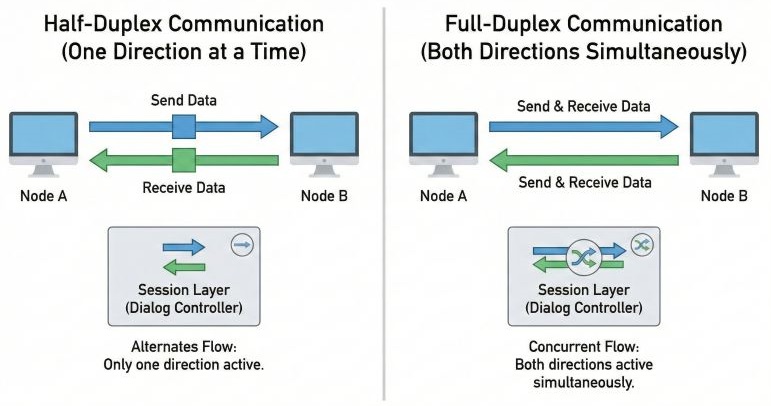
The session layer ensures that data exchange follows the selected communication mode properly.
Token Management
Token management is used to control access to shared resources. It prevents multiple systems from performing the same critical operation at the same time.
A token is a special permission given to a system. Only a specific system holding the token is allowed to perform a specific operation. Other systems must wait until the token is released. It prevents problems like data inconsistency, data corruption, and conflicting updates.
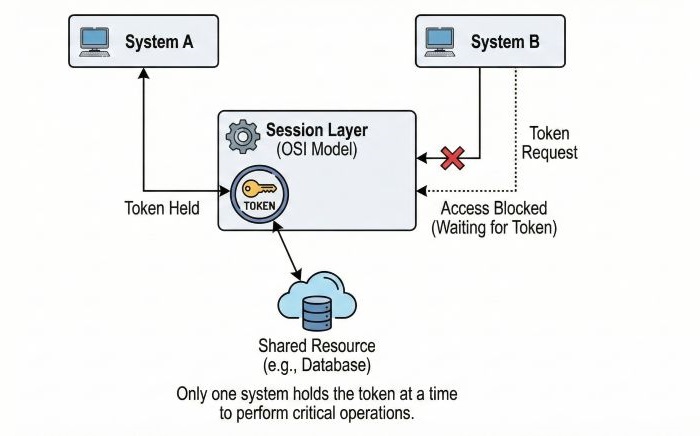
For example, when two users try to modify the same database record at the same time, token management ensures that only one user is allowed to update the record.
Synchronizing the Sessions
Synchronization is one of the most important features of the session layer, especially for long data transfers. The session layer inserts synchronization points or checkpoints in the data stream. These checkpoints mark positions where data has been successfully transmitted and acknowledged.
If a failure occurs after a checkpoint, communication resumes from the last checkpoint instead of starting from the beginning. It saves a lot of time, bandwidth, and system effort.
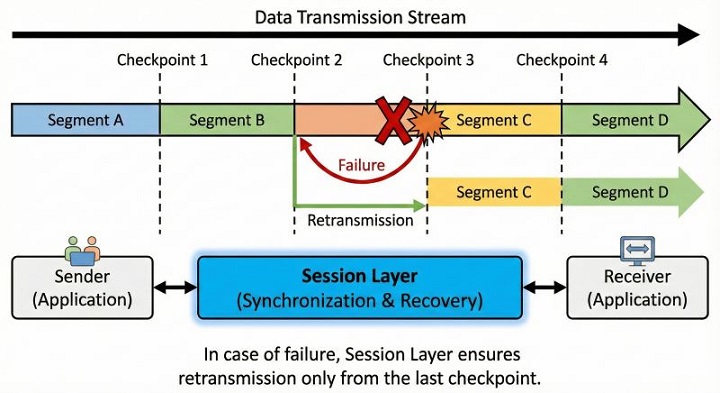
For example, while transferring a large video file, if the network fails near the end, only the remaining part needs to be sent again.
Session Layer in Real-World Applications
The Session layer plays an important role in many real-world applications, even though users do not directly notice it.
- Video conferencing applications − Manage sessions between participants
- Online banking sessions − Useful for secure user sessions
- Remote desktop connections − Manage interactive sessions
- File transfer applications − File transfer sessions
- Login and logout sessions − User authentication and session termination
The Session layer works closely with other layers −
- Transport Layer − Provides reliable data delivery
- Presentation Layer − Handles data format and security
- Application Layer − Interacts with user
The Session layer acts as a bridge between data transmission and user-level interaction.
Conclusion
The Session Layer ensures that communication sessions are properly established, managed, synchronized, and terminated. By ensuring proper dialog control, token management, and synchronization, it makes long and complex communication reliable and efficient. The session layer makes sure that communication starts correctly, runs smoothly, and ends properly without confusion.
