
- Data Comm & Networks Home
- DCN - Overview
- DCN - What is Computer Network
- DCN - Uses of Computer Network
- DCN - Computer Network Types
- DCN - Network LAN Technologies
- DCN - Computer Network Models
- DCN - Computer Network Security
- DCN - Components
- DCN - Connectors
- DCN - Switches
- DCN - Repeaters
- DCN - Gateways
- DCN - Bridges
- DCN - Socket
- DCN - Network Interface Card
- DCN - NIC: Pros and Cons
- DCN - Network Hardware
- DCN - Network Port
- Computer Network Topologies
- DCN - Computer Network Topologies
- DCN - Point-to-point Topology
- DCN - Bus Topology
- DCN - Star Topology
- DCN - Ring Topology
- DCN - Mesh Topology
- DCN - Tree Topology
- DCN - Hybrid Topology
- Physical Layer
- DCN - Physical Layer Introduction
- DCN - Digital Transmission
- DCN - Analog Transmission
- DCN - Transmission media
- DCN - Wireless Transmission
- DCN - Transmission Impairments
- DCN - Multiplexing
- DCN - Network Switching
- DCN - Circuit Switching
- DCN - Packet Switching
- DCN - Message Switching
- Data Link Layer
- DCN - Data Link Layer Introduction
- DCN - Data Link Control & Protocols
- DCN - RMON
- DCN - Token Ring Network
- DCN - Hamming Code
- DCN - Byte Stuffing
- DCN - Channel Allocation
- DCN - MAC Address
- DCN - Address Resolution Protocol
- DCN - Cyclic Redundancy Checks
- DCN - Error Control
- DCN - Flow Control
- DCN - Framing
- DCN - Error Detection & Correction
- DCN - Error Correcting Codes
- DCN - Parity Bits
- Network Layer
- DCN - Network Layer Introduction
- DCN - Network Addressing
- DCN - Routing
- DCN - Routing Table
- DCN - Internetworking
- DCN - Network Layer Protocols
- DCN - Routing Information Protocol
- DCN - Border Gateway Protocol
- DCN - OSPF Protocol
- DCN - Network Address Translation
- DCN - Network Address Translation Types
- Transport Layer
- DCN - Transport Layer Introduction
- DCN - Transmission Control Protocol
- DCN - User Datagram Protocol
- DCN - Congestion Control
- DCN - Open Loop Congestion Control
- DCN - Closed Loop Congestion Control
- DCN - Congestion Control Algorithms
- DCN - Token Bucket Algorithm
- DCN - TCP Tahoe Algorithm
- DCN - TCP Reno Algorithm
- DCN - TCP New Reno Algorithm
- DCN - TCP BIC Algorithm
- DCN - TCP CUBIC Algorithm
- DCN - TCP Service Model
- DCN - TLS Handshake
- DCN - TCP Vs. UDP
- Application Layer
- DCN - Session Layer
- DCN - Presentation Layer
- DCN - Application Layer Introduction
- DCN - Client-Server Model
- DCN - Application Protocols
- DCN - Network Services
- DCN - Virtual Private Network
- DCN - Load Shedding
- DCN - Optimality Principle
- DCN - Service Primitives
- DCN - Services of Network Security
- DCN - Hypertext Transfer Protocol
- DCN - File Transfer Protocol
- DCN - Secure Socket Layer
- Network Protocols
- DCN - ALOHA Protocol
- DCN - Pure ALOHA Protocol
- DCN - Sliding Window Protocol
- DCN - Stop and Wait Protocol
- DCN - Link State Routing
- DCN - Link State Routing Protocol
- Network Algorithms
- DCN - Shortest Path Algorithm
- DCN - Routing Algorithm
- DCN - Adaptive Routing Algorithms
- DCN - Non-Adaptive Routing Algorithms
- DCN - Leaky Bucket Algorithm
- Wireless Networks
- DCN - Wireless Networks
- DCN - Wireless LANs
- DCN - Wireless LAN & IEEE 802.11
- DCN - IEEE 802.11 Wireless LAN Standards
- DCN - IEEE 802.11 Networks
- Multiplexing
- DCN - Multiplexing & Its Types
- DCN - Time Division Multiplexing
- DCN - Synchronous TDM
- DCN - Asynchronous TDM
- DCN - Synchronous Vs. Asynchronous TDM
- DCN - Frequency Division Multiplexing
- DCN - TDM Vs. FDM
- DCN - Code Division Multiplexing
- DCN - Wavelength Division Multiplexing
- Miscellaneous
- DCN - Shortest Path Routing
- DCN - B-ISDN Reference Model
- DCN - Design Issues For Layers
- DCN - Selective-repeat ARQ
- DCN - Flooding
- DCN - E-Mail Format
- DCN - Cryptography
- DCN - Unicast, Broadcast, & Multicast
- DCN - Network Virtualization
- DCN - Flow Vs. Congestion Control
- DCN - Asynchronous Transfer Mode
- DCN - ATM Networks
- DCN - Synchronous Vs. Asynchronous Transmission
- DCN - Network Attacks
- DCN - WiMax
- DCN - Buffering
- DCN - Authentication
- DCN Useful Resources
- DCN - Quick Guide
- DCN - Useful Resources
- DCN - Discussion
Presentation Layer in OSI Model
The Presentation Layer is the sixth layer of the OSI reference model. It deals with the way data is shown, stored, and transferred between two different systems.
Up until the Session Layer, we mainly assume that the data is only a stream of bits and bytes. The focus is only on maintaining a connection and sending the data reliably. But in the real world, data is not only bits. It can be text, numbers, images, audio, video, documents, encrypted files, compressed files, etc.
Different computers understand and store this data in different ways. This difference creates problems during communication. The presentation layer solves this problem. It converts data from the internal format of the sender into a common external format. At the receiving end, it again converts this external format into the internal format of the receiver. Because of this, both systems understand the data correctly.
The Importance of Presentation Layer
Every computer system is designed differently. Some use different processors, some use different operating systems, and some use different programming languages. Hence, the internal data representation is not same everywhere. For example, a Windows system and a UNIX system may store data differently. A mainframe computer and a personal computer also have different internal formats.
If these systems communicate without the presentation layer, the received data may become corrupted or meaningless. The presentation layer acts like a common language between systems.
In simple words, the presentation layer ensures that −
- Data sent by one system is understood by another system.
- Data is compact and efficient.
- Data remains secure during transmission.
Main Functions of Presentation Layer
The presentation layer performs many important functions. These functions are related to data formatting, data size reduction, and data security.
- Data translation
- Data representation handling
- Data compression
- Data encryption and decryption
All these tasks are done automatically by the system and are invisible to the user.
Data Translation
Data translation means converting data from one format into another format. This is required because different systems use different character sets and encoding schemes. For example, one system may use ASCII encoding and another system may use EBCDIC encoding. If ASCII data is sent directly to an EBCDIC system, the characters may appear wrong.
The presentation layer converts ASCII characters into a common format before transmission. At the receiving end, it converts the common format into EBCDIC. This translation ensures that text, symbols, and numbers appear correctly on the destination system.
Data Representation
Data representation refers to how data is stored internally in a computer. Different computers use different internal representations. Some of the common character representation methods include −
- ASCII − Widely used in personal computers
- EBCDIC − Used mainly in IBM mainframe systems
- BCD − Used in some financial and accounting systems
Similarly, integer representation also differs −
- Most computers use two's complement representation.
- Some systems use one's complement.
- Some older systems use even 60-bit number formats.
Because of these differences, even if data is transmitted without errors, the values may not match. The presentation layer ensures correct interpretation.
Byte Ordering Problem
Another major issue is byte ordering. Some systems follow the big-endian format and some follow the little-endian format.
- In the big-endian format, the most significant byte is stored first.
- In the little-endian format, the least significant byte is stored first.
If data is transferred without handling byte order, numbers can become incorrect. The presentation layer manages byte ordering so that data remains accurate.
Data Compression
Data compression is used to reduce the size of data before transmission. It helps in saving memory, reducing transmission time, and lowering network cost. Many network services charge users based on the amount of data transmitted. In such cases, compression is very useful.
Compression works by identifying repeated patterns in data and replacing them with shorter codes. It reduces the total number of bits sent over the network. For example, if a file contains repeated words or numbers, compression can reduce its size greatly. If most numbers are between 0 and 255, they can be sent using a single byte.
At the receiving end, the presentation layer decompresses the data back to its original form.
There are mainly two types of data compression −
- Lossless compression − Lossless compression does not lose any data. It is used for text files, documents, and important data.
- Lossy compression − Lossy compression removes some data permanently. It is used for images, audio, and video where slight loss is acceptable.
Data Encryption
Data encryption is used to protect data from unauthorized access. It converts readable data into unreadable form. Only the intended receiver with the correct key can decrypt the data. Others cannot understand it, even if they capture it.
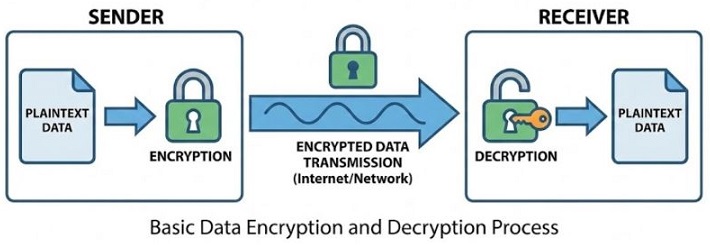
Encryption is very important in modern networks because data travels through public channels.
Presentation Layer and Its Role in Network Security
Security is a big concern in today's networks. Problems like hacking, wiretapping, and data theft are common. Earlier, networks were private and limited to organizations. It was easier to provide security measures. These days, data travels across global networks, satellites, and wireless links. Anyone with tools and knowledge can try to intercept data.
Security Services Provided by the Presentation Layer
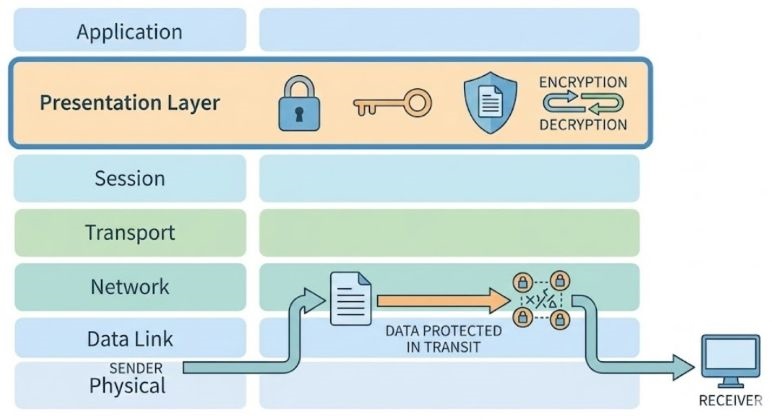
The presentation layer plays a very important role in providing security services in a computer network. When data travels from one system to another, it usually passes through public networks where anyone can try to read or modify it.
To prevent any unnecessary security threats, the presentation layer uses techniques like encryption and authentication. These security services make sure that the data remains safe, correct, and reaches the right person only.
- Protection from unauthorized access − It ensures that only allowed users can read the data. Even if someone captures the data during transmission, they cannot understand it without proper permission or key.
- Prevention of unauthorized deletion − This service makes sure that no one can delete the data while it is being transferred. The receiver should get the complete data exactly as sent by the sender.
- Prevention of unauthorized insertion − It prevents attackers from adding fake or unwanted data into the original message. Only the actual sender's data should reach the receiver.
- Verification of sender − It helps the receiver confirm that the data is really coming from the correct sender and not from someone pretending to be them.
- Electronic signatures − Electronic signatures are used to sign documents digitally. They help in proving the identity of the sender and ensure that the data has not been changed.
- Confidential communication − It ensures that data is kept secret during transmission. Only the intended receiver can read the message, while others see only meaningless data.
Presentation Layer and User Experience
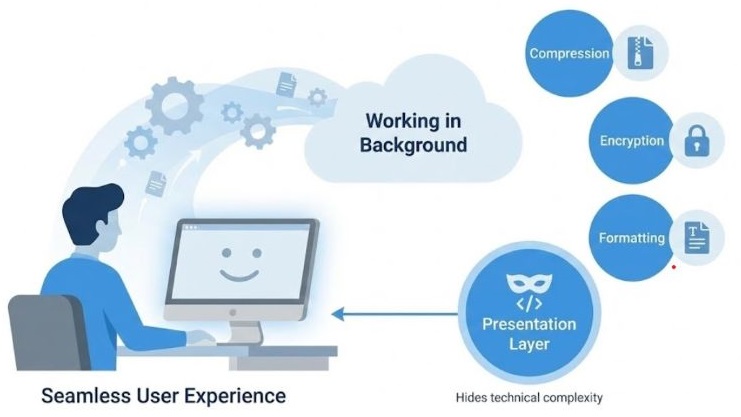
From the user's point of view, the presentation layer works silently in the background. The user does not see any technical details related to data conversion, compression, or security.
The user simply sees the text, clear images, and properly working audio or video. Even when data is encrypted or compressed, the user does not need to do anything manually. This makes computer networks easy to use, because the complexity is hidden and everything looks simple and smooth.
Real-World Examples of Presentation Layer
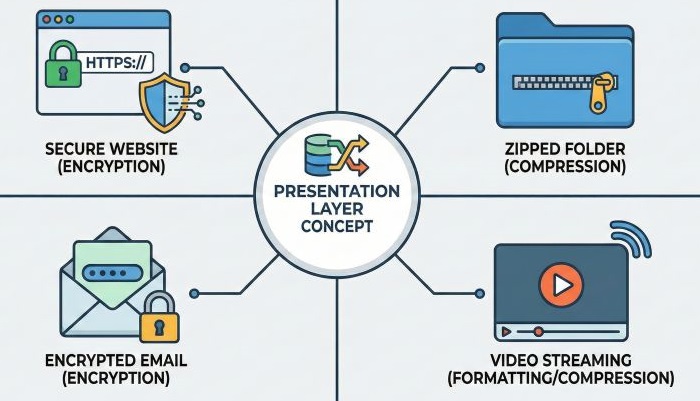
The presentation layer works all the time without us realizing it. Some common examples are given below −
- Secure websites using HTTPS − When you open a secure website, the data between your browser and the server is encrypted by the presentation layer.
- Compressed ZIP files − ZIP files use compression so that file size becomes smaller and easier to send or download.
- Encrypted emails − Emails containing sensitive information are encrypted so that only the receiver can read them.
- Streaming video and audio − Video and audio data is compressed and sometimes encrypted before being streamed smoothly over the network.
Conclusion
The Presentation Layer plays a very important role in computer networks. It ensures that data is presented in the correct form, reduced in size, and protected from unauthorized access. Without the Presentation Layer, computers with different architectures would not understand each other properly. In simple terms, the Presentation Layer makes sure that data sent is data understood .
