
- Data Comm & Networks Home
- DCN - Overview
- DCN - What is Computer Network
- DCN - Uses of Computer Network
- DCN - Computer Network Types
- DCN - Network LAN Technologies
- DCN - Computer Network Models
- DCN - Computer Network Security
- DCN - Components
- DCN - Connectors
- DCN - Switches
- DCN - Repeaters
- DCN - Gateways
- DCN - Bridges
- DCN - Socket
- DCN - Network Interface Card
- DCN - NIC: Pros and Cons
- DCN - Network Hardware
- DCN - Network Port
- Computer Network Topologies
- DCN - Computer Network Topologies
- DCN - Point-to-point Topology
- DCN - Bus Topology
- DCN - Star Topology
- DCN - Ring Topology
- DCN - Mesh Topology
- DCN - Tree Topology
- DCN - Hybrid Topology
- Physical Layer
- DCN - Physical Layer Introduction
- DCN - Digital Transmission
- DCN - Analog Transmission
- DCN - Transmission media
- DCN - Wireless Transmission
- DCN - Transmission Impairments
- DCN - Multiplexing
- DCN - Network Switching
- DCN - Circuit Switching
- DCN - Packet Switching
- DCN - Message Switching
- Data Link Layer
- DCN - Data Link Layer Introduction
- DCN - Data Link Control & Protocols
- DCN - RMON
- DCN - Token Ring Network
- DCN - Hamming Code
- DCN - Byte Stuffing
- DCN - Channel Allocation
- DCN - MAC Address
- DCN - Address Resolution Protocol
- DCN - Cyclic Redundancy Checks
- DCN - Error Control
- DCN - Flow Control
- DCN - Framing
- DCN - Error Detection & Correction
- DCN - Error Correcting Codes
- DCN - Parity Bits
- Network Layer
- DCN - Network Layer Introduction
- DCN - Network Addressing
- DCN - Routing
- DCN - Routing Table
- DCN - Internetworking
- DCN - Network Layer Protocols
- DCN - Routing Information Protocol
- DCN - Border Gateway Protocol
- DCN - OSPF Protocol
- DCN - Network Address Translation
- DCN - Network Address Translation Types
- Transport Layer
- DCN - Transport Layer Introduction
- DCN - Transmission Control Protocol
- DCN - User Datagram Protocol
- DCN - Congestion Control
- DCN - Open Loop Congestion Control
- DCN - Closed Loop Congestion Control
- DCN - Congestion Control Algorithms
- DCN - Token Bucket Algorithm
- DCN - TCP Tahoe Algorithm
- DCN - TCP Reno Algorithm
- DCN - TCP New Reno Algorithm
- DCN - TCP BIC Algorithm
- DCN - TCP CUBIC Algorithm
- DCN - TCP Service Model
- DCN - TLS Handshake
- DCN - TCP Vs. UDP
- Application Layer
- DCN - Session Layer
- DCN - Presentation Layer
- DCN - Application Layer Introduction
- DCN - Client-Server Model
- DCN - Application Protocols
- DCN - Network Services
- DCN - Virtual Private Network
- DCN - Load Shedding
- DCN - Optimality Principle
- DCN - Service Primitives
- DCN - Services of Network Security
- DCN - Hypertext Transfer Protocol
- DCN - File Transfer Protocol
- DCN - Secure Socket Layer
- Network Protocols
- DCN - ALOHA Protocol
- DCN - Pure ALOHA Protocol
- DCN - Sliding Window Protocol
- DCN - Stop and Wait Protocol
- DCN - Link State Routing
- DCN - Link State Routing Protocol
- Network Algorithms
- DCN - Shortest Path Algorithm
- DCN - Routing Algorithm
- DCN - Adaptive Routing Algorithms
- DCN - Non-Adaptive Routing Algorithms
- DCN - Leaky Bucket Algorithm
- Wireless Networks
- DCN - Wireless Networks
- DCN - Wireless LANs
- DCN - Wireless LAN & IEEE 802.11
- DCN - IEEE 802.11 Wireless LAN Standards
- DCN - IEEE 802.11 Networks
- Multiplexing
- DCN - Multiplexing & Its Types
- DCN - Time Division Multiplexing
- DCN - Synchronous TDM
- DCN - Asynchronous TDM
- DCN - Synchronous Vs. Asynchronous TDM
- DCN - Frequency Division Multiplexing
- DCN - TDM Vs. FDM
- DCN - Code Division Multiplexing
- DCN - Wavelength Division Multiplexing
- Miscellaneous
- DCN - Shortest Path Routing
- DCN - B-ISDN Reference Model
- DCN - Design Issues For Layers
- DCN - Selective-repeat ARQ
- DCN - Flooding
- DCN - E-Mail Format
- DCN - Cryptography
- DCN - Unicast, Broadcast, & Multicast
- DCN - Network Virtualization
- DCN - Flow Vs. Congestion Control
- DCN - Asynchronous Transfer Mode
- DCN - ATM Networks
- DCN - Synchronous Vs. Asynchronous Transmission
- DCN - Network Attacks
- DCN - WiMax
- DCN - Buffering
- DCN - Authentication
- DCN Useful Resources
- DCN - Quick Guide
- DCN - Useful Resources
- DCN - Discussion
Address Resolution Protocol (ARP)
Address Resolution Protocol (ARP) is a network-specific standard protocol. ARP is a simple protocol that operates at the Data Link Layer (Layer 2) of the OSI model. It is responsible for resolving IP addresses to MAC addresses. Read this chapter to get a good understanding of how the ARP works to map MAC addresses to IP addresses.
We will cover the following topics in this chapter −
- What is Address Resolution Protocol?
- ARP Request
- ARP Reply
- ARP Cache
- ARP Packet Generation
- Types of ARP
- Inverse Address Resolution Protocol
- Proxy ARP
- Gratuitous ARP
- ARP Commands
- What is ARP Table?
- ARP Poisoning
So, let's begin the chapter with a basic overview of ARP.
What is Address Resolution Protocol?
The Address Resolution Protocol is important for changing the higher-level protocol address (IP addresses) to physical network addresses. It is described in RFC 826.
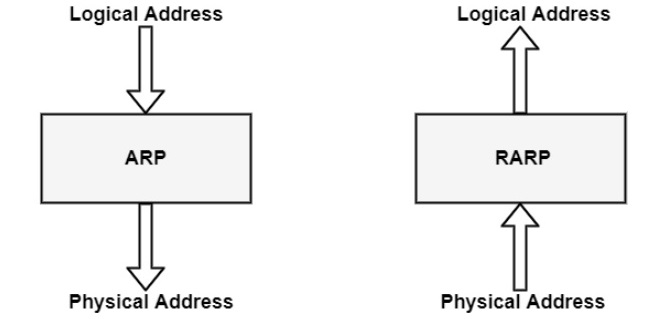
ARP relates an IP address with the physical address. On a typical physical network such as LAN, each device on a link is identified by a physical address, usually printed on the network interface card (NIC). A physical address can be changed easily when NIC on a particular machine fails.
ARP can find the physical address of the node when its internet address is known. ARP provides a dynamic mapping from an IP address to the corresponding hardware address.
When one host wants to communicate with another host on the network, it needs to resolve the IP address of each host to the host's hardware address.
This process is as follows −
- When a host tries to interact with another host, an ARP request is initiated. If the IP address is for the local network, the source host checks its ARP cache to find out the hardware address of the destination computer.
- If the correspondence hardware address is not found, ARP broadcasts the request to all the local hosts.
- All hosts receive the broadcast and check their own IP address. If no match is discovered, the request is ignored.
- The destination host that finds the matching IP address sends an ARP reply to the source host along with its hardware address, thus establishing the communication. The ARP cache is then updated with the hardware address of the destination host.
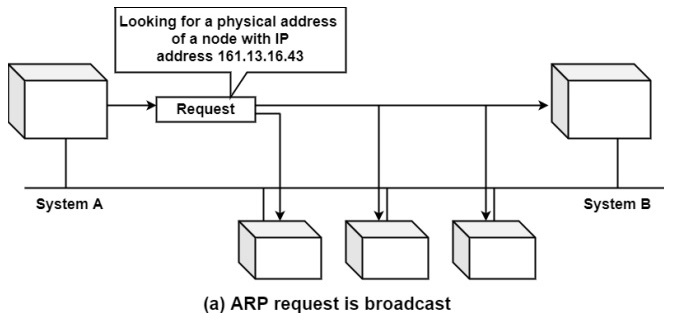
ARP Request
ARP requests are used to determine the MAC address of a device on a LAN. When a device wants to send a packet to another device, it broadcasts an ARP request packet containing the IP address of the destination device. The device with the matching IP address responds with its MAC address, and the sender can use this information to send the packet to the destination device.
Example − A device on a LAN wants to send a packet to another device with the IP address 192.168.1.100. It broadcasts an ARP request packet containing the IP address 192.168.1.100. The device with the IP address 192.168.1.100 responds with its MAC address, 00-11-22-33-44-55. The sender can now use this information to send the packet to the destination device.
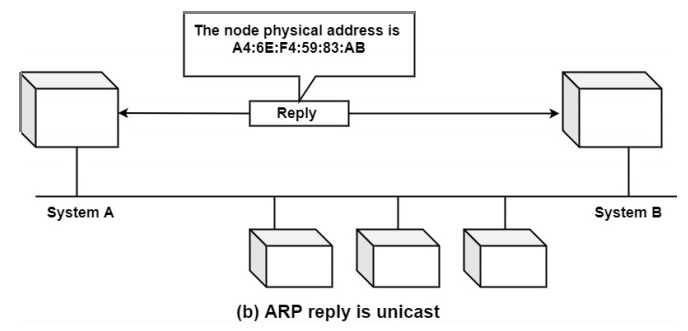
ARP Reply
ARP replies are used to respond to ARP requests. When a device receives an ARP request packet containing its IP address, it responds with its MAC address. This allows the sender to send packets to the destination device.
Example − A device on a LAN receives an ARP request packet containing the IP address 192.168.1.100. It responds with its MAC address, 00-11-22-33-44-55. The sender can now use this information to send packets to the destination device.
ARP Cache
ARP cache is used to store recently resolved IP-MAC address mappings. When a device sends an ARP request, it stores the mapping in its ARP cache. This allows the device to quickly send packets to the same destination device without having to send an ARP request again.
Example − A device on a LAN sends an ARP request to determine the MAC address of the device with IP address 192.168.1.100. It receives a response with the MAC address 00-11-22-33-44-55. The device stores this mapping in its ARP cache. When it wants to send a packet to the same device again, it can quickly retrieve the MAC address from its ARP cache instead of sending another ARP request.
ARP Packet Generation
If an application needs to send information to a specific IP destination address, the IP routing structure first determines the IP address of the next-hop of the packet (it should be the destination host itself or a router) and the hardware tool on which it should be transmitted.
If it is an IEEE 802.3/4/5 network, the ARP structure should be considered to design the <protocol type target protocol address> to a physical address.
The ARP module attempts to find the address in this ARP cache. If it is to find the connecting pair, it provides the equivalent 48-bit physical location back to the caller (the device driver), which then shares the packet. If it does not discover the pair in its table, it removes the packet (the assumption is that a higher-level protocol will resend) and creates a network broadcast of an ARP request.
The following diagram shows the format of an ARP packet −
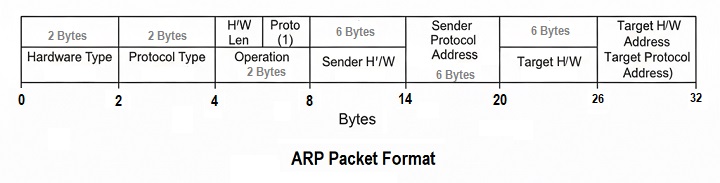
Let's now find out the role of each field in an ARP packet −
- Hardware Type − It is a 16-bit field that defines the type of network in which the ARP is running.
- Protocol Type − It is a 16-bit field that defines protocol using ARP.
- Hardware Length − It is an 8-bit field it defines the length of a physical address in bytes.
- Protocol Length − It is an 8-bit field that defines the length of IP address in bytes.
- Operation − It is a 16-bits field that defines the type of packet: (i)ARP Request and (ii) ARP Reply.
- Sender Hardware Address − It is a variable length that defines the physical address of the target.
- Target Hardware Address − It is a variable-length field that defines the logical address of the target.
Types of ARP
The following are the types of ARP:
Reserve Address Resolution Protocol (RARP)
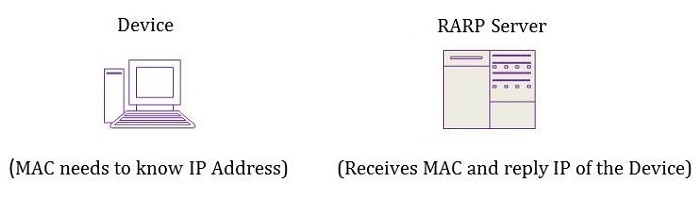
RARP protocol is used by a device that knows its MAC address but does not know its IP address in a local area network (LAN).
- A network administrator creates a table in a local area network (LAN) gateway router that maps the physical machine addresses to equivalent IP addresses.
- When a new machine is set up, then its RARP client requests the IP address from the gateway router.
- Assuming that an entry has been set up in the router table, the reserve ARP server will return the IP address to the machine which can store it for future use.
Getting an IP address from a MAC address can be handled by the reserved address resolution protocol (RARP) which works similar to ARP.
To obtain the IP address, the host first broadcasts a RARP request packet containing its MAC address on the network. All the hosts in the network will receive the packets but only the server responds to the host by sending a RARP response packet containing the host MAC and IP address.
Inverse Address Resolution Protocol (InARP)
Inverse ARP is the opposite of ARP. Instead of using a layer-3 IP address to find a layer-2 MAC address, Inverse ARP uses layer-2 MAC addresses to find a layer-3 IP address. Inverse ARP is mostly used by Frame relay and ATM Networks to map the DLCI to IP Address. So the router asks for the IP Address of the destination or other ends of PVC by listing DLCI for that router.
Proxy ARP
Proxy ARP is a technique using which a proxy server on a given network answers the ARP queries for an IP address that is not on that network.
- For example, suppose the host is connected to the router over the Ethernet and the host has the address 10.10.1.1/16 and the router has 10.10.10.0/24.
- The host wants to resolve the ARP for 10.10.1.110 and thinks that the router is in the same subnet, so it will be able to get the MAC-address.
- However, as routers, by design, limit broadcast domains, so it will not send the ARP reply back and it will reject the request.
- But if another router has any other interface connected to the 10.10.1.1/16 network and proxy ARP is enabled, then the router will send the ARP reply to the host by listing its own MAC address.It will act as a proxy for the destination network.
Gratuitous ARP
A gratuitous ARP is an unprompted address resolution protocol response. When a new device joins the local area network (LAN), it broadcasts its MAC address to the whole network immediately after its network interfaces boot up.
Gratuitous ARP packet has both source and destination IP set to the IP address of the device issuing the packet, and the destination MAC is the broadcast address ff:ff:ff:ff:ff:ff or 00:00:00:00:00:00 based on the address resolution protocol (ARP) implementation.
No continuation packets are sent in response to a gratuitous ARP packet.
ARP Commands
In this section, let's learn some ARP commands and their usage.
ARP Command: arp
The arp command is used to display or modify the ARP cache on a computer. We can use it to display the ARP cache, add entries to the cache, and delete entries from the cache.
For example, the following command will display the ARP cache −
C:>arp
To display the IP address, physical address, and type of the ARP entries in the cache. The type of entry can be either dynamic or static.
Dynamic entries are learned by the computer through ARP broadcasts and are typically used for devices that are connected to the same network. Static entries are manually added by the user and are typically used for devices that are not connected to the same network.
ARP Command: arp -a
The arp -a command is used to display the ARP cache, including both dynamic and static entries. This command is similar to the arp command without any options, but it also displays the status of the entries in the cache.
C:>arp -a
This command will display the IP address, physical address, type, and status of the ARP entries in the cache. The status of the entry can be either incomplete or complete. Incomplete entries are those that have not yet been resolved, while complete entries are those that have been resolved and are in the cache.
ARP Command: arp -g
The arp -g command is used to display the ARP cache, including only the dynamic entries. This command is similar to the arp -a command, but it only displays the dynamic entries in the cache.
C:>arp -g
This command will display the IP address, physical address, and type of the dynamic ARP entries in the cache.
ARP Command: arp -s
The arp -s command is used to add a static entry. This command is used to manually add an entry to the ARP cache for a device that is not connected to the same network.
For example, if you have a device with the IP address 192.168.1.100 that is not connected to your network, but you need to communicate with it, you can use the arp -s command to add a static entry to the ARP cache for that device.
C:>arp -s 192.168.1.100 00-11-22-33-44-55
Once the entry is added, you can use the arp command to confirm that the entry is in the cache −
C:>arp
This command will display the IP address, physical address, and type of the ARP entries in the cache, including the static entry for IP address 192.168.1.100.
ARP Command: arp -d
The arp -d command is used to delete an entry from the ARP cache. To remove an entry from the ARP cache that is no longer needed or is incorrect. For example, if you have an entry in the ARP cache for a device that is no longer connected to the network, you can use the arp -d command to delete that entry from the cache.
C:>arp -d 192.168.1.100
Once the entry is deleted, you can use the arp command to confirm that the entry is no longer in the cache:
C:>arp
This command will display the IP address, physical address, and type of the ARP entries in the cache, without the entry for IP address 192.168.1.100.
What is ARP Table?
The ARP table is a database that is maintained by a device on a network. It stores a list of IP addresses and their corresponding MAC addresses, which are used to identify devices on the network. The table is typically stored in the device's memory and is updated dynamically as devices are added or removed from the network.
When a device on a network needs to communicate with another device, it first checks its ARP table to see if it has the necessary information. If it does, it uses the stored MAC address to send the data packet directly to the other device. If the device does not have the necessary information in its ARP table, it sends out an ARP request, which is a broadcast message that asks all devices on the network if they have the requested IP address. The device with the requested IP address will then respond with its MAC address, which is added to the requesting device's ARP table.
The ARP table plays a critical role in network communication. Without it, devices would not be able to accurately determine the physical address of other devices, which would make it impossible for them to communicate with each other.
The ARP table also helps to improve the efficiency of network communication by allowing devices to quickly and directly send data packets to the correct destination without having to rely on a broadcast message.
ARP Poisoning
ARP poisoning is a type of attack in which an attacker sends false ARP replies to a device, causing it to update its ARP cache with incorrect information. This can be used to intercept traffic intended for another device, or even redirect traffic to the attacker's device.
Example − An attacker sends false ARP replies to a device on a LAN, claiming that the attacker's device has the IP address 192.168.1.100 and the MAC address 00-11-22-33-44-55. The device updates its ARP cache with this information and sends packets intended for the device with IP address 192.168.1.100 to the attacker's device. The attacker can then intercept or redirect these packets.
Preventing ARP Poisoning
To prevent ARP poisoning, there are several techniques that can be used −
- ARP Inspection − ARP inspection is a technique used to validate ARP requests and replies. It compares the ARP packets to a pre-configured list of allowed IP-MAC address mappings and discards any packets that do not match.
- Port Security − Port security is a technique used to limit the number of MAC addresses that can be learned on a switch port. This can prevent an attacker from flooding the switch with false ARP replies.
- ARP Spoofing Detection − ARP spoofing detection is a technique used to detect and alert on ARP spoofing attempts. This can be done by monitoring the ARP cache for changes, or by using a protocol analyzer to capture and analyze ARP packets.
- Virtual Private LAN Service (VPLS) − VPLS is a technique used to segment a LAN into multiple virtual LANs. This can prevent an attacker from broadcasting false ARP replies to the entire LAN.
Conclusion
Address Resolution Protocol (ARP) plays an important role in device communication on local networks. ARP helps in connecting the IP addresses to MAC addresses for data transfer. ARP requests, responses, packet formats and frames all work as a group to make communication fast and simple. ARP poisoning shows that attackers can misuse this protocol which is why methods like ARP inspection and port security are important. If we take an overall look ARP helps us in everyday network communications.
