
- Data Comm & Networks Home
- DCN - Overview
- DCN - What is Computer Network
- DCN - Uses of Computer Network
- DCN - Computer Network Types
- DCN - Network LAN Technologies
- DCN - Computer Network Models
- DCN - Computer Network Security
- DCN - Components
- DCN - Connectors
- DCN - Switches
- DCN - Repeaters
- DCN - Gateways
- DCN - Bridges
- DCN - Socket
- DCN - Network Interface Card
- DCN - NIC: Pros and Cons
- DCN - Network Hardware
- DCN - Network Port
- Computer Network Topologies
- DCN - Computer Network Topologies
- DCN - Point-to-point Topology
- DCN - Bus Topology
- DCN - Star Topology
- DCN - Ring Topology
- DCN - Mesh Topology
- DCN - Tree Topology
- DCN - Hybrid Topology
- Physical Layer
- DCN - Physical Layer Introduction
- DCN - Digital Transmission
- DCN - Analog Transmission
- DCN - Transmission media
- DCN - Wireless Transmission
- DCN - Transmission Impairments
- DCN - Multiplexing
- DCN - Network Switching
- DCN - Circuit Switching
- DCN - Packet Switching
- DCN - Message Switching
- Data Link Layer
- DCN - Data Link Layer Introduction
- DCN - Data Link Control & Protocols
- DCN - RMON
- DCN - Token Ring Network
- DCN - Hamming Code
- DCN - Byte Stuffing
- DCN - Channel Allocation
- DCN - MAC Address
- DCN - Address Resolution Protocol
- DCN - Cyclic Redundancy Checks
- DCN - Error Control
- DCN - Flow Control
- DCN - Framing
- DCN - Error Detection & Correction
- DCN - Error Correcting Codes
- DCN - Parity Bits
- Network Layer
- DCN - Network Layer Introduction
- DCN - Network Addressing
- DCN - Routing
- DCN - Routing Table
- DCN - Internetworking
- DCN - Network Layer Protocols
- DCN - Routing Information Protocol
- DCN - Border Gateway Protocol
- DCN - OSPF Protocol
- DCN - Network Address Translation
- DCN - Network Address Translation Types
- Transport Layer
- DCN - Transport Layer Introduction
- DCN - Transmission Control Protocol
- DCN - User Datagram Protocol
- DCN - Congestion Control
- DCN - Open Loop Congestion Control
- DCN - Closed Loop Congestion Control
- DCN - Congestion Control Algorithms
- DCN - Token Bucket Algorithm
- DCN - TCP Tahoe Algorithm
- DCN - TCP Reno Algorithm
- DCN - TCP New Reno Algorithm
- DCN - TCP BIC Algorithm
- DCN - TCP CUBIC Algorithm
- DCN - TCP Service Model
- DCN - TLS Handshake
- DCN - TCP Vs. UDP
- Application Layer
- DCN - Session Layer
- DCN - Presentation Layer
- DCN - Application Layer Introduction
- DCN - Client-Server Model
- DCN - Application Protocols
- DCN - Network Services
- DCN - Virtual Private Network
- DCN - Load Shedding
- DCN - Optimality Principle
- DCN - Service Primitives
- DCN - Services of Network Security
- DCN - Hypertext Transfer Protocol
- DCN - File Transfer Protocol
- DCN - Secure Socket Layer
- Network Protocols
- DCN - ALOHA Protocol
- DCN - Pure ALOHA Protocol
- DCN - Sliding Window Protocol
- DCN - Stop and Wait Protocol
- DCN - Link State Routing
- DCN - Link State Routing Protocol
- Network Algorithms
- DCN - Shortest Path Algorithm
- DCN - Routing Algorithm
- DCN - Adaptive Routing Algorithms
- DCN - Non-Adaptive Routing Algorithms
- DCN - Leaky Bucket Algorithm
- Wireless Networks
- DCN - Wireless Networks
- DCN - Wireless LANs
- DCN - Wireless LAN & IEEE 802.11
- DCN - IEEE 802.11 Wireless LAN Standards
- DCN - IEEE 802.11 Networks
- Multiplexing
- DCN - Multiplexing & Its Types
- DCN - Time Division Multiplexing
- DCN - Synchronous TDM
- DCN - Asynchronous TDM
- DCN - Synchronous Vs. Asynchronous TDM
- DCN - Frequency Division Multiplexing
- DCN - TDM Vs. FDM
- DCN - Code Division Multiplexing
- DCN - Wavelength Division Multiplexing
- Miscellaneous
- DCN - Shortest Path Routing
- DCN - B-ISDN Reference Model
- DCN - Design Issues For Layers
- DCN - Selective-repeat ARQ
- DCN - Flooding
- DCN - E-Mail Format
- DCN - Cryptography
- DCN - Unicast, Broadcast, & Multicast
- DCN - Network Virtualization
- DCN - Flow Vs. Congestion Control
- DCN - Asynchronous Transfer Mode
- DCN - ATM Networks
- DCN - Synchronous Vs. Asynchronous Transmission
- DCN - Network Attacks
- DCN - WiMax
- DCN - Buffering
- DCN - Authentication
- DCN Useful Resources
- DCN - Quick Guide
- DCN - Useful Resources
- DCN - Discussion
Routing Tables in Computer Networks
A router (a network layer hardware) is used in a computer network to forward data packets from one network to another. Routers use routing tables, a data structure, to forward the data packets from the source network to the destination network efficiently. A routing table acts like a GPS for network traffic. A router uses its routing table to get the best path to send data packets to their destination.
Read this chapter to get good understanding of routing tables, its purpose, components, types of routing and their difference, working of routing table, and route selection in a routing table.
What is a Routing Table?
A routing table is a data structure stored inside a router that has information about various networking paths to different destinations. A router uses a routing table to find the path to move a packet from source network to destination network efficiently.
Every router has its own routing table. When a packet arrives at a router, router first checks the destination IP address and then check for the best path in its routing table to forward the packet. A routing table informs a router about where a packet should be forwarded next and about the best path to reach its destination.
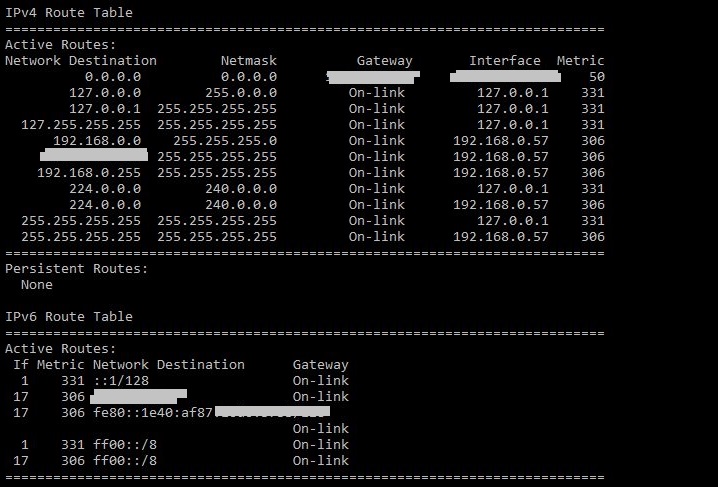
A routing table looks like the one shown below −
Roles of Routing Table
The most imporant roles of a routing table are listed below −
- To choose the best path for forwarding packets.
- To improve the network performance.
- To make fast packet delivery by minimizing latency.
- It prevents packet wandering by reducing any unnecessary hops.
- It adapts to any network changes in dynamic routing.
Components of Routing Table
A router table consists of the following columns −
- Destination Network − It represents the address of the target network/subnet. For example: 192.168.10.0/24.
- Subnet Mask/Prefix − It is used to identify the network portion and host portion.
- Next Hop − It is the IP address of the next router along the path of destination. Suppose you are at a station A(current position), and to reach station C(destination), you travel via station B(next hop).
- Interface − It is the physical or logical network interface through which a packet should go to reach next hop or destination.
- Metric Cost − It represents the cost to find which path is the best. It can be based on hop count, bandwidth, delay or reliability. Lower the metric cost, better is the chosen path.
- Route Source − It represents how the route was updated. It can be updated by static or dynamic routes, by routing protocols like RIP, OSPF, etc.
Types of Routing Table Entries
You can make routing table entries using three different approaches −
- Directly connected routes − Routes are automatically created when a network interface is configured with an IP address. These networks are directly attached to the router's interface.
- Static routes − Static routes are also known as non-adaptive routes because they are manually configured by network administrators. Static routes are useful in small networks that cannot adapt automatically to network changes. Static routes remain in routing table until removed manually.
- Dynamic routes − It is also known as adaptive routing, as it uses routing protocols like RIP (Routing Information Protocol), EIGRP (Enhanced Interior Gateway Routing Protocol), OSPF (Open Shortest Path First), and BGP (Border Gateway Protocol) to automatically update the routing table. Routers use these protocols for communicating with each other and share information about network topology.
Static Routing vs Dynamic Routing
The main difference between static and dynamic routing is in the way they are updated. Here are the key differences between these two types of routing −
| Static Routing | Dynamic Routing |
|---|---|
| Routing table is manually updated by network administrator. | Routing table is automatically updated using protocols. |
| It is suitable for small networks. | It is suitable for large and complex networks. |
| It is less resource intensive. | It is more resource intensive. |
| It does not adapt to network changes automatically as it is manually updated. | It adapts to network changes automatically. |
| It is more secure since routes are manually updated. | It is less secure because routers share routes among themselves. |
How Does a Routing Table Work?
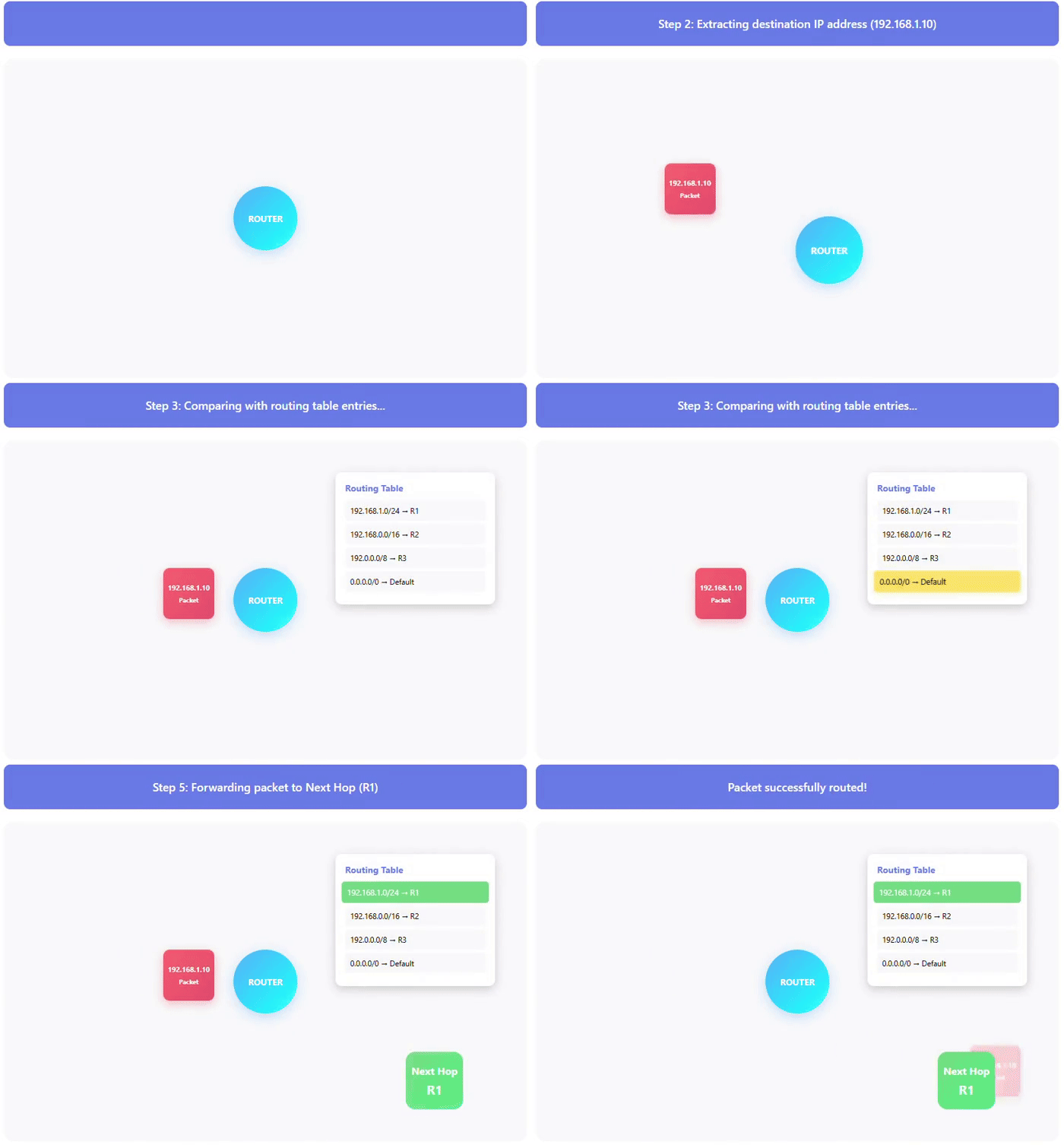
Below are the steps in which a routing table works −
- First, a router receives a packet.
- Then the router extracts the destination IP address from the packet.
- Then it compares the destination IP address with entries of its routing table.
- It selects the matching route with the longest subnet mask using longest prefix match.
- Then it forwards the packet to the next hop.
- If no match is found, packet is sent to default route.
Here is an animation of the above steps of how routing table works −
Commands to View Routing Table
You can use the following commands to view the routing table in your device −
| Device | Commands |
|---|---|
| Windows | route print or netstat -r |
| Linux | route -n or ip route show |
| MacOS | netstat -nr or route -n get <IP> |
| Cisco Router | show ip route |
Route Selection in Routing
You can use various metrics to decide which path to take when you have multiple path options. A metric represents cost of using a particular route/path. Different routing protocols uses different metrics that are mentioned below:
- Hop Count − It represents the number of routers a packet must pass through. It is used by Routing Information Protocol(RIP). A lower hop count represents better route.
- Bandwidth − It means maximum capacity of data transmission of a network link. It is used by OSPF and EIGRP. A higher bandwidth represents better route.
- Delay − It represents the time taken to travel the path by a packet. It is used by EIGRP. A lower delay represents better route.
- Load − It represents the traffic of path. It is used by EIGRP. A lower load represents better route.
- Reliability − It represents the rate of error on the path. It is used by EIGRP. A higher reliability represents better route.
Conclusion
To conclude, routers use their routing table for forwarding packets efficiently. Routing table helps in selecting the best path based on destination and routing information.
