
- Data Comm & Networks Home
- DCN - Overview
- DCN - What is Computer Network
- DCN - Uses of Computer Network
- DCN - Computer Network Types
- DCN - Network LAN Technologies
- DCN - Computer Network Models
- DCN - Computer Network Security
- DCN - Components
- DCN - Connectors
- DCN - Switches
- DCN - Repeaters
- DCN - Gateways
- DCN - Bridges
- DCN - Socket
- DCN - Network Interface Card
- DCN - NIC: Pros and Cons
- DCN - Network Hardware
- DCN - Network Port
- Computer Network Topologies
- DCN - Computer Network Topologies
- DCN - Point-to-point Topology
- DCN - Bus Topology
- DCN - Star Topology
- DCN - Ring Topology
- DCN - Mesh Topology
- DCN - Tree Topology
- DCN - Hybrid Topology
- Physical Layer
- DCN - Physical Layer Introduction
- DCN - Digital Transmission
- DCN - Analog Transmission
- DCN - Transmission media
- DCN - Wireless Transmission
- DCN - Transmission Impairments
- DCN - Multiplexing
- DCN - Network Switching
- DCN - Circuit Switching
- DCN - Packet Switching
- DCN - Message Switching
- Data Link Layer
- DCN - Data Link Layer Introduction
- DCN - Data Link Control & Protocols
- DCN - RMON
- DCN - Token Ring Network
- DCN - Hamming Code
- DCN - Byte Stuffing
- DCN - Channel Allocation
- DCN - MAC Address
- DCN - Address Resolution Protocol
- DCN - Cyclic Redundancy Checks
- DCN - Error Control
- DCN - Flow Control
- DCN - Framing
- DCN - Error Detection & Correction
- DCN - Error Correcting Codes
- DCN - Parity Bits
- Network Layer
- DCN - Network Layer Introduction
- DCN - Network Addressing
- DCN - Routing
- DCN - Routing Table
- DCN - Internetworking
- DCN - Network Layer Protocols
- DCN - Routing Information Protocol
- DCN - Border Gateway Protocol
- DCN - OSPF Protocol
- DCN - Network Address Translation
- DCN - Network Address Translation Types
- Transport Layer
- DCN - Transport Layer Introduction
- DCN - Transmission Control Protocol
- DCN - User Datagram Protocol
- DCN - Congestion Control
- DCN - Open Loop Congestion Control
- DCN - Closed Loop Congestion Control
- DCN - Congestion Control Algorithms
- DCN - Token Bucket Algorithm
- DCN - TCP Tahoe Algorithm
- DCN - TCP Reno Algorithm
- DCN - TCP New Reno Algorithm
- DCN - TCP BIC Algorithm
- DCN - TCP CUBIC Algorithm
- DCN - TCP Service Model
- DCN - TLS Handshake
- DCN - TCP Vs. UDP
- Application Layer
- DCN - Session Layer
- DCN - Presentation Layer
- DCN - Application Layer Introduction
- DCN - Client-Server Model
- DCN - Application Protocols
- DCN - Network Services
- DCN - Virtual Private Network
- DCN - Load Shedding
- DCN - Optimality Principle
- DCN - Service Primitives
- DCN - Services of Network Security
- DCN - Hypertext Transfer Protocol
- DCN - File Transfer Protocol
- DCN - Secure Socket Layer
- Network Protocols
- DCN - ALOHA Protocol
- DCN - Pure ALOHA Protocol
- DCN - Sliding Window Protocol
- DCN - Stop and Wait Protocol
- DCN - Link State Routing
- DCN - Link State Routing Protocol
- Network Algorithms
- DCN - Shortest Path Algorithm
- DCN - Routing Algorithm
- DCN - Adaptive Routing Algorithms
- DCN - Non-Adaptive Routing Algorithms
- DCN - Leaky Bucket Algorithm
- Wireless Networks
- DCN - Wireless Networks
- DCN - Wireless LANs
- DCN - Wireless LAN & IEEE 802.11
- DCN - IEEE 802.11 Wireless LAN Standards
- DCN - IEEE 802.11 Networks
- Multiplexing
- DCN - Multiplexing & Its Types
- DCN - Time Division Multiplexing
- DCN - Synchronous TDM
- DCN - Asynchronous TDM
- DCN - Synchronous Vs. Asynchronous TDM
- DCN - Frequency Division Multiplexing
- DCN - TDM Vs. FDM
- DCN - Code Division Multiplexing
- DCN - Wavelength Division Multiplexing
- Miscellaneous
- DCN - Shortest Path Routing
- DCN - B-ISDN Reference Model
- DCN - Design Issues For Layers
- DCN - Selective-repeat ARQ
- DCN - Flooding
- DCN - E-Mail Format
- DCN - Cryptography
- DCN - Unicast, Broadcast, & Multicast
- DCN - Network Virtualization
- DCN - Flow Vs. Congestion Control
- DCN - Asynchronous Transfer Mode
- DCN - ATM Networks
- DCN - Synchronous Vs. Asynchronous Transmission
- DCN - Network Attacks
- DCN - WiMax
- DCN - Buffering
- DCN - Authentication
- DCN Useful Resources
- DCN - Quick Guide
- DCN - Useful Resources
- DCN - Discussion
Network Switching in Computer Networks
Switching is the process of forwarding packets coming in from one port to a port leading towards the destination. When data comes on a port, it is called ingress; and when it leaves a port or goes out, it is called egress. A communication system may include a number of switches and nodes.
At a broad level, switching can be divided into two major categories −
- Connection Oriented − Before the data could be forwarded to its destination, a path has to be established between both the endpoints. Data is then forwarded on that circuit. After the transfer is completed, circuits can be kept for future use or can be turned down immediately.
- Connectionless − The data is forwarded on behalf of forwarding tables. No previous handshaking is required and acknowledgements are optional.
In today's world of Internet, mobile networks, cloud services, and data centers, network switching plays a very important role. Every message, email, video call, or website request depends on network switching in some way or the other.
What is Network Switching?
When a client connects to another computer network which is outside their current position, the messages do not directly jump from one system to another. The data travels through different transmission media like cables, fibre optics, wireless signals, etc. This complete method of moving the data from one computer network to another network is called network switching.
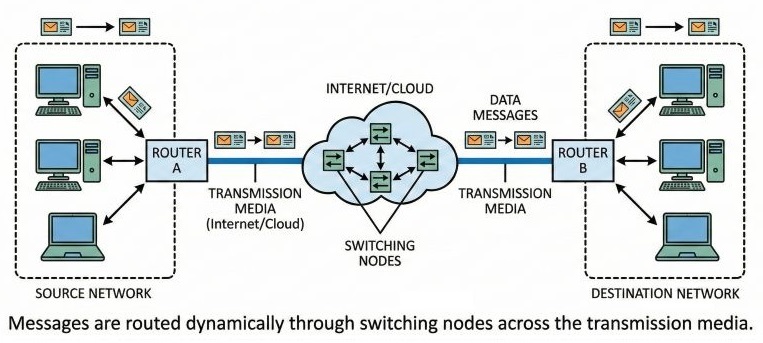
Without switching, computers will not be able to communicate properly, especially when the number of devices becomes very large. Switching helps the network decide which path the data should take so that it reaches the correct destination.
Switches in Computer Networks
A switch can be considered as an advanced form of a hub. Earlier, hubs were used to connect devices, but hubs send data to all connected devices, which creates unnecessary traffic. A switch is smarter.
Switches provide dedicated bandwidth to each node in the network. This means traffic passing through one node does not affect the traffic of another node. Because of this, network performance improves a lot.
A switch is a combination of hardware and software. It has enough intelligence to decide where data should go. Using software controls, a switch can turn on or turn off specific ports, control traffic flow, and manage data efficiently.
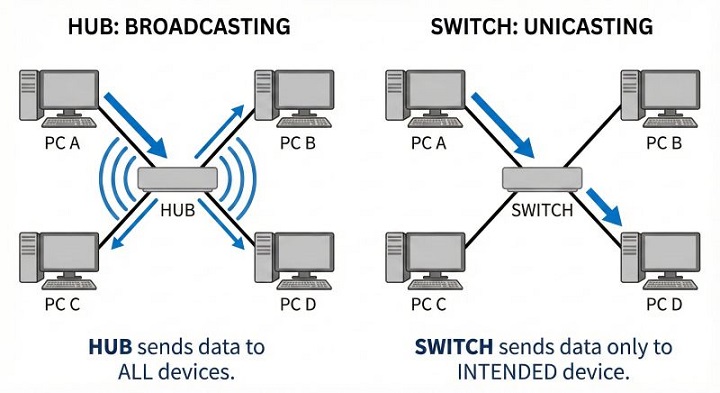
Due to these features, switches are widely used in LANs, data centers, and enterprise networks.
Need for Switching Techniques
When we try to connect multiple devices together, a major problem comes up: how should these devices be connected? One solution is to connect every device with every other device using point-to-point connections, like in a mesh topology. But this method becomes very difficult when the network grows because: (a) it requires too many physical links, (b) cost increases very fast, and (c) maintenance becomes complex.
Another approach is to use a single shared line like in bus topology. But this solution too becomes wasteful for large networks. As the number of devices increases and distance grows, performance drops and collisions increase.
It is due to these problems that switching techniques are used. Switching allows multiple devices to share network resources in an organised and efficient way without direct connections between every device.
Types of Switching Techniques
There are mainly three switching techniques used in computer networks −
- Circuit Switching
- Message Switching
- Packet Switching
Each technique works in a different manner and is suitable for different types of communication.
Circuit Switching
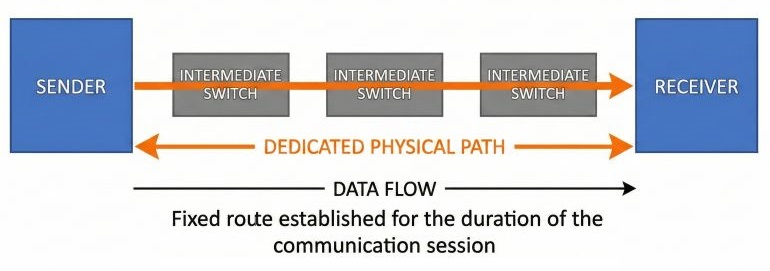
Circuit switching creates a direct physical connection between two devices before any data is transmitted. This connection remains active for the entire duration of communication.
Once the circuit is established, data flows continuously without any interruption. This method is mostly used in traditional telephone networks. A circuit switching device can be seen as a system with "n" input lines and "m" output lines that creates a fixed path between the sender and the receiver.
The main limitation is that even if no data is being transmitted, the dedicated path remains reserved and cannot be used by others. This leads to wastage of resources.
Message Switching
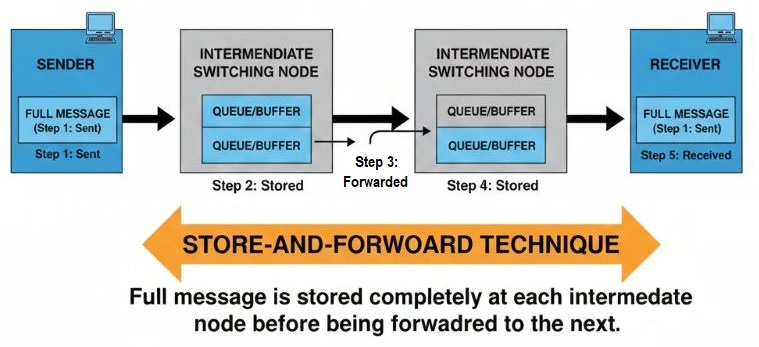
In message switching, there is no fixed physical path between the sender and the receiver. When the sender has data to transmit, the entire message is sent to the first switching office, usually a router. The message is stored completely, checked for errors, and then forwarded to the next switching node.
This process continues until the message reaches the destination. Because the message is stored at each node before forwarding, this method is known as store and forward.
If the outgoing link is busy, the message is kept in a queue and sent later. This reduces data loss but increases delay, making message switching unsuitable for real-time applications.
Packet Switching
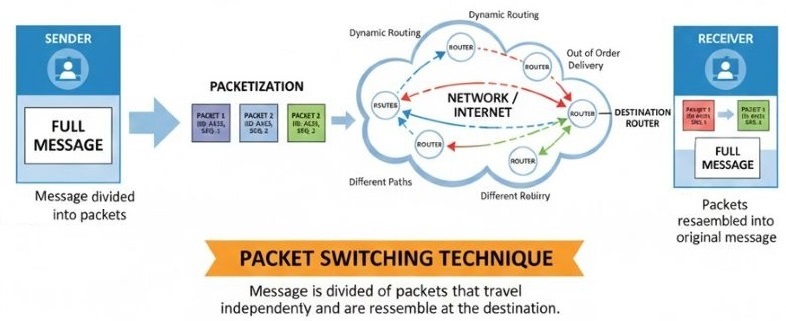
Packet switching divides the data into small units called packets. Each packet contains: a source address, a destination address, and control information.
Packets are transmitted independently and may follow different paths to reach the destination. At the destination, packets are reassembled to form the original message. This technique is highly efficient and flexible. It is widely used in modern networks such as the Internet.
Advantages of Switching
Switching offers the following benefits −
- A switch increases the bandwidth of the network
- It reduces the workload on individual computers
- It improves overall network performance
- It reduces frame collisions by creating separate collision domains
Because of these advantages, switches are preferred over hubs in modern networks.
Disadvantages of Switching
Even though switching is very useful, it also has some limitations −
- A switch is more costly than a network bridge
- It cannot always resolve network connectivity problems quickly
- Proper design is needed to handle multicast traffic
Conclusion
Network switching is the backbone of modern communication systems. It allows data to move smoothly from one network to another without confusion or overload.
Switches and switching techniques help manage traffic, improve speed, and make networks scalable. Each switching technique has its own role, and together they make large networks function properly. Without switching, computer networks would be slow, inefficient, and difficult to manage.
