- Spring Data Tutorial - Home
- Spring Data Apache Solr
- Overview
- Prerequisites
- Introduction
- What is Apache Solr?
- Getting Started
- Querying
- Features
- Conclusion
- Spring Data Cassandra
- Overview
- Prerequisites
- Introduction
- What is Cassandra?
- Getting Started
- Annotation AllowFiltering with Query Methods
- Partition and Clustering
- Coding hands-on on Partitioning and Clustering
- Features
- Conclusion
- Spring Data Couchbase
- Overview
- Prerequisites
- Introduction
- What is Couchbase?
- Getting Started
- Views
- CouchbaseTemplate
- Hands-on using CouchbaseTemplate
- Features
- Conclusion
- Spring Data Elasticsearch
- Overview
- Prerequisites
- Introduction
- What is ElasticSearch?
- Getting Started
- Querying
- Configuring ElasticsearchOperations bean
- Features
- Conclusion
- Spring Data JDBC
- Introduction
- Need of Spring Data JDBC
- Features
- Domain-Driven Design
- Prerequisites
- Getting Started
- Conclusion
- Spring Data JPA
- Background
- Introduction
- Prerequisites
- Getting Started
- Features
- Conclusion
- Spring Data MongoDB
- Overview
- Prerequisites
- Introduction
- What is MongoDB?
- Getting Started
- Query Methods
- Annotations
- Exposing REST end points
- Relationship
- Conclusion
- Spring Data Redis
- Overview
- Prerequisites
- Introduction
- What is Redis?
- Redis Java Clients
- Getting Started
- Features
- Conclusion
- Spring Data REST
- Background
- Introduction to Spring Data REST
- Prerequisites
- Getting Started
- Features
- Conclusion
- Spring Data Tutorial Useful Resources
- Spring Data Tutorial - Quick Guide
- Spring Data Tutorial - Useful Resources
- Spring Data Tutorial - Discussion
Spring Data Redis - Getting Started
We can create a Spring project in our favourite IDE. You can create a Spring or Spring Boot based project through IDE. The code sample and examples used in this tutorial has been created through Spring Initializr. If you have created normal Maven or Gradle projects then add below dependencies (i.e. Spring Web Starter and Spring Data Redis (Access + Driver) to your
For Maven
<dependency>
   <groupId>org.springframework.boot</groupId>
   <artifactId>spring-boot-starter-web</artifactId>
</dependency>
<dependency>
   <groupId>org.springframework.boot</groupId>
   <artifactId>spring-boot-starter-data-redis</artifactId>
</dependency>
Above are two Spring Web and Spring Data Redis dependences. If you have created your project as Spring Boot or Starting with Spring Initializr then your final list of dependencies wil look like this −
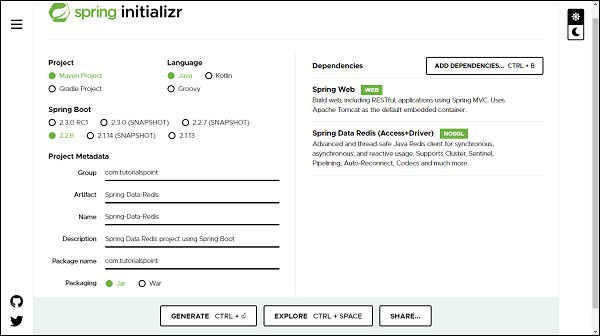
Apart from this, we need to add two more dependencies that is Jedis client and commonspool2 from apache, lets add these two to our POM.
<dependency>
   <groupId>redis.clients</groupId>
   <artifactId>jedis</artifactId>
</dependency>
<dependency>
   <groupId>org.apache.commons</groupId>
   <artifactId>commons-pool2</artifactId>
   <version>2.8.0</version>
</dependency>
The following is our final pom.xml file that is created when you choose Maven −
<?xml version="1.0" encoding="UTF-8"?>
<project xmlns="http://maven.apache.org/POM/4.0.0"
xmlns:xsi="http://www.w3.org/2001/XMLSchema-instance"
xsi:schemaLocation="http://maven.apache.org/POM/4.0.0 https://maven.apa
che.org/xsd/maven-4.0.0.xsd">
   <modelVersion>4.0.0</modelVersion>
   <parent>
      <groupId>org.springframework.boot</groupId>
      <artifactId>spring-boot-starter-parent</artifactId>
      <version>2.2.6.RELEASE</version>
      <relativePath /> <!-- lookup parent from repository -->
   </parent>
   <groupId>com.tutorialspoint</groupId>
   <artifactId>Spring-Data-Redis</artifactId>
   <version>0.0.1-SNAPSHOT</version>
   <name>Spring-Data-Redis</name>
   <description>Spring Data Redis project using Spring Boot</description>
   <properties>
      <java.version>1.8</java.version>
   </properties>
   <dependencies>
      <dependency>
         <groupId>org.springframework.boot</groupId>
         <artifactId>spring-boot-starter-data-redis</artifactId>
      </dependency>
      <dependency>
         <groupId>redis.clients</groupId>
         <artifactId>jedis</artifactId>
      </dependency>
      <dependency>
         <groupId>org.apache.commons</groupId>
         <artifactId>commons-pool2</artifactId>
         <version>2.8.0</version>
      </dependency>
      <dependency>
         <groupId>org.springframework.boot</groupId>
         <artifactId>spring-boot-starter-web</artifactId>
      </dependency>
      <dependency>
         <groupId>org.springframework.boot</groupId>
         <artifactId>spring-boot-starter-test</artifactId>
         <scope>test</scope>
         <exclusions>
            <exclusion>
               <groupId>org.junit.vintage</groupId>
               <artifactId>junit-vintage-engine</artifactId>
            </exclusion>
         </exclusions>
      </dependency>
   </dependencies>
   <build>
      <plugins>
         <plugin>
            <groupId>org.springframework.boot</groupId>
            <artifactId>spring-boot-maven-plugin</artifactId>
         </plugin>
      </plugins>
   </build>
</project>
For Gradle
plugins {
   id 'org.springframework.boot' version '2.2.6.RELEASE'
   id 'io.spring.dependency-management' version '1.0.9.RELEASE'
   id 'java'
}
group = 'com.example'
version = '0.0.1-SNAPSHOT'
sourceCompatibility = '1.8'
repositories {
   mavenCentral()
}
dependencies {
   implementation 'org.springframework.boot:spring-boot-starter-data-redis
   '
   implementation 'org.springframework.boot:spring-boot-starter-web'
   testImplementation('org.springframework.boot:spring-boot-starter-test')
   {
      exclude group: 'org.junit.vintage', module: 'junit-vintage-engine'
   }
}
test {
   useJUnitPlatform()
}
Add the external dependency for Jedis and common−poole2 to the above file.
//https://mvnrepository.com/artifact/redis.clients/jedis
compile group: redis.clients, name: jedis, version: 2.8.0
//https://mvnrepository.com/artifact/org.apache.commons/commons-pool2
compile group: org.apache.commons, name: commons-pool2, version: 2.8.0
The Redis Configuration
To set up a connection between Redis server and application, we will use Redis Client i.e. Jedis. We will be using JedisConnectionFactory class from Jedis, to get Redis connections, bypassing Redis server details like host, port, etc.
RedisTemplate
RedisTemplate is a class from Spring Data Redis. Through RedisTemplate we achieve an abstractions level which helps us in performing various Redis operations such as serialization and exception translation. It provides a set of methods to communicate with a Redis instance. In short RedisTemplate is the central class to interact with the Redis data to perform various Redis operations, through the following methods.
RedisTemplate Operations
Based on the data type we are using, we can use the right from Redis templates. Some of the popular operations are −
For Value related Operation it uses opsForValue() method which returns Redis string/value operations.
For Hash related Operation it uses the opsForHash() method which returns Redis hash operations.
For List related Operation it uses the opsForList() method which returns Redis List operations.
For Set related Operation it uses opsForSet() method which returns Redis Set operations.
For ZSet related Operation it uses the opsForZSet() method which returns Redis sorted set operations.
RedisTemplate class takes two−parameter (i.e. the type of Redis key and the type of Redis value) on instantiation.
Serializers
Once we started storing data in Redis, we will notice that Redis stores the data in bytes. But to do further processing we may need to convert these bytes into various other data types such as String, JSON, XML, objects, etc. We can do this conversion with the help of Serializers. Thus a serializer converts a byte data into other types and vice versa. There are 5 main types of serializers.
GenericToStringSerializer: It serializes String to bytes and vice versa
JacksonJsonRedisSerializer: It converts object to JSON and vice versa
JdkSerializationRedisSerializer: It uses the Java−based serialization methods
OxmSerializer: It uses the Object/XML mapping.
StringRedisSerializer: It also converts the String into Bytes and vice versa but using the specified charset. by default it uses UTF−8 charset.
Redis Java Configuration
Lets define a config class to configure Spring Data Redis.
import org.springframework.context.annotation.Bean;
import org.springframework.context.annotation.Configuration;
import org.springframework.data.redis.connection.jedis.JedisConnectionFacto
ry;
import org.springframework.data.redis.core.RedisTemplate;
@Configuration
public class RedisConfig {
   // Define a connection factory
   @Bean
   JedisConnectionFactory jedisConnectionFactory() {
      return new JedisConnectionFactory();
   }
   // Define a RedisTemplate using JedisConnection Factory
   @Bean
   public RedisTemplate<String, Object> redisTemplate() {
      RedisTemplate<String, Object> template = new RedisTemplate<>();
      template.setConnectionFactory(jedisConnectionFactory());
      return template;
   }
}
In the above config class, first we created JedisConnectionFactory using Jedis Client, and then we created RedisTemplate using JedisConnectionFactory. This RedisTemplate will now be used for querying the data from repository.
Custom Connection Properties
If we observe the above config class, we can find that Redis server details are missing. Lets add Redis server details to the JedisConnection factory.
@Bean
JedisConnectionFactory jedisConnectionFactory() {
   RedisStandaloneConfiguration redisStandaloneConfiguration = new Red
   isStandaloneConfiguration("localhost", 6379);
   return new JedisConnectionFactory(redisStandaloneConfiguration);
}
We can also keep the server host and port information in the application.properties and use them here as follows −
@Autowired
private Environment env;
@Bean
JedisConnectionFactory jedisConnectionFactory() {
   RedisStandaloneConfiguration redisStandaloneConfiguration = new Red
   isStandaloneConfiguration(
   env.getProperty("spring.redis.host", "127.0.0.1"),
   Integer.parseInt(env.getProperty("spring.redis.port", "6379
   ")));
   return new JedisConnectionFactory(redisStandaloneConfiguration);
}
and our application.properties file will contain below two properties.
spring.redis.host=127.0.0.1
spring.redis.port=6379
We can also specify some other properties such as password, total pool connection or idle pool connection if applicable. So far, we are done with the configuration setup. Make sure that Redis is installed and it is running on your machine before launching the application.
Creating Entity
It will be a normal Java class (POJO) −
import java.io.Serializable;
public class Customer implements Serializable {
   private Long id;
   private String name;
   private String email;
   private Double salary;
   public Long getId() {
      return id;
   }
   public void setId(Long id) {
      this.id = id;
   }
   public String getName() {
      return name;
   }
   public void setName(String name) {
      this.name = name;
   }
   public String getEmail() {
      return email;
   }
   public void setEmail(String email) {
      this.email = email;
   }
   public Double getSalary() {
      return salary;
   }
   public void setSalary(Double salary) {
      this.salary = salary;
   }
   @Override
   public String toString() {
      return "Customer [id=" + id + ", name=" + name + ", email=" + email
      + ", salary=" + salary + "]";
   }
   @Override
   public int hashCode() {
      final int prime = 31;
      int result = 1;
      result = prime * result + ((email == null) ? 0 : email.hashCode());
      result = prime * result + ((id == null) ? 0 : id.hashCode());
      result = prime * result + ((name == null) ? 0 : name.hashCode());
      result = prime * result + ((salary == null) ? 0 : salary.hashCode()
      );
      return result;
   }
   @Override
   public boolean equals(Object obj) {
      if (this == obj)
      return true;
      if (obj == null)
      return false;
      if (getClass() != obj.getClass())
      return false;
      Customer other = (Customer) obj;
      if (email == null) {
         if (other.email != null)
         return false;
      } else if (!email.equals(other.email))
      return false;
      if (id == null) {
         if (other.id != null)
         return false;
      } else if (!id.equals(other.id))
      return false;
      if (name == null) {
         if (other.name != null)
         return false;
      } else if (!name.equals(other.name))
      return false;
      if (salary == null) {
         if (other.salary != null)
         return false;
      } else if (!salary.equals(other.salary))
      return false;
      return true;
   }
}
Creating Repository
It will be an interface.
import java.util.List;
import java.util.Map;
import java.util.Set;
import com.tutorialspoint.jedis.entity.Customer;
public interface CustomerRepository {
   // Working with Strings
   void setCustomerAsString(String key, String value);
   Object getCustomerAsString(String key);
   void deleteByKey(String id);
   // Working with List
   void persistCustomerList(Customer customer);
   List<Object> fetchAllCustomer();
   // Working with Set
   void persistCustomerSet(Customer customer);
   Set<Object> fetchAllCustomerFromSet();
   boolean isSetMember(Customer customer);
   // Working with Hash
   void persistCustomeHash(Customer customer);
   void updateCustomerHash(Customer customer);
   Map<Object, Object> findAllCustomerHash();
   Object findCustomerInHash(Long id);
   void deleteCustomerHash(Long id);
}
Lets write an implementation of this interface.
import java.util.List;
import java.util.Map;
import java.util.Set;
import java.util.concurrent.TimeUnit;
import org.springframework.beans.factory.annotation.Autowired;
import org.springframework.data.redis.core.RedisTemplate;
import org.springframework.stereotype.Repository;
import com.tutorialspoint.jedis.entity.Customer;
import com.tutorialspoint.jedis.repository.CustomerRepository;
@Repository
public class CustomerRepositoryImpl implements CustomerRepository {
   private final String CUSTOMER_LIST_KEY = "customer_list";
   private final String CUSTOMER_SET_KEY = "customer_set";
   private final String CUSTOMER_HASH_KEY = "customer_hash";
   @Autowired
   private RedisTemplate<String, Object> redisTemplate;
   @Override
   public void setCustomerAsString(String key, String value) {
      redisTemplate.opsForValue().set(key, value);
      redisTemplate.expire(key, 60, TimeUnit.SECONDS);
   }
   @Override
   public Object getCustomerAsString(String key) {
      return redisTemplate.opsForValue().get(key);
   }
   @Override
   public void deleteByKey(String key) {
      redisTemplate.expire(key, 0, TimeUnit.SECONDS);
   }
   // List Operations
   @Override
   public void persistCustomerList(Customer customer) {
      redisTemplate.opsForList().leftPush(CUSTOMER_LIST_KEY, customer);
   }
   @Override
   public List<Object> fetchAllCustomer() {
      return redisTemplate.opsForList().range(CUSTOMER_LIST_KEY, 0, -1);
   }
   // Set Operations
   @Override
   public void persistCustomerSet(Customer customer) {
      // Add an object to given set
      redisTemplate.opsForSet().add(CUSTOMER_SET_KEY, customer);
   }
   @Override
   public Set<Object> fetchAllCustomerFromSet() {
      // Fetch an object from a given set key
      return redisTemplate.opsForSet().members(CUSTOMER_SET_KEY);
   }
   // Hash operations
   @Override
   public boolean isSetMember(Customer customer) {
      // Check whether an object is part of the guven set or not?
      return redisTemplate.opsForSet().isMember(CUSTOMER_SET_KEY, custome
      r);
   }
   @Override
   public void persistCustomeHash(Customer customer) {
      // Persisting an object to the hash
      redisTemplate.opsForHash().put(CUSTOMER_HASH_KEY, customer.getId(),
      customer);
   }
   @Override
   public void updateCustomerHash(Customer customer) {
      // Updating an object to the hash
      redisTemplate.opsForHash().put(CUSTOMER_HASH_KEY, customer.getId(),
      customer);
   }
   @Override
   public Map<Object, Object> findAllCustomerHash() {
      // Finding all customer in Hash
      return redisTemplate.opsForHash().entries(CUSTOMER_HASH_KEY);
   }
   @Override
   public Object findCustomerInHash(Long id) {
      // Find a customer from Hash based on id
      return redisTemplate.opsForHash().get(CUSTOMER_HASH_KEY, id);
   }
   @Override
   public void deleteCustomerHash(Long id) {
      // Delete a customer from Hash
      redisTemplate.opsForHash().delete(CUSTOMER_HASH_KEY, id);
   }
}
In the above implementation we are using RedisTemplate to perform operation like push, get and delete etc with Redis database. WE have given expiry time in second with value 60. That means data will get deleted from database post 60 second of persistence time. Also we are trying to delete an object from Redis data base, for that we are using expire() method of RedisTemplate(). Deleting a record from Redis is simply mean expiring it. Lets write service to invoke these methods.
import java.util.List;
import java.util.Map;
import java.util.Set;
import com.tutorialspoint.jedis.entity.Customer;
public interface CustomerService {
   void setCustomerAsString(String key, String value);
   String getCustomerAsString(String key);
   void deleteById(String id);
   void persistCustomerToList(Customer customer);
   List<Object> fetchAllCustomer();
   void persistCustomerToSet(Customer customer);
   Set<Object> findAllSetCustomer();
   boolean isSetMember(Customer customer);
   void deleteFromHash(Long id);
   Customer findHashCustomer(Long id);
   void updateCustomerTohash(Customer customer);
   Map<Object, Object> findAllHashCustomer();
   void persistCustomerToHash(Customer customer);
}
Lets write an implementation of the above service −
import java.util.List;
import java.util.Map;
import java.util.Set;
import org.springframework.beans.factory.annotation.Autowired;
import org.springframework.stereotype.Service;
import com.tutorialspoint.jedis.entity.Customer;
import com.tutorialspoint.jedis.repository.CustomerRepository;
import com.tutorialspoint.jedis.service.CustomerService;
@Service
public class CustomerServiceImpl implements CustomerService {
   @Autowired
   private CustomerRepository customerRepository;
   @Override
   public void setCustomerAsString(String key, String value) {
      customerRepository.setProgrammerAsString(key, value);
   }
   @Override
   public String getCustomerAsString(String key) {
      return (String) customerRepository.getProgrammerAsObject(key);
   }
   @Override
   public void deleteById(String id) {
      customerRepository.deleteByKey(id);
   }
   @Override
   public void persistCustomerToList(Customer customer) {
      customerRepository.persistCustomerList(customer);
   }
   @Override
   public List<Object> fetchAllCustomer() {
      return customerRepository.fetchAllCustomer();
   }
   @Override
   public void persistCustomerToSet(Customer customer) {
      customerRepository.persistCustomerSet(customer);
   }
   @Override
   public Set<Object> findAllSetCustomer() {
      return customerRepository.fetchAllCustomerFromSet();
   }
   @Override
   public boolean isSetMember(Customer customer) {
      return customerRepository.isSetMember(customer);
   }
   // Hash related operations
   @Override
   public void deleteFromHash(Long id) {
      customerRepository.deleteCustomerHash(id);
   }
   @Override
   public Customer findHashCustomer(Long id) {
      Customer customer = (Customer) customerRepository.findCustomerInHas
      h(id);
      return customer;
   }
   @Override
   public void updateCustomerTohash(Customer customer) {
      customerRepository.updateCustomerHash(customer);
   }
   @Override
   public Map<Object, Object> findAllHashCustomer() {
      return customerRepository.findAllCustomerHash();
   }
   @Override
   public void persistCustomerToHash(Customer customer) {
      customerRepository.persistCustomeHash(customer);
   }
}
Accessing Data Using RedisTemplate from Customer Repository
Now, lets create a controller to push and fetch some data through rest endpoints.
import java.util.List;
import java.util.Map;
import java.util.Set;
import org.springframework.beans.factory.annotation.Autowired;
import org.springframework.web.bind.annotation.DeleteMapping;
import org.springframework.web.bind.annotation.GetMapping;
import org.springframework.web.bind.annotation.PathVariable;
import org.springframework.web.bind.annotation.PostMapping;
import org.springframework.web.bind.annotation.RequestBody;
import org.springframework.web.bind.annotation.RestController;
import com.fasterxml.jackson.core.JsonProcessingException;
import com.fasterxml.jackson.databind.ObjectMapper;
import com.tutorialspoint.jedis.entity.Customer;
import com.tutorialspoint.jedis.service.CustomerService;
@RestController
public class CustomerController {
   @Autowired
   private CustomerService customerService;
   // Persisting an object
   @PostMapping("/customer/add")
   public void persistObject(@RequestBody Customer customer) {
      ObjectMapper objectMapper = new ObjectMapper();
      try {
         customerService.setCustomerAsString(String.valueOf(customer.getI
         d()),
         objectMapper.writeValueAsString(customer));
      } catch (JsonProcessingException e) {
         e.printStackTrace();
      }
   }
   // Retrieving an object
   @GetMapping("/customer/find/{id}")
   public String fetchObject(@PathVariable String id) {
      return customerService.getCustomerAsString(id);
   }
   // Deleting an object
   @DeleteMapping("/customer/delete/{id}")
   public void deleteObject(@PathVariable String id) {
      customerService.deleteById(id);
   }
   // Add an object to the list
   @PostMapping("/customer/list/add")
   public void persistObjectList(@RequestBody Customer customer) {
      customerService.persistCustomerToList(customer);
   }
   // Retrieving all object from the list
   @GetMapping("/customer/find/all")
   public List<Object> fetchObjectList() {
      return customerService.fetchAllCustomer();
   }
   // Add an object to the set
   @PostMapping("/customer/set/add")
   public void persistObjecSet(@RequestBody Customer customer) {
      customerService.persistCustomerToSet(customer);
   }
   // Retrieving all object from the set
   @GetMapping("/customer/find/set/all")
   public Set<Object> findAllSetCustomer() {
      return customerService.findAllSetCustomer();
   }
   // Check whether an object is in the set or not
   @PostMapping("/customer/set/memeber")
   public boolean isSetMember(@RequestBody Customer customer) {
      return customerService.isSetMember(customer);
   }
   // Add an object to the HASH
   @PostMapping("/customer/hash/add")
   public void persistObjecHash(@RequestBody Customer customer) {
      customerService.persistCustomerToHash(customer);
   }
   // Retrieving all object from the HASH
   @GetMapping("/customer/find/hash/all")
   public Map<Object, Object> findAllHashCustomer() {
      return customerService.findAllHashCustomer();
   }
   // Update an object to the HASH
   @PostMapping("/customer/hash/update")
   public void updateHashCustomer(@RequestBody Customer customer) {
      customerService.updateCustomerTohash(customer);
   }
   // Retrieving all object from the HASH
   @GetMapping("/customer/find/hash/{id}")
   public Customer findHashCustomer(@PathVariable Long id) {
      return customerService.findHashCustomer(id);
   }
   // Deleting an object
   @DeleteMapping("/customer/hash/delete/{id}")
   public void deleteObjectFromHash(@PathVariable Long id) {
      customerService.deleteFromHash(id);
   }
}
Persisting and Object as String
Lets persist some data through postman, our endpoint will be http://localhost:8080/customer/add of type POST, we can pass Customer fields in the body −
{
   "id":1,
   "name":"Jacob",
   "email":"john@gmail.com",
   "salary":28500
}
Now hit the send button, the record is persisted and postman returned the response 200 [OK].
Retrieving an Object as String
Lets try to fetch it out the above record from Redis database through postman, it would be a GET call with url http://localhost:8080/customer/find/1 RESPONSE
{"id":1,"name":"Jacob","email":"john@gmail.com","salary":28500.0}
Make sure to invoke above GET call within 60 second, because while saving, we have given the expiry time in second with duration 60.
Deleting an Object
Lets try deleting it out from the database. Let call our delete api with endpoint http://localhost:8080/customer/delete/1 of Type DELETE. Invoking this API will return 200 [OK] which means record has been dropped out from the Redis database. If you try fetching it out, there wont be any record.
Working with List Data Type
If you observe in the UserRepositoryImpl, we have addedbelow code for working with List.
// List Operations
@Override
public void persistCustomerList(Customer customer) {
   redisTemplate.opsForList().leftPush(CUSTOMER_LIST_KEY, customer);
}
@Override
public List<Object> fetchAllCustomer() {
   return redisTemplate.opsForList().range(CUSTOMER_LIST_KEY, 0, -1);
}
Persisting a list of Objects
To do So, we used opsForList() method of RedisTemplate. All the customers will get added to the list one by one. Lets add some of them using rest end points http://localhost:8080/customer/list/add. It will be a POST call
{
   "id":1,
   "name":"Jacob",
   "email":"john@gmail.com",
   "salary":28500
}
and, add one more customer to the list.
{
   "id":2,
   "name":"John",
   "email":"jacob@gmail.com",
   "salary":18500
}
Submitting the above two request body will give 200 [OK].
Fetching a list of Objects
Lets fetch out the list of customers available in the list. It will be a GET call with end point http://localhost:8080/customer/find/all RESPONSE −
[
   {
      "id": 2,
      "name": "John",
      "email": "jacob@gmail.com",
      "salary": 18500.0
   },
   {
      "id": 1,
      "name": "Jacob",
      "email": "john@gmail.com",
      "salary": 28500.0
   }
]
Working with Set Data Type
If we observe in the UserRepository, we have added below part of code to work with Set related operations.
// Set Operations
@Override
public void persistCustomerSet(Customer customer) {
   // Add an object to given set
   redisTemplate.opsForSet().add(CUSTOMER_SET_KEY, customer);
}
@Override
public Set<Object> fetchAllCustomerFromSet() {
   //Fetch an object from a given set key
   return redisTemplate.opsForSet().members(CUSTOMER_SET_KEY);
}
@Override
public boolean isSetMember(Customer customer) {
   // Check whether an object is part of the guven set or not?
   return redisTemplate.opsForSet().isMember(CUSTOMER_SET_KEY, custome
   r);
}
Persisting a Set of Objects
Lets add below data to the set, It would be a POST call with endpoint http://localhost:8080/customer/set/add with body −
{
   "id":1,
   "name":"Asad",
   "email":"asad@gmail.com",
   "salary":38500
}
and another object
{
   "id":2,
   "name":"Ali",
   "email":"ali@gmail.com",
   "salary":8500
}
Fetching Set Objects
Lets fetch the data from set, It would be a GET call with endpoint http://localhost:8080/customer/find/set/all OUTPUT −
[
   {
      id: 1,
      name: Asad,
      email: "asad@gmail.com",
      salary: 38500.0
   },
   {
      id: 2,
      name: Ali,
      email: "ali@gmail.com",
      salary: 8500.0
   }
]
Is an Object Member of Set
Lets check whether an object is part of given set or not, It would be a POST call, and data need to be passed in the body, with endpoint url http://localhost:8080/customer/set/memeber BODY −
{
   "id":2,
   "name":"Ali",
   "email":"ali@gmail.com",
   "salary":8500
}
OUTPUT
true with 200 [OK]
Working with Hash Data Type
If we observe in the CustomerRepository, we have added below part of code to perform certain operations with Hash −
// Hash operations
@Override
public boolean isSetMember(Customer customer) {
   // Check whether an object is part of the guven set or not?
   return redisTemplate.opsForSet().isMember(CUSTOMER_SET_KEY, custome
   r);
}
@Override
public void persistCustomeHash(Customer customer) {
   // Persisting an object to the hash
   redisTemplate.opsForHash().put(CUSTOMER_HASH_KEY, customer.getId(),
   customer);
}
@Override
public void updateCustomerHash(Customer customer) {
   // Updating an object to the hash
   redisTemplate.opsForHash().put(CUSTOMER_HASH_KEY, customer.getId(),
   customer);
}
@Override
public Map<Object, Object> findAllCustomerHash() {
   // Finding all customer in Hash
   return redisTemplate.opsForHash().entries(CUSTOMER_HASH_KEY);
}
@Override
public Object findCustomerInHash(Long id) {
   // Find a customer from Hash based on id
   return redisTemplate.opsForHash().get(CUSTOMER_HASH_KEY, id);
}
@Override
public void deleteCustomerHash(Long id) {
   // Delete a customer from Hash
   redisTemplate.opsForHash().delete(CUSTOMER_HASH_KEY, id);
}
In the above code sample, we are using common put method() for pushing a new object into the Hash as well as for updating an object into the hash. This is because a put method will override the entry if it already exists.
Persisting an object to the Hash
{
   "id":1,
   "name":"Martin",
   "email":"martin@gmail.com",
   "salary":380500
}
and another object
{
   "id":2,
   "name":"Luther",
   "email":"luther@gmail.com",
   "salary":100500
}
Fetching all objects from Hash
Lets fetch the above added data from the hash using GET URL http://localhost:8080/customer/find/hash/all OUTPUT −
{
   "1": {
      "id": 1,
      "name": "Martin",
      "email": "martin@gmail.com",
      "salary": 380500.0
   },
   "2": {
      "id": 2,
      "name": "Luther",
      "email": "luther@gmail.com",
      "salary": 100500.0
   }
}
Updating an Object to the Hash
Lets update customer whose id is 1, we will update his salary using POST URL http://localhost:8080//customer/hash/update and Body Data −
{
   "id":1,
   "name":"Martin",
   "email":"martin@gmail.com",
   "salary":180500
}
Finding an object from the Hash
Lets fetch the above customer, and check whether data has been updated or not. It will be a GET call with URL http://localhost:8080/customer/find/hash/1 RESPONSE −
{
   "id":1,
   "name":"Martin",
   "email":"martin@gmail.com",
   "salary":180500
}
Deleting an object from the Hash
Lets try deleting the customer with id=1. It wil be a DELETE call with URI http://localhost:8080/customer/hash/delete/1, and the customer has been deleted.
Spring Data Redis with CrudRepository
In the above examples we have been working with a domain class and repository without extending CrudRepository. Spring Data Redis has inbuilt support for CrudRepositories as well. Working with CrudRepository with Spring Data Redis requires entities to be annotated with special kind of annotations. Lets create a new entity and repository to illustrate this in details.
Creating Entity
import org.springframework.data.redis.core.RedisHash;
@RedisHash("user")
public class User {
   public enum Gender {
      MALE, FEMALE
   }
   @Id
   private Long id;
   private String name;
   @Indexed
   private Gender gender;
   private int marks;
   public User(String name, Gender gender, int marks) {
      this.name = name;
      this.gender = gender;
      this.marks = marks;
   }
   public Long getId() {
      return id;
   }
   public void setId(Long id) {
      this.id = id;
   }
   public String getName() {
      return name;
   }
   public void setName(String name) {
      this.name = name;
   }
   public Gender getGender() {
      return gender;
   }
   public void setGender(Gender gender) {
      this.gender = gender;
   }
   public int getMarks() {
      return marks;
   }
   public void setMarks(int marks) {
      this.marks = marks;
   }
}
The above entity is annotated with annotation @RedisHash, It marks the entity as an aggregate root to be stored in a RedisHash. We can also use other annotations supported by Spring Data.
Creating Repositories
Lets create a repository, this time we will extend CrudRepository.
import org.springframework.data.repository.CrudRepository;
import org.springframework.stereotype.Repository;
import com.tutorialspoint.jedis.entity.User;
@Repository
public interface UserRepository extends CrudRepository<User, Long> {
}
By extending CrudRepository, in UserRepository, we have automatically access to the all persistence method for CRUD functionality.
Accessing Data Using User Repository
Lets create a controller to push and fetch data to/from the Redis database.
import java.util.Optional;
import org.springframework.beans.factory.annotation.Autowired;
import org.springframework.web.bind.annotation.DeleteMapping;
import org.springframework.web.bind.annotation.GetMapping;
import org.springframework.web.bind.annotation.PathVariable;
import org.springframework.web.bind.annotation.PostMapping;
import org.springframework.web.bind.annotation.RequestBody;
import org.springframework.web.bind.annotation.RestController;
import com.tutorialspoint.jedis.entity.User;
import com.tutorialspoint.jedis.repository.UserRepository;
@RestController
public class UserController {
   @Autowired
   private UserRepository userRepository;
   // Persisting an object
   @PostMapping("/user/add")
   public void persistObject(@RequestBody User user) {
      userRepository.save(user);
   }
   // Retrieving an object
   @GetMapping("/user/find/{id}")
   public Optional<User> fetchObject(@PathVariable Long id) {
      return userRepository.findById(id);
      // Deleting an object
      @DeleteMapping("/user/delete/{id}")
      public void deleteObject(@PathVariable Long id) {
         userRepository.deleteById(id);
      }
      // Retrieving all object from the list
      @GetMapping("/user/find/all")
      public Iterable<User> fetchObjectList() {
         return userRepository.findAll();
      }
   }
}
Persisting and Object
Lets push some data using postman, our endpoint will be http://localhost:8080/user/add, It will be a POST call, with below data in body.
{
   "id": 1,
   "name": "Jacob",
   "gender": 1,
   "marks": 98
}
and
{
   "id":2,
   "name":"John",
   "gender":0,
   "marks":88
}
We have pushed two users data in through above API. WE can push as many we want in similar way.
Retrieving an Object
Lets find out the user data pushed above, our GET API end point will be http://localhost:8080/user/find/2, We are trying to fetch the user with id=2. RESPONSE −
{
   "id": 2,
   "name": "John",
   "gender": "MALE",
   "marks": 88
}
Finding all Objects
Lets try fetching out all the user records present in the Redis database. Our GET API end point will be http://localhost:8080/user/find/all RESPONSE −
[
   {
      "id": 1,
      "name": "Jacob",
      "gender": "FEMALE",
      "marks": 98
   },
   {
      "id": 2,
      "name": "John",
      "gender": "MALE",
      "marks": 88
   }
]
Deleting an Object
Finally, lets try deleting out one of the user record, We will try to delete user with id=1, our DELETE API endpoint will be http://localhost:8080/user/delete/1. Hitting this api will give us 200 [OK] and if we try fetching out again with GET URI http://localhost:8080/user/find/1 we will get response as 200 [OK] with content null.
