- Spring Data Tutorial - Home
- Spring Data Apache Solr
- Overview
- Prerequisites
- Introduction
- What is Apache Solr?
- Getting Started
- Querying
- Features
- Conclusion
- Spring Data Cassandra
- Overview
- Prerequisites
- Introduction
- What is Cassandra?
- Getting Started
- Annotation AllowFiltering with Query Methods
- Partition and Clustering
- Coding hands-on on Partitioning and Clustering
- Features
- Conclusion
- Spring Data Couchbase
- Overview
- Prerequisites
- Introduction
- What is Couchbase?
- Getting Started
- Views
- CouchbaseTemplate
- Hands-on using CouchbaseTemplate
- Features
- Conclusion
- Spring Data Elasticsearch
- Overview
- Prerequisites
- Introduction
- What is ElasticSearch?
- Getting Started
- Querying
- Configuring ElasticsearchOperations bean
- Features
- Conclusion
- Spring Data JDBC
- Introduction
- Need of Spring Data JDBC
- Features
- Domain-Driven Design
- Prerequisites
- Getting Started
- Conclusion
- Spring Data JPA
- Background
- Introduction
- Prerequisites
- Getting Started
- Features
- Conclusion
- Spring Data MongoDB
- Overview
- Prerequisites
- Introduction
- What is MongoDB?
- Getting Started
- Query Methods
- Annotations
- Exposing REST end points
- Relationship
- Conclusion
- Spring Data Redis
- Overview
- Prerequisites
- Introduction
- What is Redis?
- Redis Java Clients
- Getting Started
- Features
- Conclusion
- Spring Data REST
- Background
- Introduction to Spring Data REST
- Prerequisites
- Getting Started
- Features
- Conclusion
- Spring Data Tutorial Useful Resources
- Spring Data Tutorial - Quick Guide
- Spring Data Tutorial - Useful Resources
- Spring Data Tutorial - Discussion
Getting Started with Spring Data Solr
Like other Spring−based projects, you can start from scratch by creating a maven or Gradle based project from your favourite IDE. Follow below step by step process or you can bypass the basic setup steps that are already familiar with.
Adding Dependencies
If you have created normal Maven or Gradle projects then add below dependencies to your pom.
For Maven
<dependency>
   <groupId>org.springframework.boot</groupId>
   <artifactId>spring-boot-starter-data-solr</artifactId>
</dependency>
For Gradle
implementation('org.springframework.boot:spring-boot-starter-data-solr')
Above one is the Spring Data Apache Solr dependency. If you have created your project as Spring Boot or Starting with Spring Initializr then your final list of dependencies wil look like this −
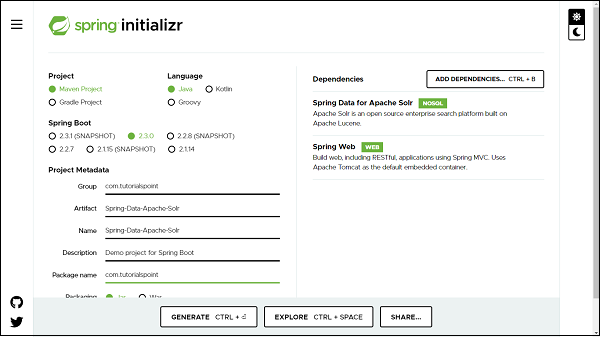
Note − The code sample and examples used in this tutorial has been created through Spring Initializr. The following is your final pom.xml file that is created when you choose Maven −
<?xml version="1.0" encoding="UTF-8"?>
<project xmlns="http://maven.apache.org/POM/4.0.0" xmlns:xsi="http://www.w3
   .org/2001/XMLSchema-instance"
   xsi:schemaLocation="http://maven.apache.org/POM/4.0.0 https://maven.apa
   che.org/xsd/maven-4.0.0.xsd">
   <modelVersion>4.0.0</modelVersion>
   <parent>
      <groupId>org.springframework.boot</groupId>
      <artifactId>spring-boot-starter-parent</artifactId>
      <version>2.3.0.RELEASE</version>
      <relativePath/> <!-- lookup parent from repository -->
   </parent>
   <groupId>com.tutorialspoint</groupId>
   <artifactId>Spring-Data-Solr</artifactId>
   <version>0.0.1-SNAPSHOT</version>
   <name>Spring-Data-Solr</name>
   <description>Spring Data Apache Solr project using Spring Boot</description>
   <properties>
      <java.version>1.8</java.version>
   </properties>
   <dependencies>
      <dependency>
         <groupId>org.springframework.boot</groupId>
         <artifactId>spring-boot-starter-data-solr</artifactId>
      </dependency>
      <dependency>
         <groupId>org.springframework.boot</groupId>
         <artifactId>spring-boot-starter-web</artifactId>
      </dependency>
      <dependency>
         <groupId>org.springframework.boot</groupId>
         <artifactId>spring-boot-starter-test</artifactId>
         <scope>test</scope>
         <exclusions>
            <exclusion>
               <groupId>org.junit.vintage</groupId>
               <artifactId>junit-vintage-engine</artifactId>
            </exclusion>
         </exclusions>
      </dependency>
   </dependencies>
   <build>
   <plugins>
         <plugin>
            <groupId>org.springframework.boot</groupId>
            <artifactId>spring-boot-maven-plugin</artifactId>
         </plugin>
      </plugins>
   </build>
</project>
Creating Solr Document
A Solr document in Apache Solr is an actual domain object and it will be created as a POJO. Its maps columns to be persisted into the database. It uses annotation @SolrDocument from org.springframework.data.solr.core.mapping.
Lets define our first document −
import org.springframework.data.annotation.Id;
import org.springframework.data.solr.core.mapping.Indexed;
import org.springframework.data.solr.core.mapping.SolrDocument;
@SolrDocument(collection = "users")
public class Users {
   @Id
   @Indexed
   private Long id;
   @Indexed(name = "name", type = "string")
   private String name;
   public Users() {
   }
   public Users(Long id, String name) {
      this.id = id;
      this.name = name;
   }
   public Long getId() {
      return id;
   }
   public void setId(Long id) {
      this.id = id;
   }
   public String getName() {
      return name;
   }
   public void setName(String name) {
      this.name = name;
   }
   @Override
   public String toString() {
      return "Customer [id=" + id + ", name=" + name + "]";
   }
}
@SolrDocument− We used to mark our domain object with this annotation to map class Users as Solr document which is indexed to collection name users. @Id here we mark it for identity purpose which will act as a primary key. This annotation is from org.springframework.data.annotation.Id.
@Indexed − It is used to indexed the field to users collection, so that it is searchable
Creating a Repository
Lets define an interface which will be our repository −
import java.util.List;
import org.springframework.data.solr.repository.SolrCrudRepository;
import com.tutorialspoint.entity.Users;
public interface UsersRepository extends SolrCrudRepository<Users, Long> {
   public List<Users> findByName(String name);
}
The process of creating a repository is similar to the repository creation in any Spring data−based project, the only difference here is that it extends SolrCrudRepository from org.springframework.data.solr.repository, which works on top of SolrRepository which again extends PagingAndSortingRepository.
Configuring DataSource
We can configure Solr using application.properties file, and Java-based configuration. We can choose either one among them. Lets discuss one by one.
Java Based Configuration
Create a config file, say SolrConfig,
import org.apache.solr.client.solrj.SolrClient;
import org.apache.solr.client.solrj.impl.HttpSolrClient;
import org.springframework.context.annotation.Bean;
import org.springframework.context.annotation.ComponentScan;
import org.springframework.context.annotation.Configuration;
import org.springframework.data.solr.core.SolrTemplate;
import org.springframework.data.solr.repository.config.EnableSolrRepositori
es;
@Configuration
@EnableSolrRepositories(basePackages = "com.tutorialspoint.repository")
@ComponentScan
public class SolrConfig {
   @Bean
   public SolrClient solrClient() {
      return new HttpSolrClient.Builder("http://localhost:8983/solr").bui
      ld();
   }
   @Bean
   public SolrTemplate solrTemplate(SolrClient client) throws Exception {
      return new SolrTemplate(client);
   }
}
Using application.properties file
Below one is the majorly used configuration.
spring.data.solr.host=http://localhost:8983/solr/
We can also enable/disable the Solr repository based on the requirement by adding the following property.
spring.data.solr.repositories.enabled=false
Performing CRUD Operation
Now lets perform below some CRUD operation. We will try adding some users to the above document, and retrieve some of them by their id or name. Following is the code for the same.
import java.util.Optional;
import org.springframework.boot.CommandLineRunner;
import org.springframework.boot.SpringApplication;
import org.springframework.boot.autoconfigure.SpringBootApplication;
import org.springframework.context.annotation.Bean;
import com.tutorialspoint.entity.Users;
import com.tutorialspoint.repository.UsersRepository;
@SpringBootApplication
public class SpringDataSolrApplication {
   public static void main(String[] args) {
      SpringApplication.run(SpringDataSolrApplication.class, args);
   }
   @Bean
   CommandLineRunner commandLineRunner(UsersRepository usersRepository) {
      return new CommandLineRunner() {
         @Override
         public void run(String... args) throws Exception {
            // Creating some entries
            Users user1 = usersRepository.save(new Users(1l, "Kallis"))
            ;
            System.out.println(usersRepository.save(user1));
            Users user2 = usersRepository.save(new Users(2l, "Mills"));
            System.out.println(user2);
            Users user3 = usersRepository.save(new Users(3l, "Wilson"))
            ;
            System.out.println(user3);
            // Fetching entry
            System.out.println(usersRepository.findById(2l));
            // Find all entry
            usersRepository.findAll().forEach(System.out::println);
            // Update entry
            Optional<Users> usersrOptional = usersRepository.findById(3
            l);
            if (usersrOptional.isPresent()) {
               Users user = usersrOptional.get();
               user.setName("Wilson Monk");
               usersRepository.save(user);
            }
            System.out.println(usersRepository.findByName("Wilson Monk"
            ));
            // Deleting entry
            usersRepository.delete(user2);
            // fetch all Entry
            usersRepository.findAll().forEach(System.out::println);
         }
      };
   }
}
The above code has used CommandLineRunner which will be executed on application startup. We have created three users and saved them in the database and executed the method findById() to retrieve the user by id. We also tried updating one of the records and re−retrieved byName() query method to check if it has been updated. Finally we are deleting one of the records. Lets run the application as the Spring Boot App, below is the output. Creating Entries
Customer [id=1, name=Kallis]
Customer [id=2, name=Mills]
Customer [id=3, name=Wilson]
// Fetching entry by Id
Optional[Customer [id=2, name=Mills]]
Finding all entry
Customer [id=1, name=Kallis]
Customer [id=2, name=Mills]
Customer [id=3, name=Wilson]
Updating an entry name from Wilson to Wilson Monk and retrieving it byName
[Customer [id=3, name=Wilson Monk]]
Deleted the entry with id 2, and re−retrived all entry
Customer [id=1, name=Kallis]
Customer [id=3, name=Wilson Monk]
