- Spring Data Tutorial - Home
- Spring Data Apache Solr
- Overview
- Prerequisites
- Introduction
- What is Apache Solr?
- Getting Started
- Querying
- Features
- Conclusion
- Spring Data Cassandra
- Overview
- Prerequisites
- Introduction
- What is Cassandra?
- Getting Started
- Annotation AllowFiltering with Query Methods
- Partition and Clustering
- Coding hands-on on Partitioning and Clustering
- Features
- Conclusion
- Spring Data Couchbase
- Overview
- Prerequisites
- Introduction
- What is Couchbase?
- Getting Started
- Views
- CouchbaseTemplate
- Hands-on using CouchbaseTemplate
- Features
- Conclusion
- Spring Data Elasticsearch
- Overview
- Prerequisites
- Introduction
- What is ElasticSearch?
- Getting Started
- Querying
- Configuring ElasticsearchOperations bean
- Features
- Conclusion
- Spring Data JDBC
- Introduction
- Need of Spring Data JDBC
- Features
- Domain-Driven Design
- Prerequisites
- Getting Started
- Conclusion
- Spring Data JPA
- Background
- Introduction
- Prerequisites
- Getting Started
- Features
- Conclusion
- Spring Data MongoDB
- Overview
- Prerequisites
- Introduction
- What is MongoDB?
- Getting Started
- Query Methods
- Annotations
- Exposing REST end points
- Relationship
- Conclusion
- Spring Data Redis
- Overview
- Prerequisites
- Introduction
- What is Redis?
- Redis Java Clients
- Getting Started
- Features
- Conclusion
- Spring Data REST
- Background
- Introduction to Spring Data REST
- Prerequisites
- Getting Started
- Features
- Conclusion
- Spring Data Tutorial Useful Resources
- Spring Data Tutorial - Quick Guide
- Spring Data Tutorial - Useful Resources
- Spring Data Tutorial - Discussion
Spring Data Apache Solr - Querying
The concept Query methods and Custom Query methods are easily accessible here because the repository associated with SolrCrudRepository works on top of PagingAndSortingRepository which in turns extends CrudRepository. Thus by default all the methods like save(), findOne(), findById(), findAll(), count(), delete(), deleteById() etc are accesible and can be used. Other than this it also has access to all the methods associated with Paging and sorting. Spring Data Apache Solr comes with a rich set of query approaches such as −
Method Name Query Generation
Custom Query With @Query Annotation
Named Query
Lets explore the above query technique defined by the Spring Data Solr API.
Method Name Query Generation
These are the usual query methods which get generated based on the methods name of the attribute of our domain object, such as −
List<Users> findByName(String name);
Custom Query with @Query Annotation
We can also create our search query using @Query annotation. Lets define a custom query and use @Query annotation.
@Query("id:*?0* OR name:*?0*")
public Page<Users> findByCustomQuery(String searchTerm, Pageable pageable);
The above custom query will fetch a record from the Solr database by performing a lookup on the id and name of a user. and it will return the results. Lets invoke this method and try fetching out the result −
usersRepository.findByCustomQuery("Kallis", PageRequest.of(0, 5)).forEach(S
ystem.out::println);
The above statement is saying to fetch a user based on the name Kallis, and obtain the first−page result with the size of max 5 records. The output of the above statement will be −
Customer [id=1, name=Kallis]
Named Query
This type of query is similar to Custom Query with @Query Annotation, except these queries are declared in a separate properties file. Lets create a properties file named namedQueries.properties(We can give any name) in parallel to application.properties file. Now lets add our first named query in that file.
Users.findByNamedQuery=id:*?0* OR name:*?0*
After adding the above file and query to that file our project structure will look like this.
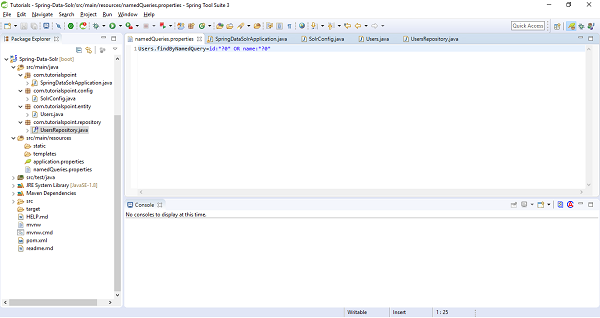
Lets add this file information as class path in SolrConfig file. Add namedQueriesLocation = "classpath:namedQueries.properties" as attribute under @EnableSolrRepositories. Our updated SolrConfig file will be
import org.apache.solr.client.solrj.SolrClient;
import org.apache.solr.client.solrj.impl.HttpSolrClient;
import org.springframework.context.annotation.Bean;
import org.springframework.context.annotation.ComponentScan;
import org.springframework.context.annotation.Configuration;
import org.springframework.data.solr.core.SolrTemplate;
import org.springframework.data.solr.repository.config.EnableSolrRepositori
es;
@Configuration
@EnableSolrRepositories(basePackages = "com.tutorialspoint.repository", nam
edQueriesLocation = "classpath:namedQueries.properties")
@ComponentScan
public class SolrConfig {
   @Bean
   public SolrClient solrClient() {
      return new HttpSolrClient.Builder("http://localhost:8983/solr").bui
      ld();
   }
   @Bean
   public SolrTemplate solrTemplate(SolrClient client) throws Exception {
      return new SolrTemplate(client);
   }
}
Now, lets move to our repository and add a custom query to invoke this named query.
@Query(name = "Users.findByNamedQuery")
public Page<Users> findByNamedQuery(String searchTerm, Pageable pageable);
Note− @Query annotation is optional here and not required in case the qury method name findByNamedQuery matches with the query name used in properties file. Lets invoke above method and check the result.
usersRepository.findByNamedQuery("Wilson", PageRequest.of(0, 5)).forEach(Sy
stem.out::println);
The above statement will return result of first page with at most 5 records, as follows −
Customer [id=3, name=Wilson Monk]
