- Spring Data Tutorial - Home
- Spring Data Apache Solr
- Overview
- Prerequisites
- Introduction
- What is Apache Solr?
- Getting Started
- Querying
- Features
- Conclusion
- Spring Data Cassandra
- Overview
- Prerequisites
- Introduction
- What is Cassandra?
- Getting Started
- Annotation AllowFiltering with Query Methods
- Partition and Clustering
- Coding hands-on on Partitioning and Clustering
- Features
- Conclusion
- Spring Data Couchbase
- Overview
- Prerequisites
- Introduction
- What is Couchbase?
- Getting Started
- Views
- CouchbaseTemplate
- Hands-on using CouchbaseTemplate
- Features
- Conclusion
- Spring Data Elasticsearch
- Overview
- Prerequisites
- Introduction
- What is ElasticSearch?
- Getting Started
- Querying
- Configuring ElasticsearchOperations bean
- Features
- Conclusion
- Spring Data JDBC
- Introduction
- Need of Spring Data JDBC
- Features
- Domain-Driven Design
- Prerequisites
- Getting Started
- Conclusion
- Spring Data JPA
- Background
- Introduction
- Prerequisites
- Getting Started
- Features
- Conclusion
- Spring Data MongoDB
- Overview
- Prerequisites
- Introduction
- What is MongoDB?
- Getting Started
- Query Methods
- Annotations
- Exposing REST end points
- Relationship
- Conclusion
- Spring Data Redis
- Overview
- Prerequisites
- Introduction
- What is Redis?
- Redis Java Clients
- Getting Started
- Features
- Conclusion
- Spring Data REST
- Background
- Introduction to Spring Data REST
- Prerequisites
- Getting Started
- Features
- Conclusion
- Spring Data Tutorial Useful Resources
- Spring Data Tutorial - Quick Guide
- Spring Data Tutorial - Useful Resources
- Spring Data Tutorial - Discussion
Exposing REST endpoints
To do so, lets define a controller and some mapping of the endpoints.
import java.util.List;
import java.util.Optional;
import org.springframework.beans.factory.annotation.Autowired;
import org.springframework.web.bind.annotation.DeleteMapping;
import org.springframework.web.bind.annotation.GetMapping;
import org.springframework.web.bind.annotation.PathVariable;
import org.springframework.web.bind.annotation.PostMapping;
import org.springframework.web.bind.annotation.RequestBody;
import org.springframework.web.bind.annotation.RequestMapping;
import org.springframework.web.bind.annotation.RestController;
import com.tutorialspoint.document.Customer;
import com.tutorialspoint.repository.CustomerRepository;
@RestController
@RequestMapping("/rest")
public class CustomerController {
   @Autowired
   private CustomerRepository customerRepository;
   @GetMapping("/customers")
   public List<Customer> fetchCustomers() {
      return customerRepository.findAll();
   }
   @PostMapping("/customer/add")
   public void persisDocument(@RequestBody Customer customer) {
      customerRepository.save(customer);
   }
   @GetMapping("/customer/find/{id}")
   public Optional<Customer> fetchDocument(@PathVariable Long id) {
      return customerRepository.findById(id);
   }
   @DeleteMapping("/customer/{id}")
   public void deleteDocument(@PathVariable Long id) {
      customerRepository.deleteById(id);
   }
}
The above controller have different mapping methods, responsible for fetching[GET], adding[POST], finding[GET] and deleting[DELETE] the customer from data source. Lets add a customer to the data source, It will be a post call with Customer details in the body. Our endpoint url will be http://localhost:8080/rest/customer/add and pass the below data in the body.
{
   "id":3,
   "name":"Asad",
   "email":"asad@gmail.com",
   "salary":28500
}
The api will return response code 200[OK]. Now, lets first find out all the customers availble in the document. To do so we can use Postman client. Lets execute rest end point http://localhost:8080/rest/customersthrough postman −
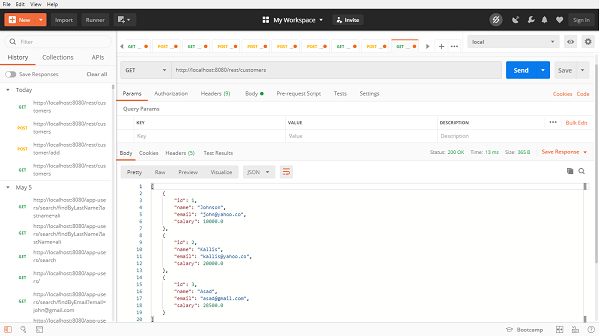
[
   {
      "id": 1,
      "name": "Johnson",
      "email": "john@yahoo.co",
      "salary": 10000.0
   },
   {
      "id": 2,
      "name": "Kallis",
      "email": "kallis@yahoo.co",
      "salary": 20000.0
   },
   {
      "id": 3,
      "name": "Asad",
      "email": "asad@gmail.com",
      "salary": 28500.0
   }
]
Similarly we can find a customer by passing an id of customer, lets find the customer with id=2,our rest end point will be http://localhost:8080/rest/customer/find/2, and the output will be −
{
   "id": 2,
   "name": "Kallis",
   "email": "kallis@yahoo.co",
   "salary": 20000.0
}
Now, lets try deleting a resource by passing customer id and invikoing DELETE method with rest end point http://localhost:8080/rest/customer/3 and it has been deleted.
