- Spring Data Tutorial - Home
- Spring Data Apache Solr
- Overview
- Prerequisites
- Introduction
- What is Apache Solr?
- Getting Started
- Querying
- Features
- Conclusion
- Spring Data Cassandra
- Overview
- Prerequisites
- Introduction
- What is Cassandra?
- Getting Started
- Annotation AllowFiltering with Query Methods
- Partition and Clustering
- Coding hands-on on Partitioning and Clustering
- Features
- Conclusion
- Spring Data Couchbase
- Overview
- Prerequisites
- Introduction
- What is Couchbase?
- Getting Started
- Views
- CouchbaseTemplate
- Hands-on using CouchbaseTemplate
- Features
- Conclusion
- Spring Data Elasticsearch
- Overview
- Prerequisites
- Introduction
- What is ElasticSearch?
- Getting Started
- Querying
- Configuring ElasticsearchOperations bean
- Features
- Conclusion
- Spring Data JDBC
- Introduction
- Need of Spring Data JDBC
- Features
- Domain-Driven Design
- Prerequisites
- Getting Started
- Conclusion
- Spring Data JPA
- Background
- Introduction
- Prerequisites
- Getting Started
- Features
- Conclusion
- Spring Data MongoDB
- Overview
- Prerequisites
- Introduction
- What is MongoDB?
- Getting Started
- Query Methods
- Annotations
- Exposing REST end points
- Relationship
- Conclusion
- Spring Data Redis
- Overview
- Prerequisites
- Introduction
- What is Redis?
- Redis Java Clients
- Getting Started
- Features
- Conclusion
- Spring Data REST
- Background
- Introduction to Spring Data REST
- Prerequisites
- Getting Started
- Features
- Conclusion
- Spring Data Tutorial Useful Resources
- Spring Data Tutorial - Quick Guide
- Spring Data Tutorial - Useful Resources
- Spring Data Tutorial - Discussion
Spring Data JPA - Getting started
Like other Spring−based projects, you can start from scratch by creating a maven or Gradle based project from your favorite IDE. Follow below step by step process or you can bypass the basic setup steps that are already familiar with.
Adding Dependencies
If you have created normal Maven or Gradle projects then add below dependencies to your pom.
For Maven
<!-- https://mvnrepository.com/artifact/org.springframework.data/spring-data-jpa -->
<dependency>
   <groupId>org.springframework.data</groupId>
   <artifactId>spring-data-jpa</artifactId>
   <version>2.2.6.RELEASE</version>
</dependency>
For Gradle
// https://mvnrepository.com/artifact/org.springframework.data/spring-data-jpa
compile group: 'org.springframework.data', name: 'spring-data-jpa', version: '2.2.6.RELEASE'
If you have created your project as Spring Boot or Starting with Spring Initializr then do not forget to add Spring Data JPA dependency.
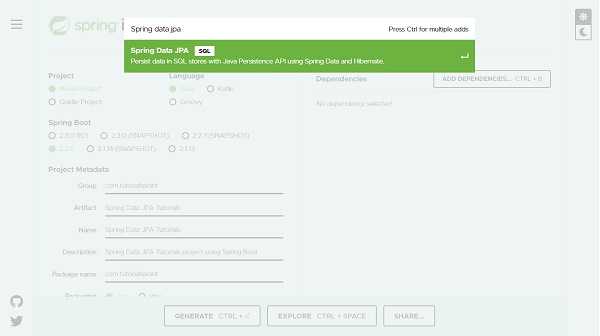
Post selection of Spring Data JPA dependency it will look like this.
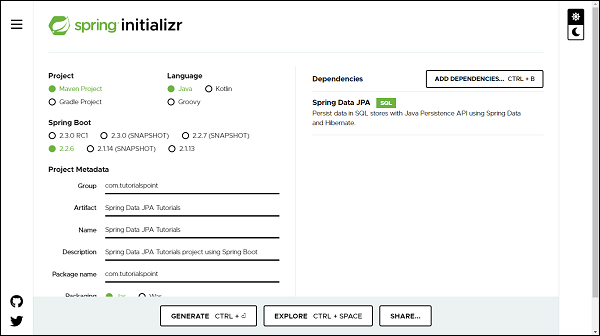
Note− This tutorial assumes that MySQL is installed on your machine and a database is created. If you dont know how to install MySQL and create a database learn our ∽ MySQL tutorials by clicking here.
You can add database dependency as per of your choice, For illustration purpose this tutorial has used hsqldb and MySQL database. You can find the respective dependency in below pom. The following is your final pom.xml file that is created when you choose Maven −
<?xml version="1.0" encoding="UTF-8"?>
<project xmlns="http://maven.apache.org/POM/4.0.0" xmlns:xsi="http://www.w3.org/2001/XMLSchema-instance"
xsi:schemaLocation="http://maven.apache.org/POM/4.0.0 https://maven.apache.org/xsd/maven-4.0.0.xsd">
   <modelVersion>4.0.0</modelVersion>
   <parent>
      <groupId>org.springframework.boot</groupId>
      <artifactId>spring-boot-starter-parent</artifactId>
      <version>2.2.6.RELEASE</version>
      <relativePath/> <!-- lookup parent from repository -->
   </parent>
   <groupId>com.tutorialspoint</groupId>
   <artifactId>Spring-Data-JPA-Tutorials</artifactId>
   <version>0.0.1-SNAPSHOT</version>
   <name>Spring-Data-JPA-Tutorials</name>
   <description>Spring Data JPA project using Spring Boot</description>
   <properties>
      <java.version>1.8</java.version>
   </properties>
   <dependencies>
      <dependency>
         <groupId>org.springframework.boot</groupId>
         <artifactId>spring-boot-starter-data-jpa</artifactId>
      </dependency>
      <dependency>
         <groupId>com.h2database</groupId>
         <artifactId>h2</artifactId>
         <scope>runtime</scope>
      </dependency>
      <dependency>
         <groupId>mysql</groupId>
         <artifactId>mysql-connector-java</artifactId>
         <scope>runtime</scope>
      </dependency>
      <dependency>
         <groupId>org.springframework.boot</groupId>
         <artifactId>spring-boot-starter-test</artifactId>
         <scope>test</scope>
         <exclusions>
            <exclusion>
               <groupId>org.junit.vintage</groupId>
               <artifactId>junit-vintage-engine</artifactId>
            </exclusion>
         </exclusions>
      </dependency>
   </dependencies>
   <build>
      <plugins>
         <plugin>
            <groupId>org.springframework.boot</groupId>
            <artifactId>spring-boot-maven-plugin</artifactId>
         </plugin>
      </plugins>
   </build>
</project>
Here in this tutorial we will work with hsqldb Once dependencies are added, we can add a couple of classes and interfaces which will act as our entities and repositories. Note- All the code covered in this tutorial has been generated through Spring Boot.
Configuring application.properties file
If you have created your project using Spring Boot, it gives your application.properties file under resource folder of your project. If not, you can create an application.properties file in src/main/resources/ folder. Once file created enter the MySQL database details such as database name, username and password as shown below. If you are not giving database details in application.properties file and you have added dependency for hsqldb databse then by default thi sdatabase will be used by Spring data JPA for your project.
spring.jpa.hibernate.ddl-auto=update
spring.datasource.url=jdbc:mysql://localhost:3306/tutorials_point
spring.datasource.username=mySqlUserName
spring.datasource.password=mySqlPassword
In the above configuration we have spring.jpa.hibernate.ddl−auto whose default value for MySQL is none and for H2 database is create−drop. All possible values are create, update,create−drop and none. create− A database get created everytime but never drops on close. update− A database get changed as per entity structure. create−drop− A database get created everytime but drops it once SessionFactory is closed none− No change in the database structure. Note− If we do not have our database structure, we should use create or update.
Creating Entities
An entity in Spring Data JPA can be created using annotation @Entity from javax.persistence. Create a normal java class and add the entity annotation. This annotation instruct the Hibernate to create a table using the class definition. Lets have a look on below created User entity.
import javax.persistence.Entity;
import javax.persistence.GeneratedValue;
import javax.persistence.GenerationType;
import javax.persistence.Id;
@Entity
public class User {
   @Id
   @GeneratedValue(strategy = GenerationType.AUTO)
   private Long id;
   private String firstName;
   private String lastName;
   private String email;
   protected User() {
   }
   public User(String firstName, String lastName, String email) {
      this.firstName = firstName;
      this.lastName = lastName;
      this.email = email;
   }
   public Long getId() {
      return id;
   }
   public void setId(Long id) {
      this.id = id;
   }
   public String getFirstName() {
      return firstName;
   }
   public void setFirstName(String firstName) {
      this.firstName = firstName;
   }
   public String getLastName() {
      return lastName;
   }
   public void setLastName(String lastName) {
      this.lastName = lastName;
   }
   public String getEmail() {
      return email;
   }
   public void setEmail(String email) {
      this.email = email;
   }
   @Override
   public String toString() {
      return "User [id=" + id + ", firstName=" + firstName + ", lastName=" + lastName + ", email=" + email + "]";
   }
}
If you want to give a custom name to your entity use annotation @Table from javax.persistence. Syntax @Table(name="table_name"). Since Spring Data JPA works on top of JPA, and so all other annotation used above are from javax.persistence. Default Constructor- defined above will be used by JPA and not by you and so declared as protected. The other parameterised construtor will be used y you to create an object of User to persist into the database. The annotation @Id is used against id property to recongnise objects ID. The annotaion GeneratedValueis to instruct the JPA that Id genartion should happen automatically. The toSting()is used for your convenience to print User properties.
Creating Repositories
Lets create an interface which will be our repository. In Spring Data JPA we need to extend CrudRepository from org.springframework.data.repository. CrudRepository gives us most commonly used CRUD methods like save(), delete(), findById(), findAll() and few others. Lets have a look on created repository.
import org.springframework.data.repository.CrudRepository;
import com.tutorialspoint.entities.User;
public interface UserRepositories extends CrudRepository<User, Long> {

}
Extending a CrudRepository automatically creates a bean against the interface name. In our case Spring will create a bean called userRepository. The CrusRepository takes a generic parameter which will be the entity name and its Id type. In our case it is User and Long respectively. Extending CrudRepository enables access to several most commonly used CRUD methods like save(), delete(), findById(), findAll() and few others. There is much more to learn about the methods inside the repository, we will be discussing this in the section of Query Methods in detail, but first lets perform some CRUD operation on the above-created entity. In legacy Java application, You were supposed to write an implementation class for UserRepository, but with Spring Data JPA you are not supposed to write any implementation of UserRepository interface. Spring Data JPA automatically creates an implementation in the background for you, when you run your application.
Note− We are not required to create a database schema manually in Spring Data JPA, Hibernate will automatically translate the above−defined entity into the table.
Perform CRUD Operation
We will try to add some users to the table users and retrieve one of them by their name. Create operation is straight forward, instantiate User and invoke save() of the repository, user will get created into the database. To retrieve invoke findBy Query methods (We will discuss Query Methods in detail in next section), To perform an update operation call update() method and delete() for deleting an entry from a database. Here is the code
import org.springframework.boot.ApplicationRunner;
import org.springframework.boot.SpringApplication;
import org.springframework.boot.autoconfigure.SpringBootApplication;
import org.springframework.context.annotation.Bean;
import com.tutorialspoint.entities.User;
import com.tutorialspoint.repositories.UserRepositories;
@SpringBootApplication
public class SpringDataJpaTutorialsApplication {
   public static void main(String[] args) {
      SpringApplication.run(SpringDataJpaTutorialsApplication.class, args);
   }
   @Bean
   ApplicationRunner applicationRunner(UserRepositories usersRepositories) {
      return args -> {
         User users1 = new User("William", "Monk", "monk@xyz.com");
         User users2 = new User("Tofel", "Patrick", "tofel@xyz.com");
         User users3 = new User("Johnson", "Mitchel", "johnson@xyz.com");
         usersRepositories.save(users1);// persist user1
         usersRepositories.save(users2);// persist user2
         usersRepositories.save(users3);// persist user3
         // Retrieve User William
         System.out.println(usersRepositories.findById(users1.getId()));
         System.out.println(usersRepositories.findById(users2.getId()));
         users2.setLastName("Scotch");
         // Updating User Tofel last name and retrieve
         System.out.println(usersRepositories.save(users2));
         // Delete User Johnson
         usersRepositories.delete(users3);
         // Try Fetching User Johnson
         System.out.println(usersRepositories.findById(users3.getId()));
      };
   }
}
Your final project structure will look something like this.
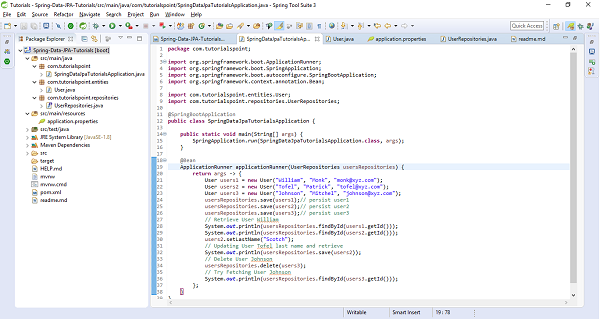
The above sample test code has used ApplicationRunner which will be executed on application startup. It creates three users and saved them in the database. It has also updated one of the user and deleted the other one and tried testing by fetching them out to make sure the code is working. Lets run the application as the Spring Boot App, below is the screenshot of the output.
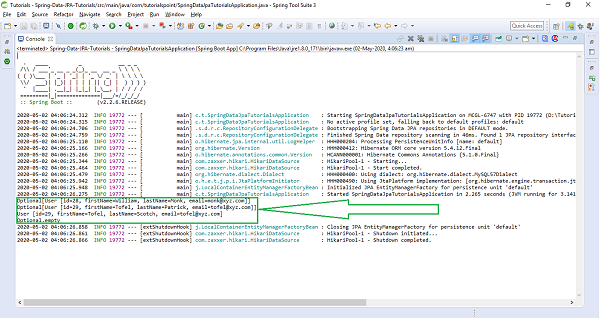
Query Methods
Spring Data JPA lets you define the methods inside the repository with the method signature. In above declared entity User has methods for attributes like firstName,lastName,email, So you can declare your query method with these signature inside UserRepository which will be findByFirstName(), findByLastName(), and findByEmail(). Similarly for other properties of your entity you can generate your query method from their name. You just need to prefix findBy against each property in a camelcase fashion. These query methods are also called as FinderMethods. Declaring queries by following this naming convention and invoking these methods at run time Spring Data will generate queries for you and it will load the data from the database.
Find By One Field
As discussed above, if you want to fetch a record just by using one field of the entity, the query method inside the repository will be written as follows.
import org.springframework.data.repository.CrudRepository;
import com.tutorialspoint.entities.User;
import java.lang.String;
import java.util.List;
public interface UserRepositories extends CrudRepository<User, Long> {
   List<User> findByFirstName(String firstname);
   List<User> findByLastName(String lastname);
   List<User> findByEmail(String email);
}
Find By Multiple Field
The convention is not limited to find a record by using only one field but also you can club more than one properties together and write finder method. If you want to find a record based on two or more field just use the Query keywords. Suppose you want to find all the users by their firstName and email id then your resultant quesry will be List<User> findByFirstNameAndEmail(String name, String email). Other example could be List<User> findByFirstNameAndLastName(String firstName,String lastName);
Find Using Query Keyword
The concatenation of the two field has been done with And keyword. The followings are the list of Query keywords that can be used in finder methods.
Query Keywords |
Query Keywords Expressions |
Sample |
|---|---|---|
AND |
And |
findByFirstNameAndLastName |
OR |
Or |
findByFirstNameOrEmail |
IN |
In, IsIn |
findByEmailIn(Collection<String> emails) |
BEFORE |
Before, IsBefore |
findByStartDateBefore |
AFTER |
After, IsAfter |
findByStartDateAfter |
BETWEEN |
Between, IsBetween |
findByStartDateBetween |
CONTAINING |
Containng, IsContainng, Contains |
findByFirstNameContaining |
FALSE |
False, IsFalse |
findByAvailebleFalse |
EXISTS |
Exists |
findByEmailExists |
Query Keywords |
Query Keywords Expressions |
Sample |
|---|---|---|
ENDING_WITH |
EndingWith, IsEndingWith, EndsWith |
findByLastNameEndingWith |
GREATER_THAN |
GreaterThan, IsGreaterThan |
findBySalaryGreaterThan |
GREATER_THAN_EQUALS |
GreaterThanEqual, IsGreaterThanEqual |
findBySalaryGreaterThanEqual |
LESS_THAN |
LessThan |
findBySalaryLessThan |
LESS_THAN_EQUALS |
After, IsAfter |
findByStartDateAfter |
BETWEEN |
LessThanEqual |
findBySalaryLessThanEqual |
IS_EMPTY |
Empty, IsEmpty |
findByEmailIsEmpty |
IS_NOT_EMPTY |
NotEmpty, IsNotEmpty |
findByEmailIsNotEmpty |
IS_NULL |
IsNull |
findByEmailNotNull |
NOT_NULL |
NotNull |
findByEmailNotNull |
IS_NOT_NULL |
IsNotNull |
findByEmailIsNotNull |
LIKE |
Like |
findByLastNameLike |
NOT_LIKE |
NotLike |
findByLastNameNotLike |
STARTING_WITH |
StartingWith |
findByLastNameStartingWith |
ORDER_BY |
OrderBy |
findByEmailOrderByLastNameDesc |
Query Keywords |
Query Keywords Expressions |
Sample |
|---|---|---|
NOT |
Not |
findByLastNameNot |
NOT_IN |
NotIn |
findByEmailNotIn(Collection |
TRUE |
True |
findByAvailebleTrue |
IGNORE_CASE |
IgnoreCase |
findByLastNameIgnoreCase |
Hands−on Coding on Query Methods
Lets modify the above entity a bit and add some Integer, Boolean and Date fields along with String, so that we can perform most of the query methods. Now it will look like as follows.
import java.util.Date;
import javax.persistence.Entity;
import javax.persistence.GeneratedValue;
import javax.persistence.GenerationType;
import javax.persistence.Id;
@Entity
public class User {
   @Id
   @GeneratedValue(strategy = GenerationType.AUTO)
   private Long id;
   private String firstName;
   private String lastName;
   private String email;
   private Long salary;
   private boolean available;
   private Date startDate;
   protected User() {
   }
   public User(String firstName, String lastName, String email, Long salary, boolean available, Date startDate) {
      this.firstName = firstName;
      this.lastName = lastName;
      this.email = email;
      this.salary = salary;
      this.available = available;
      this.startDate = startDate;
   }
   public Long getId() {
      return id;
   }
   public void setId(Long id) {
      this.id = id;
   }
   public String getFirstName() {
      return firstName;
   }
   public void setFirstName(String firstName) {
      this.firstName = firstName;
   }
   public String getLastName() {
      return lastName;
   }
   public void setLastName(String lastName) {
      this.lastName = lastName;
   }
   public String getEmail() {
      return email;
   }
   public void setEmail(String email) {
      this.email = email;
   }
   public Long getSalary() {
      return salary;
   }
   public void setSalary(Long salary) {
      this.salary = salary;
   }
   public boolean isAvailable() {
      return available;
   }
   public void setAvailable(boolean available) {
      this.available = available;
   }
   public Date getStartDate() {
      return startDate;
   }
   public void setStartDate(Date startDate) {
      this.startDate = startDate;
   }
   @Override
   public String toString() {
      return "User [id=" + id + ", firstName=" + firstName + ", lastName=" + lastName + ", email=" + email
      + ", salary=" + salary + ", available=" + available + ", startDate=" + startDate + "]";
   }
}
Lets Add some Query methods inside repository,
import org.springframework.data.repository.CrudRepository;
import com.tutorialspoint.entities.User;
import java.lang.String;
import java.util.List;
import java.lang.Long;
import java.util.Date;
public interface UserRepositories extends CrudRepository<User, Long> {
   List<User> findByFirstName(String firstname);
   List<User> findByLastName(String lastname);
   List<User> findByEmail(String email);
   List<User> findByFirstNameAndLastName(String firstName, String lastName);
   List<User> findBySalaryLessThan(Long salary);
   List<User> findByStartDateAfter(Date startdate);
   List<User> findByStartDateBefore(Date startdate);
}
Lets persist some users and add try fetching them using the above query methods.
import java.util.Date;
import org.springframework.boot.ApplicationRunner;
import org.springframework.boot.SpringApplication;
import org.springframework.boot.autoconfigure.SpringBootApplication;
import org.springframework.context.annotation.Bean;
import com.tutorialspoint.entities.User;
import com.tutorialspoint.repositories.UserRepositories;
@SpringBootApplication
public class SpringDataJpaTutorialsApplication {
   public static void main(String[] args) {
   SpringApplication.run(SpringDataJpaTutorialsApplication.class, args);
   }
   @Bean
   ApplicationRunner applicationRunner(UserRepositories usersRepositories) {
      return args -> {
         User users1 = new User("Micheal", "Stoch", "stochk@xyz.com", 10000L, true, new Date());
         User users2 = new User("Benjamin", "Franklin", "franklin@xyz.com", 15000L, false, new Date());
         User users3 = new User("Rosoto", "Warner", "rosoto@xyz.com", 19000L, true, new Date());
         usersRepositories.save(users1);// persist user1
         usersRepositories.save(users2);// persist user2
         usersRepositories.save(users3);// persist user3
         // Retrieve Users based on query methods
         System.out.println(usersRepositories.findByEmail("rosoto@xyz.com"));
         System.out.println(usersRepositories.findByFirstName("Micheal"));
         System.out.println(usersRepositories.findByFirstNameAndLastName("Benjamin", "Franklin"));
         System.out.println(usersRepositories.findBySalaryLessThan(15000L));
         System.out.println(usersRepositories.findByStartDateAfter(new Date()));// It shouldn't return any result
      };
   }
}
Program Output
For the above print statements below is the output.
[User [id=36, firstName=Rosoto, lastName=Warner, email=rosoto@xyz.com, salary=19000, available=true, startDate=2020-05-02 17:35:42.567]]

[User [id=34, firstName=Micheal, lastName=Stoch, email=stochk@xyz.com, salary=10000, available=true, startDate=2020-05-02 17:35:42.567]]

[User [id=35, firstName=Benjamin, lastName=Franklin, email=franklin@xyz.com, salary=15000, available=false, startDate=2020-05-02 17:35:42.567]]

[User [id=34, firstName=Micheal, lastName=Stoch, email=stochk@xyz.com, salary=10000, available=true, startDate=2020-05-02 17:35:42.567]]

[] // empty list necause no entry has satrt date after the current date
Similarly, you can use other query methods based on your requirements.
Paging and Sorting
The above queries work well if the database has limited records, but you can think of a situation where a database is having records in millions and billions. You can take an example of any e−commerce website where you are looking for a product. When you search for a product on an e-commerce site, it will not display all the records at once, instead, it will show you the some of the products(say top 10 or 50) and the remaining products it will page the results. This concept is called pagination where you have an option of going to the next page or certain page number and fetching the record of that page. This approach is efficient because it doesnt load the all data at once instead it loads the few records from the database. Not only this, but you can also sort the record based on their price, ratings, and relevancy, etc. Spring Data JPA supports pagination as well as sorting, the only things you need to do is extending PagingAndSortingRepository instead of CrudRepository. PagingAndSortingRepository is a child interface of the CrudRepository. Pageable is a most key interfaces for Paging and PageRequest is the implementation for Pageable. For sorting you have three key classes Sort, Direction, and Order from Spring Data.
Page Request
It consists of 3, of static method as follows.
PageRequest.of(int page, int size);
It creates an unsorted PageRequest, where the page is a non−negative page index and size is the size of page(number of records per page) to be returned, and it should be non-negative.
PageRequest.of(int page, int size, Sort sort);
It creates a sorted PageRequest.
Sort parameter must not be null, if so use Sort.unsorted() instead.
PageRequest.of(int page, int size, Direction direction, String properties)
It creates a PageRequest with sort direction and properties applied.
direction and properties must not be null.
Sort
It consist of 4, by static methods as follows
Sort.by(String property);
It creates a sort for the given properties and properties must not be null.
Sort.byby(List<Orders> order);
It creates a sort for the given Orders and orders must not be null.
Sort.bySort.by(Order orders);
It creates a sort for the given Orders and orders must not be null.
Sort.bySort.by(Direction direction, String properties)
Sort.by(Direction direction, String properties) − It creates a Sort; direction and properties must not be null.
Lets create an entity Product to illustrate the paging and sorting concept.
import javax.persistence.Entity;
import javax.persistence.Id;
@Entity
public class Product {
   @Id
   @GeneratedValue(strategy = GenerationType.AUTO)
   private Long id;
   private String name;
   private String features;
   private Double price;
   protected Product() {
   }
   public Product(String name, Double price, String features) {
      this.name = name;
      this.price = price;
      this.features = features;
   }
   public Long getId() {
      return id;
   }
   public void setId(Long id) {
      this.id = id;
   }
   public String getName() {
      return name;
   }
   public void setName(String name) {
      this.name = name;
   }
   public Double getPrice() {
      return price;
   }
   public void setPrice(Double price) {
      this.price = price;
   }
   public String getFeatures() {
      return features;
   }
   public void setFeatures(String features) {
      this.features = features;
   }
   @Override
   public String toString() {
      return "Product [id=" + id + ", name=" + name + ", features=" + features + ", price=" + price + "]";
   }
}
Lets create a repository for above entity, but make sure to extend PagingAndSortingRepository instaed of CrudRepository.
import org.springframework.data.repository.PagingAndSortingRepository;
import com.tutorialspoint.entities.Product;
import java.lang.String;
import java.util.List;
import java.lang.Long;
import java.lang.Double;
public interface ProductRepository extends PagingAndSortingRepository<Product, Lo ng> {
   List<Product> findByName(String name, Pageable pageable);
   List<Product> findByIdIn(List<Long> ids, Pageable pageable);
   List<Product> findByNameAndFeatures(String name, String features, Pageable pageable);
   List<Product> findByPriceGreaterThan(Double price, Pageable pageable);
   List<Product> findByPriceBetween(Double price1, Double price2, Pageable pageable);
   List<Product> findByNameContains(String features, Pageable pageable);
   List<Product> findByNameLike(String features, Pageable pageable);
}
Now lets write business logic to save some products and fetch some record page wise and in sorted fashion from the database. The below code contains some such operations, have a look at each.
import java.util.Date;
import org.springframework.boot.ApplicationRunner;
import org.springframework.boot.SpringApplication;
import org.springframework.boot.autoconfigure.SpringBootApplication;
import org.springframework.context.annotation.Bean;
import org.springframework.data.domain.Page;
import org.springframework.data.domain.PageRequest;
import org.springframework.data.domain.Pageable;
import com.tutorialspoint.entities.Product;
import com.tutorialspoint.entities.User;
import com.tutorialspoint.repositories.ProductRepository;
import com.tutorialspoint.repositories.UserRepositories;
@SpringBootApplication
public class SpringDataJpaTutorialsApplication {
   public static void main(String[] args) {
      SpringApplication.run(SpringDataJpaTutorialsApplication.class, args);
   }
   @Bean
   ApplicationRunner applicationRunner(ProductRepository productRepository) {
      return args -> {
         Product product = new Product("IPhone", 70000.00, "IOS");
         Product product2 = new Product("Laptop", 90000.00, "Core i5");
         Product product3 = new Product("TV", 30000.00, "4k Smart");
         Product product4 = new Product("Bed", 40000.00, "King Size");
         Product product5 = new Product("Fridge", 25000.00, "Double Door");
         Product product6 = new Product("Wachine Machine", 50000.00, "Automatic");
         Product product7 = new Product("Xiomi Smart Phone", 45000.00, "Android");
         productRepository.save(product);
         productRepository.save(product2);
         productRepository.save(product3);
         productRepository.save(product4);
         productRepository.save(product5);
         productRepository.save(product6);
         productRepository.save(product7);
         // Pagination with findAll() method
         Pageable pageable = PageRequest.of(0, 2);
         Page<Product> products = productRepository.findAll(pageable);
         products.stream().forEach(System.out::println);
      };
   }
}
For illustration purpose, above code is fetching 2 records per page, So for the first page below is the out put.
Product [id=1, name=IPhone, features=IOS, price=70000.0] Product [id=2, name=Laptop, features=Core i5, price=90000.0]
Lets modify the pageable Pageable pageable = PageRequest.of(1, 2); and fetch second page record, It will return the output as follows.
Product [id=3, name=TV, features=4k Smart, price=30000.0] Product [id=4, name=Bed, features=King Size, price=40000.0]
Lets Sorting the records based on price, To do so add the below code.
Sort sort = Sort.by("price");
Iterable<Product> sortedProducts = productRepository.findAll(sort);
sortedProducts.forEach(f -> System.out.println(f.getName() + "->" + f.getPrice()));
Above sorting methods returns result in Ascending order by default. Have a look on output
Fridge->25000.0
TV->30000.0
Bed->40000.0
Xiomi             Smart          Phone->45000.0
Wachine                          Machine->50000.0
IPhone->70000.0
Laptop->90000.0
If you want to fetch the record in Descending order, use Direction as follows.
Sort sortDesc = Sort.by(Direction.DESC, "price");
Iterable<Product> sortedProductsDesc = productRepository.findAll(sortDesc);
sortedProductsDesc.forEach(f -> System.out.println(f.getName() + " " + f.getPrice()));
Laptop                              90000.0
IPhone                              70000.0
Wachine           Machine           50000.0
Xiomi       Smart          Phone    45000.0
Bed                                 40000.0
TV                                  30000.0
Fridge                              25000.0
If you want to sort the record based on multiple properties, you can do this.
Sort sortByMultiplePropDesc = Sort.by(Direction.DESC, "price", "name");
Iterable<Product> sortByMultiplePropDescItr = productRepository.findAll(sortByMultiplePropDesc);
sortByMultiplePropDescItr.forEach(f -> System.out.println(f.getName() + " " + f.getPrice()));
Above code Sorts the recors based on price and then the result of this again get sorted by name
Laptop                                             90000.0
IPhone                                             70000.0
Wachine                 Machine                    50000.0
Xiomi             Smart          Phone             45000.0
Bed                                                40000.0
TV                                                 30000.0
Fridge                                             25000.0
Lets Put Paging and Sorting together, with findAll() method
Pageable pageablewithSort = PageRequest.of(0, 2, Direction.DESC, "price");
Page<Product> pageProduct = productRepository.findAll(pageablewithSort);
pageProduct.stream().forEach(f -> System.out.println(f.getName() + "-" + f.getPrice()));
Output
Laptop                  90000.0
IPhone                  70000.0
Finally, lets apply paging and sorting with Query methods(custom finder methods)
Pageable customPageablewithSort = PageRequest.of(0, 7, Direction.DESC, "name");
List<Product> pageProductCustom = productRepository.findByNameContains("Phone", customPageablewithSort);
pageProductCustom.stream().forEach(f -> System.out.println(f.getName() + "--" + f.getPrice()));
Above code, trying to find out all the products whose name contains Phone, belwo is the output
Xiomi          Smart    Phone45000.0
IPhone70000.0
JPQL
It stands for Java Persistence Query language. Its is a standard from JPA to perform some query operation against objects and domain classes. Instaed of writing SQL queries against database tables, you can write JPQL queries against the class objects and fields. JPQL is similar to SQL queries but instead of writing table and column name from database, you will be using your domain class name. For Example you have a table in database called employee_details but your mapped Java/Domain class name is EmployeeDetails, then your SQL select query will be select * from employee_details but your JPQL query will be select * from EmployeeDetails . Note in JPQL it has used domain name not the database table name. Lets take another example, Suppose you want to fetch first_name and last_ name of a user from user table, created in the begining off this tutorials. So your SQL query will be select first_name,last_name from user but your JPQL query will be select firstName,lastName from User. If youhave observe the query you will find JPQL always uses class/domain name, instead of database tanle or column name. These JPQL will internally get converted to SQL queries by ORM tool. With JPQL You can use named parameters, you can perform both select and non select operations such as update and delete etc using JPQL. You can also use aggregate functions, relational operators, joinsconditional operaters and almost everything what is there in SQL can be performed with JPQL easily.
JPQL is case sensitive when it comes to the domain class names, and its fields name. but it is not case sennsitive, when it comes to keyword used in the JPQL query such as like, count, etc.
A JPQL query is written by using annotation @Query from org.springframework.data.jpa.repository. Lets have a look at one of the queries.
@Query("from User")
List<User> findAllUsers();
This query says that fetch all the users from the user table.
Read Partial Data
Lets write a query to fetch only firstName and lastName of a user, but not the whole information. You can write your JPQL as follows.
@Query("select u.firstName,u.lastName from User u")
List<Object[]> findUserPartialData();
It will return the list of object, you can iterate through the list and get the firstName at index 0 and last name at index 1.
Using Named Query Parameter
If you want to fetch a user by firstName then your named query will be written as
@Query("select u from User u where u.firstName=:name")
List<User> findAllUsersByName(String name);
Remember the parameter name in the query is a query parameter and that should be mentioned in the query after =: (an equal and colon sign). The above query can also be written as
@Query("from User where firstName=:name")
List<User> findAllUsersByName(String name);
Non Select Operations
JPQL support DDL operation as well, such as create, update, and delete. To do so you need to use an annotation @Modifying on top of your query. This is because if you do not specify @Modifying annotation, by default Spring data assumes that all queries are read(select) queries. To perform any non−select operation you should need to use this annotation, violating this will result in an exception. Apart from this, to perform such DDL operation your query should also be annotated with @Transactional annotation from javax.transaction.Transactional. Lets write a DDL query to delete users based on the first name through JPQL.
@Modifying
@Transactional
@Query("delete from User where firstName=:fName")
void deleteUserByFirstName(String fName);
