- Spring Data Tutorial - Home
- Spring Data Apache Solr
- Overview
- Prerequisites
- Introduction
- What is Apache Solr?
- Getting Started
- Querying
- Features
- Conclusion
- Spring Data Cassandra
- Overview
- Prerequisites
- Introduction
- What is Cassandra?
- Getting Started
- Annotation AllowFiltering with Query Methods
- Partition and Clustering
- Coding hands-on on Partitioning and Clustering
- Features
- Conclusion
- Spring Data Couchbase
- Overview
- Prerequisites
- Introduction
- What is Couchbase?
- Getting Started
- Views
- CouchbaseTemplate
- Hands-on using CouchbaseTemplate
- Features
- Conclusion
- Spring Data Elasticsearch
- Overview
- Prerequisites
- Introduction
- What is ElasticSearch?
- Getting Started
- Querying
- Configuring ElasticsearchOperations bean
- Features
- Conclusion
- Spring Data JDBC
- Introduction
- Need of Spring Data JDBC
- Features
- Domain-Driven Design
- Prerequisites
- Getting Started
- Conclusion
- Spring Data JPA
- Background
- Introduction
- Prerequisites
- Getting Started
- Features
- Conclusion
- Spring Data MongoDB
- Overview
- Prerequisites
- Introduction
- What is MongoDB?
- Getting Started
- Query Methods
- Annotations
- Exposing REST end points
- Relationship
- Conclusion
- Spring Data Redis
- Overview
- Prerequisites
- Introduction
- What is Redis?
- Redis Java Clients
- Getting Started
- Features
- Conclusion
- Spring Data REST
- Background
- Introduction to Spring Data REST
- Prerequisites
- Getting Started
- Features
- Conclusion
- Spring Data Tutorial Useful Resources
- Spring Data Tutorial - Quick Guide
- Spring Data Tutorial - Useful Resources
- Spring Data Tutorial - Discussion
Spring Data MongoDB - Relationships
Lets discuss a use case where a customer can purchase multiple products, based on review of a product. Also in this case, consider a customer has only one address to ship the product. Below is the ER diagram for this use case, we will discuss this relationship use case through Spring Data MongoDB.
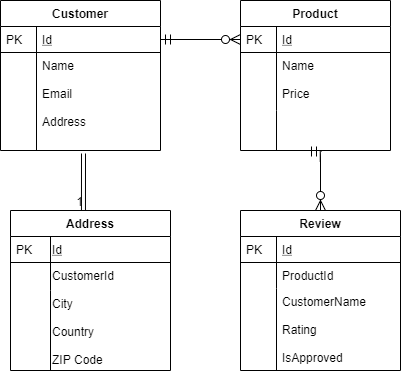
Lets re−write the Customer document with other dependent class, which will be as follows.
Root Document Customer
import java.util.ArrayList;
import java.util.List;
import org.springframework.data.annotation.Id;
import org.springframework.data.mongodb.core.index.Indexed;
import org.springframework.data.mongodb.core.mapping.Document;
@Document
public class Customer {
   @Id
   private String id;
   private String name;
   @Indexed(unique = true)
   private String email;
   private Address address;
   private List<Product> products;
   public Customer() {
      this.products = new ArrayList<Product>();
   }
   public Customer(String name, String email, Address address, List<Produc
   t> products) {
      this.name = name;
      this.email = email;
      this.address = address;
      this.products = products;
   }
   public String getId() {
      return id;
   }
   public void setId(String id) {
      this.id = id;
   }
   public String getName() {
      return name;
   }
   public void setName(String name) {
      this.name = name;
   }
   public String getEmail() {
   return email;
   }
   public void setEmail(String email) {
      this.email = email;
   }
   public Address getAddress() {
      return address;
   }
   public void setAddress(Address address) {
      this.address = address;
   }
   public List<Product> getProducts() {
      return products;
   }
   public void setProducts(List<Product> products) {
      this.products = products;
   }
   @Override
   public String toString() {
      return "Customer [id=" + id + ", name=" + name + ", email=" + email
      + ", address=" + address + ", products="
      + products + "]";
   }
}
Address class
public class Address {
   private String city;
   private String country;
   private Integer zipCode;
   public Address() {
   }
   public Address(String city, String country, Integer zipCode) {
      this.city = city;
      this.country = country;
      this.zipCode = zipCode;
   }
   public String getCity() {
      return city;
   }
   public void setCity(String city) {
      this.city = city;
   }
   public String getCountry() {
      return country;
   }
   public void setCountry(String country) {
      this.country = country;
   }
   public Integer getZipCode() {
      return zipCode;
   }
   public void setZipCode(Integer zipCode) {
      this.zipCode = zipCode;
   }
   @Override
   public String toString() {
      return "Address [city=" + city + ", country=" + country + ", zipCod
      e=" + zipCode + "]";
   }
}
Product Document
import java.util.List;
import org.springframework.data.annotation.Id;
import org.springframework.data.mongodb.core.mapping.Document;
@Document
public class Product {
   @Id
   private String id;
   private String name;
   private Double price;
   private List<Review> reviews;
   public Product() {
   }
   public Product(String name, Double price, List<Review> reviews) {
      this.name = name;
      this.price = price;
      this.reviews = reviews;
   }
   public String getName() {
      return name;
   }
   public void setName(String name) {
      this.name = name;
   }
   public Double getPrice() {
      return price;
   }
   public void setPrice(Double price) {
      this.price = price;
   }
   public List<Review> getReviews() {
      return reviews;
   }
   public void setReviews(List<Review> reviews) {
      this.reviews = reviews;
   }
   public String getId() {
      return id;
   }
   public void setId(String id) {
      this.id = id;
   }
   @Override
   public String toString() {
      return "Product [id=" + id + ", name=" + name + ", price=" + price
      + ", reviews=" + reviews + "]";
   }
}
Review Class
public class Review {
   private String customerName;
   private Integer rating;
   private boolean approved;
   public Review() {
   }
   public Review(String customerName, Integer rating, boolean approved) {
      this.customerName = customerName;
      this.rating = rating;
      this.approved = approved;
   }
   public String getCustomerName() {
      return customerName;
   }
   public void setCustomerName(String customerName) {
      this.customerName = customerName;
   }
   public Integer getRating() {
      return rating;
   }
   public void setRating(Integer rating) {
      this.rating = rating;
   }
   public boolean isApproved() {
      return approved;
   }
   public void setApproved(boolean approved) {
      this.approved = approved;
   }
   @Override
   public String toString() {
      return "Review [ customerName=" + customerName + ", rating=" + rati
      ng + ", approved=" + approved + "]";
   }
}
Customer Repository
import java.util.Optional;
import org.springframework.data.mongodb.repository.MongoRepository;
import com.tutorialspoint.document.Customer;
public interface CustomerRepository extends MongoRepository<Customer, Strin
g> {
   Optional<Customer> findByEmail(String email);
}
Product Repository
import org.springframework.data.mongodb.repository.MongoRepository;
import com.tutorialspoint.document.Product;
public interface ProductRepository extends MongoRepository<Product, String>
{
   Product findByName(String string);
}
If you observe, we have not created a repository for Address and Reviews, because Spring Data MongoDb is a part of the Spring Data project and the complete Spring data project work on the aggregate root principle of DDD. Since the address is the part of the Customer document, and Review is part of the Product document, so we are required to create one repository per aggregate root. If we want we can skip the Product repository as well, and it still works.
In the above long list of documents, unlike our JPA based application we have not used any annotation for representing a relationship like @OneToOne or @OneToMany. Spring Data MongoDB doesnt entertain such annotations, and it understand the relationship based on context. We can find in the above documents that a customer can have an address and many products. Also a product could have many reviews. Lets try persisting some data and fetching it out. To do so we will be using CommandLineRunner.
import java.util.Arrays;

import org.springframework.boot.CommandLineRunner;
import org.springframework.boot.SpringApplication;
import org.springframework.boot.autoconfigure.SpringBootApplication;
import org.springframework.context.annotation.Bean;
import com.tutorialspoint.document.Address;
import com.tutorialspoint.document.Customer;
import com.tutorialspoint.document.Product;
import com.tutorialspoint.document.Review;
import com.tutorialspoint.repository.CustomerRepository;
import com.tutorialspoint.repository.ProductRepository;
@SpringBootApplication
public class SpringDataMongoDbApplication {
   public static void main(String[] args) {
      SpringApplication.run(SpringDataMongoDbApplication.class, args);
   }
   @Bean
   CommandLineRunner commandLineRunner(CustomerRepository customerReposito
   ry, ProductRepository productRepository) {
      return new CommandLineRunner() {
         @Override
         public void run(String... args) throws Exception {
         // Persist a product with review
            Product product = new Product("IpHone", 60000.0d, Arrays.as
            List(new Review("asad", 4, true)));
            product = productRepository.save(product);
            // Persist a customer with address and product
            Customer customer = new Customer("Asad Ali", "asad@gmail.co
            m", new Address("Hyd", "India", 122001),
            Arrays.asList(product));
            customer = customerRepository.save(customer);
            // Fetch the customer
            System.out.println(customer);
         }
      };
   }
}
OUTPUT
Customer [id=5eb327768442b8385bd4bb1a, name=Asad Ali, email=asad@gmail.com,
address=Address [city=Hyd, country=India, zipCode=122001], products=[Product
[id=5eb327768442b8385bd4bb19, name=IpHone, price=60000.0, reviews=[Review [
customerName=asad, rating=4, approved=true]]]]]
Lets perform one more insert and retrieve operation to the above documents:
@Bean
CommandLineRunner commandLineRunner(CustomerRepository customerReposito
ry, ProductRepository productRepository) {
   return new CommandLineRunner() {
      @Override
      public void run(String... args) throws Exception {
         Product samsung = new Product("Samsung", 50000.0d, Arrays.a
         sList(new Review("ali", 5, true)));
         samsung = productRepository.save(samsung);
         //Fetch Old record with name Iphone
         Product product = productRepository.findByName("IpHone");
         // Save multiple two products for this user
         Customer customer = new Customer("Ali", "ali@gmail.com", ne
         w Address("Gurgaon", "India", 122018),
         Arrays.asList(samsung, product));
         customer = customerRepository.save(customer);
         System.out.println(customer);
         // Find by Email
         System.out.println(customerRepository.findByEmail("asad@gma
         il.com"));
      }
   };
}
OUTPUT
Customer [id=5eb32bd590ac0c3e200677ea, name=Ali, email=ali@gmail.com,
address=Address [city=Gurgaon, country=India, zipCode=122018], products=[Product
[id=5eb32bd490ac0c3e200677e9, name=Samsung, price=50000.0, reviews=[Review [
customerName=ali, rating=5, approved=true]]], Product [id=5eb327768442b8385bd4bb19,
name=IpHone, price=60000.0, reviews=[Review [ customerName=asad, rating=4,
approved=true]]]]]
Optional[Customer [id=5eb327768442b8385bd4bb1a, name=Asad Ali, email=asad@gmail.com,
address=Address [city=Hyd, country=India, zipCode=122001], products=[Product
[id=5eb327768442b8385bd4bb19, name=IpHone, price=60000.0, reviews=[Review [
customerName=asad, rating=4, approved=true]]]]]]
