- Spring Data Tutorial - Home
- Spring Data Apache Solr
- Overview
- Prerequisites
- Introduction
- What is Apache Solr?
- Getting Started
- Querying
- Features
- Conclusion
- Spring Data Cassandra
- Overview
- Prerequisites
- Introduction
- What is Cassandra?
- Getting Started
- Annotation AllowFiltering with Query Methods
- Partition and Clustering
- Coding hands-on on Partitioning and Clustering
- Features
- Conclusion
- Spring Data Couchbase
- Overview
- Prerequisites
- Introduction
- What is Couchbase?
- Getting Started
- Views
- CouchbaseTemplate
- Hands-on using CouchbaseTemplate
- Features
- Conclusion
- Spring Data Elasticsearch
- Overview
- Prerequisites
- Introduction
- What is ElasticSearch?
- Getting Started
- Querying
- Configuring ElasticsearchOperations bean
- Features
- Conclusion
- Spring Data JDBC
- Introduction
- Need of Spring Data JDBC
- Features
- Domain-Driven Design
- Prerequisites
- Getting Started
- Conclusion
- Spring Data JPA
- Background
- Introduction
- Prerequisites
- Getting Started
- Features
- Conclusion
- Spring Data MongoDB
- Overview
- Prerequisites
- Introduction
- What is MongoDB?
- Getting Started
- Query Methods
- Annotations
- Exposing REST end points
- Relationship
- Conclusion
- Spring Data Redis
- Overview
- Prerequisites
- Introduction
- What is Redis?
- Redis Java Clients
- Getting Started
- Features
- Conclusion
- Spring Data REST
- Background
- Introduction to Spring Data REST
- Prerequisites
- Getting Started
- Features
- Conclusion
- Spring Data Tutorial Useful Resources
- Spring Data Tutorial - Quick Guide
- Spring Data Tutorial - Useful Resources
- Spring Data Tutorial - Discussion
What is MongoDB
MongoDB is a document−based NoSQL database. It stores the information in key−value format, more specifically like a JSON document. We use MongoDB for storing a high volume of data. On a high−level, MongoDB uses terms like Database, Collection, Document, and Field.
Database −
It is equivalent to the RDBMS database which acts as a container for collections.
Collection −
It exists within a database and it is equivalent to the tables in RDBMS.
Document −
It is a equivalent to a row in RDBMS. A document in MongoDB collection is a single record.
Field −
It is an equivalent to a column in RDBMS having a key−value pair. A document could have zero or more fields. To learn more about MongoDB, visit our tutorials by clicking here.
Installation Guide
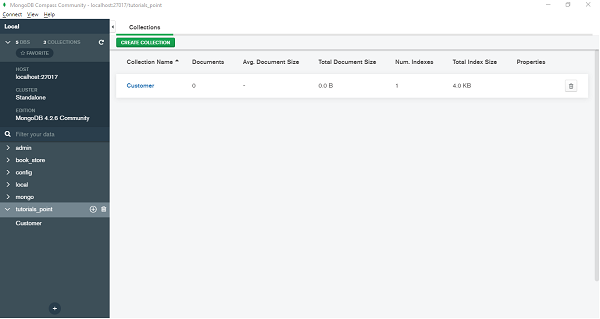
Since this tutorial will be working extensively with MongoDB. Make sure it is installed on your machine, If not you can install it from here based on your system configuration. While installing make sure to install the Compass tool. It is a client with a nice GUI to interact with MongoDB server. Once it is installed you can create a database (say tutorials_point), by providing a collection name (say customers) through Compass GUI, finally it will look like −