- Spring Data Tutorial - Home
- Spring Data Apache Solr
- Overview
- Prerequisites
- Introduction
- What is Apache Solr?
- Getting Started
- Querying
- Features
- Conclusion
- Spring Data Cassandra
- Overview
- Prerequisites
- Introduction
- What is Cassandra?
- Getting Started
- Annotation AllowFiltering with Query Methods
- Partition and Clustering
- Coding hands-on on Partitioning and Clustering
- Features
- Conclusion
- Spring Data Couchbase
- Overview
- Prerequisites
- Introduction
- What is Couchbase?
- Getting Started
- Views
- CouchbaseTemplate
- Hands-on using CouchbaseTemplate
- Features
- Conclusion
- Spring Data Elasticsearch
- Overview
- Prerequisites
- Introduction
- What is ElasticSearch?
- Getting Started
- Querying
- Configuring ElasticsearchOperations bean
- Features
- Conclusion
- Spring Data JDBC
- Introduction
- Need of Spring Data JDBC
- Features
- Domain-Driven Design
- Prerequisites
- Getting Started
- Conclusion
- Spring Data JPA
- Background
- Introduction
- Prerequisites
- Getting Started
- Features
- Conclusion
- Spring Data MongoDB
- Overview
- Prerequisites
- Introduction
- What is MongoDB?
- Getting Started
- Query Methods
- Annotations
- Exposing REST end points
- Relationship
- Conclusion
- Spring Data Redis
- Overview
- Prerequisites
- Introduction
- What is Redis?
- Redis Java Clients
- Getting Started
- Features
- Conclusion
- Spring Data REST
- Background
- Introduction to Spring Data REST
- Prerequisites
- Getting Started
- Features
- Conclusion
- Spring Data Tutorial Useful Resources
- Spring Data Tutorial - Quick Guide
- Spring Data Tutorial - Useful Resources
- Spring Data Tutorial - Discussion
What is Couchbase
Couchbase is an open-source document−oriented NoSQL database. It stores the information in key−value format, more specifically like a JSON document. We use Couchbase for horizontal scaling. To learn more about Couchbase, visit the official site by clicking here.
Installation Guide
Since this tutorial will be working extensively with Couchbase. Make sure it is installed on your machine, If not you can install it from here based on your system configuration.
Steps Post Installation
Once it is installed, it will navigate us to the URL − http://localhost:8091/index.html
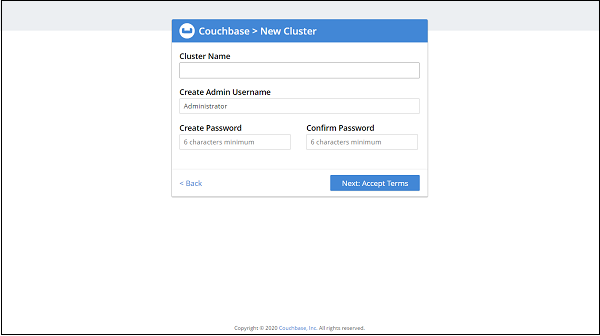
Create Cluster
It will ask to set up the cluster, Click to create a new one, It will look like: Now, It −
Now, It will ask to accept Terms and condition −
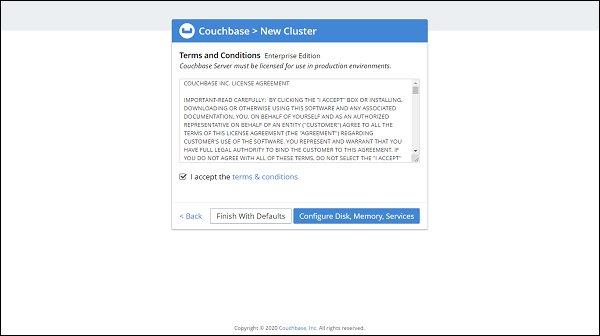
Accept it and click on Configure Disk, Memory, Services (You can also click on Finish with defaults, if don't want to configure).
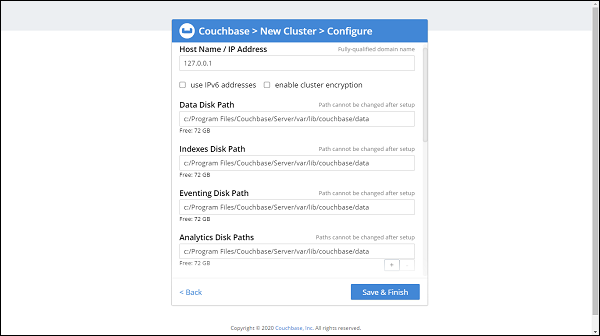
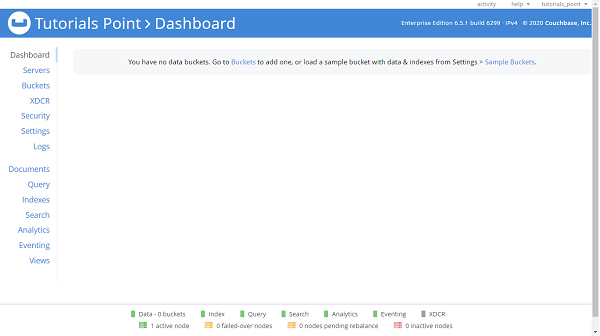
See if configurations like disk and memory need to be changed, Once done click on Save and Finish. The final screen will be −
Create Bucket
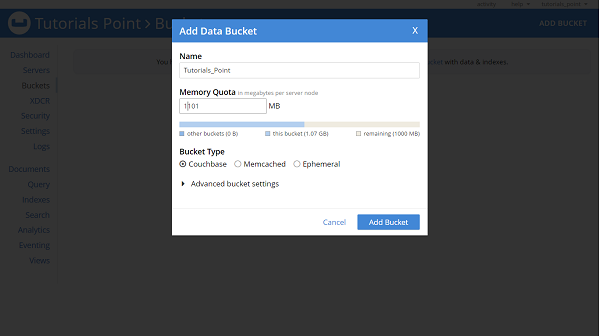
Once the cluster setup is done we need to create a bucket. Click on Buckets and then click on ADD BUCKET. Enter a name for Bucket, Here we have given Tutorials_Point
What is Bucket in the Couchbase?
A Bucket in the Couchbase is similar to the Table in RDBMS, or equivalent to a Collection in the MongoDB database. The bucket keeps holds of documents.
Create Primary Index
By default custom queries will be processed using the N1QL engine, If we are using Couchbase 4.0 or later. We must need to create a primary index on the bucket, to add support for N1QL. To create primary index Click on Query and then type below command in Query Editor
CREATE PRIMARY INDEX ON Tutorials_Point USING GSI;
In the above command, Tutorials_Point is our Bucket name, GSI is a global secondary index, and GSI is majorly used for optimizing Adhoc N1QL queries.
