- Spring Data Tutorial - Home
- Spring Data Apache Solr
- Overview
- Prerequisites
- Introduction
- What is Apache Solr?
- Getting Started
- Querying
- Features
- Conclusion
- Spring Data Cassandra
- Overview
- Prerequisites
- Introduction
- What is Cassandra?
- Getting Started
- Annotation AllowFiltering with Query Methods
- Partition and Clustering
- Coding hands-on on Partitioning and Clustering
- Features
- Conclusion
- Spring Data Couchbase
- Overview
- Prerequisites
- Introduction
- What is Couchbase?
- Getting Started
- Views
- CouchbaseTemplate
- Hands-on using CouchbaseTemplate
- Features
- Conclusion
- Spring Data Elasticsearch
- Overview
- Prerequisites
- Introduction
- What is ElasticSearch?
- Getting Started
- Querying
- Configuring ElasticsearchOperations bean
- Features
- Conclusion
- Spring Data JDBC
- Introduction
- Need of Spring Data JDBC
- Features
- Domain-Driven Design
- Prerequisites
- Getting Started
- Conclusion
- Spring Data JPA
- Background
- Introduction
- Prerequisites
- Getting Started
- Features
- Conclusion
- Spring Data MongoDB
- Overview
- Prerequisites
- Introduction
- What is MongoDB?
- Getting Started
- Query Methods
- Annotations
- Exposing REST end points
- Relationship
- Conclusion
- Spring Data Redis
- Overview
- Prerequisites
- Introduction
- What is Redis?
- Redis Java Clients
- Getting Started
- Features
- Conclusion
- Spring Data REST
- Background
- Introduction to Spring Data REST
- Prerequisites
- Getting Started
- Features
- Conclusion
- Spring Data Tutorial Useful Resources
- Spring Data Tutorial - Quick Guide
- Spring Data Tutorial - Useful Resources
- Spring Data Tutorial - Discussion
Spring Data Couchbase - Views
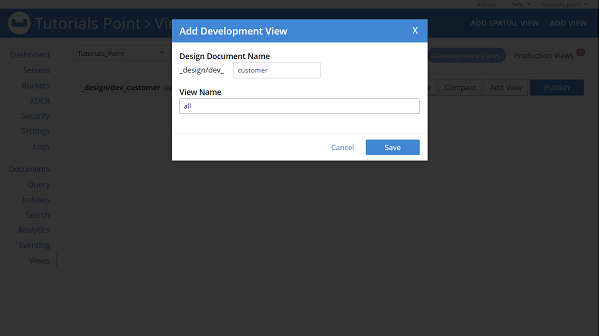
We need to create a Couchbase design document and Views in our bucket. Our document class name will be a design document name but in lowerCamelCase format( Here its customer). To support the findAll repository method we need to create a view named all. To create design documents and views, Go to the Couchbase server dashboard, and click on Views, followed by ADD VIEW.
Enter the details as mentioned in the below image.
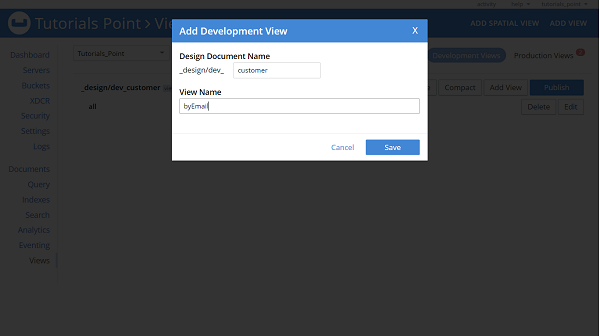
If we want to create a view for any custom method such as findBySalary or findByEmail then it needs to be created in the same way, as follows.
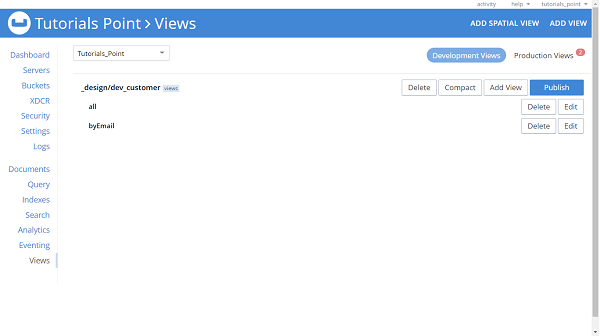
Similarly, we can create views for all other custom methods of our repository. Finally, it will look like this −
If we want, we can create or modify the views using Map functions, to do this click on edit, and enter map function. Lets say we want to create views for findByName, then our equivalent map function will be −
function (doc, meta) {
   if(doc._class == "com.tutorialspoint.couchbase.document.Customer"
   && doc.name) {
      emit(doc.name, null);
   }
}
For field salary and method findBySalary it will be −
function (doc, meta) {
   if(doc._class == "com.tutorialspoint.couchbase.document.Customer"
   && doc.salary) {
      emit(doc.salary, null);
   }
}
Views based custom methods inside repository must be annotated with the annotation @View as given below −
@View
List<Customer> findByName(String name);
Creation of view are optional if we are using Couchbase server 4.0 or later, otherwise it is mandatory.
