- Spring Data Tutorial - Home
- Spring Data Apache Solr
- Overview
- Prerequisites
- Introduction
- What is Apache Solr?
- Getting Started
- Querying
- Features
- Conclusion
- Spring Data Cassandra
- Overview
- Prerequisites
- Introduction
- What is Cassandra?
- Getting Started
- Annotation AllowFiltering with Query Methods
- Partition and Clustering
- Coding hands-on on Partitioning and Clustering
- Features
- Conclusion
- Spring Data Couchbase
- Overview
- Prerequisites
- Introduction
- What is Couchbase?
- Getting Started
- Views
- CouchbaseTemplate
- Hands-on using CouchbaseTemplate
- Features
- Conclusion
- Spring Data Elasticsearch
- Overview
- Prerequisites
- Introduction
- What is ElasticSearch?
- Getting Started
- Querying
- Configuring ElasticsearchOperations bean
- Features
- Conclusion
- Spring Data JDBC
- Introduction
- Need of Spring Data JDBC
- Features
- Domain-Driven Design
- Prerequisites
- Getting Started
- Conclusion
- Spring Data JPA
- Background
- Introduction
- Prerequisites
- Getting Started
- Features
- Conclusion
- Spring Data MongoDB
- Overview
- Prerequisites
- Introduction
- What is MongoDB?
- Getting Started
- Query Methods
- Annotations
- Exposing REST end points
- Relationship
- Conclusion
- Spring Data Redis
- Overview
- Prerequisites
- Introduction
- What is Redis?
- Redis Java Clients
- Getting Started
- Features
- Conclusion
- Spring Data REST
- Background
- Introduction to Spring Data REST
- Prerequisites
- Getting Started
- Features
- Conclusion
- Spring Data Tutorial Useful Resources
- Spring Data Tutorial - Quick Guide
- Spring Data Tutorial - Useful Resources
- Spring Data Tutorial - Discussion
Spring Data Elasticsearch - Getting Started
We can create a Spring project in our favourite IDE. You can create a Spring or Spring Boot based project through IDE. The code sample and examples used in this tutorial has been created through Spring Initializr. If you have created normal Maven or Gradle projects then add below dependencies (i.e. Spring Web and Spring Data Elasticsearch (Access+Driver) to your pom or Gradle file.
For Maven
<dependency>
   <groupId>org.springframework.boot</groupId>
   <artifactId>spring-boot-starter-web</artifactId>
</dependency>
<dependency>
   <groupId>org.springframework.boot</groupId>
   <artifactId>spring-boot-starter-data-elasticsearch</artifactId>
</dependency>
Above are two Spring Web and Spring Data Elasticsearch dependences. If you have created your project as Spring Boot or Starting with Spring Initializr then your final list of dependencies will look like this −
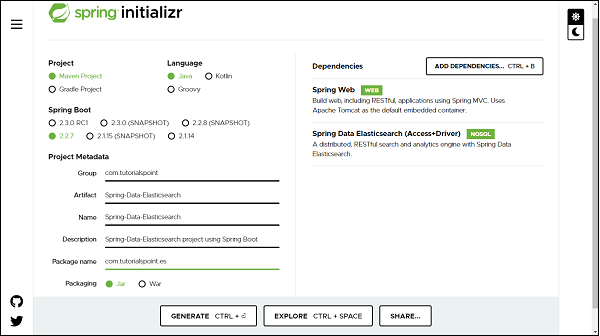
The following is our final pom.xml file that is created when you choose Maven −
<?xml version="1.0" encoding="UTF-8"?>
<project xmlns="http://maven.apache.org/POM/4.0.0" xmlns:xsi="http://www.w3.org/2001/XMLSchema-instance"
xsi:schemaLocation="http://maven.apache.org/POM/4.0.0 https://maven.apache.org/xsd/maven-4.0.0.xsd">
   <modelVersion>4.0.0</modelVersion>
   <parent>
      <groupId>org.springframework.boot</groupId>
      <artifactId>spring-boot-starter-parent</artifactId>
      <version>2.2.7.RELEASE</version>
      <relativePath/> <!-- lookup parent from repository -->
   </parent>
   <groupId>com.tutorialspoint</groupId>
   <artifactId>Spring-Data-Elasticsearch</artifactId>
   <version>0.0.1-SNAPSHOT</version>
   <name>Spring-Data-Elasticsearch</name>
   <description>Spring Data Elasticsearchproject using Spring Boot</description>
   <properties>
      <java.version>1.8</java.version>
   </properties>
   <dependencies>
   <dependency>
      <groupId>org.springframework.boot</groupId>
      <artifactId>spring-boot-starter-data-elasticsearch</artifactId>
   </dependency>
   <dependency>
      <groupId>org.springframework.boot</groupId>
      <artifactId>spring-boot-starter-web</artifactId>
   </dependency>
   <dependency>
      <groupId>org.springframework.boot</groupId>
      <artifactId>spring-boot-starter-test</artifactId>
      <scope>test</scope>
      <exclusions>
         <exclusion>
            <groupId>org.junit.vintage</groupId>
            <artifactId>junit-vintage-engine</artifactId>
         </exclusion>
      </exclusions>
   </dependency>
   </dependencies>
   <build>
      <plugins>
         <plugin>
            <groupId>org.springframework.boot</groupId>
            <artifactId>spring-boot-maven-plugin</artifactId>
         </plugin>
      </plugins>
   </build>
</project>
Creating a Customer Entity
An entity in Elasticsearch context is called Document. Lets create it using annotation @Document from org.springframework.data.elasticsearch.annotations.
import java.util.List;
import org.springframework.data.annotation.Id;
import org.springframework.data.elasticsearch.annotations.Document;
import org.springframework.data.elasticsearch.annotations.Field;
import org.springframework.data.elasticsearch.annotations.FieldType;
@Document(indexName = "tutorials_point", type = "customer", shards = 3)
public class Customer {
   @Id
   private Long id;
   private String name;
   private String email;
   private Double salary;
   @Field(type = FieldType.Nested, includeInParent = true)
   private List<Address> addresses;
   public Long getId() {
      return id;
   }
   public void setId(Long id) {
      this.id = id;
   }
   public String getName() {
      return name;
   }
   public void setName(String name) {
      this.name = name;
   }
   public String getEmail() {
      return email;
   }
   public void setEmail(String email) {
      this.email = email;
   }
   public Double getSalary() {
      return salary;
   }
   public void setSalary(Double salary) {
      this.salary = salary;
   }
   public List<Address> getAddresses() {
      return addresses;
   }
   public void setAddresses(List<Address> addresses) {
      this.addresses = addresses;
   }
   @Override
   public String toString() {
      return "Customer [id=" + id + ", name=" + name + ", email=" + email + ", salary=" + salary + ", addresses="
      + addresses + "]";
   }
}
We can observe that the annotation Document contains some other properties such as an index, type and shard. It simply means that the instance of Customer class will be stored in the Elasticsearch under an index called tutorials_point, and document type will be customer with sharding value 3. Coming to the field of Customer class, it has @Id from org.springframework.data.annotation and a new annotation called @Field from org.springframework.data.elasticsearch.annotations. It has two attributes defined first one is type and other one is includeInParent. Which means, at the time of indexing in elastic search, the object of the associated class Address will be embedded in Customer.
Creating a Customer Repository
Repository creation is similar to other Spring Data projects, the only difference here is that, we need to extend ElasticsearchRepository which works on top of ElasticsearchCrudRepository which in turn works on top of PagingAndSortingRepository.
import org.springframework.data.elasticsearch.repository.ElasticsearchRepository;
import org.springframework.stereotype.Repository;
import com.tutorialspoint.es.document.Customer;
@Repository
public interface CustomerRepository extends ElasticsearchRepository<Customer, Long> {
}
Accessing Data Using ElasticSearch from Customer Repository
Lets define a controller to perform some read and write operation to the Elastic search through REST APIs.
import java.util.Optional;
import org.springframework.beans.factory.annotation.Autowired;
import org.springframework.web.bind.annotation.DeleteMapping;
import org.springframework.web.bind.annotation.GetMapping;
import org.springframework.web.bind.annotation.PathVariable;
import org.springframework.web.bind.annotation.PostMapping;
import org.springframework.web.bind.annotation.RequestBody;
import org.springframework.web.bind.annotation.RequestMapping;
import org.springframework.web.bind.annotation.RestController;
import com.tutorialspoint.es.document.Customer;
import com.tutorialspoint.es.service.CustomerService;
@RestController
@RequestMapping("/rest")
public class CustomerController {
   @Autowired
   private CustomerService customerService;
   // Persisting a customer to ElasticSearch
   @PostMapping("/customer/save")
   public Customer persistCustomer(@RequestBody Customer customer) {
      return customerService.save(customer);
   }
   // Retrieving a customer from ElasticSearch
   @GetMapping("/customer/find-by-id/{id}")
   public Customer fetchCustomer(@PathVariable Long id) {
      Optional<Customer> customerOpt = customerService.findById(id);
      return customerOpt.isPresent() ? customerOpt.get() : null;
   }
   // Deleting a customer from elasticsearch
   @DeleteMapping("/customer/delete/{id}")
   public void deleteObject(@PathVariable Long id) {
      customerService.deleteById(id);
   }
}
Lets Define a Service for this.
import java.util.Optional;
import org.springframework.beans.factory.annotation.Autowired;
import org.springframework.stereotype.Service;
import com.tutorialspoint.es.document.Customer;
import com.tutorialspoint.es.repository.CustomerRepository;
import com.tutorialspoint.es.service.CustomerService;
@Service
public class CustomerServiceImpl implements CustomerService {
   @Autowired
   private CustomerRepository customerRepository;
   @Override
   public Customer save(Customer customer) {
      return customer = customerRepository.save(customer);
   }
   @Override
   public Optional<Customer> findById(Long id) {
      return customerRepository.findById(id);
   }
   @Override
   public void deleteById(Long id) {
      customerRepository.deleteById(id);
   }
}
Persisting an Object
Since our code is ready, we can launch our application, make sure Elasticsearch server is configured, installed and running on machine. Lets try pushing some customer details into the elastic search through rest end points http://localhost:8080/rest/customer/save. It will be a POST call with below body −
{
   "id": 1,
   "name": "Jack",
   "email": "jack@yahoo.com",
   "salary": 18100.0,
   "addresses": [
      {
         "city": "Mumbai",
         "country": "India",
         "zipCode": 111111
      }
   ]
}
Congratulation, it has been pushed and we received 200[OK] as response. Lets add one more −
{
   "id": 2,
   "name": "Ma",
   "email": "ma@yahoo.com",
   "salary": 38100.0,
   "addresses": [
      {
         "city": "Chennai",
         "country": "India",
         "zipCode": 111111
      }
   ]
}
and it has been pushed.
Retrieving an Object
Lets fetch one of the above customer and check, Our API end point will be http://localhost:8080/rest/customer/find-by-id/1, Here wwe are fetching by ID and the customer with id 1. RESPONSE −
{
   "id": 1,
   "name": "Jack",
   "email": "jack@yahoo.com",
   "salary": 18100.0,
   "addresses": [
      {
         "city": "Mumbai",
         "country": "India",
         "zipCode": 111111
      }
   ]
}
Deleting an Object
Lets delete a customer with id 2, our end point will be http://localhost:8080/rest/customer/delete/2. It will be a DELETE call. RESPONSE: 200 [OK]. If we try fetching it out through GET, we wont be getting any data.
