
- SolidJS - Home
- SolidJS - Cheatsheet
- SolidJS - vs Vue, and Svelte
- SolidJS - Environment Setup
- SolidJS - First Solid App
- SolidJS - JSX Fundamentals
- SolidJS - Fine-grained Reactivity
- Building with Components
- SolidJS - Function Components
- SolidJS - Styling Your Components
- SolidJS - Conditional Rendering
- SolidJS - Dynamic Lists
- SolidJS - Passing Data
- SolidJS - Event Handling
- Routing, Data, and Async Operations
- SolidJS - Setting up Routes
- SolidJS - Input Handling
- SolidJS - Input Types
- SolidJS - Form Handling
- SolidJS Useful Resources
- SolidJS - Useful Resources
- SolidJS - Discussion
SolidJS - Setting up routes
Routing allows our SPAs (Single Page Applications) to display different content based on the URL, without full page reloads. It is basically a process of mapping different URLs to different components in an application, like when a user wants to move from the Home page to the other pages, just the content changes, not the entire page. In SolidJS, routing helps us develop fast and responsive applications.
SolidJS uses the Solid Router library, which provides declarative routing, dynamic routes, navigation components, and programmatic navigation.
Installing the Router Package
To install the router package, these steps will guide you through the whole process. Please follow the steps given below to set up your first SolidJS application.
# Using npm
npm install @solidjs/router

# Using yarn
yarn add @solidjs/router

# Using pnpm
pnpm add @solidjs/router
Project Structure
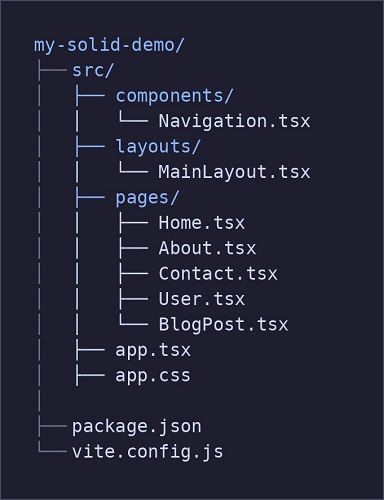
After setting up, you will have this structure −
Basic Route Configuration
Let us start with a basic routing setup. Each route corresponds to a component that is rendered when the URL matches the defined path.
Creating Page Components
First, create individual page components inside the src/pages directory.
Home Page
Create a Home page for the application that will be used as the landing page. Paste the code in the given path src/pages/Home.tsx (make sure to create the file as Home.tsx) −
import { Component } from 'solid-js'

const Home: Component = () => {
  return (
    <div>
      <h1>Welcome to the Home Page</h1>
      <p>This is the Home page of our application.</p>
    </div>
  )
}

export default Home
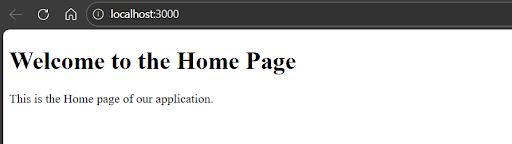
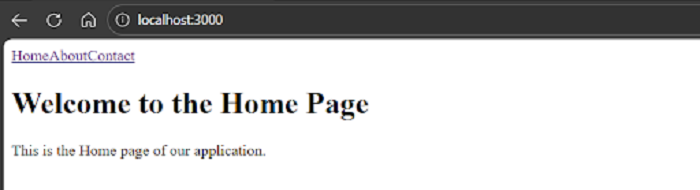
The Home page will look like this −
About Page
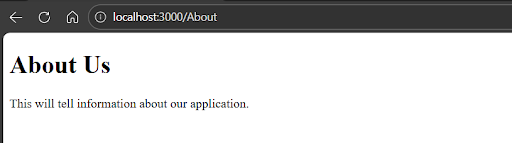
Then, we will create another page as the About Us page for the application. Paste the code in the given path src/pages/About.tsx (make sure to create the file as About.tsx) and then search for http://localhost:3000/About, it will show your page −
import { Component } from 'solid-js'

const About: Component = () => {
  return (
    <div>
      <h1>About Us</h1>
      <p>This will tell information about our application.</p>
    </div>
  )
}

export default About
The About Page will look like this −
Contact Page
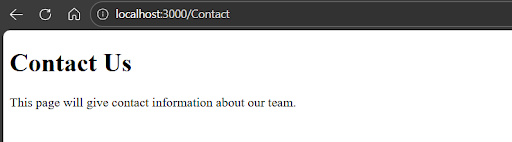
Lastly, we will create the Contact page for the application. Paste the code in the given path src/pages/Contact.tsx (make sure to create the file as Contact.tsx) and then search for http://localhost:3000/Contact, it will show your page −
import { Component } from 'solid-js'

const Contact: Component = () => {
  return (
    <div>
      <h1>Contact Us</h1>
      <p>This page will give contact information about our team.</p>
    </div>
  )
}

export default Contact
The Contact page will look like this −
Configuring Routes
Now, define routes in the main app.tsx file using the Router and Route components.
import { Router, Route } from "@solidjs/router";
import Home from "./pages/Home";
import About from "./pages/About";
import Contact from "./pages/Contact";

function App() {
  return (
    <Router>
      <Route path="/" component={Home} />
      <Route path="/about" component={About} />
      <Route path="/contact" component={Contact} />
    </Router>
  );
}

export default App;
Navigation Components
Solid Router provides the <A> component, which works like an anchor tag but enables client-side navigation without reloading the page.
Using the <A> Component
In the components folder, we will make the Navigation.tsx file and paste the code in the given path src/components/Navigation.tsx −
import { A } from '@solidjs/router'

export default function Navigation() {
  return (
    <nav class="nav">
      <A href="/" activeClass="active">
        Home
      </A>
      <A href="/about" activeClass="active">
        About
      </A>
      <A href="/contact" activeClass="active">
        Contact
      </A>
    </nav>
  )
}
Create a Layout component
Inside the src folder, create a folder named layouts and create a file named MainLayout.tsx. Paste the code in the given path src/layouts/MainLayout.tsx −
import { ParentComponent } from 'solid-js'
import Navigation from '../components/Navigation'

const MainLayout: ParentComponent = props => {
  return (
    <>
      <Navigation />
      {props.children}
    </>
  )
}

export default MainLayout
Also to give
Using Navigation in App
The Navigation component can be placed above all routes to create a common layout. Updated app.tsx file with the given code −
import { Component } from 'solid-js'
import { Router, Route } from '@solidjs/router'

import MainLayout from './layouts/MainLayout'
import Home from './pages/Home'
import About from './pages/About'
import Contact from './pages/Contact'

const App: Component = () => {
  return (
    <Router>
      <Route path="/" component={MainLayout}>
        <Route path="/" component={Home} />
        <Route path="/about" component={About} />
        <Route path="/contact" component={Contact} />
      </Route>
    </Router>
  )
}

export default App
Programmatic Navigation
For navigation based on events like login or form submission, Solid Router provides the useNavigate hook.
import { useNavigate } from "@solidjs/router";

export default function LoginButton() {
  const navigate = useNavigate();

  const handleLogin = () => {
    console.log("Logging in...");
    navigate("/dashboard");
  };

  return (
    <button onClick={handleLogin}>
      Login
    </button>
  );
}
Dynamic Routes
Dynamic routes allow URLs with parameters. These parameters can be accessed using the useParams hook.
User Profile Route
We will create a page named User for routing in the pages folder. Paste the code in the given path src/pages/User.tsx (make sure to create the file as User.tsx), add the User page route in the app.tsx, also update the Navigation.tsx with <A href="/user/5">User</A> to display it on the page and then search for http://localhost:3000/user/5, it will show your page −
import { useParams } from "@solidjs/router";

export default function User() {
  const params = useParams();

  return (
    <div>
      <h1>User Profile</h1>
      <p>User ID: {params.id}</p>
    </div>
  );
}
In the output, we can see that when we clicked on the User link, we accessed the user profile −

Blog Post Route
To add the blog post, we will create the file name Blogpost in the pages folder. Paste the code in the given path src/pages/BlogPost.tsx (make sure to create the file as BlogPost.tsx). update the Navigation.tsx with <A href="/blog/1">Blog</A> to display it on the page and then search for http://localhost:3000/blog/1, it will show your page −
// src/pages/BlogPost.tsx
import { useParams } from "@solidjs/router";
import { createSignal, onMount } from "solid-js";

export default function BlogPost() {
  const params = useParams();
  const [post, setPost] = createSignal(null);

  onMount(async () => {
    const response = await fetch(
      `https://jsonplaceholder.typicode.com/posts/${params.id}`
    );
    setPost(await response.json());
  });

  return (
    <div>
      <h1>{post()?.title}</h1>
      <p>{post()?.body}</p>
    </div>
  );
}
The blog page will look like this −

Registering Dynamic Routes
We will add the User page and BlogPost page route in the app.tsx file −
<Route path="/user/:id" component={User} />
<Route path="/blog/:id" component={BlogPost} />
With this setup, SolidJS provides fast, declarative, and flexible routing for modern web applications.
Nested Routes
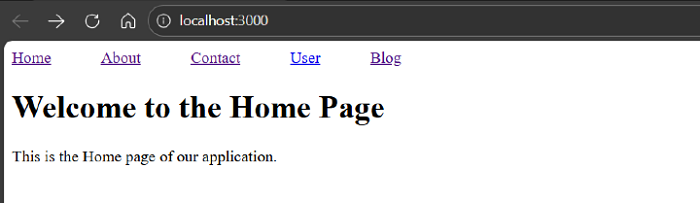
The nested routes help us to create layouts with child routes. Here we have created MainLayout as the parent component and the other routes as child components. Paste the code into the app.tsx file −
import { Component } from 'solid-js'
import { Router, Route } from '@solidjs/router'
import './app.css'
import MainLayout from './layouts/MainLayout'
import Home from './pages/Home'
import About from './pages/About'
import Contact from './pages/Contact'
import User from './pages/User'
import BlogPost from './pages/BlogPost'

const App: Component = () => {
  return (
    <Router>
      {/* Parent Layout Route */}
      <Route path="/" component={MainLayout}>
        {/* Child Routes */}
        <Route path="/" component={Home} />
        <Route path="/about" component={About} />
        <Route path="/contact" component={Contact} />
        <Route path="/user/:id" component={User} />
        <Route path="/blog/:id" component={BlogPost} />
      </Route>
    </Router>
  )
}

export default App
Also, to give some spacing between the routes, we will paste the code into the app.css file in the given path src/app.css −
.heading {
  color: black;
  text-align: center;
  padding: 10px 20px;
  border-radius: 8px;
  background-color: green;
}
.nav a {
  margin-right: 50px;
}
In the upcoming chapters, we will cover the basics of Form Handling and Error Handling.
