- SolidJS - Home
- SolidJS - Cheatsheet
- SolidJS - vs Vue, and Svelte
- SolidJS - Environment Setup
- SolidJS - First Solid App
- SolidJS - JSX Fundamentals
- SolidJS - Fine-grained Reactivity
- Building with Components
- SolidJS - Function Components
- SolidJS - Styling Your Components
- SolidJS - Conditional Rendering
- SolidJS - Dynamic Lists
- SolidJS - Passing Data
- SolidJS - Event Handling
- Routing, Data, and Async Operations
- SolidJS - Setting up Routes
- SolidJS - Input Handling
- SolidJS - Input Types
- SolidJS - Form Handling
- SolidJS Useful Resources
- SolidJS - Useful Resources
- SolidJS - Discussion
SolidJS - Dynamic Lists
What is List Rendering?
List rendering is a process of displaying multiple elements from a collection, such as an array or an object, in which each element corresponds to an item in the collection of data.
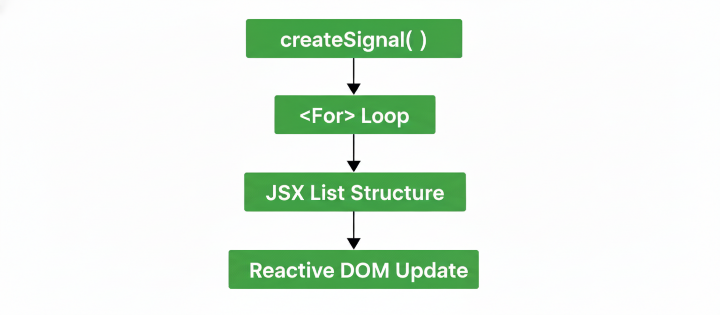
SolidJS provides reactive list rendering tools through which you can update UI automatically and add, remove, or re-order items without re-rendering the complete list.
Dynamic List Rendering Methods
When working with dynamic data, SolidJS provides these two methods to handle dynamic list rendering −
For
The <For> component is the best way to loop over an array of objects in SolidJS. This allows you to render elements based on the contents of an array or an object.
The <For> component is used to work with complex data structures like an array of objects, where the data changes frequently, and it is similar to the .map() function in JavaScript.
The <each > property of the <For> component in SolidJS is used to loop over the collection of data. It also has a callback function that stores a fallback element to render while the list is loading(optional).
The <For> component takes two arguments −
- item − This represents the current element from the data array that is being rendered in the list
- index − This represents the position of the current item.
Syntax
The following is the syntax for the <For> components in SolidJS −
<For each={array()} >
  {(item, index) =>
       // logic for rendering each component
  }
</For>
Example 1
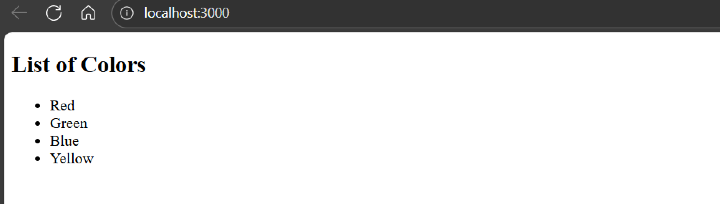
In the example below, we have created an array of signals named "colors" and used it inside the <For> component to iterate over it to show the dynamic list rendering, and displayed the UI on the Application −
import { createSignal, For } from 'solid-js'

function DynamicListDemo() {
  const [colors] = createSignal(['Red', 'Green', 'Blue', 'Yellow'])

  return (
    <div>
      <h2>List of Colors</h2>
      <ul>
        <For each={colors()}>{color => <li>{color}</li>}</For>
      </ul>
    </div>
  )
}

export default DynamicListDemo
Below is the output for the above code −
Example 2
In the example below, we have created an array of signals named "colors" and used it inside the <For> component to iterate over it to show the dynamic list rendering, and displayed the UI on the Application −
import { createSignal, For } from 'solid-js'

function DynamicColorList() {
  const [colors, setColors] = createSignal(['Red', 'Green', 'Blue', 'Yellow'])

  const addColor = () => setColors([...colors(), 'Black'])
  const removeLast = () => setColors(colors().slice(0, -1))

  return (
    <div>
      <h2>Dynamic Color List</h2>

      <button onClick={addColor}>Add</button>
      <button onClick={removeLast}>Remove</button>

      <ul>
        <For each={colors()}>{color => <li>{color}</li>}</For>
      </ul>
    </div>
  )
}

export default DynamicColorList
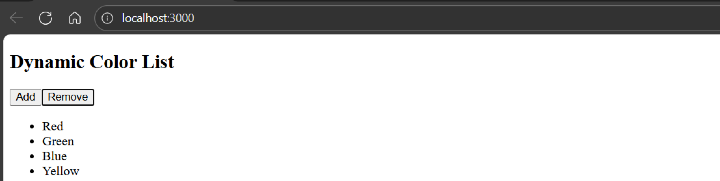
When the "Add" button is pressed, the Black color is added to the list as seen in the output below −
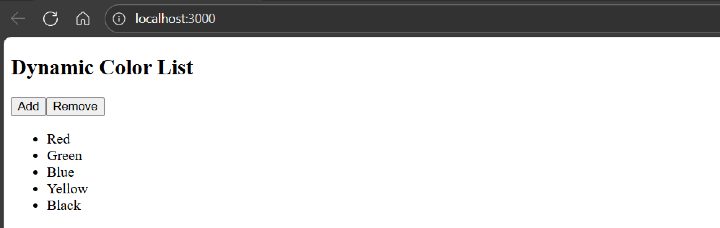
When the "remove" button is pressed, the Black color is removed from the list, as seen in the output below −
Index
The <Index> component is similar to the <For> component, but it is used for a stable list structure, in which the length of the list does not change often, but the data inside it changes frequently.
In the <Index> component, when there is a change in the list value, only the data at the specified index is updated, not the entire list. This is useful when working with JavaScript primitives like strings and numbers.
Syntax
The following is the syntax for the <Index> component in SolidJS −
<Index each={array()} >
  {(item, index) =>
       // logic for rendering each component
  }
</For>
Example
In the example below, we have created a signal named "animals" and used it inside the <Index> component for dynamic list rendering, and displayed the UI on the Application −
import { createSignal, Index } from 'solid-js'

function DynamicListDemo() {
  const [animals] = createSignal(['Cat', 'Dog', 'Elephant', 'Tiger'])

  return (
    <div>
      <h2>List of Animals</h2>
      <ol>
        <Index each={animals()}>{(animal, i) => <li>{animal()}</li>}</Index>
      </ol>
    </div>
  )
}

export default DynamicListDemo
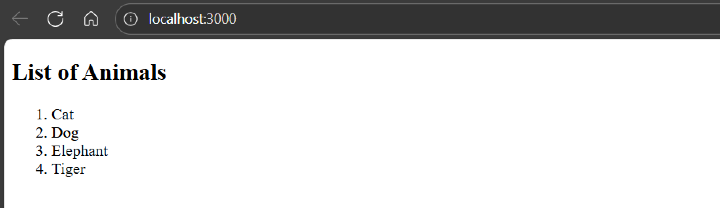
Below is the output for the above code −