
- SolidJS - Home
- SolidJS - Cheatsheet
- SolidJS - vs Vue, and Svelte
- SolidJS - Environment Setup
- SolidJS - First Solid App
- SolidJS - JSX Fundamentals
- SolidJS - Fine-grained Reactivity
- Building with Components
- SolidJS - Function Components
- SolidJS - Styling Your Components
- SolidJS - Conditional Rendering
- SolidJS - Dynamic Lists
- SolidJS - Passing Data
- SolidJS - Event Handling
- Routing, Data, and Async Operations
- SolidJS - Setting up Routes
- SolidJS - Input Handling
- SolidJS - Input Types
- SolidJS - Form Handling
- SolidJS Useful Resources
- SolidJS - Useful Resources
- SolidJS - Discussion
SolidJS - Fine-grained Reactivity
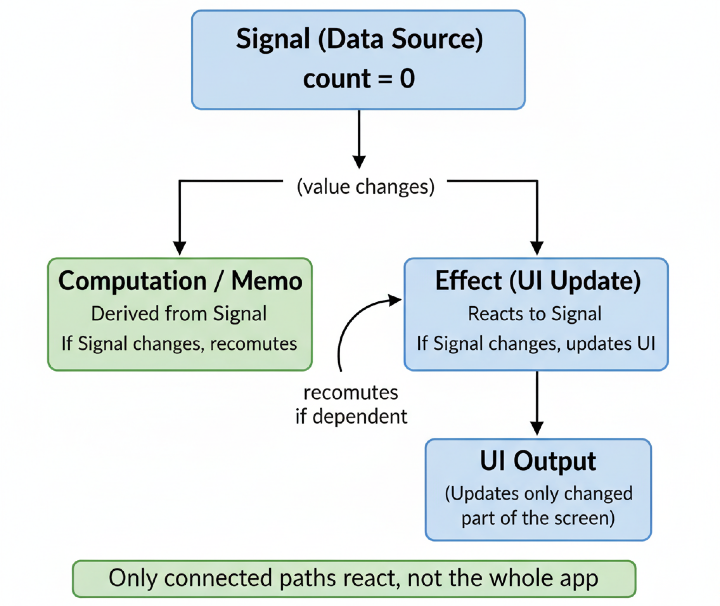
What is Fine-grained Reactivity?
Fine-grained reactivity means the updates that occur at a particular level are tracked in small data blocks instead of re-rendering all the components. In simple terms, each part of reactive data knows exactly which computations depend on it, and when that data changes, a particular part is re-executed, and thus no need to re-render the entire component.
How is it different from ReactJS?
When working with ReactJS, if something changes in the ReactJS application, like a button click or new data added, ReactJS doesn't change the DOM(Web Page) immediately. Instead of this, ReactJS re-runs the component and gets the new version of the UI, and then creates a virtual DOM of the web page.
Now, it compares the new version and the old version of the web page(called reconciliation), at last it updates only those specific parts that are different in the old version, not the whole page.
Whereas SolidJS doesn't use the virtual DOM, instead of re-running the whole components or comparing virtual DOMs, it runs its components once to know what the DOM should look like in UI, and tracks the reactive dependencies at a fine-grained level.
When the state changes, SolidJS updates only the specific parts of the DOM that are affected without re-rendering the entire component. To achieve this, SolidJS uses signals, which use getter/setter pairs that allow state management, similar to useState in ReactJS.
Example in ReactJS
In the example below, each time the setCount is called, ReactJS re-renders the entire "Counter_Demo" component.
function Counter_Demo() {
  const [count, setCount] = useState(0);
  return <h2>{count}</h2>;
}
Example in SolidJS
In the example below, each time the setCount is called, SolidJS only updates the <h2> heading, not the entire "Counter_Demo" component.
function Counter_Demo() {
  const [count, setCount] = createSignal(0);
  return <h2>{count()}</h2>;
}
Core Primitives of Fine-grained Reactivity
The following are the core primitives of fine-grained reactivity in SolidJS −
Signals
Signals are the building blocks for managing the state in a SolidJS application. They are used to store and update values, and it is the starting foundation for reactivity in SolidJS.
Signals are used to represent values in a SolidJS application. They can be of any kind, such as primitive values(strings and numbers), complex values(arrays and objects), or the current page.
Creating a Signal
To create a signal in a SolidJS application, you have to use the createSignal() function, which is a part of the SolidJS library.
const [count, setCount] = createSignal(0);
In the above syntax, the "count" is the getter, setCount is the setter, and the createSignal() function creates a signal with an initial value of 0.
Accessing and Updating values
The getter function returned by the createSignal() function is used to access the value of the signal, and the setter function is used to update the value of the signal. You can call these functions without any arguments.
console.log(count()); // Accessing the value

setCount(count() + 1); // Updating the value
console.log(count());
Below is the output for the above code −
0
1
Reactivity
Signals are reactive, which means they automatically update when their value changes. In simple terms, signals remember where they're used, and when their value changes, they automatically update the part, no need to re-render, no manual updates needed
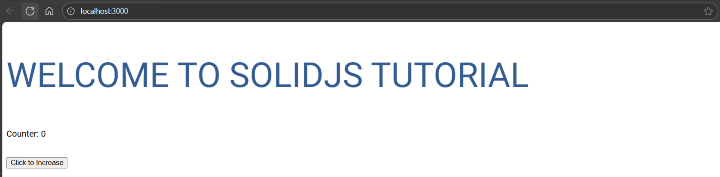
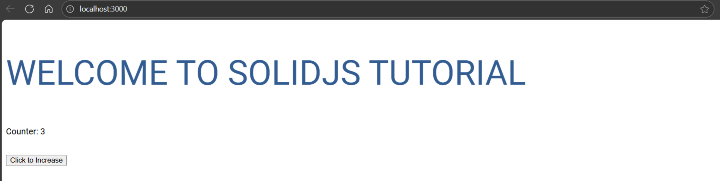
In the example below, we have created a reactive signal count, and each time you click the button, the setCount() increases the value, and the displayed number updates automatically.
import { createSignal } from 'solid-js'

export default function App() {
  const [count, setCount] = createSignal(0);

  return (
    <div>
      <h1>Welcome to SolidJS Tutorial</h1>
      <p>Counter: {count()}</p>
      <button onClick={() => setCount(count() + 1)}>Click to Increase</button>
    </div>
  );
}
Below is the output for the above code, with the initial count and the incremented count −
Effects
The functions that automatically re-run when the signals they depend on change are known as effects. They play an important role in managing side effects, which are the actions that occur outside of the scope, such as data fetching and DOM manipulations.
Using an Effect
To use an effect in a SolidJS application, you have to use the createEffect() function, which is a part of the SolidJS library. When this effect is triggered, the function takes a callback as its argument.
const [count, setCount] = createSignal(0);

createEffect(() => {
  console.log(count());
});
In the above syntax, an effect is created using the createEffect() function that logs the current value of count, and when the value of count changes, the effect is triggered, it runs again, and logs the new value of count.
Managing Multiple Signals
Managing multiple signals means an effect can watch more than one signal at the same time. Whenever any of the signals change, the effect uses the latest value of all the signals.
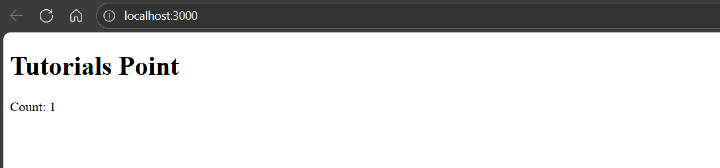
In the example below, we have created two reactive signals, "count" and "message". When the setCount(1) and the setMessage("Tutorials Point") run, SolidJS updates the signals and re-runs the effect once, logging the latest values to the console.
import { createSignal, createEffect } from "solid-js";

export default function App() {
  const [count, setCount] = createSignal(0);
  const [message, setMessage] = createSignal("Welcome to Solid Tutorial!");

  createEffect(() => {
    console.log(count(), message());
  });

  setCount(1);
  setMessage("Tutorials Point");

  return (
    <div>
      <h1>{message()}</h1>
      <p>Count: {count()}</p>
    </div>
  );
}
The following shows the output in the console −
>0 "Welcome to Solid Tutorial!"
1 "Welcome to Solid Tutorial!"
1 "Tutorials Point"
The image below shows the updated message and count directly on the web page −
Memos
Memos in SolidJS are read-only signals that automatically memoize the result of a calculation. They only re-run the calculation when something they depend on changes, instead of every time the component updates.
Using memos
To create a memo in a SolidJS application, you have to use the createMemo() function, which is a part of the SolidJS library. Inside this function, define the derived value or computations that you want to memoize.
const [count, setCount] = createSignal(0);

const isOdd = createMemo(() => count() % 2 !== 0);
console.log(isOdd());
setCount(5);
console.log(isOdd());
Below is the output for the above code −
false
true
Advantages of Using Memos
The following are the advantages of using memos in SolidJS −
- If you work with heavy calculations that take a lot of time, memos help by storing the outcomes. This way, you can avoid running those same computations over and over.
- Memos run just once whenever their dependencies change, keeping things optimized from the start.
- Since memo values are cached, the app updates faster, and fewer resources are used.
- Memos prevent any accidental modification of derived values, due to their read-only safety.
