
- SolidJS - Home
- SolidJS - Cheatsheet
- SolidJS - vs Vue, and Svelte
- SolidJS - Environment Setup
- SolidJS - First Solid App
- SolidJS - JSX Fundamentals
- SolidJS - Fine-grained Reactivity
- Building with Components
- SolidJS - Function Components
- SolidJS - Styling Your Components
- SolidJS - Conditional Rendering
- SolidJS - Dynamic Lists
- SolidJS - Passing Data
- SolidJS - Event Handling
- Routing, Data, and Async Operations
- SolidJS - Setting up Routes
- SolidJS - Input Handling
- SolidJS - Input Types
- SolidJS - Form Handling
- SolidJS Useful Resources
- SolidJS - Useful Resources
- SolidJS - Discussion

SolidJS Tutorial
This SolidJS tutorial has been designed for students and frontend designers who are looking to learn this framework. We have provided numerous practical examples to explain the concepts in simple and easy steps. This tutorial has been prepared and reviewed by experienced developers, and we have put the best of our effort to make it useful for our readers.
After completing this tutorial, you will find yourself at a moderate level of expertise in SolidJS programming, from where you can advance yourself to the next levels of UI and UX building.
What is SolidJS?
SolidJS is a modern and reactive JavaScript framework that is used in building high-performance interactive web applications. It sounds similar to ReactJS as it uses JSX, Component architecture, and unidirectional data flow, as we are using the same for React-based applications.
SolidJS provides tools to enhance your components with reactivity, that is, a declarative JavaScript code that links the user interface with the data.
React uses a virtual DOM for reactivity, whereas SolidJS uses a compiled DOM.
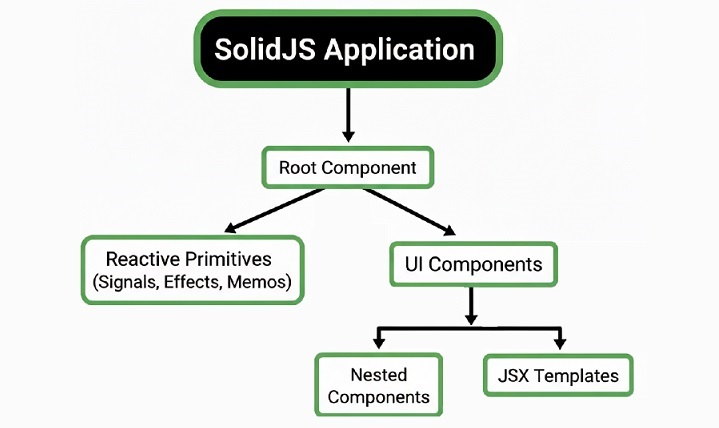
The following illustration depicts the hierarchy of Solid.js components −
Advantages of SolidJS
Listed below are some of the major advantages of using SolidJS −
- SolidJS has a small bundle size. It doesn’t include a heavy virtual DOM system which is why SolidJS makes the applications faster and efficient.
- SolidJS helps in creating single-page applications which means the app loads only once the Javascript only updates the needed part of the page.
- It's easier to integrate the vanillaJS library into SolidJS than ReactJS due to the nature of the function body.
SolidJS Components
SolidJS code is organized in a component-like structure. A component generally constitutes one part of the UI. It’s simply a JavaScript function that returns the JSX that describes how the parts of the UI should look and behave.
SolidJS components help us, the programmers, to split the application into smaller pieces of code, each handling a particular part of the UI logic. Below is the demonstration of a component named "DemoSolid" −
function DemoSoild() {
  return <h1>Welcome to SolidJS Tutorial !</h1>;
}

export default DemoSoild;
Simple SolidJS Code
Here, we are creating a simple SolidJS component named "Demo" with a createSignal that creates a reactive variable called "name". So, whenever the input changes, the text updates instantly without re-rendering the component again and again.
Let's have a quick look at a simple example in SolidJS −
import { createSignal } from "solid-js";

function Demo() {
  const [name, setName] = createSignal("TutorialsPoint");

  return (
    <>
      <h1>Welcome to , {name()}!</h1>
      <input
        type="text"
        value={name()}
        onInput={(e) => setName(e.target.value)}
      />
    </>
  );
}

export default Demo;
The above code generates the following output, as shown in the image −

Getting Started with SolidJS
In the subsequent chapters of this tutorial, we will be exploring the following topics one by one −
- Solid.js - Home Page
- Solid.js - Cheat Sheet
- Solid.js - vs Vue, and Svelte
- Solid.js - Environment Setup
- Solid.js - First Solid App
- Solid.js - JSX Fundamentals
- Solid.js - Fine-grained Reactivity
Building with Components
We will explore the components and how to implement them, and pass data within them −
- Solid.js - Function Components
- Solid.js - Styling Your Components
- Solid.js - Conditional Rendering
- Solid.js - Dynamic Lists
- Solid.js - Passing Data
- Solid.js - Event Handling
- Solid.js - DOM Interactions
Routing, Data, and Async Operations
We will be exploring the following topics for routing and error handling in SolidJS −
- Solid.js - Setting up routes
- Solid.js - Forms and User Input
- Solid.js - Fetching and Managing Data
- Solid.js - Error Handling
- Solid.js - Handling Async Operations
- Solid.js - Handling Authentication and Tokens
Advanced Topics
Furthermore, in SolidJS, we will be exploring the following advanced topics to enhance our level.
- Solid.js - TypeScript with Solid.js
- Solid.js - Testing Solid.js Applications
- Solid.js - Deploying Solid.js Applications
- Solid.js - Server-Side Rendering and Streaming
- Solid.js - Animation and Transitions
- Solid.js - Integrating with Other Libraries and Frameworks
- Solid.js - Best Practices
FAQs on SolidJS
In this section, we have listed down a set of important frequently asked questions (FAQs) on SolidJS along with their brief answers −
1. How do I start learning SolidJS?
To start learning SolidJS, first make sure you know basics of HTML, CSS, and JavaScript (ES6). Then you can begin by learning components, signals and continue it to routing and practice it in small segments.
2. How do I install Solid.js and create my first project?
Follow the steps given below to set up Solid.js and create your first project -
- First of all, you need to istall Node.js.
- Open your terminal and run the "npm create solid@latest" command and navigate into the project folder using cd.
- Install dependencies.
- Start the development server using the "npm run dev" command.
- Open the http://localhost:5173 to launch your first project.
3. What are the benefits of using SolidJs?
SolidJS is lightweight due to its small bundle size; it uses fine-grained reactivity and it is relatively faster due to its one-time components rendering.
4. What problem does Solid.js solve?
SolidJS resolves the issue of slow and inefficient UI updates caused by virtual DOM re-rendering as in ReactJS.
5. Is Solid.js a framework or a library?
SolidJS is primarily a Javascript library, not a framework. However, SolidJS can work like a framework if combined with SolidStart, similar to React + Next.js.
