- SolidJS - Home
- SolidJS - Cheatsheet
- SolidJS - vs Vue, and Svelte
- SolidJS - Environment Setup
- SolidJS - First Solid App
- SolidJS - JSX Fundamentals
- SolidJS - Fine-grained Reactivity
- Building with Components
- SolidJS - Function Components
- SolidJS - Styling Your Components
- SolidJS - Conditional Rendering
- SolidJS - Dynamic Lists
- SolidJS - Passing Data
- SolidJS - Event Handling
- Routing, Data, and Async Operations
- SolidJS - Setting up Routes
- SolidJS - Input Handling
- SolidJS - Input Types
- SolidJS - Form Handling
- SolidJS Useful Resources
- SolidJS - Useful Resources
- SolidJS - Discussion
SolidJS - Conditional Rendering
What is Conditional Rendering?
The process of displaying different UI elements based on particular conditions is known as conditional rendering. Conditional rendering is a fundamental concept in UI development that is used to hide or display elements based on the data, user input, or other conditions.
In JavaScript, conditional rendering is achieved by the ternary(?:) operator or the logical AND(&&) operator. Similar to JavaScript, you can use these operators in your application for conditional rendering.
In the example below, we have created a reactive signal named "isVisible" and set its value to true. Whenever the user clicks the "Hide" button, the "isVisible" is set to false, and the h1 heading is hidden from the UI.
import { createSignal } from 'solid-js'

export default function DemoComponent() {
  const [isVisible, setIsVisible] = createSignal(true)

  return (
    <div>
      {isVisible() ? <h1>Welcome to Tutorials Point</h1> : null}
      <button onClick={() => setIsVisible(false)}>Hide</button>
    </div>
  )
}
The above code is suitable for simpler conditions in conditional rendering, but SolidJS provides dedicated components to handle conditional rendering in a simpler and readable format.
Different Ways to Handle Conditional Rendering
The following are the three components provided by SolidJS to handle conditional rendering −
Show
The <Show> component renders its children when a condition is true. It is similar to the ternary operator in JavaScript, and it uses control flow logic inside the JSX. If multiple conditions need to be handled, the <Show> component can be nested to handle each condition, but it is complex.
The <show> component has two properties, which are as follows −
- when − This property is used to determine whether or not to render its children, and it can be a boolean value or a function that returns a boolean value.
- fallback − This property specifies the content to be rendered when the condition evaluates to false and can return a JSX element.
Syntax
The following is the syntax for the <Show> component in SolidJS −
<Show when={condition} fallback={fallbackContent}>
  {mainContent}
</Show>
Example
In the example below, we have created a signal named "login" and used it inside the <Show> component for conditional rendering, and displayed the UI on the Application −
import { createSignal, Show } from 'solid-js'

function ConditionalDemo() {
  const [login, setlogin] = createSignal(false)

  return (
    <>
      <Show when={login()} fallback={<h2>Login to continue</h2>}>
        <h1>Welcome to SolidJS Tutorial!</h1>
      </Show>
      <button onClick={() => setlogin(!login())}>
        {login() ? 'Logout' : 'Login'}
      </button>
    </>
  )
}

export default ConditionalDemo
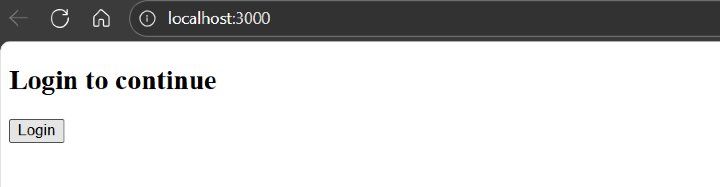
When the login is false, it shows the fallback text "Login to continue" as the output below −
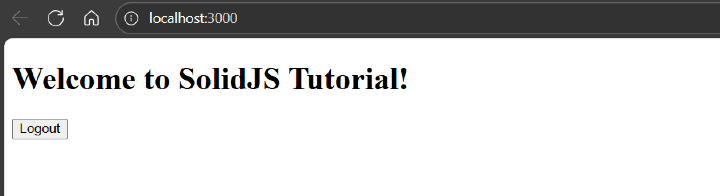
When the login is true, it shows "Welcome to SolidJS Tutorial" as the output below −
Switch and Match
<Switch> and <Match> components are used when multiple conditions need to be handled, as it is difficult to manage the flow control with nested <show> components.
Similar to JavaScript's switch case, the <Switch> component in SolidJS wraps multiple <Match>components inside it. So that each condition is executed in order, and the first component that executes to true will have its children rendered, and the rest will be ignored, and this goes on until one of the conditions is a match. If none do, it renders the default case.
Syntax
The following is the syntax for the <Switch> and <Match> components in SolidJS −
<Switch fallback={<p>Default case</p>}>
  <Match when={condition1}>Content 1</Match>
  <Match when={condition2}>Content 2</Match>
  <Match when={condition3}>Content 3</Match>
</Switch>
Example
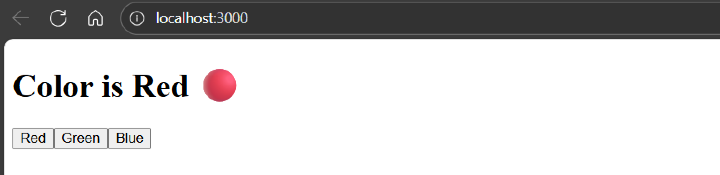
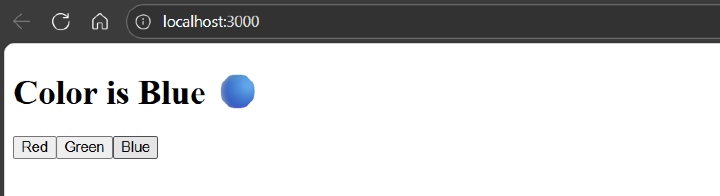
In the example below, we have created a signal named "color" and used it inside the <Switch> component for conditional rendering, and displayed the UI on the Application −
import { createSignal, Switch, Match } from 'solid-js'

function ConditionalDemo() {
  const [color, setColor] = createSignal('red')

  return (
    <>
      <Switch fallback={<p>Please select a color</p>}>
        <Match when={color() === 'red'}>
          <h1>Color is Red 🔴</h1>
        </Match>
        <Match when={color() === 'green'}>
          <h1>Color is Green 🟢</h1>
        </Match>
        <Match when={color() === 'blue'}>
          <h1>Color is Blue 🔵</h1>
        </Match>
      </Switch>
      <div>
        <button onClick={() => setColor('red')}>Red</button>
        <button onClick={() => setColor('green')}>Green</button>
        <button onClick={() => setColor('blue')}>Blue</button>
      </div>
    </>
  )
}

export default ConditionalDemo
Below is the output for the above code −

For
The <For> component is the best way to loop over an array of objects in SolidJS. The <For> component is similar to the .map() function in JavaScript.The following are the props of the <For> component in SolidJS −
- each − The list of items to render.
- fallback − A fallback element to render while the list is loading(optional).
- children − A callback that returns a JSX element for each item in the list.
Syntax
The following is the syntax for the <For> components in SolidJS −
<For each={array()} fallback={<p>Content to display if the array is empty</p>}>
  {(item, index) => <p>{index() + 1}. {item}</p>}
</For>
Example
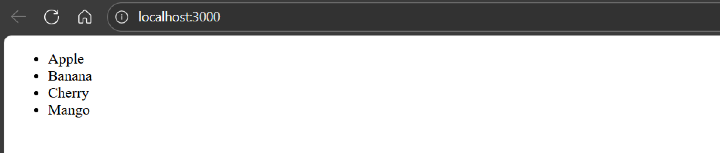
In the example below, we have created an array of signals named "fruits" and used it inside the <For> component to iterate over it to show the conditional rendering, and displayed the UI on the Application −
import { createSignal, For } from 'solid-js'

function ConditionalDemo() {
  const [fruits] = createSignal(['Apple', 'Banana', 'Cherry', 'Mango'])

  return (
    <ul>
      <For each={fruits()}>{fruit => <li>{fruit}</li>}</For>
    </ul>
  )
}

export default ConditionalDemo
Below is the output for the above code −