- Kivy - Home
- Kivy Basics
- Kivy - Getting Started
- Kivy - Installation
- Kivy - Architecture
- Kivy - File Syntax
- Kivy - Applications
- Kivy - Hello World
- Kivy - App Life Cycle
- Kivy - Events
- Kivy - Properties
- Kivy - Inputs
- Kivy - Behaviors
- Kivy Buttons
- Kivy - Buttons
- Kivy - Button Events
- Kivy - Button Colors
- Kivy - Button Size
- Kivy - Button Position
- Kivy - Round Buttons
- Kivy - Disabled Buttons
- Kivy - Image Button
- Kivy Widgets
- Kivy - Widgets
- Kivy - Label
- Kivy - Text Input
- Kivy - Canvas
- Kivy - Line
- Kivy - Checkbox
- Kivy - Dropdown List
- Kivy - Windows
- Kivy - ScrollView
- Kivy - Carousel
- Kivy - Slider
- Kivy - Images
- Kivy - Popup
- Kivy - Switch
- Kivy - Spinner
- Kivy - Splitter
- Kivy - Progress Bar
- Kivy - Bubble
- Kivy - Tabbed Panel
- Kivy - Scatter
- Kivy - Accordion
- Kivy - File Chooser
- Kivy - Color Picker
- Kivy - Code Input
- Kivy - Modal View
- Kivy - Toggle Button
- Kivy - Camera
- Kivy - Tree View
- Kivy - reStructuredText
- Kivy - Action Bar
- Kivy - Video Player
- Kivy - Stencil View
- Kivy - VKeyboard
- Kivy - Touch Ripple
- Kivy - Audio
- Kivy - Videos
- Kivy - Spelling
- Kivy - Effects
- Kivy - Input Recorder
- Kivy - OpenGL
- Kivy - Text
- Kivy - Text Markup
- Kivy - Settings
- Kivy Layouts
- Kivy - Layouts
- Kivy - Float Layout
- Kivy - Grid Layouts
- Kivy - Box Layouts
- Kivy - Stack Layout
- Kivy - Anchor Layout
- Kivy - Relative Layout
- Kivy - Page Layout
- Kivy - Recycle Layout
- Kivy - Layouts in Layouts
- Kivy Advanced Concepts
- Kivy - Configuration Object
- Kivy - Atlas
- Kivy - Data Loader
- Kivy - Cache Manager
- Kivy - Console
- Kivy - Animation
- Kivy - Multistroke
- Kivy - Clock
- Kivy - SVGs
- Kivy - UrlRequest
- Kivy - Clipboard
- Kivy - Factory
- Kivy - Gesture
- Kivy - Language
- Kivy - Graphics
- Kivy - Drawing
- Kivy - Packaging
- Kivy - Garden
- Kivy - Storage
- Kivy - Vector
- Kivy - Utils
- Kivy - Inspector
- Kivy - Tools
- Kivy - Logger
- Kivy - Framebuffer
- Kivy Applications and Projects
- Kivy - Drawing App
- Kivy - Calculator App
- Kivy - Stopwatch App
- Kivy - Camera Handling
- Kivy - Image Viewer
- Kivy - Bezier
- Kivy - Canvas Stress
- Kivy - Circle Drawing
- Kivy - Widget Animation
- Kivy - Miscellaneous
- Kivy Useful Resources
- Kivy - Quick Guide
- Kivy - Useful Resources
- Kivy - Discussion
Kivy - Switch
The Switch widget in Kivy framework resembles the electrical switch that we use in our home to put a bulb or a fan ON or OFF. The switch on the app window can be flipped by swiping its active property to True or False.
The Switch class is defined in the "kivy.uix.switch: module.
from kivy.uix.switch import Switch
switch = Switch(**kwargs)
When placed on the application window, a Switch object appears like this −
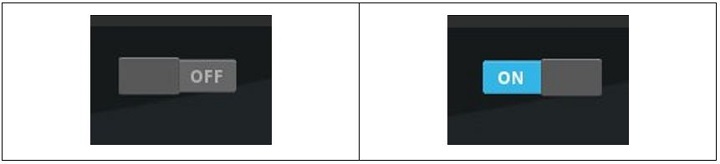
The Switch class defines a Boolean property named active, which indicates whether the switch is on/off. Generally, this property is attached to a callback function to invoke a desired action when its value changes from True to False or vice versa.
def callback(instance, value):
   if value:
      print('the switch is ON')
   else:
      print ('The switch is OFF')
switch = Switch()
switch.bind(active=callback)
Example
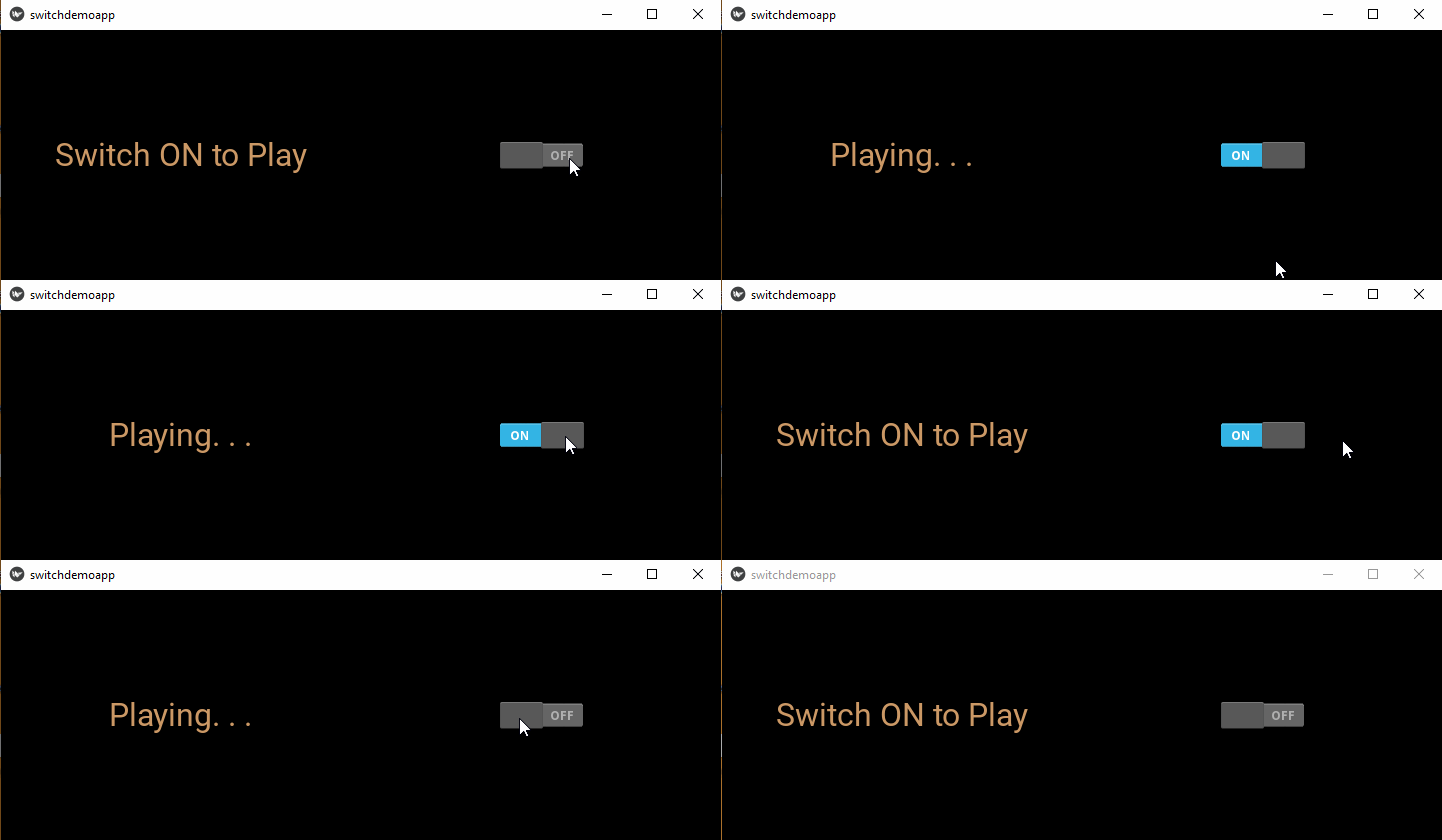
We shall use the Switch widget in the following code to start or stop playing an audio playback. The app design contains a label and a switch placed in a horizontal box layout.
The active property of Switch is bound to a switched() method. When ON, the Sound object is loaded and its play() method is called. On the other hand, when flipped to OFF, the stop() method gets invoked.
from kivy.app import App
from kivy.uix.label import Label
from kivy.uix.boxlayout import BoxLayout
from kivy.core.audio import SoundLoader
from kivy.uix.switch import Switch
from kivy.core.window import Window

Window.size = (720, 250)

class switchdemoapp(App):
   def switched(self, instance, value):
      if value == True:
         self.sound = SoundLoader.load('sample.mp3')
         self.l1.text = 'Playing. . .'
         self.sound.play()
      else:
         self.sound.stop()
         self.l1.text = 'Switch ON to Play'
   def build(self):
      box = BoxLayout(orientation='horizontal')
      self.l1 = Label(
         text = 'Switch ON to Play',
         font_size = 32, color = [.8, .6, .4, 1]
      )
      box.add_widget(self.l1)
      switch = Switch()
      switch.bind(active = self.switched)
      box.add_widget(switch)
      return box

switchdemoapp().run()
Output
The program starts with the label asking the user to swipe the switch to ON. The label caption changes to 'Playing' message. Swipe the switch to OFF to stop the music from playing.