
IPython
- IPython - Introduction
- IPython - Installation
- IPython - Getting Started
- Running & Editing Python Script
- IPython - History Command
- IPython - System Commands
- IPython - Command Line Options
- Dynamic Object Introspection
- IPython - IO Caching
- Setting IPython as Default Python Environment
- Importing Python Shell Code
- IPython - Embedding IPython
- IPython - Magic Commands
Jupyter
- Project Jupyter - Overview
- Jupyter Notebook - Introduction
- Working With Jupyter Online
- Installation and Getting Started
- Jupyter Notebook - Dashboard
- Jupyter Notebook - User Interface
- Jupyter Notebook - Types of Cells
- Jupyter Notebook - Editing
- Jupyter Notebook - Markdown Cells
- Cell Magic Functions
- Jupyter Notebook - Plotting
- Converting Notebooks
- Jupyter Notebook - IPyWidgets
QtConsole
- QtConsole - Getting Started
- QtConsole - Multiline Editing
- QtConsole - Inline Graphics
- QtConsole - Save to Html
- QtConsole - Multiple Consoles
- Connecting to Jupyter Notebook
- Using github and nbviewer
JupyterLab
- JupyterLab - Overview
- Installation & Getting Started
- JupyterLab - Interface
- JupyterLab - Installing R Kernel
Jupyter Resources
IPython - Getting Started
This chapter will explain how to get started with working on IPython.
Starting IPython from Command Prompt.
Before proceeding to understand about IPython in depth, note that instead of the regular >>>, you will notice two major Python prompts as explained below −
In[1] appears before any input expression.
Out[1] appears before the Output appears.
Besides, the numbers in the square brackets are incremented automatically. Observe the following output for a better understanding −
(myenv) D:\Projects\python\myenv>ipython
Python 3.14.2 (tags/v3.14.2:df79316, Dec  5 2025, 17:18:21) [MSC v.1944 64 bit (AMD64)]
Type 'copyright', 'credits' or 'license' for more information
IPython 9.8.0 -- An enhanced Interactive Python. Type '?' for help.
Tip: Use `ipython --help-all | less` to view all the IPython configuration options.

In [1]: 2 + 2
Out[1]: 4

In [2]: print("Hello")
Hello

In [3]: x = 2

In [4]: x
Out[4]: 2

In [5]:
Now, if you have installed Anaconda distribution of Python, open Anaconda prompt from start menu.
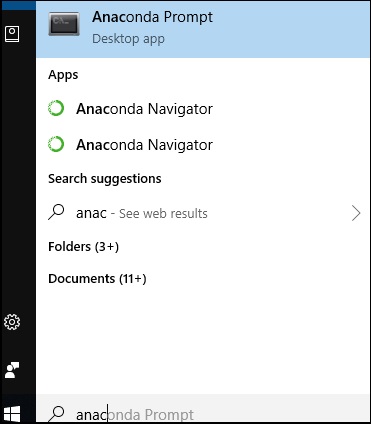
Start IPython from conda prompt
When compared to regular Python console, we can notice a difference. The IPython shell shows syntax highlighting by using different colour scheme for different elements like expression, function, variable etc.
(myenv) D:\Projects\python\myenv>ipython
Python 3.14.2 (tags/v3.14.2:df79316, Dec  5 2025, 17:18:21) [MSC v.1944 64 bit (AMD64)]
Type 'copyright', 'credits' or 'license' for more information
IPython 9.8.0 -- An enhanced Interactive Python. Type '?' for help.
Tip: Use `ipython --help-all | less` to view all the IPython configuration options.

In [1]:
Another useful enhancement is tab completion. We know that each object has one or more methods available as defined in its class. IPython pops up appropriate list of methods as you press tab key after dot in front of object.
In the following example, a string is defined. As a response, the methods of string class are shown.
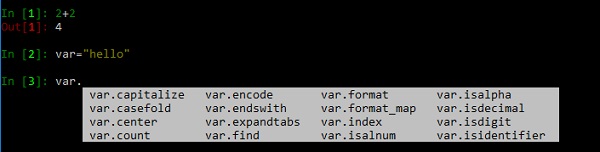
IPython provides information of any object by putting ? in front of it. It includes docstring, function definitions and constructor details of class. For example to explore the string object x defined above, in the input prompt enter x?. The result will show all information about it. Observe the screenshot given below for a better understanding −
In [5]: x = "hello"

In [6]: x?
Type:        str
String form: hello
Length:      5
Docstring:
str(object='') -> str
str(bytes_or_buffer[, encoding[, errors]]) -> str

Create a new string object from the given object. If encoding or
errors is specified, then the object must expose a data buffer
that will be decoded using the given encoding and error handler.
Otherwise, returns the result of object.__str__() (if defined)
or repr(object).
encoding defaults to 'utf-8'.
errors defaults to 'strict'.

In [7]:
Magic Functions
IPythons in-built magic functions are extremely powerful. There are two types of magic functions.
- Line magics, which work very much like DOS commands.
- Cell magics, which work on multiple lines of code.
We shall learn about line magic functions and cell magic functions in detail in subsequent chapters.