
- Angular Tutorial
- Angular - Home
- Angular - Overview
- Angular - Features
- Angular - Advantages & Disadvantages
- Angular Basics
- Angular - Environment setup
- Angular - First Application
- Angular - MVC Architecture
- Angular Components
- Angular - Components
- Angular - Component Lifecycle
- Angular - View Encapsulation
- Angular - Emulated Encapsulation
- Angular - ShadowDom Encapsulation
- Angular - Component Interaction
- Angular - Using @Input Decorator
- Angular - Using @Output Decorator
- Angular - Using Local Variable
- Angular - Using @ViewChild Decorator
- Angular - Using Services
- Angular - Component Styles
- Angular - Nested Components
- Angular - Content projection
- Angular - Single-slot Content Projection
- Angular - Multi-slot Content Projection
- Angular - Conditional Content Projection
- Angular - Dynamic components
- Angular - Using NgComponentOutlet
- Angular - Using ViewContainerRef
- Angular - Elements
- Angular Templates
- Angular - Templates
- Angular - Template statements
- Angular - Template Variables
- Angular - SVG as Templates
- Angular Binding
- Angular - Data Binding
- Angular - Interpolation
- Angular - Event Binding
- Angular - Property Binding
- Angular - Attribute Binding
- Angular - Class Binding
- Angular - Style Binding
- Angular - Two-way Binding
- Angular Directives
- Angular - Directives
- Angular - Attribute Directives
- Angular - Structural Directives
- Angular - Custom Directives
- Angular Pipes
- Angular - Pipes
- Angular - Built-in Pipes
- Angular - Custom Pipes
- Angular Forms
- Angular - Forms
- Angular - Template Driven Forms
- Angular - Reactive Forms
- Angular - Form Validation
- Angular - Dynamic Forms
- Angular Dependency Injection
- Angular - Dependency Injection
- Angular - Injectable Service
- Angular Routing
- Angular - Routing
- Angular - Dynamic Routes
- Angular - Wildcard Routes
- Angular - Nested Routes
- Angular - Navigation
- Angular - Routing in SPA
- Angular - Custom Route Matches
- Angular - Router Reference
- Angular HTTP Client programming
- Angular - Services
- Angular - HTTP Client
- Angular - Express based REST API
- Angular - Request
- Angular - Request Response Workflow
- Angular - Response
- Angular - Express based Upload API
- Angular - GET
- Angular - POST
- Angular - PUT
- Angular - DELETE
- Angular - JSONP
- Angular - CRUD Operations Using HTTP
- Angular Modules
- Angular - Introduction to Modules
- Angular - Root Module
- Angular - Feature Module
- Angular - Sharing Module
- Angular - Routing Module
- Angular - NgModules
- Angular Animation
- Angular - Animations
- Angular Service Workers & PWA
- Angular - Service Workers & PWA
- Angular Testing
- Angular - Testing Overview
- Angular Design Patterns
- Angular - Design Patterns
- Angular - Lazy Loading
- Angular - Singleton Pattern
- Angular - Observer Pattern
- Angular Libraries
- Angular - Libraries
- Angular - Angular Material
- Angular - PrimeNG
- Angular - RxJS
- Angular Advanced
- Angular - Signals
- Angular - Authentication & Authorization
- Angular - Internationalization
- Angular - Standalone Component
- Angular - Accessibility
- Angular - Web Workers
- Angular - Server Side Rendering
- Angular - Ivy Compiler
- Angular - Building with Bazel
- Angular - Backward Compatibility
- Angular - Reactive Programming
- Angular Tools
- Angular - CLI
- Angular Material UI Elements
- Angular - Paginator
- Angular - Datepicker
- Angular - Select Drop-down
- Angular Miscellaneous
- Angular - Third Party Controls
- Angular - Configuration
- Angular - Displaying Data
- Angular - Decorators & Metadata
- Angular - Basic Example
- Angular - Error Handling
- Angular - Testing & Building a Project
- Angular - Lifecycle Hooks
- Angular - User Input
- Angular - What's New?
- Angular Useful Resources
- Angular - Quick Guide
- Angular - Useful Resources
- Angular - Discussion
Angular - Using Services
Service is an integral part of the angular framework. We can create a service to implement specific functionality and then use it in any component. The best use cases of services are as follows:
- API calls
- Utility functions
- Sharing data between components
Example - Usage of a Service to share data
Let us learn how to use services to share data between components in this section. We will learn the step by step process to share data through a service in this example.
Step 1: Create a service, MyCounterService using angular CLI as shown below −
ng g service services/MyCounter
CREATE src/app/services/my-counter.spec.ts (389 bytes)
CREATE src/app/services/my-counter.ts (147 bytes)
It is better to put all the services inside a single folder. Therefore, we are creating MyCounter inside service folder using the above command.
Step 2: Create a component, MyCounterService using angular CLI as shown below −
ng generate component MyCounterService
CREATE src/app/my-counter-service/my-counter-service.spec.ts (626 bytes)
CREATE src/app/my-counter-service/my-counter-service.ts (243 bytes)
CREATE src/app/my-counter-service/my-counter-service.css (0 bytes)
CREATE src/app/my-counter-service/my-counter-service.html (34 bytes)
Step 3: Create an observable object to track the value of counter variable in the service as shown below −
private counterSource = new Subject<number>();
public counter$ = this.counterSource.asObservable()
Here,
counterSource is a variable of type Subject. Subject is an observable object provided by rxjs library. Subject can emit and receive values.
Invoked asObservable method on the counterSource to hide the identity of the source sequence.
Step 4: Implement increment and decrement methods as shown below −
inc(val: number) { this.counterSource.next(val + 1) }
dec(val: number) { this.counterSource.next(val - 1) }
Here,
next() method from counterSource is used to update the value of the counter.
Step 5: The complete code of the service, MyCounter is as follows:
my-counter.ts
import { Injectable } from '@angular/core';
import { Subject } from 'rxjs';

@Injectable({
   providedIn: 'root'
})
export class MyCounter {
   constructor() { }

   private counterSource = new Subject<number>();
   public counter$ = this.counterSource.asObservable();

   inc(val: number) { this.counterSource.next(val + 1) }
   dec(val: number) { this.counterSource.next(val - 1) }
}
Step 6: Now, open the my-counter-service.ts file and inject the service through constructor in the component.
export class MyCounterService {
   constructor(private counterService: MyCounter) {
   }
}
Step 7: Subscribe to the observables available in the service through component constructor as shown below −
this.counterService.counter$.subscribe( counter => {
   this.counter = counter;
})
Here, the subscription will update the counter value whenever there is a change in the observable.
Step 8: Implement increment (inc()) and decrement (dec()) methods by calling counter service methods as shown below −
inc() { this.counterService.inc(this.counter) }
dec() { this.counterService.dec(this.counter) }
Step 9: The complete code of the component, MyCounterService is as follows,
my-counter-service.ts
import { Component } from '@angular/core';
import { MyCounter } from '../services/my-counter';

@Component({
  selector: 'app-my-counter-service',
  imports: [],
  templateUrl: './my-counter-service.html',
  styleUrl: './my-counter-service.css',
})
export class MyCounterService {
   counter: number = 0;

   constructor(private counterService: MyCounter) {
      this.counterService.counter$.subscribe( counter => {
         this.counter = counter;
      })
   }

   inc() { this.counterService.inc(this.counter) }
   dec() { this.counterService.dec(this.counter) }
}
Step 10: Next, open the component's template, my-counter-service.html and write template markup to show the current counter value and then add two more buttons to increment and decrement the counter value. Bind inc() and dec() methods to increment and decrement button's click event respectively.
<p>counter: {{counter}}</p>

<button (click)="inc()">Increment</button>
<button (click)="dec()">Decrement</button>
Step 11: Next, open the app component's template and include our component as shown below −
<app-my-counter-service />
<router-outlet />
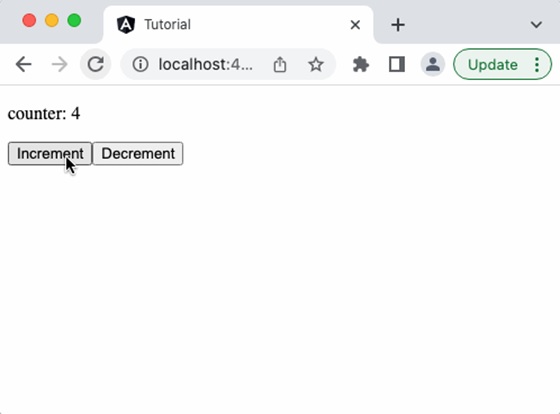
Output
Step 12: Run the application and check the output.
Step 13: Next, add another component in the app component's template as shown below −
<app-my-counter-service />
<app-my-counter-service />
<router-outlet></router-outlet>
Output
Step14: Run the application and see that incrementing one component will reflect in the other component as well. It happens as it is based on the same service.

