
- Angular Tutorial
- Angular - Home
- Angular - Overview
- Angular - Features
- Angular - Advantages & Disadvantages
- Angular Basics
- Angular - Environment setup
- Angular - First Application
- Angular - MVC Architecture
- Angular Components
- Angular - Components
- Angular - Component Lifecycle
- Angular - View Encapsulation
- Angular - Emulated Encapsulation
- Angular - ShadowDom Encapsulation
- Angular - Component Interaction
- Angular - Using @Input Decorator
- Angular - Using @Output Decorator
- Angular - Using Local Variable
- Angular - Using @ViewChild Decorator
- Angular - Using Services
- Angular - Component Styles
- Angular - Nested Components
- Angular - Content projection
- Angular - Single-slot Content Projection
- Angular - Multi-slot Content Projection
- Angular - Conditional Content Projection
- Angular - Dynamic components
- Angular - Using NgComponentOutlet
- Angular - Using ViewContainerRef
- Angular - Elements
- Angular Templates
- Angular - Templates
- Angular - Template statements
- Angular - Template Variables
- Angular - SVG as Templates
- Angular Binding
- Angular - Data Binding
- Angular - Interpolation
- Angular - Event Binding
- Angular - Property Binding
- Angular - Attribute Binding
- Angular - Class Binding
- Angular - Style Binding
- Angular - Two-way Binding
- Angular Directives
- Angular - Directives
- Angular - Attribute Directives
- Angular - Structural Directives
- Angular - Custom Directives
- Angular Pipes
- Angular - Pipes
- Angular - Built-in Pipes
- Angular - Custom Pipes
- Angular Forms
- Angular - Forms
- Angular - Template Driven Forms
- Angular - Reactive Forms
- Angular - Form Validation
- Angular - Dynamic Forms
- Angular Dependency Injection
- Angular - Dependency Injection
- Angular - Injectable Service
- Angular Routing
- Angular - Routing
- Angular - Dynamic Routes
- Angular - Wildcard Routes
- Angular - Nested Routes
- Angular - Navigation
- Angular - Routing in SPA
- Angular - Custom Route Matches
- Angular - Router Reference
- Angular HTTP Client programming
- Angular - Services
- Angular - HTTP Client
- Angular - Express based REST API
- Angular - Request
- Angular - Request Response Workflow
- Angular - Response
- Angular - Express based Upload API
- Angular - GET
- Angular - POST
- Angular - PUT
- Angular - DELETE
- Angular - JSONP
- Angular - CRUD Operations Using HTTP
- Angular Modules
- Angular - Introduction to Modules
- Angular - Root Module
- Angular - Feature Module
- Angular - Sharing Module
- Angular - Routing Module
- Angular - NgModules
- Angular Animation
- Angular - Animations
- Angular Service Workers & PWA
- Angular - Service Workers & PWA
- Angular Testing
- Angular - Testing Overview
- Angular Design Patterns
- Angular - Design Patterns
- Angular - Lazy Loading
- Angular - Singleton Pattern
- Angular - Observer Pattern
- Angular Libraries
- Angular - Libraries
- Angular - Angular Material
- Angular - PrimeNG
- Angular - RxJS
- Angular Advanced
- Angular - Signals
- Angular - Authentication & Authorization
- Angular - Internationalization
- Angular - Standalone Component
- Angular - Accessibility
- Angular - Web Workers
- Angular - Server Side Rendering
- Angular - Ivy Compiler
- Angular - Building with Bazel
- Angular - Backward Compatibility
- Angular - Reactive Programming
- Angular Tools
- Angular - CLI
- Angular Material UI Elements
- Angular - Paginator
- Angular - Datepicker
- Angular - Select Drop-down
- Angular Miscellaneous
- Angular - Third Party Controls
- Angular - Configuration
- Angular - Displaying Data
- Angular - Decorators & Metadata
- Angular - Basic Example
- Angular - Error Handling
- Angular - Testing & Building a Project
- Angular - Lifecycle Hooks
- Angular - User Input
- Angular - What's New?
- Angular Useful Resources
- Angular - Quick Guide
- Angular - Useful Resources
- Angular - Discussion
Angular - Request
What is HTTP Request?
In HTTP protocol,the requestis a process of starting communication with the server by the client application or browser. In Angular, a request refers to making HTTP calls to a server to fetch, send, or manipulate data. These requests are handled by the Angular HttpClient module.
The following diagram will give you a clear understanding of the HTTP Request:
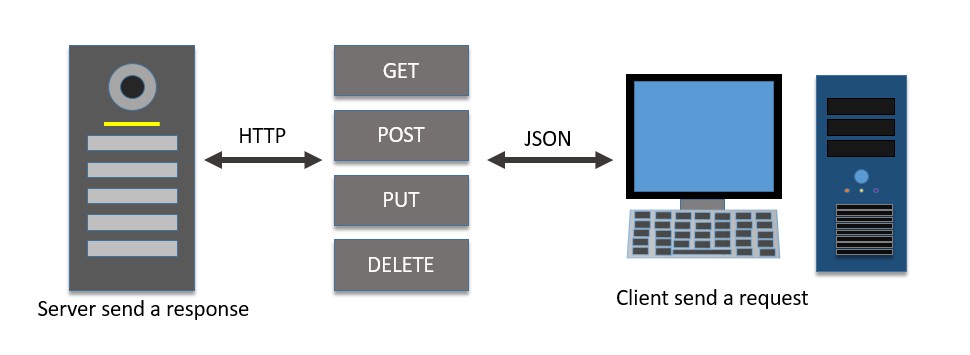
Let's see how to send a request (HTTP calls) to the server in the Angular framework, there are various options available in the request phase in this chapter. We will discuss them one by one.
Create a Server for Expense REST APISetting up the HttpClient service
Before making HTTP requests, we need to properly set up the HttpClient service in our Angular application. You need to import the HttpClient in App Config:
provideHttpClient(withInterceptorsFromDi())
app.config.ts
import { ApplicationConfig, provideBrowserGlobalErrorListeners } from '@angular/core';
import { provideRouter } from '@angular/router';

import { routes } from './app.routes';
import { provideHttpClient, withInterceptorsFromDi } from '@angular/common/http';

export const appConfig: ApplicationConfig = {
  providers: [
    provideBrowserGlobalErrorListeners(),
    provideRouter(routes),
    provideHttpClient(withInterceptorsFromDi())
  ]
};
Now HttpClient can be injected into any Angular component when necessary, as shown below:
import { Injectable } from '@angular/core';
import { HttpClient } from '@angular/common/http';

@Injectable()
export class MyService {
   constructor(private http: HttpClient) { }
}
Request Response Workflow
Working example
Let us create a working angular example to get all expense items from the server by using the HttpClient service class and the HttpRequest option.
Step 1: Create a new angular application by running ng new command as shown below:
ng new my-http-app
Enable angular routing and CSS as shown below −
? Would you like to add Angular routing? Yes
? Which stylesheet format would you like to use? CSS
Step 2: Enable HTTP communication in the application by configuring HttpClient in the configuration (app.config.ts):
import { ApplicationConfig, provideBrowserGlobalErrorListeners } from '@angular/core';
import { provideRouter } from '@angular/router';

import { routes } from './app.routes';
import { provideHttpClient, withInterceptorsFromDi } from '@angular/common/http';

export const appConfig: ApplicationConfig = {
  providers: [
    provideBrowserGlobalErrorListeners(),
    provideRouter(routes),
    provideHttpClient(withInterceptorsFromDi())
  ]
};
Step 3: Create a new interface, Expense to represent our expense item:
interface Expense {
   id: Number,
   item: String,
   amount: Number,
   category: String,
   location: String,
   spendOn: Date
}

export default Expense;
Step 4: Create a new component, ListExpenses to show the expense items from the server:
ng generate component ListExpenses
It will create the component as shown below −
CREATE src/app/list-expenses/list-expenses.css (0 bytes)
CREATE src/app/list-expenses/list-expenses.html (28 bytes)
CREATE src/app/list-expenses/list-expenses.spec.ts (602 bytes)
CREATE src/app/list-expenses/list-expenses.ts (229 bytes)
UPDATE src/app/app.module.ts (581 bytes)
Step 5: Include our new component into the App root components view, app.component.html as shown below:
<app-list-expenses></app-list-expenses>

<router-outlet></router-outlet>
Step 6: Inject theHttpClientinto the ListExpenses component through the constructor as shown below:
import { Component } from '@angular/core';
import { HttpClient } from '@angular/common/http';

@Component({
   selector: 'app-list-expenses',
   templateUrl: './list-expenses.component.html',
   styleUrls: ['./list-expenses.component.css']
})
export class ListExpensesComponent {

   constructor(private http: HttpClient) { }
}
Step 7: Implement the OnInit life cycle hook to request the server for expenses after the initialization of the ListExpenses component:
export class ListExpenses implements OnInit{
   constructor(private http: HttpClient) { }
   ngOnInit(): void {
   }
}
Step 8: Create a local variable,expensesto hold our expenses from the server:
export class ListExpensesComponent implements OnInit{
   expenses: Expense[] = [];
   constructor(private http: HttpClient) { }
   ngOnInit(): void {
   }
}
Step 9: Create a HttpRequest object and set the URL of the expenses endpoint:
export class ListExpensesComponent implements OnInit{
   expenses: Expense[] = [];
   constructor(private http: HttpClient) { }
   ngOnInit(): void {
      let req = new HttpRequest(
         'GET',
         'http://localhost:8000/api/expense',{
            responseType: 'json'
         }
      )
   }
}
Here,
- Set GET as the http method of our endpoint.
- Set http://localhost:8000/api/expense as the URL of our endpoint.
- Set JSON as responseType. This will parse the response of the body as JSON.
Step 10: Call therequestmethod of this.HTTP (HttpClientinstance) object by passing theHttpRequestobject and getting the expense object from the server. Then, set the expenses into our local variable,expenses.
export class ListExpensesComponent implements OnInit{
   expenses: Expense[] = [];
   constructor(private http: HttpClient) { }
   ngOnInit(): void {
   let req = new HttpRequest(
      'GET',
      'http://localhost:8000/api/expense',{
         responseType: 'json'
      }
   )

   this.http.request<Expense[]>(req)
      .subscribe((data : HttpEvent<Expense[]> )=> {
         this.expenses = (data as HttpResponse<Expense[]>).body as Expense[]
         console.log(this.expenses)
      })
   }
}
Here,
- Sets theExpense[]as the type of the object returned by the server. The server will send the array of expense objects in its body in JSON format.
- Subscribed to the request (this.http.request) object. Then parsed the subscribed data as an array of expense objects and set it to a local expense variable (this.expenses).
Step 11: The complete code of the ListExpensesComponent is as follows −
import { Component, OnInit } from '@angular/core';
import { HttpClient, HttpRequest, HttpResponse, HttpEvent } from '@angular/common/http';
import Expense from '../Expense';

@Component({
   selector: 'app-list-expenses',
   templateUrl: './list-expenses.html',
   styleUrls: ['./list-expenses.css']
})
export class ListExpenses implements OnInit{

   expenses: Expense[] = [];

   constructor(private http: HttpClient) { }

   ngOnInit(): void {

      let req = new HttpRequest(
         'GET',
         'http://localhost:8000/api/expense',{
            responseType: 'json'
         }
      )

      this.http.request<Expense[]>(req)
         .subscribe((data : HttpEvent<Expense[]> )=> {
            this.expenses = (data as HttpResponse<Expense[]>).body as Expense[]
            console.log(this.expenses)
         })
   }
}
Step 12: Next, get the expenses object from the component and render it in our component template page (list-expenses.component.html)
<div><h3>Expenses</h3></div>
<ul>
   @for(expense of expenses; track $index){
   <li>
      {{expense.item}} @ {{expense.location}} for {{expense.amount}} USD on {{expense.spendOn | date:'shortDate' }}
   </li>
   }
</ul>
Step 13: Finally, run the application using below command:
ng serve
Step 14: Open the browser and navigate to http://localhost:4200/ URL and check the output:
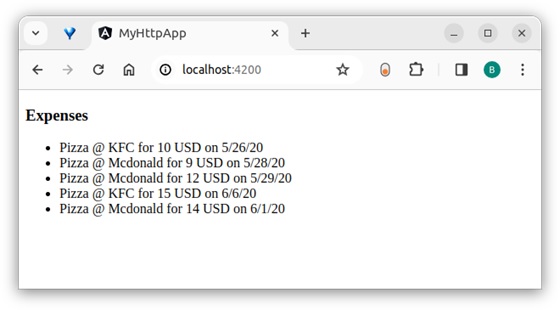
Here, the output shows our expenses as a list of items.
Step 15: Let us modify the above sample application by changing the HttpRequest option to a generic option.
Step 16: Change the ngOnInit method as shown below:
ngOnInit(): void {
   this.http.request<Expense[]>('GET', 'http://localhost:8000/api/expense', {
      observe : 'body',
      responseType : 'json'
   })
   .subscribe( data => {
      this.expenses = data as Expense[]
      console.log(this.expenses)
   })
}
Here,
- Removed the HttpRequest object.
- Changed the argument of the request method by incorporating the generic options.
- Set the observe option in the third argument as body. This will parse the body and return the body only instead of the whole response.
- Changed the subscribe() method and set the returned data as the array of expenses (Expense[]).
Step 17: Run the application and confirm the output. The output is the same as the above sample:
Conclusion
An Angular provides an easy way to request a HTTP calls to the server through the HttpClient service and HttpRequest objects.request() method is a generic method to support all HTTP verbs like GET, POST, PUT, DELETE, etc. We will learn more methods to target particular HTTP verbs in the upcoming chapters.
