
- Angular Tutorial
- Angular - Home
- Angular - Overview
- Angular - Features
- Angular - Advantages & Disadvantages
- Angular Basics
- Angular - Environment setup
- Angular - First Application
- Angular - MVC Architecture
- Angular Components
- Angular - Components
- Angular - Component Lifecycle
- Angular - View Encapsulation
- Angular - Emulated Encapsulation
- Angular - ShadowDom Encapsulation
- Angular - Component Interaction
- Angular - Using @Input Decorator
- Angular - Using @Output Decorator
- Angular - Using Local Variable
- Angular - Using @ViewChild Decorator
- Angular - Using Services
- Angular - Component Styles
- Angular - Nested Components
- Angular - Content projection
- Angular - Single-slot Content Projection
- Angular - Multi-slot Content Projection
- Angular - Conditional Content Projection
- Angular - Dynamic components
- Angular - Using NgComponentOutlet
- Angular - Using ViewContainerRef
- Angular - Elements
- Angular Templates
- Angular - Templates
- Angular - Template statements
- Angular - Template Variables
- Angular - SVG as Templates
- Angular Binding
- Angular - Data Binding
- Angular - Interpolation
- Angular - Event Binding
- Angular - Property Binding
- Angular - Attribute Binding
- Angular - Class Binding
- Angular - Style Binding
- Angular - Two-way Binding
- Angular Directives
- Angular - Directives
- Angular - Attribute Directives
- Angular - Structural Directives
- Angular - Custom Directives
- Angular Pipes
- Angular - Pipes
- Angular - Built-in Pipes
- Angular - Custom Pipes
- Angular Forms
- Angular - Forms
- Angular - Template Driven Forms
- Angular - Reactive Forms
- Angular - Form Validation
- Angular - Dynamic Forms
- Angular Dependency Injection
- Angular - Dependency Injection
- Angular - Injectable Service
- Angular Routing
- Angular - Routing
- Angular - Dynamic Routes
- Angular - Wildcard Routes
- Angular - Nested Routes
- Angular - Navigation
- Angular - Routing in SPA
- Angular - Custom Route Matches
- Angular - Router Reference
- Angular HTTP Client programming
- Angular - Services
- Angular - HTTP Client
- Angular - Express based REST API
- Angular - Request
- Angular - Request Response Workflow
- Angular - Response
- Angular - Express based Upload API
- Angular - GET
- Angular - POST
- Angular - PUT
- Angular - DELETE
- Angular - JSONP
- Angular - CRUD Operations Using HTTP
- Angular Modules
- Angular - Introduction to Modules
- Angular - Root Module
- Angular - Feature Module
- Angular - Sharing Module
- Angular - Routing Module
- Angular - NgModules
- Angular Animation
- Angular - Animations
- Angular Service Workers & PWA
- Angular - Service Workers & PWA
- Angular Testing
- Angular - Testing Overview
- Angular Design Patterns
- Angular - Design Patterns
- Angular - Lazy Loading
- Angular - Singleton Pattern
- Angular - Observer Pattern
- Angular Libraries
- Angular - Libraries
- Angular - Angular Material
- Angular - PrimeNG
- Angular - RxJS
- Angular Advanced
- Angular - Signals
- Angular - Authentication & Authorization
- Angular - Internationalization
- Angular - Standalone Component
- Angular - Accessibility
- Angular - Web Workers
- Angular - Server Side Rendering
- Angular - Ivy Compiler
- Angular - Building with Bazel
- Angular - Backward Compatibility
- Angular - Reactive Programming
- Angular Tools
- Angular - CLI
- Angular Material UI Elements
- Angular - Paginator
- Angular - Datepicker
- Angular - Select Drop-down
- Angular Miscellaneous
- Angular - Third Party Controls
- Angular - Configuration
- Angular - Displaying Data
- Angular - Decorators & Metadata
- Angular - Basic Example
- Angular - Error Handling
- Angular - Testing & Building a Project
- Angular - Lifecycle Hooks
- Angular - User Input
- Angular - What's New?
- Angular Useful Resources
- Angular - Quick Guide
- Angular - Useful Resources
- Angular - Discussion
Angular - Dynamic Routes
This chapter will discuss, what is dynamic routes in Angular, including its syntax, usage and example of using in real-time Angular project.
Dynamic Routes in Angular
In Angular, dynamic routes are used to load a specific data or entity within a component based on the route parameters.
For example, in a streaming platform having multiple videos, the application could use dynamic routes to load each video within the VideosComponent by passing the video ID as a route parameter.
This way, each time a user navigates to a new video (e.g., /videos/:id), the corresponding video data is fetched and displayed dynamically.
Note: Dynamic routing refers to the overall technique or approach of implementing dynamic routes.
Syntax of Angular Dynamic Routes
Below is the syntax to create Dynamic Routes in Angular −
const routes: Routes = [
  { path: 'route-path/:parameterName', component: SomeComponent }
];
Here,
- route-path: This represents the name of the route path that will be used to access the current component.
- parameterName: The name of the parameter that you want to access, such as id.
- SomeComponent: The name of the component that should be loaded based on the current path and parameter.
The 'parameterName' can be accessed in the component using two techniques, which are:
- Using Observable.
- Using snapshot (non-observable option).
Using Observable
Angular provides a special interface named paramMap to access the parameters of the path (URL). parmaMap has the following methods −
has(name): Returns true if the specified name is available in the path (parameter list).
get(name): Returns the value of the specified name in the path (parameter list).
getAll(name): Returns the multiple value of the specified name in the path. The get() method returns only the first value when multiple values are available.
keys: Returns all parameters available in the path.
The Steps to access the parameter using paramMap are as follows −
Import paramMap available in @angular/router package.
Use paramMap in the ngOnInit() to access the parameter and set it to a local variable.
ngOnInit() {
    this.route.paramMap.subscribe(params => {
        this.parameterName = params.get('parameterName);
    });
}
We can use it directly in the rest service using the pipe method.
this.item$ = this.route.paramMap.pipe(
    switchMap(params => {
      this.selectedId = Number(params.get('parameterName'));
      return this.service.getItem(this.selectedId);
    })
);
Using snapshot
The snapshot is similar to Observable, but it does not support observable and gets the parameter value immediately.
let id = this.route.snapshot.paramMap.get('parameterName');
Example - Usage of Angular Dynamic Routes
Below is a example of using the Dynamic Routes in a Angular project −
Step 1: Define Home Component
ng g c home
CREATE src/app/home/home.spec.ts (540 bytes)
CREATE src/app/home/home.ts (189 bytes)
CREATE src/app/home/home.css (0 bytes)
CREATE src/app/home/home.html (20 bytes)
Step 2: Define About Component
ng g c about
CREATE src/app/about/about.spec.ts (547 bytes)
CREATE src/app/about/about.ts (193 bytes)
CREATE src/app/about/about.css (0 bytes)
CREATE src/app/about/about.html (21 bytes)
Step 3: Define ViewItem Component
ng g c view-item
CREATE src/app/view-item/view-item.spec.ts (569 bytes)
CREATE src/app/view-item/view-item.ts (208 bytes)
CREATE src/app/view-item/view-item.css (0 bytes)
CREATE src/app/view-item/view-item.html (25 bytes)
Step 4: Define dynamic route
app.routes.ts
import { Routes } from '@angular/router';
import { Home } from './home/home';
import { About } from './about/about';
import { ViewItem } from './view-item/view-item';

export const routes: Routes = [
   {path: 'home', component: Home},
   {path: 'about', component: About},
   {path: 'view/:id', component: ViewItem}
];
Step 5: Add your routes to your application
<h1>Angular Routing</h1>
<a routerLink="/home">Home</a><br />
<a routerLink="/about">About</a><br />
<a routerLink="/view/1">View Item1</a><br />
<a routerLink="/view/2">View Item2</a><br />
<router-outlet></router-outlet>
Step 6: Include routerModule in app.ts
app.ts
import { Component, signal } from '@angular/core';
import { RouterModule, RouterOutlet } from '@angular/router';

@Component({
   selector: 'app-root',
   imports: [RouterOutlet, RouterModule],
   templateUrl: './app.html',
   styleUrl: './app.css'
})
export class App {
   protected readonly title = signal('myApp');
}
Step 7: Access 'id' parameter in ViewItem Component
view-item.ts
import { Component, OnInit } from '@angular/core';
import { ActivatedRoute } from '@angular/router';

@Component({
  selector: 'app-view-item',
  imports: [],
  templateUrl: './view-item.html',
  styleUrl: './view-item.css',
})
export class ViewItem implements OnInit{
  id: any;
  constructor(private route: ActivatedRoute){}
  ngOnInit(): void {
      this.route.paramMap.subscribe(res=> {
        this.id = res.get('id');
      });
  }

}
Step 8: Display the current Item based on it's id
view-item.html
<p>View item{{id}}</p>
Now run the application and see the output:
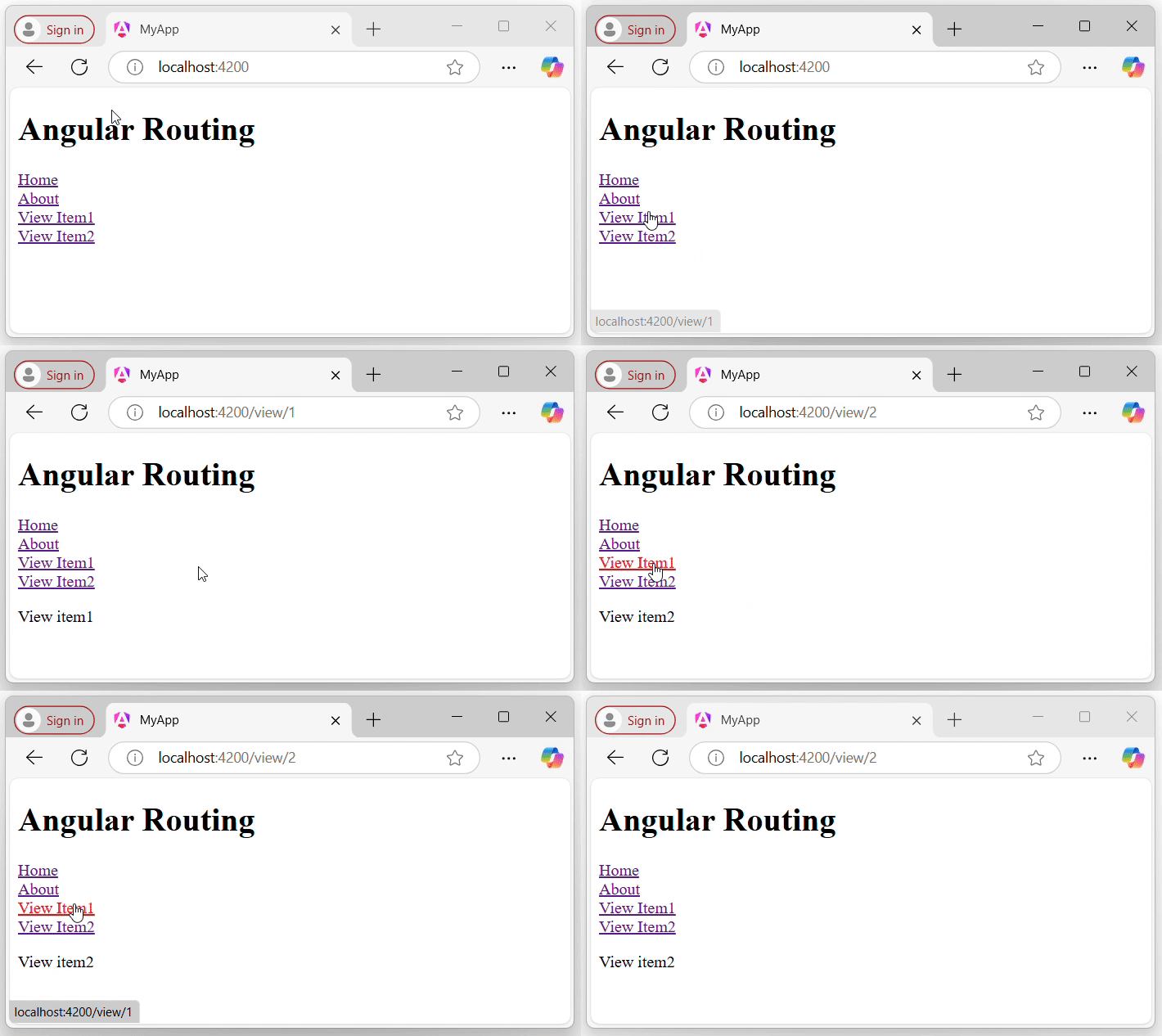
By observing the URL in the above GIF, you can clearly see that the items are loaded dynamically based on changes to their ID parameter in the routes.
