- Advanced Android - Home
- Advanced Android - Material Design
- Advanced Android - Sliding Menu
- Advanced Android - Tabs
- Advanced Android - Sliders
- Advanced Android - Floating Labels
- Advanced Android - ViewPager
- Material Login & Registration
- Advanced Android - Snackbar
- Expandable List View
- Search Functionality
- Count Down Functionality
- Draw Spritesheet
- Advanced Android - Linkify Class
- Advanced Android - ViewFlipper
- Advanced Android - loader
- Advanced Android - Slider Menu
- SwipeRefreshLayout
- Shake to Refresh
- Advanced Android - Color Palette
- Crumbling Layout
- Advanced Android - Page Flip
- Ken Burns effect
- Advanced Android - Parallax Header
- Borderless Dialog
- Advanced Android - Holder View
- Scrolling TextView by Ticker
- Floating Action Menu
- Spinner Data from Database
- Advanced Android - Flexbox Layout
- Advanced Android - YouTube API
- Video Streaming
- Cardview & Recycleview
Advanced Android - Shake to Refresh
Android Shake to refresh is used in instead of pulling down our finger, we shake our smartphone to refresh the UI.
Example
This example demostrate about how to integrate Android Shake to Refresh.
Step 1 − Create a new project in Android Studio, go to File ⇒ New Project and fill all required details to create a new project.
Step 2 − Add the following code to res/layout/activity_main.xml.
<?xml version = "1.0" encoding = "utf-8"?>
<RelativeLayout xmlns:android = "http://schemas.android.com/apk/res/android"
   xmlns:tools = "http://schemas.android.com/tools"
   android:layout_width = "match_parent"
   android:layout_height = "match_parent"
   android:paddingLeft = "@dimen/activity_horizontal_margin"
   android:paddingRight = "@dimen/activity_horizontal_margin"
   android:paddingTop = "@dimen/activity_vertical_margin"
   android:paddingBottom = "@dimen/activity_vertical_margin">
   <TextView
      android:text = "@string/app_name"
      android:layout_width = "wrap_content"
      android:layout_height = "wrap_content"
      android:layout_centerHorizontal = "true"
      android:id = "@+id/txt"/>
   <ListView
      android:layout_width = "wrap_content"
      android:layout_height = "wrap_content"
      android:id = "@+id/list"
      android:layout_below = "@id/txt"
      android:layout_marginTop = "15dp"/>
</RelativeLayout>
Step 3 − Add the following code to src/MainActivity.java
package myapplication.example.com.myapplication;

import android.app.Activity;
import android.os.Bundle;
import android.view.Menu;
import android.view.MenuItem;
import android.widget.ArrayAdapter;
import android.widget.ListView;
import android.widget.Toast;

public class MainActivity extends Activity implements ShakeEventManager.ShakeListener {
   private String[] dataList;
   private ArrayAdapter<String> adpt;
   private ListView listView;
   private ShakeEventManager sd;

   @Override
   protected void onCreate(Bundle savedInstanceState) {
      super.onCreate(savedInstanceState);
      setContentView(R.layout.activity_main);
      createData();
      adpt = new ArrayAdapter<String>(
         this, android.R.layout.simple_list_item_1, dataList);

      listView = (ListView) findViewById(R.id.list);
      listView.setAdapter(adpt);
      sd = new ShakeEventManager();
      sd.setListener(this);
      sd.init(this);
   }

   @Override
   public boolean onCreateOptionsMenu(Menu menu) {
      // Inflate the menu; this adds items to the action bar if it is present.
      return true;
   }

   @Override
   public boolean onOptionsItemSelected(MenuItem item) {
      return super.onOptionsItemSelected(item);
   }
   private void createData() {
      int start = (int) (Math.random() * 10);
      dataList = new String[15];

      for (int i=0; i < dataList.length; i++)dataList[i] = "Item_" + (start + i);
   }

   @Override
   public void onShake() {
      createData();
      adpt = new ArrayAdapter<String>(
         this, android.R.layout.simple_list_item_1, dataList);

      Toast.makeText(this, "Refresh data...", Toast.LENGTH_SHORT).show();
      listView.setAdapter(adpt);
   }

   @Override
   protected void onResume() {
      super.onResume();
      sd.register();
   }

   @Override
   protected void onPause() {
      super.onPause();
      sd.deregister();
   }
}
Step 4 − Add the following code to src/ShakeEventManager.java
package myapplication.example.com.myapplication;

import android.content.Context;
import android.hardware.Sensor;
import android.hardware.SensorEvent;
import android.hardware.SensorEventListener;
import android.hardware.SensorManager;
import android.util.Log;

public class ShakeEventManager implements SensorEventListener {
   private SensorManager sManager;
   private Sensor s;

   private static final int MOV_COUNTS = 2;
   private static final int MOV_THRESHOLD = 4;
   private static final float ALPHA = 0.8F;
   private static final int SHAKE_WINDOW_TIME_INTERVAL = 500; // milliseconds

   // Gravity force on x,y,z axis
   private float gravity[] = new float[3];

   private int counter;
   private long firstMovTime;
   private ShakeListener listener;
   public ShakeEventManager() {
   }
   public void setListener(ShakeListener listener) {
      this.listener = listener;
   }
   public void init(Context ctx) {
      sManager = (SensorManager)  ctx.getSystemService(Context.SENSOR_SERVICE);
      s = sManager.getDefaultSensor(Sensor.TYPE_ACCELEROMETER);
      register();
   }
   public void register() {
      sManager.registerListener(this, s, SensorManager.SENSOR_DELAY_NORMAL);
   }

   @Override
   public void onSensorChanged(SensorEvent sensorEvent) {
      float maxAcc = calcMaxAcceleration(sensorEvent);
      Log.d("SwA", "Max Acc ["+maxAcc+"]");

      if (maxAcc >= MOV_THRESHOLD) {
         if (counter == 0) {
            counter++;
            firstMovTime = System.currentTimeMillis();
            Log.d("SwA", "First mov..");
         } else {
            long now = System.currentTimeMillis();
            if ((now - firstMovTime) < SHAKE_WINDOW_TIME_INTERVAL)counter++;
            else {
               resetAllData();
               counter++;
               return;
            }
            Log.d("SwA", "Mov counter ["+counter+"]");
            if (counter >= MOV_COUNTS)
            if (listener != null)
            listener.onShake();
         }
      }
   }
   @Override
   public void onAccuracyChanged(Sensor sensor, int i) {
   }
   public void deregister()  {
      sManager.unregisterListener(this);
   }
   private float calcMaxAcceleration(SensorEvent event) {
      gravity[0] = calcGravityForce(event.values[0], 0);
      gravity[1] = calcGravityForce(event.values[1], 1);
      gravity[2] = calcGravityForce(event.values[2], 2);

      float accX = event.values[0] - gravity[0];
      float accY = event.values[1] - gravity[1];
      float accZ = event.values[2] - gravity[2];

      float max1 = Math.max(accX, accY);
      return Math.max(max1, accZ);
   }
   // Low pass filter
   private float calcGravityForce(float currentVal, int index) {
      return  ALPHA * gravity[index] + (1 - ALPHA) * currentVal;
   }

   private void resetAllData() {
      Log.d("SwA", "Reset all data");
      counter = 0;
      firstMovTime = System.currentTimeMillis();
   }
   public static interface ShakeListener {
      public void onShake();
   }
}
Step 5 − No need to change manifest.xml.
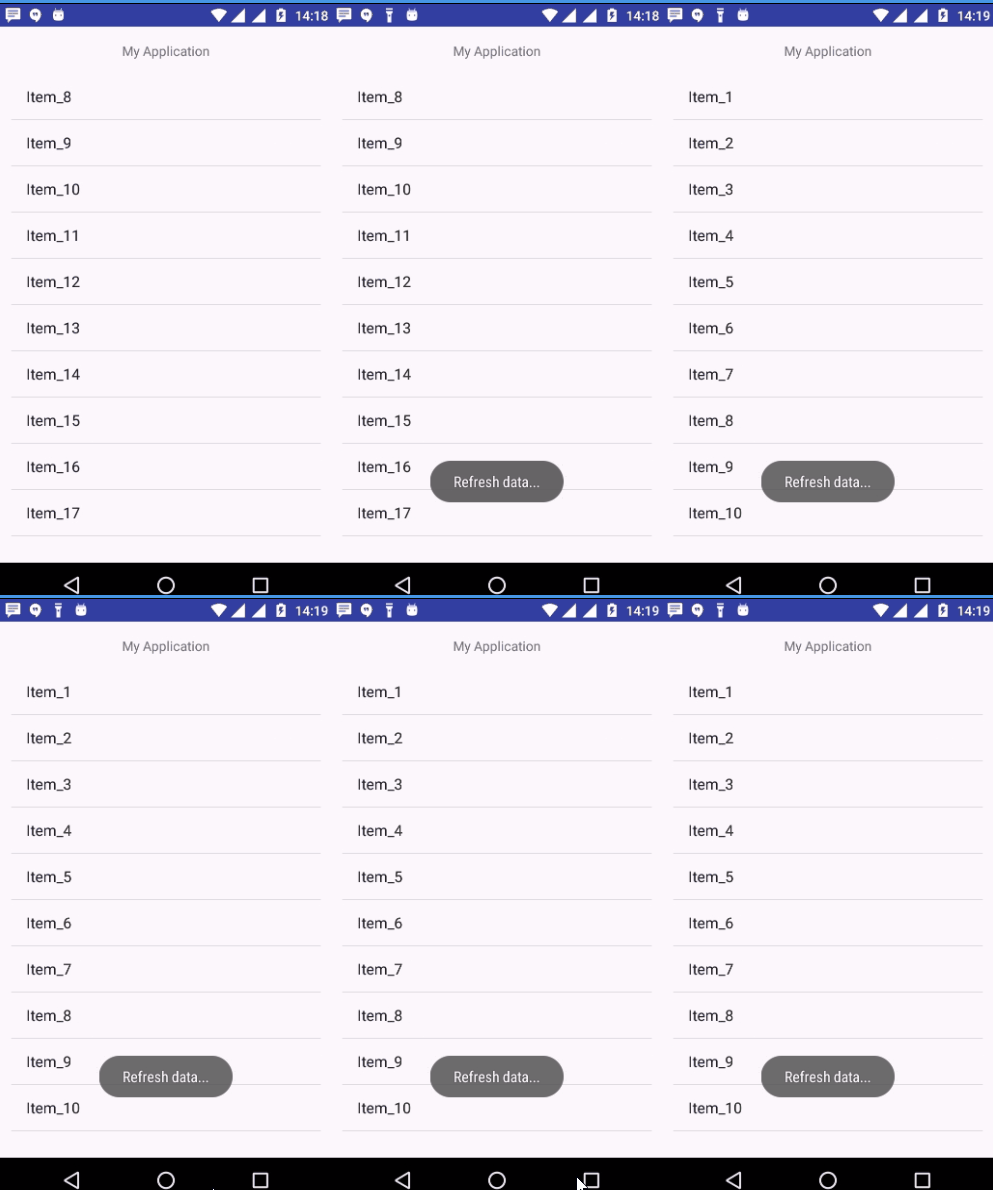
Let's try to run your application. I assume you have connected your actual Android Mobile device with your computer. To run the app from android studio, open one of your project's activity files and click Run  icon from the toolbar. Select your mobile device as an option and then check your mobile device which will display your default screen −