- Advanced Android - Home
- Advanced Android - Material Design
- Advanced Android - Sliding Menu
- Advanced Android - Tabs
- Advanced Android - Sliders
- Advanced Android - Floating Labels
- Advanced Android - ViewPager
- Material Login & Registration
- Advanced Android - Snackbar
- Expandable List View
- Search Functionality
- Count Down Functionality
- Draw Spritesheet
- Advanced Android - Linkify Class
- Advanced Android - ViewFlipper
- Advanced Android - loader
- Advanced Android - Slider Menu
- SwipeRefreshLayout
- Shake to Refresh
- Advanced Android - Color Palette
- Crumbling Layout
- Advanced Android - Page Flip
- Ken Burns effect
- Advanced Android - Parallax Header
- Borderless Dialog
- Advanced Android - Holder View
- Scrolling TextView by Ticker
- Floating Action Menu
- Spinner Data from Database
- Advanced Android - Flexbox Layout
- Advanced Android - YouTube API
- Video Streaming
- Cardview & Recycleview
Cardview & RecyclerView
Android CardView is a view which has all material design properties and shadows according the elevation. The best part about this view is that, it extends FrameLayout and it can be displayed on all the platforms of android since its available through the Support v7 library.
Example
This example demostrate about how to integrate CardView with RecyclerView by creating a beautiful music app that displays music albums with a cover image and title.
To use the CardView, you should add the library in build.gradle file as shown below −
dependencies {
   compile fileTree(dir: 'libs', include: ['*.jar'])
   testCompile 'junit:junit:4.12'
   compile 'com.android.support:appcompat-v7:24.2.0'
   compile 'com.android.support:cardview-v7:21.0.+'
   compile 'com.android.support:recyclerview-v7:21.0.+'
}
Following is the modified content of the xml res/layout/activity_main.xml.
<?xml version = "1.0" encoding = "utf-8"?>
<RelativeLayout xmlns:android = "http://schemas.android.com/apk/res/android"
   xmlns:tools = "http://schemas.android.com/tools"
   android:layout_width = "match_parent"
   android:layout_height = "match_parent"
   tools:context = ".MainActivity">
   <android.support.v7.widget.RecyclerView
      android:id = "@+id/my_recycler_view"
      android:layout_width = "match_parent"
      android:layout_height = "match_parent"
      android:scrollbars = "vertical"/>
</RelativeLayout>
Following is the content of the modified main activity file src/MainActivity.java.
package myapplication.example.com.card_recycle;

import android.os.Bundle;
import android.support.v7.app.AppCompatActivity;
import android.support.v7.widget.LinearLayoutManager;
import android.support.v7.widget.RecyclerView;
import android.util.Log;
import android.view.View;
import java.util.ArrayList;

public class MainActivity extends AppCompatActivity {
   private RecyclerView mRecyclerView;
   private RecyclerView.Adapter mAdapter;
   private RecyclerView.LayoutManager mLayoutManager;
   private static String LOG_TAG = "CardViewActivity";

   @Override
   protected void onCreate(Bundle savedInstanceState) {
      super.onCreate(savedInstanceState);
      setContentView(R.layout.activity_main);

      mRecyclerView = (RecyclerView) findViewById(R.id.my_recycler_view);
      mRecyclerView.setHasFixedSize(true);
      mLayoutManager = new LinearLayoutManager(this);
      mRecyclerView.setLayoutManager(mLayoutManager);
      mAdapter = new MyRecyclerViewAdapter(getDataSet());
      mRecyclerView.setAdapter(mAdapter);

      // Code to Add an item with default animation
      //((MyRecyclerViewAdapter) mAdapter).addItem(obj, index);
      // Code to remove an item with default animation
      //((MyRecyclerViewAdapter) mAdapter).deleteItem(index);
   }
   @Override
   protected void onResume() {
      super.onResume();
      ((MyRecyclerViewAdapter) mAdapter).setOnItemClickListener(new MyRecyclerViewAdapter
         .MyClickListener() {

         @Override
         public void onItemClick(int position, View v) {
            Log.i(LOG_TAG, " Clicked on Item " + position);
         }
      });
   }
   private ArrayList<DataObject> getDataSet() {
      ArrayList results = new ArrayList<DataObject>();
      for (int index = 0; index < 20; index++) {
         DataObject obj = new DataObject("Some Primary Text " + index,
            "Secondary " + index);
         results.add(index, obj);
      }
      return results;
   }
}
Following is the content of the modified file src/MyRecyclerViewAdapter.java.
package myapplication.example.com.card_recycle;

import android.support.v7.widget.RecyclerView;
import android.util.Log;
import android.view.LayoutInflater;
import android.view.View;
import android.view.ViewGroup;
import android.widget.TextView;
import android.widget.Toast;

import java.util.ArrayList;

public class MyRecyclerViewAdapter extends RecyclerView
      .Adapter<MyRecyclerViewAdapter
      .DataObjectHolder> {
   private static String LOG_TAG = "MyRecyclerViewAdapter";
   private ArrayList<DataObject> mDataset;
   private static MyClickListener myClickListener;
   public static class DataObjectHolder extends RecyclerView.ViewHolder implements View
      .OnClickListener {

      TextView label;
      TextView dateTime;

      public DataObjectHolder(View itemView) {
         super(itemView);
         label = (TextView) itemView.findViewById(R.id.textView);
         dateTime = (TextView) itemView.findViewById(R.id.textView2);
         Log.i(LOG_TAG, "Adding Listener");
         itemView.setOnClickListener(this);
      }
      @Override
      public void onClick(View v) {
         // myClickListener.onItemClick(getAdapterPosition(), v);
         // Toast.makeText(this,"This is card View",Toast.LENGTH_LONG).show();
      }
   }
   public void setOnItemClickListener(MyClickListener myClickListener) {
      this.myClickListener = myClickListener;
   }
   public MyRecyclerViewAdapter(ArrayList<DataObject> myDataset) {
      mDataset = myDataset;
   }
   @Override
   public DataObjectHolder onCreateViewHolder(ViewGroup parent, int viewType) {
      View view = LayoutInflater.from(parent.getContext())
      .inflate(R.layout.card_view_row, parent, false);

      DataObjectHolder dataObjectHolder = new DataObjectHolder(view);
      return dataObjectHolder;
   }

   @Override
   public void onBindViewHolder(DataObjectHolder holder, int position) {
      holder.label.setText(mDataset.get(position).getmText1());
      holder.dateTime.setText(mDataset.get(position).getmText2());
   }
   public void addItem(DataObject dataObj, int index) {
      mDataset.add(index, dataObj);
      notifyItemInserted(index);
   }
   public void deleteItem(int index) {
      mDataset.remove(index);
      notifyItemRemoved(index);
   }

   @Override
   public int getItemCount() {
      return mDataset.size();
   }
   public interface MyClickListener {
      public void onItemClick(int position, View v);
   }
}
Following is the modified content of the xml res/layout/card_view_row.xml.
<?xml version = "1.0" encoding = "utf-8"?>
<LinearLayout xmlns:android = "http://schemas.android.com/apk/res/android"
   xmlns:card_view = "http://schemas.android.com/apk/res-auto"
   android:orientation = "vertical"
   android:layout_width="match_parent"
   android:layout_height = "match_parent">
   <android.support.v7.widget.CardView
      android:id = "@+id/card_view"
      android:layout_gravity = "center"
      android:layout_width = "fill_parent"
      android:layout_height = "100dp"
      android:layout_margin = "5dp"
      card_view:cardCornerRadius = "2dp"
      card_view:contentPadding = "10dp">
      <RelativeLayout
         android:layout_width = "fill_parent"
         android:layout_height = "fill_parent">
         <TextView
            android:id = "@+id/textView"
            android:layout_width = "wrap_content"
            android:layout_height = "wrap_content"
            android:textStyle = "bold"
            android:layout_alignParentTop = "true"/>
         <TextView
            android:id = "@+id/textView2"
            android:layout_width = "wrap_content"
            android:layout_height = "wrap_content"
            android:layout_marginTop = "10dp"
            android:layout_below = "@+id/textView"/>
      </RelativeLayout>

   </android.support.v7.widget.CardView>
</LinearLayout>
Following is the content of the modified file src/DataObject.java.
package myapplication.example.com.card_recycle;

public class DataObject {
   private String mText1;
   private String mText2;

   DataObject (String text1, String text2){
      mText1 = text1;
      mText2 = text2;
   }
   public String getmText1() {
      return mText1;
   }
   public void setmText1(String mText1) {
      this.mText1 = mText1;
   }
   public String getmText2() {
      return mText2;
   }
   public void setmText2(String mText2) {
      this.mText2 = mText2;
   }
}
Following is the content of AndroidManifest.xml file.
<?xml version = "1.0" encoding = "utf-8"?>
<manifest xmlns:android = "http://schemas.android.com/apk/res/android"
   package = "myapplication.example.com.card_recycle">
   <application
      android:allowBackup = "true"
      android:icon = "@mipmap/ic_launcher"
      android:label = "@string/app_name"
      android:supportsRtl = "true"
      android:theme = "@style/AppTheme">
      <activity android:name = ".MainActivity">
         <intent-filter>
            <action android:name = "android.intent.action.MAIN" />
            <category android:name = "android.intent.category.LAUNCHER" />
         </intent-filter>
      </activity>

   </application>
</manifest>
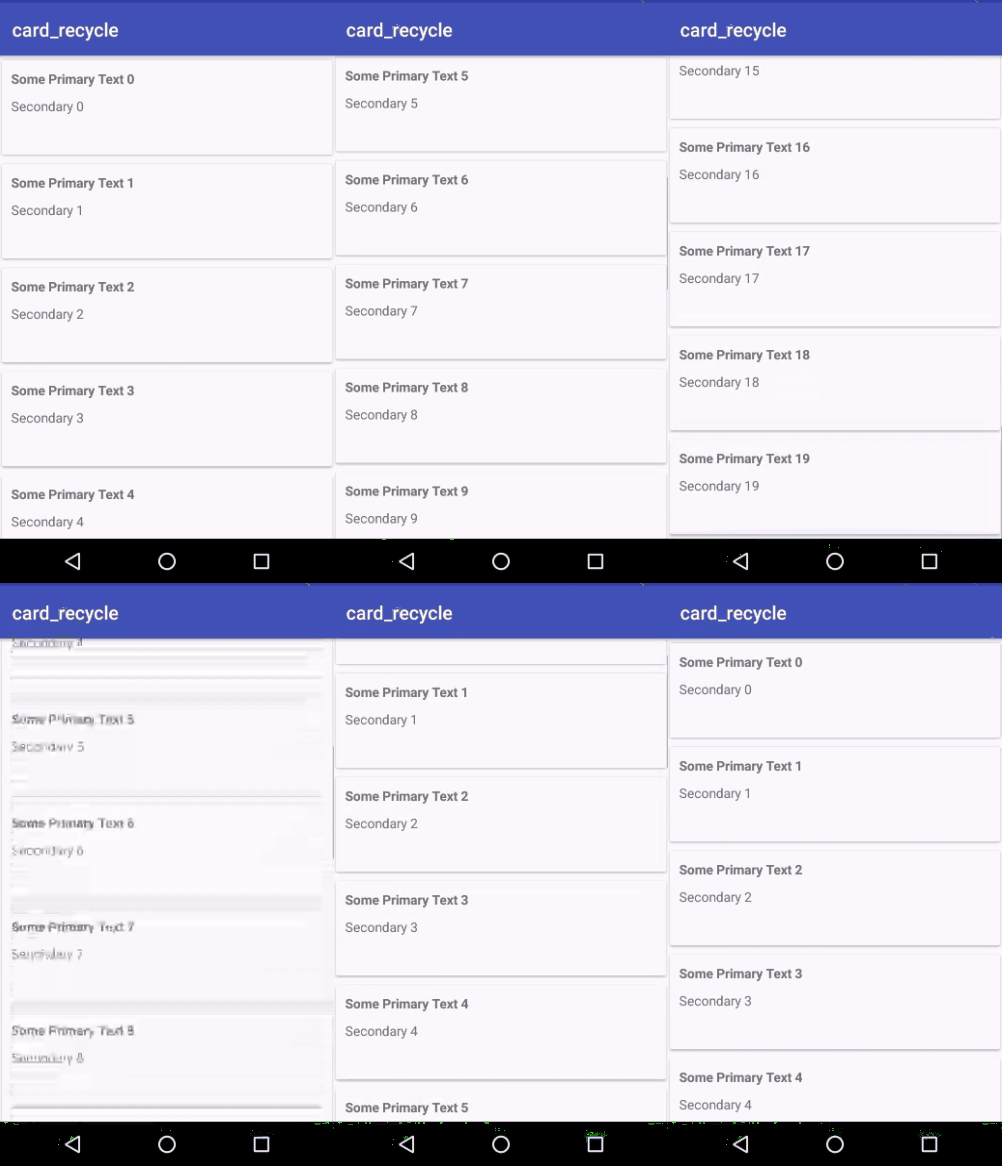
Let's try to run your application. I assume you have connected your actual Android Mobile device with your computer. To run the app from android studio, open one of your project's activity files and click Run  icon from the toolbar. Select your mobile device as an option and then check your mobile device which will display your default screen −