- Advanced Android - Home
- Advanced Android - Material Design
- Advanced Android - Sliding Menu
- Advanced Android - Tabs
- Advanced Android - Sliders
- Advanced Android - Floating Labels
- Advanced Android - ViewPager
- Material Login & Registration
- Advanced Android - Snackbar
- Expandable List View
- Search Functionality
- Count Down Functionality
- Draw Spritesheet
- Advanced Android - Linkify Class
- Advanced Android - ViewFlipper
- Advanced Android - loader
- Advanced Android - Slider Menu
- SwipeRefreshLayout
- Shake to Refresh
- Advanced Android - Color Palette
- Crumbling Layout
- Advanced Android - Page Flip
- Ken Burns effect
- Advanced Android - Parallax Header
- Borderless Dialog
- Advanced Android - Holder View
- Scrolling TextView by Ticker
- Floating Action Menu
- Spinner Data from Database
- Advanced Android - Flexbox Layout
- Advanced Android - YouTube API
- Video Streaming
- Cardview & Recycleview
Material Login and Registration Form
A login application is the screen asking your credentials to login to some particular application. You might have seen it when logging into facebook, twitter e.t.c
Example
This example demostrate about how to integrate Android Login and register form.
Step 1 − Create a new project in Android Studio, go to File ⇒ New Project and fill all required details to create a new project.
Step 2 − Add the following code to res/layout/login.xml.
<?xml version = "1.0" encoding = "utf-8"?>
<ScrollView
   xmlns:android = "http://schemas.android.com/apk/res/android"
   android:layout_width = "fill_parent"
   android:layout_height = "fill_parent"
   android:fillViewport = "true">
   <RelativeLayout
      android:layout_width = "fill_parent"
      android:layout_height = "wrap_content" android:background = "#ffffff">
      <LinearLayout android:id = "@+id/header"
         android:layout_width = "fill_parent"
         android:layout_height = "wrap_content"
         android:background = "@layout/header_gradient"
         android:paddingTop = "5dip"
         android:paddingBottom = "5dip">
         <ImageView android:src = "@drawable/abc"
            android:layout_width = "wrap_content"
            android:layout_height = "wrap_content"
            android:layout_marginLeft = "10dip"/>
      </LinearLayout>
      <LinearLayout android:id = "@+id/footer"
         android:layout_width = "fill_parent"
         android:layout_height = "90dip"
         android:background = "@layout/footer_repeat"
         android:layout_alignParentBottom = "true"
         android:orientation = "vertical">
      </LinearLayout>
      <LinearLayout
         xmlns:android = "http://schemas.android.com/apk/res/android"
         android:orientation = "vertical"
         android:layout_width = "match_parent"
         android:layout_height = "wrap_content"
         android:padding = "10dip"
         android:layout_below = "@id/header">
         <TextView android:layout_width = "fill_parent"
            android:layout_height = "wrap_content"
            android:textColor = "#372c24"
            android:text = "Email"/>
         <EditText android:layout_width = "fill_parent"
            android:layout_height = "wrap_content"
            android:layout_marginTop = "5dip"
            android:layout_marginBottom = "20dip"
            android:singleLine = "true"/>
         <TextView android:layout_width = "fill_parent"
            android:layout_height = "wrap_content"
            android:textColor = "#372c24"
            android:text = "Password"/>
         <EditText android:layout_width = "fill_parent"
            android:layout_height = "wrap_content"
            android:layout_marginTop = "5dip"
            android:singleLine = "true"
            android:password = "true"/>
         <Button android:id = "@+id/btnLogin"
            android:layout_width = "fill_parent"
            android:layout_height = "wrap_content"
            android:layout_marginTop = "10dip"
            android:text = "Login"/>
         <TextView android:id = "@+id/link_to_register"
            android:layout_width = "fill_parent"
            android:layout_height = "wrap_content"
            android:layout_marginTop = "40dip"
            android:layout_marginBottom = "40dip"
            android:text = "New to User? Register here"
            android:gravity = "center"
            android:textSize = "20dip"
            android:textColor = "#0b84aa"/>
      </LinearLayout>

   </RelativeLayout>
</ScrollView>
Step 3 − Add the following code to src/MainActivity.java
package myapplication.example.com.myapplication;

import android.app.Activity;
import android.content.Intent;
import android.os.Bundle;
import android.view.View;
import android.widget.TextView;

public class MainActivity extends Activity {
   @Override
   public void onCreate(Bundle savedInstanceState) {
      super.onCreate(savedInstanceState);
      setContentView(R.layout.login);
      TextView registerScreen = (TextView) findViewById(R.id.link_to_register);

      registerScreen.setOnClickListener(new View.OnClickListener() {
         public void onClick(View v) {
            Intent i = new Intent(getApplicationContext(), RegisterActivity.class);
            startActivity(i);
         }
      });
   }
}
Step 4 − Add the following code to src/register.java
Here abc indicates the logo of tutorialspoint.com
<?xml version = "1.0" encoding = "utf-8"?>
<ScrollView
   xmlns:android = "http://schemas.android.com/apk/res/android"
   android:layout_width = "fill_parent"
   android:layout_height = "fill_parent"
   android:fillViewport = "true">
   <RelativeLayout
      android:layout_width = "fill_parent"
      android:layout_height = "wrap_content" android:background = "#fff">
      <LinearLayout android:id = "@+id/header"
         android:layout_width = "fill_parent"
         android:layout_height = "wrap_content"
         android:background = "@layout/header_gradient"
         android:paddingTop = "5dip"
         android:paddingBottom = "5dip">
         <ImageView android:src = "@drawable/abc"
            android:layout_width = "wrap_content"
            android:layout_height = "wrap_content"
            android:layout_marginLeft = "10dip"/>
      </LinearLayout>
      <LinearLayout android:id = "@+id/footer"
         android:layout_width = "fill_parent"
         android:layout_height = "90dip"
         android:background = "@layout/footer_repeat"
         android:layout_alignParentBottom = "true"
         android:orientation = "vertical">
      </LinearLayout>
      <LinearLayout
         xmlns:android = "http://schemas.android.com/apk/res/android"
         android:orientation = "vertical"
         android:layout_width = "match_parent"
         android:layout_height = "wrap_content"
         android:padding = "10dip"
         android:layout_below = "@id/header">
         <TextView android:layout_width = "fill_parent"
            android:layout_height = "wrap_content"
            android:textColor = "#372c24"
            android:text = "Full Name"/>
         <EditText android:id = "@+id/reg_fullname"
            android:layout_width = "fill_parent"
            android:layout_height = "wrap_content"
            android:layout_marginTop = "5dip"
            android:singleLine = "true"
            android:layout_marginBottom = "20dip"/>
         <TextView android:layout_width = "fill_parent"
            android:layout_height = "wrap_content"
            android:textColor = "#372c24"
            android:text = "Email"/>
         <EditText android:id = "@+id/reg_email"
            android:layout_width = "fill_parent"
            android:layout_height = "wrap_content"
            android:layout_marginTop = "5dip"
            android:singleLine = "true"
            android:layout_marginBottom = "20dip"/>
         <TextView android:layout_width = "fill_parent"
            android:layout_height = "wrap_content"
            android:textColor = "#372c24"
            android:text = "Password"/>
         <EditText android:id = "@+id/reg_password"
            android:layout_width = "fill_parent"
            android:layout_height = "wrap_content"
            android:password = "true"
            android:singleLine = "true"
            android:layout_marginTop = "5dip"/>
         <Button android:id = "@+id/btnRegister"
            android:layout_width = "fill_parent"
            android:layout_height = "wrap_content"
            android:layout_marginTop = "10dip"
            android:text = "Register New Account"/>
         <TextView android:id = "@+id/link_to_login"
            android:layout_width = "fill_parent"
            android:layout_height = "wrap_content"
            android:layout_marginTop = "40dip"
            android:layout_marginBottom = "40dip"
            android:text = "Already has account! Login here"
            android:gravity = "center"
            android:textSize = "20dip"
            android:textColor = "#025f7c"/>
      </LinearLayout>
      <!-- Registration Form Ends -->

   </RelativeLayout>
</ScrollView>
Step 5 − Add the following code to res/layout/footer_repeat.xml.
<?xml version = "1.0" encoding = "utf-8"?>
<bitmap xmlns:android = "http://schemas.android.com/apk/res/android"
   android:src = "@drawable/abc"
   android:tileMode = "repeat"
   android:layout_width = "fill_parent"
   android:layout_height = "fill_parent"
   />
Step 6 − Add the following code to header_gradient.xml
<?xml version = "1.0" encoding = "utf-8"?>
<shape xmlns:android = "http://schemas.android.com/apk/res/android"
   android:layout_width = "fill_parent"
   android:layout_height = "fill_parent">
   <gradient
      android:startColor = "#24b2eb"
      android:centerColor = "#4ccbff"
      android:endColor = "#24b2eb"
      android:angle = "270"/>
   <corners android:radius = "5dp" />
</shape>
Step 7 − Add the following code to src/RegisterActivity.java
package myapplication.example.com.myapplication;

import android.app.Activity;
import android.os.Bundle;
import android.view.View;
import android.widget.TextView;

public class RegisterActivity extends Activity {
   @Override
   public void onCreate(Bundle savedInstanceState) {
      super.onCreate(savedInstanceState);
      setContentView(R.layout.register);
      TextView loginScreen = (TextView) findViewById(R.id.link_to_login);

      loginScreen.setOnClickListener(new View.OnClickListener() {
         public void onClick(View arg0) {
            finish();
         }
      });
   }
}
Step 8 − Add the following code to manifest.java
<?xml version = "1.0" encoding = "utf-8"?>
<manifest xmlns:android = "http://schemas.android.com/apk/res/android"
   package = "myapplication.example.com.myapplication">

   <application
      android:allowBackup = "true"
      android:icon = "@mipmap/ic_launcher"
      android:label = "@string/app_name"
      android:supportsRtl = "true"
      android:theme = "@style/AppTheme">
      <activity android:name = ".MainActivity">
         <intent-filter>
            <action android:name = "android.intent.action.MAIN" />
            <category android:name="android.intent.category.LAUNCHER" />
         </intent-filter>
      </activity>
      <activity android:name = ".RegisterActivity"
         android:label = "Register New Account"></activity>
   </application>
</manifest>
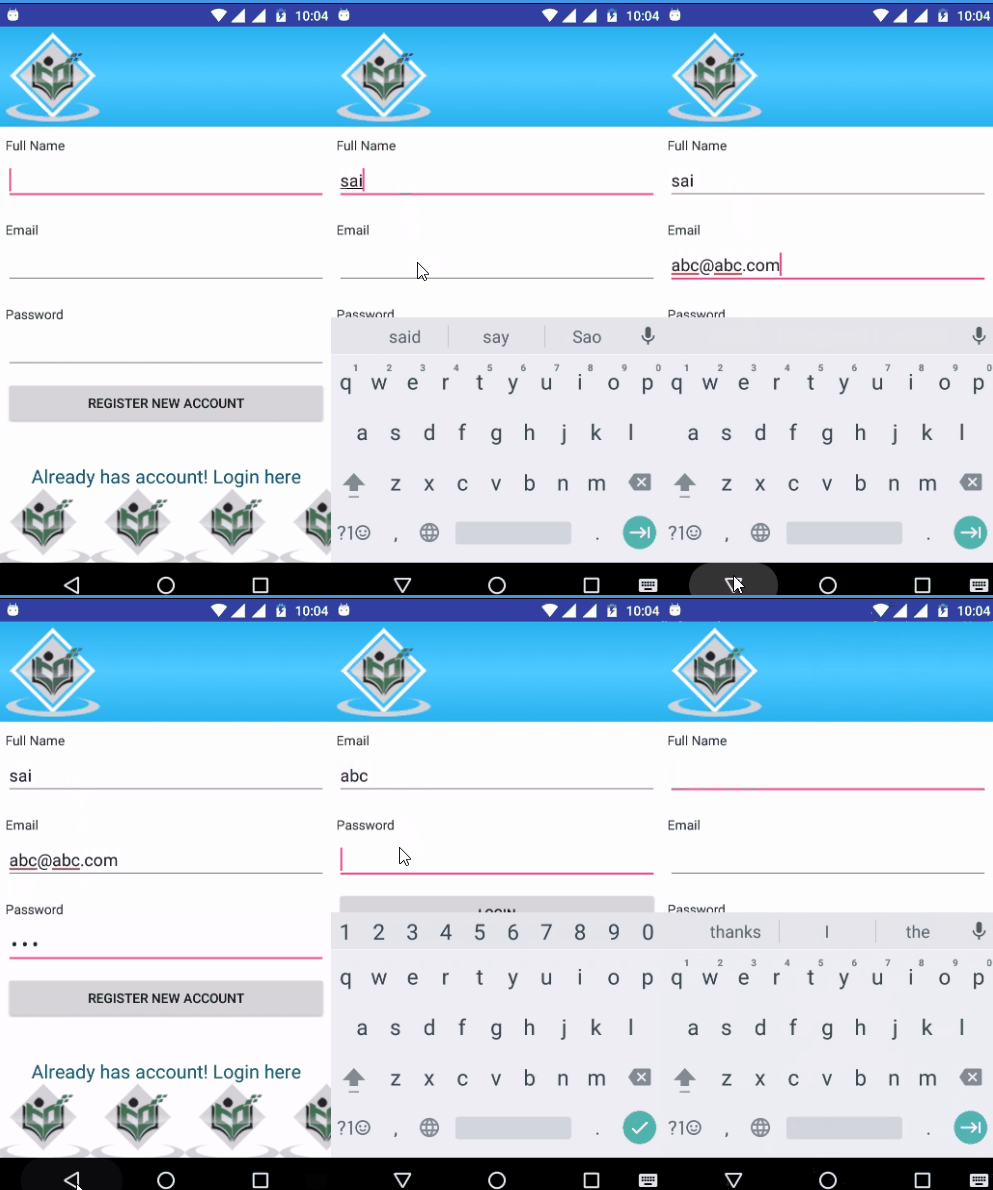
Let's try to run your application. I assume you have connected your actual Android Mobile device with your computer. To run the app from android studio, open one of your project's activity files and click Run  icon from the toolbar. Select your mobile device as an option and then check your mobile device which will display your default screen −