
- Security Testing - Home
- Security Testing - Overview
- Security Testing - Process
- Security Testing - Malicious Software
- HTTP Protocol Basics
- HTTPS Protocol Basics
- Encoding and Decoding
- Security Testing - Cryptography
- Security Testing - Same Origin Policy
- Security Testing - Cookies
- Hacking Web Applications
- Security Testing - Injection
- Testing Broken Authentication
- Testing Cross Site Scripting
- Insecure Direct Object Reference
- Testing Security Misconfiguration
- Testing Sensitive Data Exposure
- Missing Function Level Access Control
- Cross Site Request Forgery
- Components with Vulnerabilities
- Unvalidated Redirects and Forwards
- Security Testing - Ajax Security
- Testing Security - Web Service
- Security Testing - Buffer Overflows
- Security Testing - Denial of Service
- Testing Malicious File Execution
- Security Testing - Automation Tools
Security Testing - Sensitive Data Exposure
As the online application keep flooding in day by day, not all applications are secured. Many web applications do not properly protect sensitive user data such as credit cards information/Bank account info/authentication credentials. Hackers might end up stealing those weakly protected data to conduct credit card fraud, identity theft, or other crimes.
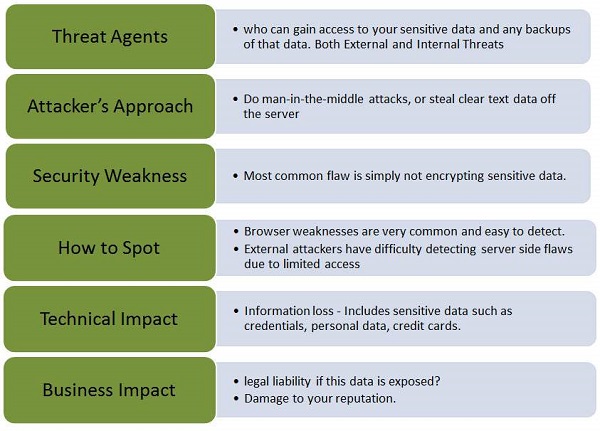
Let us understand Threat Agents, Attack Vectors, Security Weakness, Technical Impact and Business Impacts of this flaw with the help of simple diagram.
Example
Below are some of the classic examples of security misconfiguration :
A site simply doesn't use SSL for all authenticated pages. This will enable an attacker to monitor network traffic and steal the users session cookie to hijacks the users session or accessing their private data.
An application stores the credit card numbers in an encrypted format in a database. Upon retrieval those are decrypted allowing the hacker to perform a SQL injection attack to retrieve all sensitive info in a clear text. This can be avoided by encrypting the credit card numbers using a public key and allowed back-end applications to decrypt them with the private key.
Hands ON
1 .Launch WebGoat and navigate to "Insecure Storage" Section. Snapshot of the same is displayed below.
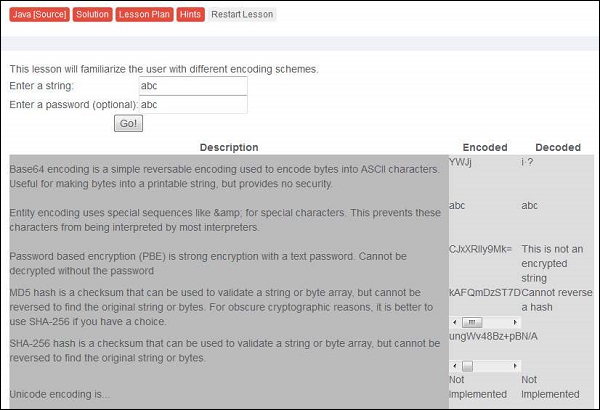
2 .Enter the username and password. Its time to learn different kind of encoding and encryption methodologies that we discussed previously. More on encoding and encryption, please refer to their corresponding chapters.
Preventing Mechanisms
It is NOT advised to store sensitive data unnecessarily and should be scraped as soon as possible if not required.
It is important to ensure that we incorporate strong and standard encryption algorithms are used and proper key management is in place.
It can also be avoided by Disabling autocomplete on forms that collect sensitive data such as password and disable caching for pages that contain sensitive data.
Dev can use the following resources as a guide to prevent this flaw during development process