- Security Testing - Home
- Security Testing - Overview
- Security Testing - Process
- Security Testing - Malicious Software
- HTTP Protocol Basics
- HTTPS Protocol Basics
- Encoding and Decoding
- Security Testing - Cryptography
- Security Testing - Same Origin Policy
- Security Testing - Cookies
- Hacking Web Applications
- Security Testing - Injection
- Testing Broken Authentication
- Testing Cross Site Scripting
- Insecure Direct Object Reference
- Testing Security Misconfiguration
- Testing Sensitive Data Exposure
- Missing Function Level Access Control
- Cross Site Request Forgery
- Components with Vulnerabilities
- Unvalidated Redirects and Forwards
- Security Testing - Ajax Security
- Testing Security - Web Service
- Security Testing - Buffer Overflows
- Security Testing - Denial of Service
- Testing Malicious File Execution
- Security Testing - Automation Tools
Security Testing - Cookies Testing
What is a cookie?
cookie, a small piece of info sent by web server to store on a web browser so that it can later read by the browser. Hence browser remembers some specific personal information. If a Hacker gets hold of the cookie information, will lead to security issues.
Cookies - Properties
It is Usually small text files, given ID tags that are stored on your computer's browser directory
It is Used by web developers to help users navigate their websites efficiently and perform certain functions
When the user browses the same website again, the data stored in the cookie is sent back to the web server to notify the website of the users previous activity.
Cookies are unavoidable for websites that have huge databases, need logins, have customizable themes.
Cookie Contents
The name of the server the cookie was sent from
The lifetime of the cookie
A value - usually a randomly generated unique number
Types of Cookies
Session Cookies - These cookies are temporary which will be erased when the user closes the browser. Even if the user logs in again into the a new cookie for that session will be created.
Persistent cookies - These cookies remain on the hard disk drive unless user wipes them off or they expire. The Cookie's expiry would be dependent on how long they can last.
Testing Cookies
Disabling Cookies: As a tester, we need to verify the access of the website after disabling cookies and to check if the pages are working properly. Navigating to all the pages of the website and watch for app crashes. It is also required to inform the user that cookies are required to use the site.
Corrupting Cookies: Another testing to be performed is by corrupting the cookies. In order to do the same, one has to find the location of the site's cookie and manually edit it with fake / invalid data which can be used access internal information from the domain which inturn can then be used to hack the site.
Removing Cookies: Remove all the cookies for the website and check how the website reacts to it.
Cross-Browser Compatibility: It is also important to check that cookies are being written properly on all supported browsers from any page that writes cookies.
Editing Cookies: If the application uses cookies to store login information then as a tester we should try changing the user in the cookie or address bar to another valid user. Editing the cookie should not let you log in to a different users account.
Viewing/Editing Cookies
Mordern browsers support viewing/editing of the cookies in the Browser itself. There are plugins mozilla/chrome using which we will be able to perform the edit successfully.
Edit Cookies plugin for Firefox
Edit This Cookie plugin for chrome
Below are the steps one should perform to Edit a cookie.
Download the plugin for Chrome from here
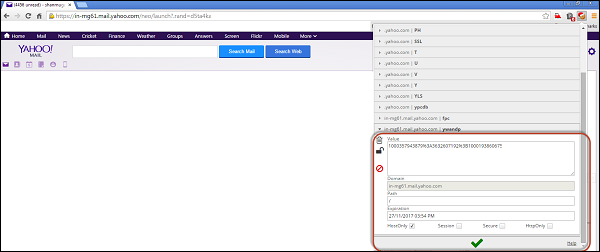
Edit the Cookie value just by accessing the 'edit this cookie' plugin from chrome as shown below.