
- Home
- Overview
- Double Strength Encryption
- Python Overview and Installation
- Reverse Cipher
- Caesar Cipher
- ROT13 Algorithm
- Transposition Cipher
- Encryption of Transposition Cipher
- Decryption of Transposition Cipher
- Encryption of files
- Decryption of files
- Base64 Encoding & Decoding
- XOR Process
- Multiplicative Cipher
- Affine Ciphers
- Hacking Monoalphabetic Cipher
- Simple Substitution Cipher
- Testing of Simple Substitution Cipher
- Decryption of Simple Substitution Cipher
- Python Modules of Cryptography
- Understanding Vignere Cipher
- Implementing Vignere Cipher
- One Time Pad Cipher
- Implementation of One Time Pad Cipher
- Symmetric & Asymmetric Cryptography
- Understanding RSA Algorithm
- Creating RSA Keys
- RSA Cipher Encryption
- RSA Cipher Decryption
- Hacking RSA Cipher
Cryptography with Python - Resources
Selected Reading
Encryption of files
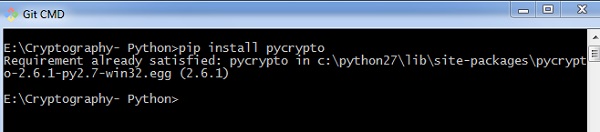
In Python, it is possible to encrypt and decrypt files before transmitting to a communication channel. For this, you will have to use the plugin PyCrypto. You can installation this plugin using the command given below.
pip install pycrypto
Example - Encrypting Files
The program code for encrypting the file with password protector is mentioned below −
main.py
# =================Other Configuration================
# Usages :
usage = "usage: %prog [options] "
# Version
Version="%prog 0.0.1"
# ====================================================
# Import Modules
import optparse, sys,os
from toolkit import processor as ps

def main():
   parser = optparse.OptionParser(usage = usage,version = Version)
   parser.add_option(
      '-i','--input',type = 'string',dest = 'inputfile',
      help = "File Input Path For Encryption", default = None)

   parser.add_option(
      '-o','--output',type = "string",dest = 'outputfile',
      help = "File Output Path For Saving Encrypter Cipher",default = ".")

   parser.add_option(
      '-p','--password',type = "string",dest = 'password',
      help = "Provide Password For Encrypting File",default = None)

   parser.add_option(
      '-p','--password',type = "string",dest = 'password',
      help = "Provide Password For Encrypting File",default = None)

   (options, args)= parser.parse_args()

   # Input Conditions Checkings
   if not options.inputfile or not os.path.isfile(options.inputfile):
      print(" [Error] Please Specify Input File Path")
      exit(0)
   if not options.outputfile or not os.path.isdir(options.outputfile):
      print(" [Error] Please Specify Output Path")
      exit(0)
   if not options.password:
      print(" [Error] No Password Input")
      exit(0)
   inputfile = options.inputfile

   outputfile = os.path.join(
      options.outputfile,os.path.basename(options.inputfile).split('.')[0]+'.ssb')
   password = options.password
   base = os.path.basename(inputfile).split('.')[1]
   work = "E"

   ps.FileCipher(inputfile,outputfile,password,work)
   return

if __name__ == '__main__':
   main()
Output
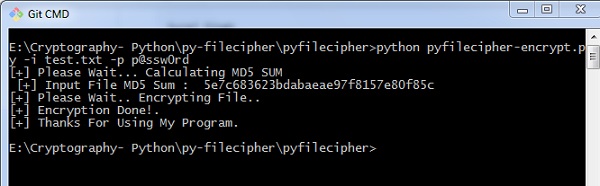
You can use the following command to execute the encryption process along with password −
python pyfilecipher-encrypt.py -i file_path_for_encryption -o output_path -p password
You can observe the following output when you execute the code given above −
Explanation
The passwords are generated using MD5 hash algorithm and the values are stored in simply safe backup files in Windows system, which includes the values as displayed below −


Advertisements