
- AWS Quicksight - Home
- AWS Quicksight - Overview
- AWS Quicksight - Landing Page
- AWS Quicksight - Using Data Sources
- AWS Quicksight - Data Source Limit
- AWS Quicksight - Editing Datasets
- AWS Quicksight - Creating New Analysis
- AWS Quicksight - Adding Visuals
- Using Filters to a Visual
- AWS Quicksight - Insights
- AWS Quicksight - Creating Story
- AWS Quicksight - Using Parameters
- AWS Quicksight - Sharing Analysis
- AWS Quicksight - Dashboards
- AWS Quicksight - Managing Quicksight
- AWS Quicksight - Edition Type
- AWS Quicksight - Managing IAM Policies
- AWS Quicksight - Embedding Dashboard
- AWS Quicksight - AWS SDKs
- Developer Responsibilities
- AWS Quicksight Useful Resources
- AWS Quicksight - Quick Guide
- AWS Quicksight - Useful Resources
- AWS Quicksight - Discussion
AWS Quicksight - Edition Type
AWS Quicksight supports different editions which vary as per user management, permissions and features supported − Standard and Enterprise. Both of these editions support all the Quicksight features for creating and sharing data visualizations.
Enterprise edition offers support for Active Directory integration to AWS directory. There are various other features which are supported in Enterprise edition as given below −
| Features Supported | Standard Edition | Enterprise Edition |
|---|---|---|
| # of Free Authors | 1 | 1 |
| # of Free Trial Authors (60Days) | 4 | 4 |
| Included SPICE Capacity | 10 GB/User | 10 GB/User |
| Readers | N/A | $0.30/session |
| Additional SPICE Capacity | $0.25/GB/mo. | $0.38/GB/mo. |
| Connect to spreadsheets, databases, data lakes, and business apps | ✓ | ✓ |
| Easily analyze data with AutoGraph | ✓ | ✓ |
| Fast, scalable visualizations | ✓ | ✓ |
| Publish dashboards for interactive data access | ✓ | ✓ |
| Single-Sign-On with SAML or OpenID Connect | ✓ | ✓ |
| Web and mobile access | ✓ | ✓ |
| Drill-down to detail and customize filters | ✓ | ✓ |
| Enable audit logs with AWS CloudTrail | ✓ | ✓ |
| Reader Role | ✓ | |
| Securely Access data in Private VPCs and On-Prem | ✓ | |
| Row Level Security | ✓ | |
| Hourly refresh of SPICE data | ✓ | |
| Secure data encryption at rest | ✓ | |
| Connect to Active Directory | ✓ | |
| Use Active Directory groups | ✓ |
You can check the subscription type of AWS Quicksight with Manage Quicksight option.
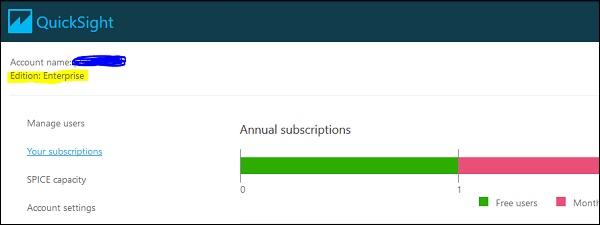
In Enterprise edition, AWS Quicksight allows you to manage users using any of the below ways −
Using Microsoft Active Directory: In Enterprise edition, you can add/remove Microsoft Active Directory groups to create and deactivate user accounts. You can access the directory groups directly or by using the AD Connector.
Federated logins.
Inviting users by email.
To manage your AD users/groups in Quicksight, you have to navigate to Manage Quicksight → Manage users/Manage groups
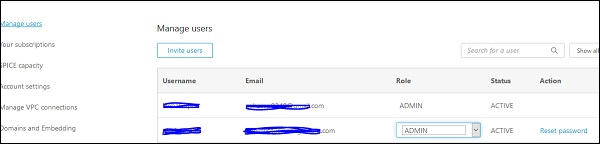
You can also change the role of an existing user by clicking on drop down list −
- Admin
- Author
- Reader
An AWS Quicksight administrator can also reset the password of an existing user using Manage User option as shown below −
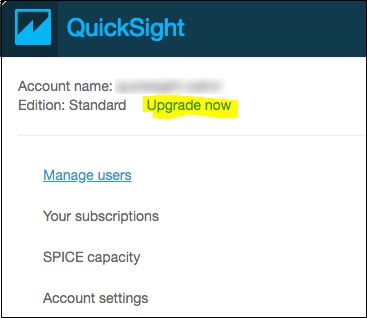
You can update from AQS Quicksight Standard edition to Enterprise edition using Manage account option. To perform an upgrade, the user should have AWS Quicksight administrator privilege.
Click on your profile icon at top right corner → Upgrade now.
Once you click on Upgrade, following screen appears. To complete the upgrade, click on the Upgrade button.
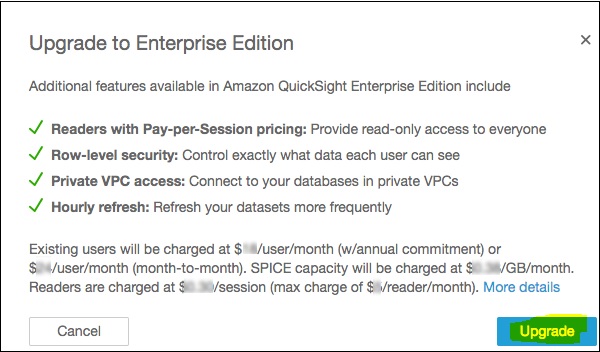
Note − Once you change your subscription from Standard edition to Enterprise edition, you cannot roll it back.