
- Pascal Tutorial
- Pascal - Home
- Pascal - Overview
- Pascal - Environment Setup
- Pascal - Program Structure
- Pascal - Basic Syntax
- Pascal - Data Types
- Pascal - Variable Types
- Pascal - Constants
- Pascal - Operators
- Pascal - Decision Making
- Pascal - Loops
- Pascal - Functions
- Pascal - Procedures
- Pascal - Variable Scope
- Pascal - Strings
- Pascal - Booleans
- Pascal - Arrays
- Pascal - Pointers
- Pascal - Records
- Pascal - Variants
- Pascal - Sets
- Pascal - File Handling
- Pascal - Memory
- Pascal - Units
- Pascal - Date & Time
- Pascal - Objects
- Pascal - Classes
- Pascal Useful Resources
- Pascal - Quick Guide
- Pascal - Useful Resources
- Pascal - Discussion
Pascal - Break Statement
The break statement in Pascal has the following two usages −
When the break statement is encountered inside a loop, the loop is immediately terminated and program control resumes at the next statement following the loop.
It can be used to terminate a case in the case statement (covered in the next chapter).
If you are using nested loops (i.e., one loop inside another loop), the break statement will stop the execution of the innermost loop and start executing the next line of code after the block.
Syntax
The syntax for a break statement in Pascal is as follows −
break;
Flow Diagram
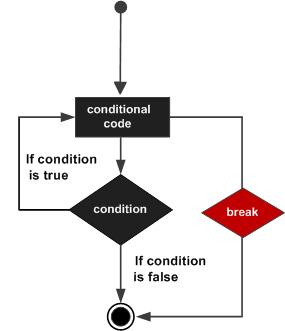
Example
program exBreak;
var
   a: integer;

begin
   a := 10;
   (* while loop execution *)
   while  a < 20 do

   begin
      writeln('value of a: ', a);
      a:=a +1;

      if( a > 15) then
         (* terminate the loop using break statement *)
      break;
   end;
end.
When the above code is compiled and executed, it produces the following result −
value of a: 10
value of a: 11
value of a: 12
value of a: 13
value of a: 14
value of a: 15
pascal_loops.htm
Advertisements