
- MERN Stack - Home
- MERN Stack - Installation
- MERN Stack - MongoDB Setup
- MERN Stack - Node Setup
- MERN Stack - Connect React with Node
- MERN Stack - Folder Structure
- MERN Stack Useful Resources
- MERN Stack - Useful Resources
- MERN Stack - Discussion
Folder Structure and Workflow
In this chapter, we will discuss the folder structure of the MERN Stack and understand how each part works along with its workflow. Since we have already set up all the necessary folders, completed the installation, and connected MongoDB, Node.js, and React.js, as well as explored basic API implementation through code examples, it's now time to understand the complete folder structure and workflow before starting the actual project.
Create Your Project Structure
Let's create folder structure of your MERN projects.
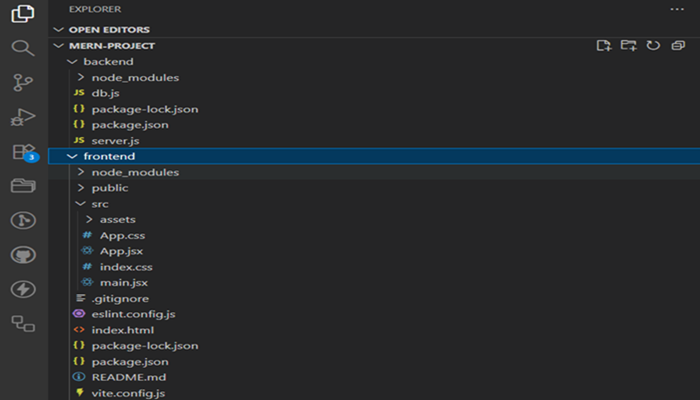
The above image shows the folder structure that you created to explain the complete MERN project. In the backend, you have a file named db.js that connects to MongoDB, and a server.js file, which serves as the main entry point of the backend and runs the server.
In the frontend, you implemented the logic inside App.js to connect with the Node.js backend.
You can also create the folder structure with MVC (Model View Controller) like this.
mern-project/
|
|---backend/
|   |---server.js
|   |---package.json
|   |---models/
|   |---routes/
|   |---controllers/
|
|---frontend/
|   |---public/
|   |---src/
|   |   |---components/
|   |   |---pages/
|   |   |---App.js
|   |   |---index.js
|   |---package.json
|
|---README.md
Folder Description
Backend (Node.js + Express + MongoDB)
The backend folder is responsible for handling the server-side logic and database operations and connections.
- server.js − The entry point of your node.js application.
- routes/ − Contains all API route definition (eg., /api/users, /api/products).
- controllers/ − Contains the logic to handle the request and response.
- models/ − Define the MongoDB schema and structure of your data using the mongoose.
Example backend structure
backend/
|---server.js
|---routes/
|   |---userRoutes.js
|---controllers/
|   |---userController.js
|---models/
|   |---userModel.js
Frontend (React.js)
The frontend folder contains all files related to the client-side user interface (UI).
- src/ − Main source folder containing components and pages.
- components/ − Reusable UI components (e.g., Navbar, Footer, Buttons).
- pages/ − Complete pages or views (e.g., Home, Login, Dashboard).
- App.js − The main React component where routes and components are rendered.
- index.js − Renders the React app inside the root element of the DOM.
Example frontend structure −
frontend/
|---src/
|   |---components/
|   |---pages/
|   |---App.js
|   |---index.js
Understanding the MERN Workflow
The workflow between the four technologies can be explained as follows −
React (Frontend)
- The user interacts with the React application (UI).
- React sends HTTP requests (using Axios or fetch) to the Node.js backend.
Node.js + Express (Backend)
- Express receives these requests at specific API endpoints (e.g.,
/api/users). - The backend processes the request and interacts with the database (MongoDB).
MongoDB (Database)
- MongoDB stores, retrieves, or updates data based on backend queries.
- After processing, MongoDB sends the result back to the backend.
Response to Frontend
- The backend sends the processed data (response) to the frontend.
- React updates the UI dynamically with the received data.
Simple Data Flow Example
The below structure will show how data will flow in MERN.
React Frontend
   ↓ (HTTP Request via Axios/Fetch)
Express + Node.js Backend
   ↓ (Database Query using Mongoose)
MongoDB Database
   ↑ (Response Data)
React UI Updates with New Data
In this chapter, you learned the workflow of the MERN stack, how MongoDB connects with Node.js, and how React.js passes requests to Node.js to access API information. From next section will start working with the project.
