
- FastAPI - Home
- FastAPI - Introduction
- FastAPI - Hello World
- FastAPI - OpenAPI
- FastAPI - Uvicorn
- FastAPI - Type Hints
- FastAPI - IDE Support
- FastAPI - Rest Architecture
- FastAPI - Path Parameters
- FastAPI - Query Parameters
- FastAPI - Parameter Validation
- FastAPI - Pydantic
- FastAPI - Request Body
- FastAPI - Templates
- FastAPI - Static Files
- FastAPI - HTML Form Templates
- FastAPI - Accessing Form Data
- FastAPI - Uploading Files
- FastAPI - Cookie Parameters
- FastAPI - Header Parameters
- FastAPI - Response Model
- FastAPI - Nested Models
- FastAPI - Dependencies
- FastAPI - CORS
- FastAPI - Crud Operations
- FastAPI - SQL Databases
- FastAPI - Using MongoDB
- FastAPI - Using GraphQL
- FastAPI - Websockets
- FastAPI - FastAPI Event Handlers
- FastAPI - Mounting A Sub-App
- FastAPI - Middleware
- FastAPI - Mounting Flast App
- FastAPI - Deployment
FastAPI Useful Resources
Selected Reading
FastAPI - Uploading Files
First of all, to send a file to the server you need to use the HTML forms enctype as multipart/form-data, and use the input type as the file to render a button, which when clicked allows you to select a file from the file system.
uploadfile.html
<html>
   <body>
      <form action="http://localhost:8000/uploader" method="POST" enctype="multipart/form-data">
         <input type="file" name="file" />
         <input type="submit"/>
      </form>
   </body>
</html>
Note that the forms action parameter to the endpoint http://localhost:8000/uploader and the method is set to POST.
This HTML form is rendered as a template with following code −
main.py
from fastapi import FastAPI, File, UploadFile, Request
from fastapi.responses import HTMLResponse
from fastapi.templating import Jinja2Templates

app = FastAPI()

templates = Jinja2Templates(directory="templates")

@app.get("/upload/", response_class=HTMLResponse)
async def upload(request: Request):
   return templates.TemplateResponse("uploadfile.html", {"request": request})
Visit http://localhost:8000/upload/. You should get the form with Choose File button. Click it to open the file to be uploaded.
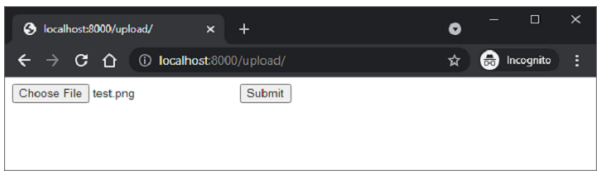
The upload operation is handled by UploadFile function in FastAPI
main.py
from fastapi import FastAPI, File, UploadFile, Request
from fastapi.responses import HTMLResponse
from fastapi.templating import Jinja2Templates
import shutil

app = FastAPI()

templates = Jinja2Templates(directory="templates")

@app.get("/upload/", response_class=HTMLResponse)
async def upload(request: Request):
   return templates.TemplateResponse("uploadfile.html", {"request": request})

@app.post("/uploader/")
async def create_upload_file(file: UploadFile = File(...)):
   with open("destination.png", "wb") as buffer:
      shutil.copyfileobj(file.file, buffer)
   return {"filename": file.filename}
We shall use shutil library in Python to copy the received file in the server location by the name destination.png

Advertisements