
- FastAPI - Home
- FastAPI - Introduction
- FastAPI - Hello World
- FastAPI - OpenAPI
- FastAPI - Uvicorn
- FastAPI - Type Hints
- FastAPI - IDE Support
- FastAPI - Rest Architecture
- FastAPI - Path Parameters
- FastAPI - Query Parameters
- FastAPI - Parameter Validation
- FastAPI - Pydantic
- FastAPI - Request Body
- FastAPI - Templates
- FastAPI - Static Files
- FastAPI - HTML Form Templates
- FastAPI - Accessing Form Data
- FastAPI - Uploading Files
- FastAPI - Cookie Parameters
- FastAPI - Header Parameters
- FastAPI - Response Model
- FastAPI - Nested Models
- FastAPI - Dependencies
- FastAPI - CORS
- FastAPI - Crud Operations
- FastAPI - SQL Databases
- FastAPI - Using MongoDB
- FastAPI - Using GraphQL
- FastAPI - Websockets
- FastAPI - FastAPI Event Handlers
- FastAPI - Mounting A Sub-App
- FastAPI - Middleware
- FastAPI - Mounting Flast App
- FastAPI - Deployment
FastAPI Useful Resources
FastAPI - Accessing Form Data
Now we shall see how the HTML form data can be accessed in a FastAPI operation function. In the example updated in FastAPI - HTML Form Templates Chapter, the /login route renders a login form. The data entered by the user is submitted to /submit URL with POST as the request method. Now we have to provide a view function to process the data submitted by the user.
FastAPI has a Form class to process the data received as a request by submitting an HTML form. However, you need to install the python-multipart module. It is a streaming multipart form parser for Python.
pip3 install python-multipart

Collecting python-multipart
  Downloading python_multipart-0.0.21-py3-none-any.whl.metadata (1.8 kB)
Downloading python_multipart-0.0.21-py3-none-any.whl (24 kB)
Installing collected packages: python-multipart
Successfully installed python-multipart-0.0.21
Add Form class to the imported resources from FastAPI
from fastapi import Form
Let us define a submit() function to be decorated by @app.post(). In order to receive the form data, declare two parameters of Form type, having the same name as the form attributes.
@app.post("/submit/")
async def submit(nm: str = Form(...), pwd: str = Form(...)):
   return {"username": nm}
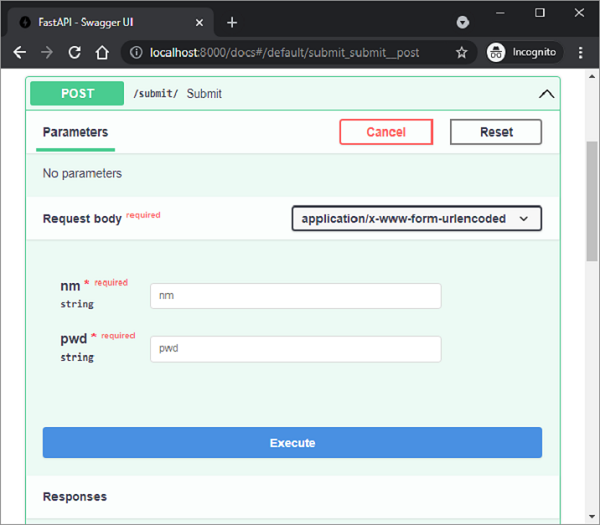
Press submit after filling the text fields. The browser is redirected to /submit URL and the JSON response is rendered. Check the Swagger API docs of the /submit route. It correctly identifies nm and pwd as the request body parameters and the forms "media type" as application/x-www-form-urlencoded.
It is even possible to populate and return Pydantic model with HTML form data. In the following code, we declare User class as a Pydantic model and send its object as the server response.
main.py
from fastapi import FastAPI, Request
from fastapi.responses import HTMLResponse
from fastapi.templating import Jinja2Templates
from fastapi.staticfiles import StaticFiles
from fastapi import Form
from pydantic import BaseModel

app = FastAPI()
templates = Jinja2Templates(directory="templates")
app.mount("/static", StaticFiles(directory="static"), name="static")

@app.get("/hello/{name}", response_class=HTMLResponse)
async def hello(request: Request, name:str):
   return templates.TemplateResponse("hello.html", {"request": request, "name":name})

@app.get("/login/", response_class=HTMLResponse)
async def login(request: Request):
   return templates.TemplateResponse("login.html", {"request": request})

class User(BaseModel):
   username:str
   password:str

@app.post("/submit/", response_model=User)
async def submit(nm: str = Form(...), pwd: str = Form(...)):
   return User(username=nm, password=pwd)
