
- FastAPI - Home
- FastAPI - Introduction
- FastAPI - Hello World
- FastAPI - OpenAPI
- FastAPI - Uvicorn
- FastAPI - Type Hints
- FastAPI - IDE Support
- FastAPI - Rest Architecture
- FastAPI - Path Parameters
- FastAPI - Query Parameters
- FastAPI - Parameter Validation
- FastAPI - Pydantic
- FastAPI - Request Body
- FastAPI - Templates
- FastAPI - Static Files
- FastAPI - HTML Form Templates
- FastAPI - Accessing Form Data
- FastAPI - Uploading Files
- FastAPI - Cookie Parameters
- FastAPI - Header Parameters
- FastAPI - Response Model
- FastAPI - Nested Models
- FastAPI - Dependencies
- FastAPI - CORS
- FastAPI - Crud Operations
- FastAPI - SQL Databases
- FastAPI - Using MongoDB
- FastAPI - Using GraphQL
- FastAPI - Websockets
- FastAPI - FastAPI Event Handlers
- FastAPI - Mounting A Sub-App
- FastAPI - Middleware
- FastAPI - Mounting Flast App
- FastAPI - Deployment
FastAPI Useful Resources
Selected Reading
FastAPI - Nested Model
Each attribute of a Pydantic model has a type. The type can be a built-in Python type or a model itself. Hence it is possible to declare nested JSON "objects" with specific attribute names, types, and validations.
Example - Constructing a Nested Model
In the following example, we construct a customer model with one of the attributes as product model class. The product model in turn has an attribute of supplier class.
from typing import Tuple
from fastapi import FastAPI
from pydantic import BaseModel

app = FastAPI()

class supplier(BaseModel):
   supplierID:int
   supplierName:str

class product(BaseModel):
   productID:int
   prodname:str
   price:int
   supp:supplier

class customer(BaseModel):
   custID:int
   custname:str
   prod:Tuple[product]
The following POST operation decorator renders the object of the customer model as the server response.
@app.post('/invoice')
async def getInvoice(c1:customer):
   return c1
main.py
from typing import Tuple
from fastapi import FastAPI
from pydantic import BaseModel

app = FastAPI()

class supplier(BaseModel):
   supplierID:int
   supplierName:str

class product(BaseModel):
   productID:int
   prodname:str
   price:int
   supp:supplier

class customer(BaseModel):
   custID:int
   custname:str
   prod:Tuple[product]

@app.post('/invoice')
async def getInvoice(c1:customer):
   return c1
Output
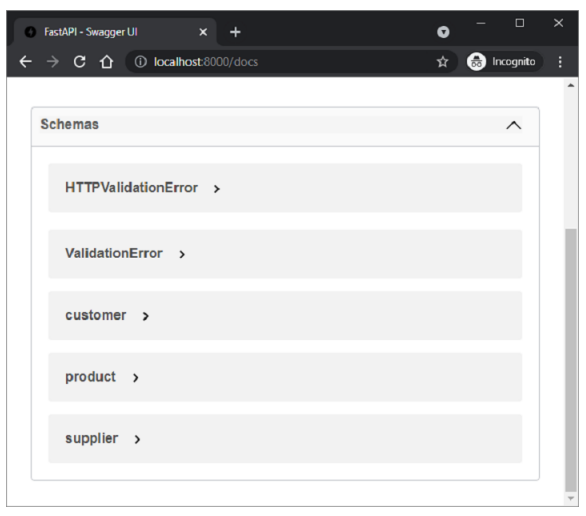
The swagger UI page reveals the presence of three schemas, corresponding to three BaseModel classes.
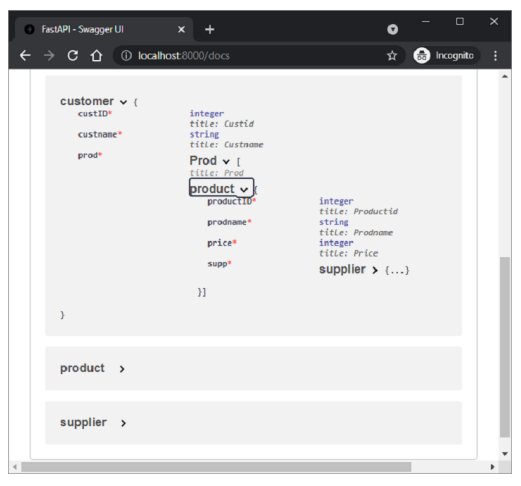
The Customer schema when expanded to show all the nodes looks like this −
An example response of "/invoice" route should be as follows −
{
   "custID": 1,
   "custname": "Jay",
   "prod": [
      {
         "productID": 1,
         "prodname": "LAPTOP",
         "price": 40000,
         "supp": {
            "supplierID": 1,
            "supplierName": "Dell"
         }
      }
   ]
}

Advertisements