
Article Categories
- All Categories
-
 Data Structure
-
 Networking
-
 RDBMS
RDBMS
-
 Operating System
-
 Java
Java
-
 MS Excel
-
 iOS
iOS
-
 HTML
HTML
-
 CSS
CSS
-
 Android
-
 Python
-
 C Programming
-
 C++
C++
-
 C#
C#
-
 MongoDB
-
 MySQL
MySQL
-
 Javascript
-
 PHP
PHP
-
 Economics & Finance
Publishing SAP Xcelsius dashboard without login
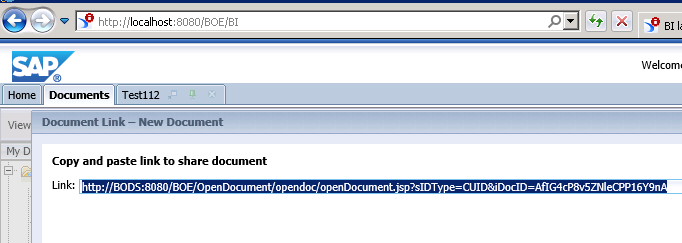
Yes, it can be achieved by using Open Document link. To get HTTP link, you need to store the object in BO repository and get open document link from BI Launchpad.
When you store the object in repository, you have to handle necessary credentials and running queries can be handled by this. You can set up SSO (Single Sign-On) in OpenDocument and SSO source can be an Active Directory authentication, or SAP BW.
When SSO is set up, clicking the generated OpenDocument link should automatically log you on and open the dashboard and you don't need to pass additional authentication.
Implementation Steps
In short, you have to follow the below steps ?
- Set up SSO and configure OpenDocument to authenticate using SSO
- Store your dashboard in the repository
- Generate an OpenDocument link to your dashboard
OpenDocument URL Structure
The OpenDocument URL follows a specific format that includes parameters for authentication and object identification ?
http://[server]:[port]/OpenDocument/opendoc/openDocument.jsp?
sIDType=CUID&iDocID=[ObjectCUID]&sType=wid&
sRefresh=Y&sWindow=Same&token=[AuthToken]
Key Parameters
- sIDType ? Specifies the identifier type (CUID or SI_ID)
- iDocID ? The unique identifier of your Xcelsius dashboard
- sType ? Document type (wid for Xcelsius dashboards)
- sRefresh ? Forces data refresh when opening
- token ? Authentication token for SSO
Conclusion
By implementing SSO with OpenDocument links, you can provide seamless access to SAP Xcelsius dashboards without requiring users to manually enter login credentials. This approach enhances user experience while maintaining security through proper authentication mechanisms.

225 Views
