
- Apache Tika - Home
- Apache Tika - Overview
- Apache Tika - Architecture
- Apache Tika - Environment
- Apache Tika - Referenced API
- Apache Tika - File Formats
- Apache Tika - Document Type Detection
- Apache Tika - Content Extraction
- Apache Tika - Metadata Extraction
- Apache Tika - Language Detection
- Apache Tika - GUI
Apache Tika Examples
- Apache Tika - Extracting PDF
- Apache Tika - Extracting ODF
- Apache Tika - Extracting MS-Office Files
- Apache Tika - Extracting Text Document
- Apache Tika - Extracting HTML Document
- Apache Tika - Extracting XML Document
- Apache Tika - Extracting .class File
- Apache Tika - Extracting JAR File
- Apache Tika - Extracting Image File
- Apache Tika - Extracting mp4 Files
- Apache Tika - Extracting mp3 Files
Apache Tika Resources
Apache Tika - Quick Guide
Apache Tika - Overview
What is Apache Tika?
Apache Tika is a library that is used for document type detection and content extraction from various file formats.
Internally, Tika uses existing various document parsers and document type detection techniques to detect and extract data.
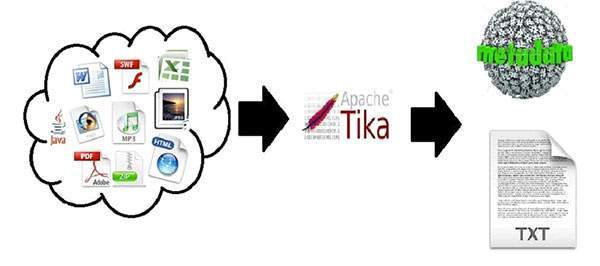
Using Tika, one can develop a universal type detector and content extractor to extract both structured text as well as metadata from different types of documents such as spreadsheets, text documents, images, PDFs and even multimedia input formats to a certain extent.
Tika provides a single generic API for parsing different file formats. It uses existing specialized parser libraries for each document type.
All these parser libraries are encapsulated under a single interface called the Parser interface.
Why Tika?
According to filext.com, there are about 15k to 51k content types, and this number is growing day by day. Data is being stored in various formats such as text documents, excel spreadsheet, PDFs, images, and multimedia files, to name a few. Therefore, applications such as search engines and content management systems need additional support for easy extraction of data from these document types. Apache Tika serves this purpose by providing a generic API to locate and extract data from multiple file formats.
Apache Tika Applications
There are various applications that make use of Apache Tika. Here we will discuss a few prominent applications that depend heavily on Apache Tika.
Search Engines
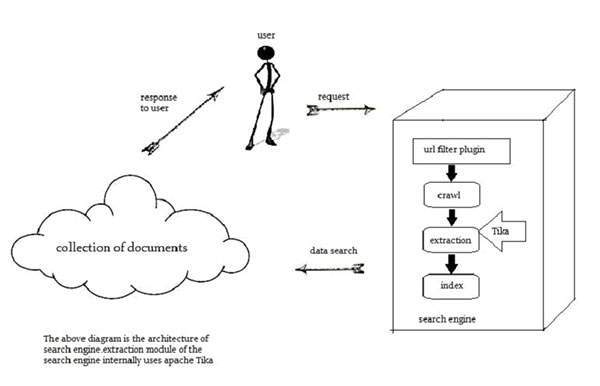
Tika is widely used while developing search engines to index the text contents of digital documents.
Search engines are information processing systems designed to search information and indexed documents from the Web.
Crawler is an important component of a search engine that crawls through the Web to fetch the documents that are to be indexed using some indexing technique. Thereafter, the crawler transfers these indexed documents to an extraction component.
The duty of extraction component is to extract the text and metadata from the document. Such extracted content and metadata are very useful for a search engine. This extraction component contains Tika.
The extracted content is then passed to the indexer of the search engine that uses it to build a search index. Apart from this, the search engine uses the extracted content in many other ways as well.
Document Analysis
In the field of artificial intelligence, there are certain tools to analyze documents automatically at semantic level and extract all kinds of data from them.
In such applications, the documents are classified based on the prominent terms in the extracted content of the document.
These tools make use of Tika for content extraction to analyze documents varying from plain text to digital documents.
Digital Asset Management
Some organizations manage their digital assets such as photographs, ebooks, drawings, music and video using a special application known as digital asset management (DAM).
Such applications take the help of document type detectors and metadata extractor to classify the various documents.
Content Analysis
Websites like Amazon recommend newly released contents of their website to individual users according to their interests. To do so, these websites follow machine learning techniques, or take the help of social media websites like Facebook to extract required information such as likes and interests of the users. This gathered information will be in the form of html tags or other formats that require further content type detection and extraction.
For content analysis of a document, we have technologies that implement machine learning techniques such as UIMA and Mahout. These technologies are useful in clustering and analyzing the data in the documents.
Apache Mahout is a framework which provides ML algorithms on Apache Hadoop a cloud computing platform. Mahout provides an architecture by following certain clustering and filtering techniques. By following this architecture, programmers can write their own ML algorithms to produce recommendations by taking various text and metadata combinations. To provide inputs to these algorithms, recent versions of Mahout use Tika to extract text and metadata from binary content.
Apache UIMA analyzes and processes various programming languages and produces UIMA annotations. Internally it uses Tika Annotator to extract document text and metadata.
History
| Year | Development |
|---|---|
| 2006 | The idea of Tika was projected before the Lucene Project Management Committee. |
| 2006 | The concept of Tika and its usefulness in the Jackrabbit project was discussed. |
| 2007 | Tika entered into Apache incubator. |
| 2008 | Versions 0.1 and 0.2 were released and Tika graduated from the incubator to the Lucene sub-project. |
| 2009 | Versions 0.3, 0.4, and 0.5 were released. |
| 2010 | Version 0.6 and 0.7 were released and Tika graduated into the top-level Apache project. |
| 2011 | Tika 1.0 was released and the book on Tika "Tika in Action was also released in the same year. |
| 2021 | Tika 2.0 was released in Jun, 2021. |
| 2024 | Tika 3.0 was released in Oct, 2024. |
| 2025 | Latest Tika 3.2.3 is released on Sep, 2025. |
Apache Tika - Architecture
Application-Level Architecture of Tika
Application programmers can easily integrate Tika in their applications. Tika provides a Command Line Interface and a GUI to make it user friendly.
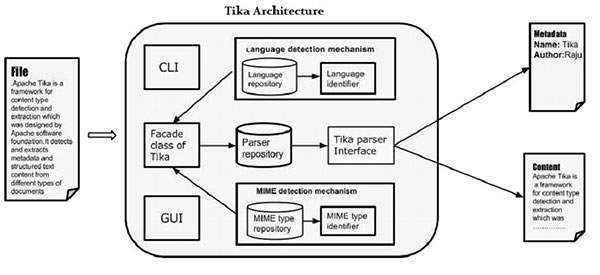
In this chapter, we will discuss the four important modules that constitute the Tika architecture. The following illustration shows the architecture of Tika along with its four modules −
- Language detection mechanism.
- MIME detection mechanism.
- Parser interface.
- Tika Facade class.
Language Detection Mechanism
Whenever a text document is passed to Tika, it will detect the language in which it was written. It accepts documents without language annotation and adds that information in the metadata of the document by detecting the language.
To support language identification, Tika has a class called Language Identifier in the package org.apache.tika.language, and a language identification repository inside which contains algorithms for language detection from a given text. Tika internally uses N-gram algorithm for language detection.
MIME Detection Mechanism
Tika can detect the document type according to the MIME standards. Default MIME type detection in Tika is done using org.apache.tika.mime.MimeTypes. It uses the org.apache.tika.filetypedetector.TikaFileTypeDetector class for most of the content type detection.
Internally Tika uses several techniques like file globs, content-type hints, magic bytes, character encodings, and several other techniques.
Parser Interface
The parser interface of org.apache.tika.parser is the key interface for parsing documents in Tika. This Interface extracts the text and the metadata from a document and summarizes it for external users who are willing to write parser plugins.
Using different concrete parser classes, specific for individual document types, Tika supports a lot of document formats. These format specific classes provide support for different document formats, either by directly implementing the parser logic or by using external parser libraries.
Tika Facade Class
Using Tika facade class is the simplest and direct way of calling Tika from Java, and it follows the facade design pattern. You can find the Tika facade class in the org.apache.tika package of Tika API.
By implementing basic use cases, Tika acts as a broker of landscape. It abstracts the underlying complexity of the Tika library such as MIME detection mechanism, parser interface, and language detection mechanism, and provides the users a simple interface to use.
Features of Tika
Unified parser Interface − Tika encapsulates all the third party parser libraries within a single parser interface. Due to this feature, the user escapes from the burden of selecting the suitable parser library and use it according to the file type encountered.
Low memory usage − Tika consumes less memory resources therefore it is easily embeddable with Java applications. We can also use Tika within the application which run on platforms with less resources like mobile PDA.
Fast processing − Quick content detection and extraction from applications can be expected.
Flexible metadata − Tika understands all the metadata models which are used to describe files.
Parser integration − Tika can use various parser libraries available for each document type in a single application.
MIME type detection − Tika can detect and extract content from all the media types included in the MIME standards.
Language detection − Tika includes language identification feature, therefore can be used in documents based on language type in a multi lingual websites.
Functionalities of Tika
Tika supports various functionalities −
- Document type detection
- Content extraction
- Metadata extraction
- Language detection
Document Type Detection
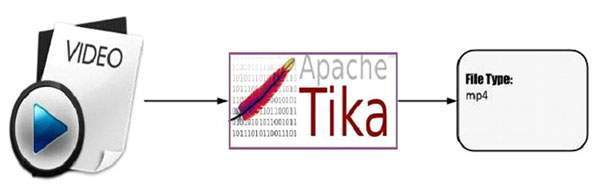
Tika uses various detection techniques and detects the type of the document given to it.
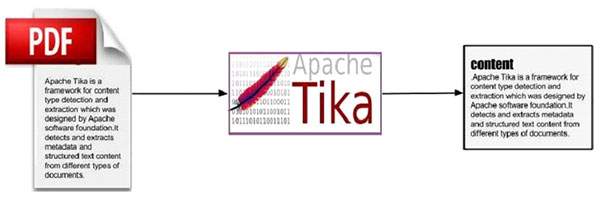
Content Extraction
Tika has a parser library that can parse the content of various document formats and extract them. After detecting the type of the document, it selects the appropriate parser from the parser repository and passes the document. Different classes of Tika have methods to parse different document formats.
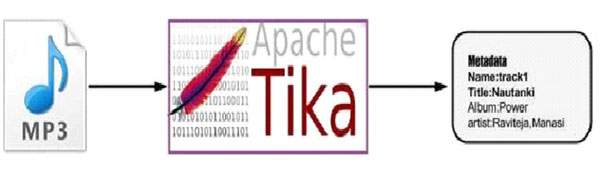
Metadata Extraction
Along with the content, Tika extracts the metadata of the document with the same procedure as in content extraction. For some document types, Tika have classes to extract metadata.
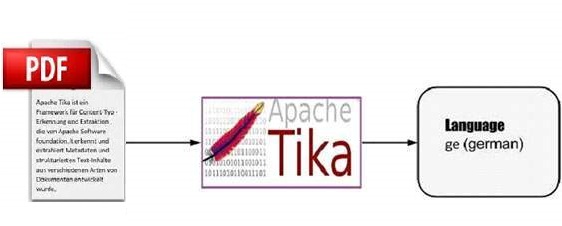
Language Detection
Internally, Tika follows algorithms like n-gram to detect the language of the content in a given document. Tika depends on classes like Languageidentifier and Profiler for language identification.
Apache Tika - Environment Setup
This chapter takes you through the process of setting up Apache Tika on Windows and Linux. User administration is needed while installing the Apache Tika.
Setup Java Development Kit (JDK)
You can download the latest version of SDK from Oracle's Java site − Java SE Downloads. You will find instructions for installing JDK in downloaded files, follow the given instructions to install and configure the setup. Finally set PATH and JAVA_HOME environment variables to refer to the directory that contains java and javac, typically java_install_dir/bin and java_install_dir respectively.
If you are running Windows and have installed the JDK in C:\jdk-24, you would have to put the following line in your C:\autoexec.bat file.
set PATH=C:\jdk-24;%PATH%
set JAVA_HOME=C:\jdk-24
Alternatively, on Windows NT/2000/XP, you will have to right-click on My Computer, select Properties → Advanced → Environment Variables. Then, you will have to update the PATH value and click the OK button.
On Unix (Solaris, Linux, etc.), if the SDK is installed in /usr/local/jdk-24 and you use the C shell, you will have to put the following into your .cshrc file.
setenv PATH /usr/local/jdk-24/bin:$PATH
setenv JAVA_HOME /usr/local/jdk-24
Alternatively, if you use an Integrated Development Environment (IDE) like Borland JBuilder, Eclipse, IntelliJ IDEA, or Sun ONE Studio, you will have to compile and run a simple program to confirm that the IDE knows where you have installed Java. Otherwise, you will have to carry out a proper setup as given in the document of the IDE.
Popular Java Editors
To write your Java programs, you need a text editor. There are many sophisticated IDEs available in the market. But for now, you can consider one of the following −
Notepad − On Windows machine, you can use any simple text editor like Notepad (Recommended for this tutorial), TextPad.
Netbeans − It is a Java IDE that is open-source and free, which can be downloaded from www.netbeans.org/index.html.
Eclipse − It is also a Java IDE developed by the eclipse open-source community and can be downloaded from www.eclipse.org.
Install Eclipse
In this chapter, we will explain how to set Spring environment in Eclipse IDE. Before proceeding with the installation, make sure that you already have Eclipse installed in your system. If not, download and install Eclipse.
For more information on Eclipse, please refer our Eclipse Tutorial
Set Maven
In this tutorial, we are using maven to run and build the spring based examples. Follow the Maven - Environment Setup to install maven.
Setting up Apache Tika Environment
Programmers can integrate Apache Tika in their environment by using
- Command line,
- Tika API,
- Command line interface (CLI) of Tika,
- Graphical User interface (GUI) of Tika, or
- the source code.
For any of these approaches, first of all, you have to download the source code of Tika.
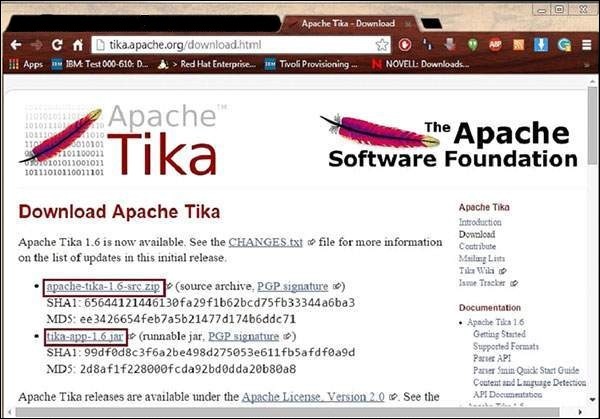
You will find the source code of Tika at https://tika.apache.org/download.html, where you will find two links −
tika-3.2.3-src.zip − It contains the source code of Tika, and
tika-app-3.2.3.jar − It is a jar file that contains the Tika application.
Download these two files. A snapshot of the official website of Tika is shown below.
After downloading the files, set the classpath for the jar file tika-app-3.2.3.jar. Add the complete path of the jar file as shown in the table below.
| OS | Output |
|---|---|
| Windows | Append the String C:\jars\tika-app-3.2.3.jar to the user environment variable CLASSPATH |
| Linux |
Export CLASSPATH = $CLASSPATH − /usr/share/jars/tika-app-3.2.3.jar.tar − |
Apache provides Tika application, a Graphical User Interface (GUI) application using Eclipse.
Tika-Maven Build
Open eclipse and create a new project.
-
If you do not having Maven in your Eclipse, set it up by following the given steps.
Open the linkhttps://tika.apache.org/3.2.3/gettingstarted.html. There you will find the maven support.
Configure the POM.XML File
Get the Tika maven dependency from https://mvnrepository.com/artifact/org.apache.tika
Shown below is the complete Maven dependency of Apache Tika.
<dependency>
   <groupId>org.apache.Tika</groupId>
   <artifactId>tika-core</artifactId>
   <version>3.2.3</version>
</dependency>
<dependency>
   <groupId>org.apache.Tika</groupId>
   <artifactId> tika-parsers-standard-package</artifactId>
   <version>3.2.3</version>
</dependency>
<dependency>
   <groupId>org.apache.tika</groupId>
   <artifactId>tika-langdetect-optimaize</artifactId>
   <version>3.2.3</version>
   <type>pom</type>
</dependency>
Apache Tika - Reference API
Users can embed Tika in their applications using the Tika facade class. It has methods to explore all the functionalities of Tika. Since it is a facade class, Tika abstracts the complexity behind its functions. In addition to this, users can also use the various classes of Tika in their applications.
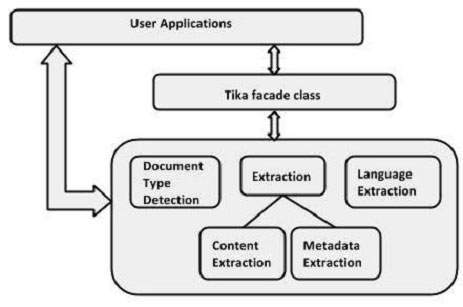
Tika Class (facade)
This is the most prominent class of the Tika library and follows the facade design pattern. Therefore, it abstracts all the internal implementations and provides simple methods to access the Tika functionalities. The following table lists the constructors of this class along with their descriptions.
package − org.apache.tika
class − Tika
| Sr.No. | Constructor & Description |
|---|---|
| 1 |
Tika () Uses default configuration and constructs the Tika class. |
| 2 |
Tika (Detector detector) Creates a Tika facade by accepting the detector instance as parameter |
| 3 |
Tika (Detector detector, Parser parser) Creates a Tika facade by accepting the detector and parser instances as parameters. |
| 4 |
Tika (Detector detector, Parser parser, Translator translator) Creates a Tika facade by accepting the detector, the parser, and the translator instance as parameters. |
| 5 |
Tika (TikaConfig config) Creates a Tika facade by accepting the object of the TikaConfig class as parameter. |
Methods and Description
The following are the important methods of Tika facade class −
| Sr.No. | Methods & Description |
|---|---|
| 1 |
parseToString (File file) This method and all its variants parses the file passed as parameter and returns the extracted text content in the String format. By default, the length of this string parameter is limited. |
| 2 |
int getMaxStringLength () Returns the maximum length of strings returned by the parseToString methods. |
| 3 |
void setMaxStringLength (int maxStringLength) Sets the maximum length of strings returned by the parseToString methods. |
| 4 |
Reader parse (File file) This method and all its variants parses the file passed as parameter and returns the extracted text content in the form of java.io.reader object. |
| 5 |
String detect (InputStream stream, Metadata metadata) This method and all its variants accepts an InputStream object and a Metadata object as parameters, detects the type of the given document, and returns the document type name as String object. This method abstracts the detection mechanisms used by Tika. |
| 6 |
String translate (InputStream text, String targetLanguage) This method and all its variants accepts the InputStream object and a String representing the language that we want our text to be translated, and translates the given text to the desired language, attempting to auto-detect the source language. |
Parser Interface
This is the interface that is implemented by all the parser classes of Tika package.
package − org.apache.tika.parser
Interface − Parser
Methods and Description
The following is the important method of Tika Parser interface −
| Sr.No. | Methods & Description |
|---|---|
| 1 |
parse (InputStream stream, ContentHandler handler, Metadata metadata, ParseContext context) This method parses the given document into a sequence of XHTML and SAX events. After parsing, it places the extracted document content in the object of the ContentHandler class and the metadata in the object of the Metadata class. |
Metadata Class
This class implements various interfaces such as CreativeCommons, Geographic, HttpHeaders, Message, MSOffice, ClimateForcast, TIFF, TikaMetadataKeys, TikaMimeKeys, Serializable to support various data models. The following tables list the constructors and methods of this class along with their descriptions.
package − org.apache.tika.metadata
class − Metadata
| Sr.No. | Constructor & Description |
|---|---|
| 1 |
Metadata() Constructs a new, empty metadata. |
| Sr.No. | Methods & Description |
|---|---|
| 1 |
add (Property property, String value) Adds a metadata property/value mapping to a given document. Using this function, we can set the value to a property. |
| 2 |
add (String name, String value) Adds a metadata property/value mapping to a given document. Using this method, we can set a new name value to the existing metadata of a document. |
| 3 |
String get (Property property) Returns the value (if any) of the metadata property given. |
| 4 |
String get (String name) Returns the value (if any) of the metadata name given. |
| 5 |
Date getDate (Property property) Returns the value of Date metadata property. |
| 6 |
String[] getValues (Property property) Returns all the values of a metadata property. |
| 7 |
String[] getValues (String name) Returns all the values of a given metadata name. |
| 8 |
String[] names() Returns all the names of metadata elements in a metadata object. |
| 9 |
set (Property property, Date date) Sets the date value of the given metadata property |
| 10 |
set(Property property, String[] values) Sets multiple values to a metadata property. |
Language Identifier Class
This class identifies the language of the given content. The following tables list the constructors of this class along with their descriptions.
package − org.apache.tika.language
class − Language Identifier
| Sr.No. | Constructor & Description |
|---|---|
| 1 |
LanguageIdentifier (LanguageProfile profile) Instantiates the language identifier. Here you have to pass a LanguageProfile object as parameter. |
| 2 |
LanguageIdentifier (String content) This constructor can instantiate a language identifier by passing on a String from text content. |
| Sr.No. | Methods & Description |
|---|---|
| 1 |
String getLanguage () Returns the language given to the current LanguageIdentifier object. |
Apache Tika - File Formats
File Formats Supported by Tika
The following table shows the file formats Tika supports.
| File format | Package Library | Class in Tika |
|---|---|---|
| XML | org.apache.tika.parser.xml | XMLParser |
| HTML | org.apache.tika.parser.html and it uses Tagsoup Library | HtmlParser |
| MS-Office compound document Ole2 till 2007 ooxml 2007 onwards |
org.apache.tika.parser.microsoft org.apache.tika.parser.microsoft.ooxml and it uses Apache Poi library |
OfficeParser(ole2) OOXMLParser (ooxml) |
| OpenDocument Format openoffice | org.apache.tika.parser.odf | OpenOfficeParser |
| portable Document Format(PDF) | org.apache.tika.parser.pdf and this package uses Apache PdfBox library | PDFParser |
| Electronic Publication Format (digital books) | org.apache.tika.parser.epub | EpubParser |
| Rich Text format | org.apache.tika.parser.rtf | RTFParser |
| Compression and packaging formats | org.apache.tika.parser.pkg and this package uses Common compress library | PackageParser and CompressorParser and its sub-classes |
| Text format | org.apache.tika.parser.txt | TXTParser |
| Feed and syndication formats | org.apache.tika.parser.feed | FeedParser |
| Audio formats | org.apache.tika.parser.audio and org.apache.tika.parser.mp3 | AudioParser MidiParser Mp3- for mp3parser |
| Imageparsers | org.apache.tika.parser.jpeg | JpegParser-for jpeg images |
| Videoformats | org.apache.tika.parser.mp4 and org.apache.tika.parser.video this parser internally uses Simple Algorithm to parse flash video formats | Mp4parser FlvParser |
| java class files and jar files | org.apache.tika.parser.asm | ClassParser CompressorParser |
| Mobxformat (email messages) | org.apache.tika.parser.mbox | MobXParser |
| Cad formats | org.apache.tika.parser.dwg | DWGParser |
| FontFormats | org.apache.tika.parser.font | TrueTypeParser |
| executable programs and libraries | org.apache.tika.parser.executable | ExecutableParser |
Apache Tika - Document Type Detection
MIME Standards
Multipurpose Internet Mail Extensions (MIME) standards are the best available standards for identifying document types. The knowledge of these standards helps the browser during internal interactions.
Whenever the browser encounters a media file, it chooses a compatible software available with it to display its contents. In case it does not have any suitable application to run a particular media file, it recommends the user to get the suitable plugin software for it.
Type Detection in Tika
Tika supports all the Internet media document types provided in MIME. Whenever a file is passed through Tika, it detects the file and its document type. To detect media types, Tika internally uses the following mechanisms.
File Extensions
Checking the file extensions is the simplest and most-widely used method to detect the format of a file. Many applications and operating systems provide support for these extensions. Shown below are the extension of a few known file types.
| File name | Extention |
|---|---|
| image | .jpg |
| audio | .mp3 |
| java archive file | .jar |
| java class file | .class |
Content-type Hints
Whenever you retrieve a file from a database or attach it to another document, you may lose the files name or extension. In such cases, the metadata supplied with the file is used to detect the file extension.
Magic Byte
Observing the raw bytes of a file, you can find some unique character patterns for each file. Some files have special byte prefixes called magic bytes that are specially made and included in a file for the purpose of identifying the file type
For example, you can find CA FE BA BE (hexadecimal format) in a java file and %PDF (ASCII format) in a pdf file. Tika uses this information to identify the media type of a file.
Character Encodings
Files with plain text are encoded using different types of character encoding. The main challenge here is to identify the type of character encoding used in the files. Tika follows character encoding techniques like Bom markers and Byte Frequencies to identify the encoding system used by the plain text content.
XML Root Characters
To detect XML documents, Tika parses the xml documents and extracts the information such as root elements, namespaces, and referenced schemas from where the true media type of the files can be found.
Type Detection using Facade Class
The detect() method of facade class is used to detect the document type. This method accepts a file as input. Shown below is an example program for document type detection with Tika facade class.
TikaDemo.java
package com.tutorialspoint.tika;

import java.io.File;

import org.apache.tika.Tika;

public class TikaDemo {

   public static void main(String[] args) throws Exception {

      //assume example.mp3 is available
      File file = new File("D:/projects/example.mp3");

      //Instantiating tika facade class
      Tika tika = new Tika();

      //detecting the file type using detect method
      String filetype = tika.detect(file);
      System.out.println(filetype);
   }
}
Output
Run the code and verify the output −
audio/mpeg
Apache Tika - Content Extraction
Tika uses various parser libraries to extract content from given parsers. It chooses the right parser for extracting the given document type.
For parsing documents, the parseToString() method of Tika facade class is generally used. Shown below are the steps involved in the parsing process and these are abstracted by the Tika ParsertoString() method.
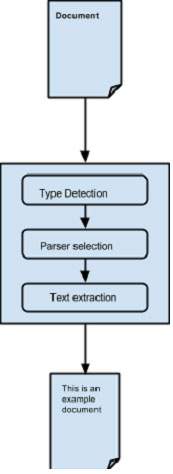
Abstracting the parsing process −
Initially when we pass a document to Tika, it uses a suitable type detection mechanism available with it and detects the document type.
Once the document type is known, it chooses a suitable parser from its parser repository. The parser repository contains classes that make use of external libraries.
Then the document is passed to choose the parser which will parse the content, extract the text, and also throw exceptions for unreadable formats.
Content Extraction using Tika
Given below is the program for extracting text from a file using Tika facade class −
TikaDemo.java
package com.tutorialspoint.tika;

import java.io.File;
import java.io.IOException;

import org.apache.tika.Tika;
import org.apache.tika.exception.TikaException;

public class TikaDemo {

   public static void main(final String[] args) throws IOException, TikaException {

      //Assume sample.txt is present
      File file = new File("D:/projects/sample.txt");

      //Instantiating Tika facade class
      Tika tika = new Tika();
      String filecontent = tika.parseToString(file);
      System.out.println("Extracted Content: " + filecontent);
   }
}
Output
Given below is the content of sample.txt.
Hi students welcome to tutorialspoint
It gives you the following output −
Extracted Content: Hi students welcome to tutorialspoint
Content Extraction using Parser Interface
The parser package of Tika provides several interfaces and classes using which we can parse a text document. Given below is the block diagram of the org.apache.tika.parser package.
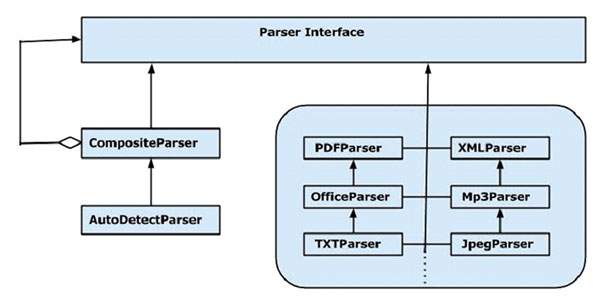
There are several parser classes available, e.g., pdf parser, Mp3Passer, OfficeParser, etc., to parse respective documents individually. All these classes implement the parser interface.
CompositeParser
The given diagram shows Tikas general-purpose parser classes: CompositeParser and AutoDetectParser. Since the CompositeParser class follows composite design pattern, you can use a group of parser instances as a single parser. The CompositeParser class also allows access to all the classes that implement the parser interface.
AutoDetectParser
This is a subclass of CompositeParser and it provides automatic type detection. Using this functionality, the AutoDetectParser automatically sends the incoming documents to the appropriate parser classes using the composite methodology.
parse() method
Along with parseToString(), you can also use the parse() method of the parser Interface. The prototype of this method is shown below.
parse(InputStream stream, ContentHandler handler, Metadata metadata, ParseContext context)
The following table lists the four objects it accepts as parameters.
| Sr.No. | Object & Description |
|---|---|
| 1 |
InputStream stream Any Inputstream object that contains the content of the file |
| 2 |
ContentHandler handler Tika passes the document as XHTML content to this handler, thereafter the document is processed using SAX API. It provides efficient postprocessing of the contents in a document. |
| 3 |
Metadata metadata The metadata object is used both as a source and a target of document metadata. |
| 4 |
ParseContext context This object is used in cases where the client application wants to customize the parsing process. |
Example - Parsing a Document
Given below is an example that shows how the parse() method is used.
Step 1 −
To use the parse() method of the parser interface, instantiate any of the classes providing the implementation for this interface.
There are individual parser classes such as PDFParser, OfficeParser, XMLParser, etc. You can use any of these individual document parsers. Alternatively, you can use either CompositeParser or AutoDetectParser that uses all the parser classes internally and extracts the contents of a document using a suitable parser.
Parser parser = new AutoDetectParser();
   (or)
Parser parser = new CompositeParser();
   (or)
object of any individual parsers given in Tika Library
Step 2 −
Create a handler class object. Given below are the three content handlers −
| Sr.No. | Class & Description |
|---|---|
| 1 |
BodyContentHandler This class picks the body part of the XHTML output and writes that content to the output writer or output stream. Then it redirects the XHTML content to another content handler instance. |
| 2 |
LinkContentHandler This class detects and picks all the H-Ref tags of the XHTML document and forwards those for the use of tools like web crawlers. |
| 3 |
TeeContentHandler This class helps in using multiple tools simultaneously. |
Since our target is to extract the text contents from a document, instantiate BodyContentHandler as shown below −
BodyContentHandler handler = new BodyContentHandler( );
Step 3 −
Create the Metadata object as shown below −
Metadata metadata = new Metadata();
Step 4 −
Create any of the input stream objects, and pass your file that should be extracted to it.
FileInputstream
Instantiate a file object by passing the file path as parameter and pass this object to the FileInputStream class constructor.
Note − The path passed to the file object should not contain spaces.
The problem with these input stream classes is that they dont support random access reads, which is required to process some file formats efficiently. To resolve this problem, Tika provides TikaInputStream.
File  file = new File(filepath)
FileInputStream inputstream = new FileInputStream(file);
   (or)
InputStream stream = TikaInputStream.get(new File(filename));
Step 5 −
Create a parse context object as shown below −
ParseContext context =new ParseContext();
Step 6 −
Instantiate the parser object, invoke the parse method, and pass all the objects required, as shown in the prototype below −
parser.parse(inputstream, handler, metadata, context);
Given below is the program for content extraction using the parser interface −
TikaDemo.java
package com.tutorialspoint.tika;

import java.io.File;
import java.io.FileInputStream;
import java.io.IOException;

import org.apache.tika.exception.TikaException;
import org.apache.tika.metadata.Metadata;
import org.apache.tika.parser.AutoDetectParser;
import org.apache.tika.parser.ParseContext;
import org.apache.tika.parser.Parser;
import org.apache.tika.sax.BodyContentHandler;

import org.xml.sax.SAXException;

public class TikaDemo {

   public static void main(final String[] args) throws IOException,SAXException, TikaException {

      //Assume sample.txt is in your current directory
      File file = new File("D:/projects/sample.txt");

      //parse method parameters
      Parser parser = new AutoDetectParser();
      BodyContentHandler handler = new BodyContentHandler();
      Metadata metadata = new Metadata();
      FileInputStream inputstream = new FileInputStream(file);
      ParseContext context = new ParseContext();

      //parsing the file
      parser.parse(inputstream, handler, metadata, context);
      System.out.println("File content : " + handler.toString());
   }
}
Output
Given below is the content of sample.txt
Hi students welcome to tutorialspoint
If you execute the above program, it will give you the following output −
File content : Hi students welcome to tutorialspoint
Apache Tika - Metadata Extraction
Besides content, Tika also extracts the metadata from a file. Metadata is nothing but the additional information supplied with a file. If we consider an audio file, the artist name, album name, title comes under metadata.
XMP Standards
The Extensible Metadata Platform (XMP) is a standard for processing and storing information related to the content of a file. It was created by Adobe Systems Inc. XMP provides standards for defining, creating, and processing of metadata. You can embed this standard into several file formats such as PDF, JPEG, JPEG, GIF, jpg, HTML etc.
Property Class
Tika uses the Property class to follow XMP property definition. It provides the PropertyType and ValueType enums to capture the name and value of a metadata.
Metadata Class
This class implements various interfaces such as ClimateForcast, CativeCommons, Geographic, TIFF etc. to provide support for various metadata models. In addition, this class provides various methods to extract the content from a file.
Metadata Names
We can extract the list of all metadata names of a file from its metadata object using the method names(). It returns all the names as a string array. Using the name of the metadata, we can get the value using the get() method. It takes a metadata name and returns a value associated with it.
String[] metadaNames = metadata.names();

String value = metadata.get(name);
Extracting Metadata using Parse Method
Whenever we parse a file using parse(), we pass an empty metadata object as one of the parameters. This method extracts the metadata of the given file (if that file contains any), and places them in the metadata object. Therefore, after parsing the file using parse(), we can extract the metadata from that object.
Parser parser = new AutoDetectParser();
BodyContentHandler handler = new BodyContentHandler();
Metadata metadata = new Metadata();   //empty metadata object
FileInputStream inputstream = new FileInputStream(file);
ParseContext context = new ParseContext();
parser.parse(inputstream, handler, metadata, context);

// now this metadata object contains the extracted metadata of the given file.
metadata.metadata.names();
Given below is the complete program to extract metadata from a text file.
TikaDemo.java
package com.tutorialspoint.tika;

import java.io.File;
import java.io.FileInputStream;
import java.io.IOException;

import org.apache.tika.exception.TikaException;
import org.apache.tika.metadata.Metadata;
import org.apache.tika.parser.AutoDetectParser;
import org.apache.tika.parser.ParseContext;
import org.apache.tika.parser.Parser;
import org.apache.tika.sax.BodyContentHandler;

import org.xml.sax.SAXException;

public class TikaDemo {

   public static void main(final String[] args) throws IOException, TikaException, SAXException {

      //Assume that boy.jpg is available
      File file = new File("D:/projects/boy.jpg");

      //Parser method parameters
      Parser parser = new AutoDetectParser();
      BodyContentHandler handler = new BodyContentHandler();
      Metadata metadata = new Metadata();
      FileInputStream inputstream = new FileInputStream(file);
      ParseContext context = new ParseContext();

      parser.parse(inputstream, handler, metadata, context);
      System.out.println(handler.toString());

      //getting the list of all meta data elements
      String[] metadataNames = metadata.names();

      for(String name : metadataNames) {
         System.out.println(name + ": " + metadata.get(name));
      }
   }
}
Output
Given below is the snapshot of boy.jpg
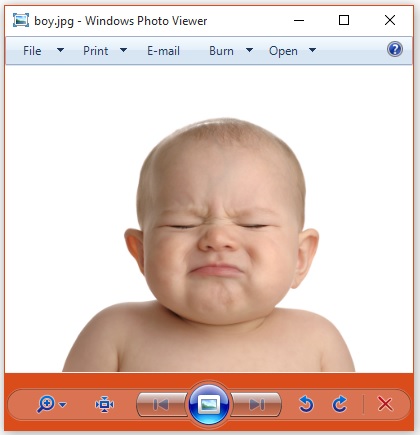
If you execute the above program, it will give you the following output −
Resolution Units: inch
Number of Tables: 4 Huffman tables
File Modified Date: Mon Oct 27 11:58:38 +05:30 2025
Compression Type: Baseline
Data Precision: 8 bits
X-TIKA:Parsed-By-Full-Set: org.apache.tika.parser.DefaultParser
Number of Components: 3
tiff:ImageLength: 435
Component 2: Cb component: Quantization table 1, Sampling factors 1 horiz/1 vert
Thumbnail Height Pixels: 0
Component 1: Y component: Quantization table 0, Sampling factors 2 horiz/2 vert
Image Height: 435 pixels
Thumbnail Width Pixels: 0
X Resolution: 96 dots
Image Width: 420 pixels
File Size: 40050 bytes
Component 3: Cr component: Quantization table 1, Sampling factors 1 horiz/1 vert
Version: 1.1
X-TIKA:Parsed-By: org.apache.tika.parser.DefaultParser
File Name: apache-tika-17701004029025818984.tmp
tiff:BitsPerSample: 8
tiff:ImageWidth: 420
Content-Type: image/jpeg
Y Resolution: 96 dots
We can also get our desired metadata values.
Adding New Metadata Values
We can add new metadata values using the add() method of the metadata class. Given below is the syntax of this method. Here we are adding the author name.
metadata.add(author,Tutorials point);
The Metadata class has predefined properties including the properties inherited from classes like ClimateForcast, CativeCommons, Geographic, etc., to support various data models. Shown below is the usage of the SOFTWARE data type inherited from the TIFF interface implemented by Tika to follow XMP metadata standards for TIFF image formats.
metadata.add(Metadata.SOFTWARE,"ms paint");
Given below is the complete program that demonstrates how to add metadata values to a given file. Here the list of the metadata elements is displayed in the output so that you can observe the change in the list after adding new values.
TikaDemo.java
package com.tutorialspoint.tika;

import java.io.File;
import java.io.FileInputStream;
import java.io.IOException;
import java.util.Arrays;

import org.apache.tika.exception.TikaException;
import org.apache.tika.metadata.Metadata;
import org.apache.tika.parser.AutoDetectParser;
import org.apache.tika.parser.ParseContext;
import org.apache.tika.parser.Parser;
import org.apache.tika.sax.BodyContentHandler;

import org.xml.sax.SAXException;

public class TikaDemo {

   public static void main(final String[] args) throws IOException, SAXException, TikaException {

      //create a file object and assume sample.txt is available
      File file = new File("D:/projects/sample.txt");

      //Parser method parameters
      Parser parser = new AutoDetectParser();
      BodyContentHandler handler = new BodyContentHandler();
      Metadata metadata = new Metadata();
      FileInputStream inputstream = new FileInputStream(file);
      ParseContext context = new ParseContext();

      //parsing the document
      parser.parse(inputstream, handler, metadata, context);

      //list of meta data elements before adding new elements
      System.out.println("metadata elements :"  +Arrays.toString(metadata.names()));

      //adding new meta data name value pair
      metadata.add("Author","Tutorials Point");
      System.out.println("metadata name value pair is successfully added");

      //printing all the meta data elements after adding new elements
      System.out.println("Here is the list of all the metadata elements after adding new elements");
      System.out.println( Arrays.toString(metadata.names()));
   }
}
Output
Given below is the content of sample.txt
Hi students welcome to tutorialspoint
If you execute the above program, it will give you the following output −
metadata elements :[X-TIKA:Parsed-By, X-TIKA:Parsed-By-Full-Set, Content-Encoding, X-TIKA:detectedEncoding, X-TIKA:encodingDetector, Content-Type]
metadata name value pair is successfully added
Here is the list of all the metadata elements after adding new elements
[X-TIKA:Parsed-By, X-TIKA:Parsed-By-Full-Set, Content-Encoding, Author, X-TIKA:detectedEncoding, X-TIKA:encodingDetector, Content-Type]
Setting Values to Existing Metadata Elements
You can set values to the existing metadata elements using the add() method. The syntax of setting the date property using the add() method is as follows −
metadata.add("Date", new Date().toString());
You can also set multiple values to the properties using the add() method. The syntax of setting multiple values to the Author property using the set() method is as follows −
metadata.set("Author", "ram ,raheem ,robin ");
Given below is the complete program demonstrating the add() method.
TikaDemo.java
package com.tutorialspoint.tika;

import java.io.File;
import java.io.FileInputStream;
import java.io.IOException;

import java.util.Date;
import java.util.GregorianCalendar;

import org.apache.tika.exception.TikaException;
import org.apache.tika.metadata.Metadata;
import org.apache.tika.parser.AutoDetectParser;
import org.apache.tika.parser.ParseContext;
import org.apache.tika.parser.Parser;
import org.apache.tika.sax.BodyContentHandler;

import org.xml.sax.SAXException;

public class TikaDemo {

   public static void main(final String[] args) throws IOException,SAXException, TikaException {

      //Create a file object and assume sample.txt is available
      File file = new File("D:/projects/sample.txt");

      //parameters of parse() method
      Parser parser = new AutoDetectParser();
      BodyContentHandler handler = new BodyContentHandler();
      Metadata metadata = new Metadata();
      FileInputStream inputstream = new FileInputStream(file);
      ParseContext context = new ParseContext();

      //Parsing the given file
      parser.parse(inputstream, handler, metadata, context);

      //list of meta data elements elements
      System.out.println("metadata elements and values of the given file :");
      String[] metadataNamesb4 = metadata.names();

      for(String name : metadataNamesb4) {
    	  System.out.println(name + ": " + metadata.get(name));
      }

      //setting date meta data
      metadata.add("Date", new Date().toString());

      //setting multiple values to author property
      metadata.set("Author", "ram ,raheem ,robin ");

      //printing all the meta data elements with new elements
      System.out.println("List of all the metadata elements  after adding new elements ");
      String[] metadataNamesafter = metadata.names();

      for(String name : metadataNamesafter) {
         System.out.println(name + ": " + metadata.get(name));
      }
   }
}
Output
Save the above code as SetMetadata.java and run it from the command prompt −
Given below is the content of sample.txt.
Hi students welcome to tutorialspoint
If you execute the above program it will give you the following output. In the output, you can observe the newly added metadata elements.
metadata elements and values of the given file :
X-TIKA:Parsed-By: org.apache.tika.parser.DefaultParser
X-TIKA:Parsed-By-Full-Set: org.apache.tika.parser.DefaultParser
Content-Encoding: ISO-8859-1
X-TIKA:detectedEncoding: ISO-8859-1
X-TIKA:encodingDetector: UniversalEncodingDetector
Content-Type: text/plain; charset=ISO-8859-1
List of all the metadata elements  after adding new elements
X-TIKA:Parsed-By: org.apache.tika.parser.DefaultParser
X-TIKA:Parsed-By-Full-Set: org.apache.tika.parser.DefaultParser
Content-Encoding: ISO-8859-1
Author: ram ,raheem ,robin
X-TIKA:detectedEncoding: ISO-8859-1
X-TIKA:encodingDetector: UniversalEncodingDetector
Date: Mon Oct 27 12:03:46 IST 2025
Content-Type: text/plain; charset=ISO-8859-1
Apache Tika - Language Detection
Need for Language Detection
For classification of documents based on the language they are written in a multilingual website, a language detection tool is needed. This tool should accept documents without language annotation (metadata) and add that information in the metadata of the document by detecting the language.
Algorithms for Profiling Corpus
What is Corpus?
To detect the language of a document, a language profile is constructed and compared with the profile of the known languages. The text set of these known languages is known as a corpus.
A corpus is a collection of texts of a written language that explains how the language is used in real situations.
The corpus is developed from books, transcripts, and other data resources like the Internet. The accuracy of the corpus depends upon the profiling algorithm we use to frame the corpus.
What are Profiling Algorithms?
The common way of detecting languages is by using dictionaries. The words used in a given piece of text will be matched with those that are in the dictionaries.
A list of common words used in a language will be the most simple and effective corpus for detecting a particular language, for example, articles a, an, the in English.
Using Word Sets as Corpus
Using word sets, a simple algorithm is framed to find the distance between two corpora, which will be equal to the sum of differences between the frequencies of matching words.
Such algorithms suffer from the following problems −
Since the frequency of matching words is very less, the algorithm cannot efficiently work with small texts having few sentences. It needs a lot of text for accurate match.
It cannot detect word boundaries for languages having compound sentences, and those having no word dividers like spaces or punctuation marks.
Due to these difficulties in using word sets as corpus, individual characters or character groups are considered.
Using Character Sets as Corpus
Since the characters that are commonly used in a language are finite in number, it is easy to apply an algorithm based on word frequencies rather than characters. This algorithm works even better in case of certain character sets used in one or very few languages.
This algorithm suffers from the following drawbacks −
It is difficult to differentiate two languages having similar character frequencies.
There is no specific tool or algorithm to specifically identify a language with the help of (as corpus) the character set used by multiple languages.
N-gram Algorithm
The drawbacks stated above gave rise to a new approach of using character sequences of a given length for profiling corpus. Such sequence of characters are called as N-grams in general, where N represents the length of the character sequence.
N-gram algorithm is an effective approach for language detection, especially in case of European languages like English.
This algorithm works fine with short texts.
Though there are advanced language profiling algorithms to detect multiple languages in a multilingual document having more attractive features, Tika uses the 3-grams algorithm, as it is suitable in most practical situations.
Language Detection in Tika
Among all the 184 standard languages standardized by ISO 639-1, Tika can detect 18 languages. Language detection in Tika is done using the getLanguage() method of the LanguageResult class. This method returns the code name of the language in String format. Given below is the list of the 18 language-code pairs detected by Tika −
| daDanish | deGerman | etEstonian | elGreek |
| enEnglish | esSpanish | fiFinnish | frFrench |
| huHungarian | isIcelandic | itItalian | nlDutch |
| noNorwegian | plPolish | ptPortuguese | ruRussian |
| svSwedish | thThai |
While instantiating the LanguageDetector class, you should use a language detector which we can choose from various vendors and using detect() method, detect the language of the text.
LanguageDetector detector = new OptimaizeLangDetector().loadModels();
LanguageResult result = detector.detect(text);
Given below is the example program for Language detection in Tika.
package com.tutorialspoint.tika;

import java.io.IOException;

import org.apache.tika.exception.TikaException;
import org.apache.tika.langdetect.optimaize.OptimaizeLangDetector;
import org.apache.tika.language.detect.LanguageDetector;
import org.apache.tika.language.detect.LanguageResult;
import org.xml.sax.SAXException;

public class TikaDemo {

   public static void main(String args[])throws IOException, SAXException, TikaException {

      String text = "This is an example text in English.";

      LanguageDetector detector = new OptimaizeLangDetector().loadModels();
      LanguageResult result = detector.detect(text);

      if(result != null && result.isReasonablyCertain()) {
         String language = result.getLanguage();
         System.out.println("Language of the given content is : " + language);
      }else {
         System.out.println("Language detection failed.");
      }
   }
}
Output
If you execute the above program it gives the following output−
Language of the given content is : en
Language Detection of a Document
To detect the language of a given document, you have to parse it using the parse() method. The parse() method parses the content and stores it in the handler object, which was passed to it as one of the arguments. Pass the String format of the handler object to the detect of the LanguageDetector class as shown below −
parser.parse(inputstream, handler, metadata, context);
LanguageIdentifier object = new LanguageIdentifier(handler.toString());
Given below is the complete program that demonstrates how to detect the language of a given document −
TikaDemo.java
package com.tutorialspoint.tika;

import java.io.File;
import java.io.FileInputStream;
import java.io.IOException;

import org.apache.tika.exception.TikaException;
import org.apache.tika.langdetect.optimaize.OptimaizeLangDetector;
import org.apache.tika.language.detect.LanguageDetector;
import org.apache.tika.language.detect.LanguageResult;
import org.apache.tika.metadata.Metadata;
import org.apache.tika.parser.AutoDetectParser;
import org.apache.tika.parser.ParseContext;
import org.apache.tika.parser.Parser;
import org.apache.tika.sax.BodyContentHandler;
import org.xml.sax.SAXException;

public class TikaDemo {

   public static void main(final String[] args) throws IOException, SAXException, TikaException {

      //Instantiating a file object
      File file = new File("D:/projects/sample.txt");

      //Parser method parameters
      Parser parser = new AutoDetectParser();
      BodyContentHandler handler = new BodyContentHandler();
      Metadata metadata = new Metadata();
      FileInputStream content = new FileInputStream(file);

      //Parsing the given document
      parser.parse(content, handler, metadata, new ParseContext());

      LanguageDetector detector = new OptimaizeLangDetector().loadModels();
      LanguageResult result = detector.detect(handler.toString());

      if(result != null && result.isReasonablyCertain()) {
         String language = result.getLanguage();
         System.out.println("Language of the given content is : " + language);
      }else {
         System.out.println("Language detection failed.");
      }
   }
}
Output
Given below is the content of sample.txt.
Hi students welcome to tutorialspoint
If you execute the above program, it will give you the following output −
Language name :en
Along with the Tika jar, Tika provides a Graphical User Interface application (GUI) and a Command Line Interface (CLI) application. You can execute a Tika application from the command prompt too like other Java applications.
Apache Tika - GUI, Graphical User Interface
Graphical User Interface (GUI)
Tika provides a jar file along with its source code in the following link https://tika.apache.org/download.html.
We've downloaded tika-app-3.2.3.jar and executed using following java command −
java -jar tika-app-3.2.3.jar

Now using GUI, we can open any file to analyze.
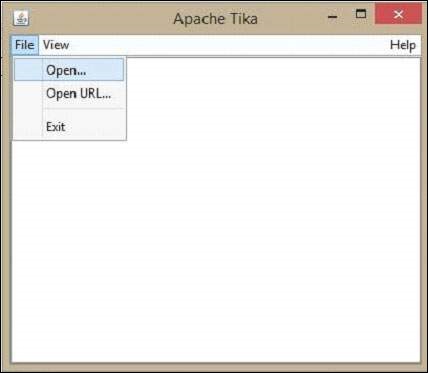
Let us now see how to make use of the Tika GUI.
On the GUI, click open, browse and select a file that is to be extracted, or drag it onto the whitespace of the window.
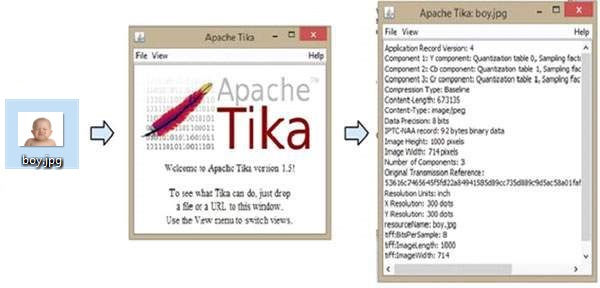
Tika extracts the content of the files and displays it in five different formats, viz. metadata, formatted text, plain text, main content, and structured text. You can choose any of the format you want.
The following illustration shows what Tika can do. When we drop the image on the GUI, Tika extracts and displays its metadata.
Apache Tika - Extracting PDF
Example - Extracting Content and Metadata from a PDF Document
Given below is the program to extract content and metadata from a PDF.
TikaDemo.java
package com.tutorialspoint.tika;

import java.io.File;
import java.io.FileInputStream;
import java.io.IOException;

import org.apache.tika.exception.TikaException;
import org.apache.tika.metadata.Metadata;
import org.apache.tika.parser.ParseContext;
import org.apache.tika.parser.pdf.PDFParser;
import org.apache.tika.sax.BodyContentHandler;

import org.xml.sax.SAXException;

public class TikaDemo {

   public static void main(final String[] args) throws IOException,TikaException {

      BodyContentHandler handler = new BodyContentHandler();
      Metadata metadata = new Metadata();
      FileInputStream inputstream = new FileInputStream(new File("D:/projects/example.pdf"));
      ParseContext pcontext = new ParseContext();

      //parsing the document using PDF parser
      PDFParser pdfparser = new PDFParser();
      pdfparser.parse(inputstream, handler, metadata,pcontext);

      //getting the content of the document
      System.out.println("Contents of the PDF:" + handler.toString());

      //getting metadata of the document
      System.out.println("Metadata of the PDF:");
      String[] metadataNames = metadata.names();

      for(String name : metadataNames) {
         System.out.println(name+ " : " + metadata.get(name));
      }
   }
}
Output
Given below is the snapshot of example.pdf
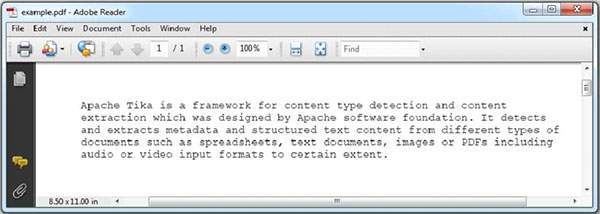
The PDF we are passing has the following properties −
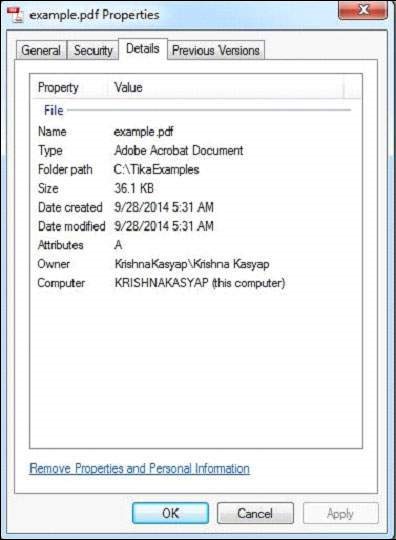
After compiling the program, you will get the output as shown below.
Contents of the PDF:
Apache Tika is a framework for content type detection and content extraction
which was designed by Apache software foundation. It detects and extracts metadata
and structured text content from different types of documents such as spreadsheets,
text documents, images or PDFs including audio or video input formats to certain extent.

Metadata of the PDF:
pdf:unmappedUnicodeCharsPerPage : 0
pdf:PDFVersion : 1.7
xmp:CreatorTool : Microsoft® Word 2021
pdf:hasXFA : false
access_permission:modify_annotations : true
dc:creator : Mahesh Parashar
pdf:num3DAnnotations : 0
dcterms:created : 2025-10-27T10:36:34Z
dcterms:modified : 2025-10-27T10:36:34Z
dc:format : application/pdf; version=1.7
xmpMM:DocumentID : uuid:463AA685-EDF0-40CC-8712-344DB211B4F7
pdf:docinfo:creator_tool : Microsoft® Word 2021
pdf:overallPercentageUnmappedUnicodeChars : 0.0
access_permission:fill_in_form : true
pdf:docinfo:modified : 2025-10-27T10:36:34Z
pdf:hasCollection : false
pdf:encrypted : false
pdf:containsNonEmbeddedFont : false
xmp:CreateDate : 2025-10-27T10:36:34Z
pdf:hasMarkedContent : true
pdf:ocrPageCount : 0
Content-Type : application/pdf
access_permission:can_print_faithful : true
xmp:ModifyDate : 2025-10-27T10:36:34Z
pdf:docinfo:creator : Mahesh Parashar
dc:language : en
pdf:producer : Microsoft® Word 2021
xmp:pdf:Producer : Microsoft® Word 2021
pdf:totalUnmappedUnicodeChars : 0
access_permission:extract_for_accessibility : true
access_permission:assemble_document : true
xmpTPg:NPages : 1
pdf:hasXMP : true
pdf:charsPerPage : 331
access_permission:extract_content : true
access_permission:can_print : true
xmp:dc:creator : Mahesh Parashar
access_permission:can_modify : true
pdf:docinfo:producer : Microsoft® Word 2021
pdf:docinfo:created : 2025-10-27T10:36:34Z
pdf:containsDamagedFont : false
Apache Tika - Extracting ODP
Example - Extracting Content and Metadata from a ODP Presentation
Given below is the program to extract content and metadata from a ODP.
TikaDemo.java
package com.tutorialspoint.tika;

import java.io.File;
import java.io.FileInputStream;
import java.io.IOException;

import org.apache.tika.exception.TikaException;
import org.apache.tika.metadata.Metadata;
import org.apache.tika.parser.ParseContext;
import org.apache.tika.parser.odf.OpenDocumentParser;
import org.apache.tika.sax.BodyContentHandler;

import org.xml.sax.SAXException;

public class TikaDemo {

   public static void main(final String[] args) throws IOException,SAXException, TikaException {

      //detecting the file type
      BodyContentHandler handler = new BodyContentHandler();
      Metadata metadata = new Metadata();
      FileInputStream inputstream = new FileInputStream(new File("D:/projects/example.odp"));
      ParseContext pcontext = new ParseContext();

      //Open Document Parser
      OpenDocumentParser openofficeparser = new OpenDocumentParser ();
      openofficeparser.parse(inputstream, handler, metadata,pcontext);
      System.out.println("Contents of the document:" + handler.toString());
      System.out.println("Metadata of the document:");
      String[] metadataNames = metadata.names();

      for(String name : metadataNames) {
         System.out.println(name + " :  " + metadata.get(name));
      }
   }
}
Output
Given below is snapshot of example.odp file.
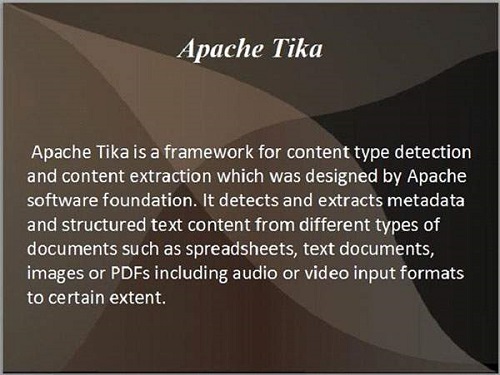
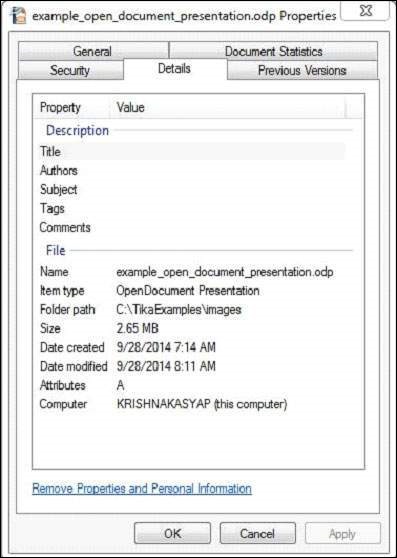
This document has the following properties −
After compiling the program, you will get the following output.
Output −
Contents of the document:
Apache Tika

	Apache Tika is a framework for content type detection and content extraction which was designed by Apache software foundation. It detects and extracts metadata and structured text content from different types of documents such as spreadsheets, text documents, images or PDFs including audio or video input formats to certain extent.

Metadata of the document:
meta:paragraph-count :  2
meta:word-count :  57
odf:version :  1.3
dc:creator :  Mahesh Parashar
extended-properties:TotalTime :  PT150S
generator :  MicrosoftOffice/14.0 MicrosoftPowerPoint
dcterms:created :  2025-10-27T10:44:41Z
dcterms:modified :  2025-10-27T10:47:12Z
editing-cycles :  1
Content-Type :  application/vnd.oasis.opendocument.presentation
Apache Tika - Extracting MS Office Files
Example - Extracting Content and Metadata from an Excel Sheet
Given below is the program to extract content and metadata from a Microsoft Office Excel Sheet.
TikaDemo.java
package com.tutorialspoint.tika;

import java.io.File;
import java.io.FileInputStream;
import java.io.IOException;

import org.apache.tika.exception.TikaException;
import org.apache.tika.metadata.Metadata;
import org.apache.tika.parser.ParseContext;
import org.apache.tika.parser.microsoft.ooxml.OOXMLParser;
import org.apache.tika.sax.BodyContentHandler;

import org.xml.sax.SAXException;

public class TikaDemo {

   public static void main(final String[] args) throws IOException, TikaException, SAXException {

      //detecting the file type
      BodyContentHandler handler = new BodyContentHandler();
      Metadata metadata = new Metadata();
      FileInputStream inputstream = new FileInputStream(new File("D:/projects/example.xlsx"));
      ParseContext pcontext = new ParseContext();

      //OOXml parser
      OOXMLParser  msofficeparser = new OOXMLParser ();
      msofficeparser.parse(inputstream, handler, metadata,pcontext);
      System.out.println("Contents of the document:" + handler.toString());
      System.out.println("Metadata of the document:");
      String[] metadataNames = metadata.names();

      for(String name : metadataNames) {
         System.out.println(name + ": " + metadata.get(name));
      }
   }
}
Output
Here we are passing the following sample Excel file.
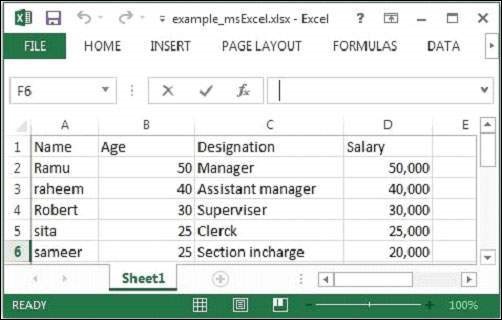
The given Excel file has the following properties −
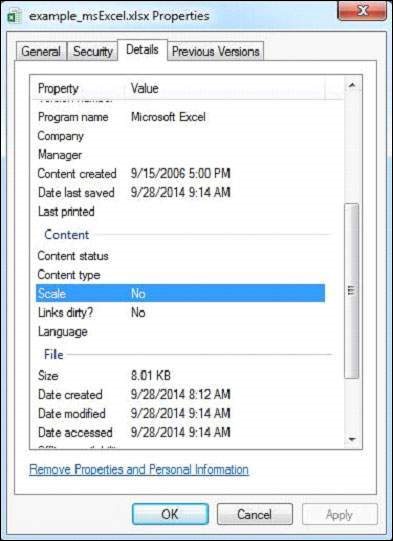
After executing the above program you will get the following output.
Contents of the document:
Sheet1
	Name	Age	Designation	Salary
	Ramu	50	Manager	50000
	Raheem	40	Assistant Manager	40000
	Robert	30	Supervisor	30000
	Sita	25	Clerk	25000
	Sameer	25	Section Incharge	20000

Metadata of the document:
extended-properties:AppVersion: 16.0300
protected: false
extended-properties:Application: Microsoft Excel
meta:last-author: Mahesh Parashar
extended-properties:DocSecurityString: None
dc:creator: Mahesh Parashar
extended-properties:Company:
dcterms:created: 2025-10-27T10:56:20Z
dcterms:modified: 2025-10-27T10:58:35Z
X-TIKA:origResourceName: D:\Projects\
Content-Type: application/vnd.openxmlformats-officedocument.spreadsheetml.sheet
dc:publisher:
Apache Tika - Extracting Text Document
Example - Extracting Content and Metadata from a Text Document
Given below is the program to extract content and metadata from a Text Document.
TikaDemo.java
package com.tutorialspoint.tika;

import java.io.File;
import java.io.FileInputStream;
import java.io.IOException;

import org.apache.tika.exception.TikaException;
import org.apache.tika.metadata.Metadata;
import org.apache.tika.parser.ParseContext;
import org.apache.tika.sax.BodyContentHandler;
import org.apache.tika.parser.txt.TXTParser;

import org.xml.sax.SAXException;

public class TikaDemo {

   public static void main(final String[] args) throws IOException,SAXException, TikaException {

      //detecting the file type
      BodyContentHandler handler = new BodyContentHandler();
      Metadata metadata = new Metadata();
      FileInputStream inputstream = new FileInputStream(new File("D:/projects/example.txt"));
      ParseContext pcontext=new ParseContext();

      //Text document parser
      TXTParser  TexTParser = new TXTParser();
      TexTParser.parse(inputstream, handler, metadata,pcontext);
      System.out.println("Contents of the document:\n" + handler.toString());
      System.out.println("Metadata of the document:");
      String[] metadataNames = metadata.names();

      for(String name : metadataNames) {
         System.out.println(name + " : " + metadata.get(name));
      }
   }
}
Output
Given below is the snapshot of sample.txt file −

The text document has the following properties −
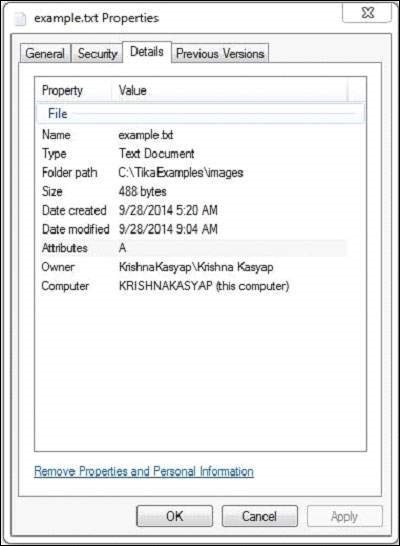
After executing the above program you will get the following output.
Contents of the document:
At tutorialspoint.com, we strive hard to provide quality tutorials for self-learning
purpose in the domains of Academics, Information Technology, Management and Computer
Programming Languages.
The endeavour started by Mohtashim, an AMU alumni, who is the founder and the managing
director of Tutorials Point (I) Pvt. Ltd. He came up with the website tutorialspoint.com
in year 2006 with the help of handpicked freelancers, with an array of tutorials for
computer programming languages.

Metadata of the document:
Content-Encoding : windows-1252
X-TIKA:detectedEncoding : windows-1252
X-TIKA:encodingDetector : UniversalEncodingDetector
Content-Type : text/plain; charset=windows-1252
Apache Tika - Extracting HTML Document
Example - Extracting Content and Metadata from a HTML Document
Given below is the program to extract content and metadata from a HTML Document.
TikaDemo.java
package com.tutorialspoint.tika;

import java.io.File;
import java.io.FileInputStream;
import java.io.IOException;

import org.apache.tika.exception.TikaException;
import org.apache.tika.metadata.Metadata;
import org.apache.tika.parser.AutoDetectParser;
import org.apache.tika.parser.ParseContext;
import org.apache.tika.sax.BodyContentHandler;

import org.xml.sax.SAXException;

public class TikaDemo {

   public static void main(final String[] args) throws IOException,SAXException, TikaException {

      //detecting the file type
      BodyContentHandler handler = new BodyContentHandler();
      Metadata metadata = new Metadata();
      FileInputStream inputstream = new FileInputStream(new File("D:/projects/example.html"));
      ParseContext pcontext = new ParseContext();

      //Html parser
      AutoDetectParser htmlparser = new AutoDetectParser();
      htmlparser.parse(inputstream, handler, metadata,pcontext);
      System.out.println("Contents of the document:" + handler.toString());
      System.out.println("Metadata of the document:");
      String[] metadataNames = metadata.names();

      for(String name : metadataNames) {
         System.out.println(name + ":   " + metadata.get(name));
      }
   }
}
Output
Given below is the snapshot of example.html file.
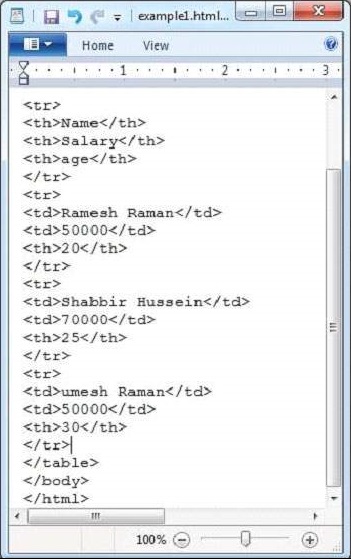
The HTML document has the following properties −
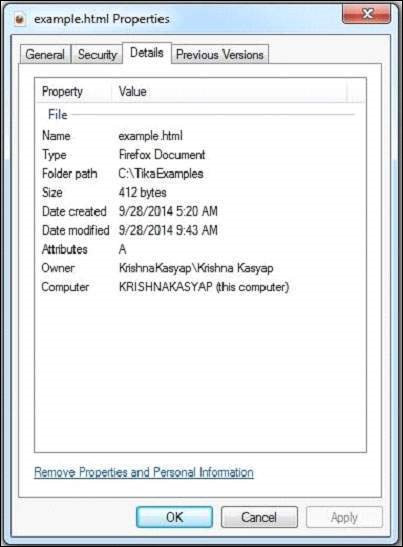
After executing the above program you will get the following output.
Contents of the document:

	Name	Salary	Age

	Ramesh	50000	20

	Shabbir	70000	25

	Umesh	50000	30

Metadata of the document:
X-TIKA:Parsed-By:   org.apache.tika.parser.DefaultParser
dc:title:   HTML Table Header
X-TIKA:Parsed-By-Full-Set:   org.apache.tika.parser.DefaultParser
Content-Encoding:   windows-1252
X-TIKA:detectedEncoding:   windows-1252
X-TIKA:encodingDetector:   UniversalEncodingDetector
Content-Type:   text/html; charset=windows-1252
Apache Tika - Extracting XML Document
Example - Extracting Content and Metadata from a XML Document
Given below is the program to extract content and metadata from a XML Document.
TikaDemo.java
package com.tutorialspoint.tika;

import java.io.File;
import java.io.FileInputStream;
import java.io.IOException;

import org.apache.tika.exception.TikaException;
import org.apache.tika.metadata.Metadata;
import org.apache.tika.parser.ParseContext;
import org.apache.tika.parser.xml.XMLParser;
import org.apache.tika.sax.BodyContentHandler;

import org.xml.sax.SAXException;

public class TikaDemo {

   public static void main(final String[] args) throws IOException,SAXException, TikaException {

      //detecting the file type
      BodyContentHandler handler = new BodyContentHandler();
      Metadata metadata = new Metadata();
      FileInputStream inputstream = new FileInputStream(new File("D:/projects/example.xml"));
      ParseContext pcontext = new ParseContext();

      //Xml parser
      XMLParser xmlparser = new XMLParser();
      xmlparser.parse(inputstream, handler, metadata, pcontext);
      System.out.println("Contents of the document:" + handler.toString());
      System.out.println("Metadata of the document:");
      String[] metadataNames = metadata.names();

      for(String name : metadataNames) {
         System.out.println(name + ": " + metadata.get(name));
      }
   }
}
Output
Given below is the snapshot of example.xml file
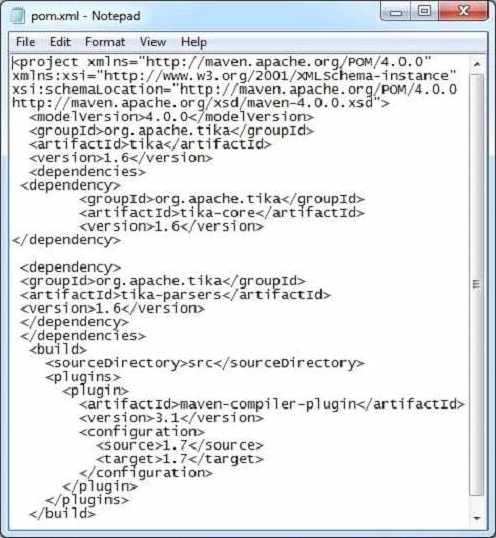
This document has the following properties −
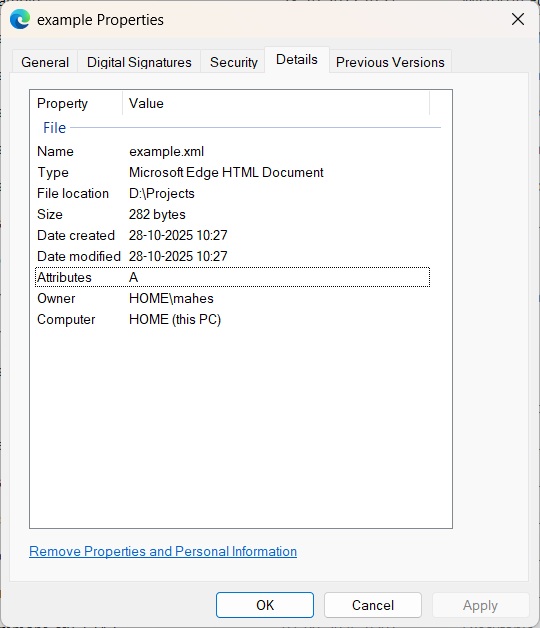
After executing the above program you will get the following output.
Contents of the document:

 Ramesh
 50000
 20

 Shabbir
 70000
 25

 Umesh
 50000
 30

Metadata of the document:
Content-Type: application/xml
Apache Tika - Extracting .class file
Example - Extracting Content and Metadata from a class file
Given below is the program to extract content and metadata from a class file.
TikaDemo.java
package com.tutorialspoint.tika;

import java.io.File;
import java.io.FileInputStream;
import java.io.IOException;

import org.apache.tika.exception.TikaException;
import org.apache.tika.metadata.Metadata;
import org.apache.tika.parser.ParseContext;
import org.apache.tika.parser.asm.ClassParser;
import org.apache.tika.sax.BodyContentHandler;

import org.xml.sax.SAXException;

public class TikaDemo {

   public static void main(final String[] args) throws IOException,SAXException, TikaException {

      //detecting the file type
      BodyContentHandler handler = new BodyContentHandler();
      Metadata metadata = new Metadata();
      FileInputStream inputstream = new FileInputStream(new File("D:/projects/Example.class"));
      ParseContext pcontext = new ParseContext();

      //Class parser
      ClassParser  ClassParser = new  ClassParser();
      ClassParser.parse(inputstream, handler, metadata,pcontext);
      System.out.println("Contents of the document:" + handler.toString());
      System.out.println("Metadata of the document:");
      String[] metadataNames = metadata.names();

      for(String name : metadataNames) {
         System.out.println(name + " :  " + metadata.get(name));
      }
   }
}
Output
Given below is the snapshot of Example.java which will generate Example.class after compilation.
package com.tutorialspoint.tika.examples;

public class Example {
   public static void main(String[] args) {
      System.out.println("This is a sample message");
   }
}
Example.class file has the following properties −
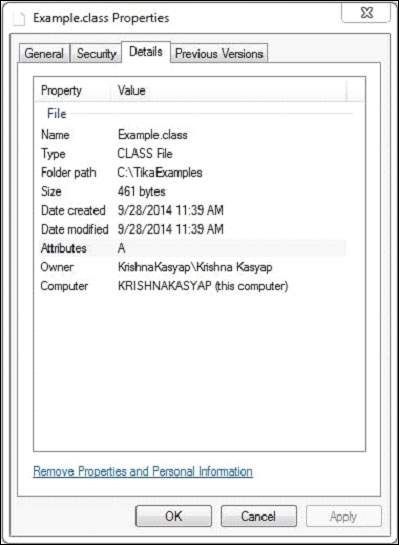
After executing the above program you will get the following output.
Contents of the document:
package com.tutorialspoint.tika.examples;
public synchronized class Example {
    public void Example();
    public static void main(String[]);
}

Metadata of the document:
dc:title :  Example
resourceName :  Example.class
Apache Tika - Extracting jar file
Example - Extracting Content and Metadata from a jar file
Given below is the program to extract content and metadata from a jar file.
TikaDemo.java
package com.tutorialspoint.tika;

import java.io.File;
import java.io.FileInputStream;
import java.io.IOException;

import org.apache.tika.exception.TikaException;
import org.apache.tika.metadata.Metadata;
import org.apache.tika.parser.ParseContext;
import org.apache.tika.sax.BodyContentHandler;
import org.apache.tika.parser.pkg.PackageParser;

import org.xml.sax.SAXException;

public class TikaDemo {

   public static void main(final String[] args) throws IOException,SAXException, TikaException {

      //detecting the file type
      BodyContentHandler handler = new BodyContentHandler();
      Metadata metadata = new Metadata();
      FileInputStream inputstream = new FileInputStream(new File("D:/projects/Example.jar"));
      ParseContext pcontext = new ParseContext();

      //Package parser
      PackageParser packageparser = new PackageParser();
      packageparser.parse(inputstream, handler, metadata,pcontext);
      System.out.println("Contents of the document: " + handler.toString());
      System.out.println("Metadata of the document:");
      String[] metadataNames = metadata.names();

      for(String name : metadataNames) {
         System.out.println(name + ":   " + metadata.get(name));
      }
   }
}
Output
Given below is the snapshot of Example.java which will generate Example.class after compilation.
package com.tutorialspoint.tika.examples;

public class Example {
   public static void main(String[] args) {
      System.out.println("This is a sample message");
   }
}
Example.jar file has the following properties −
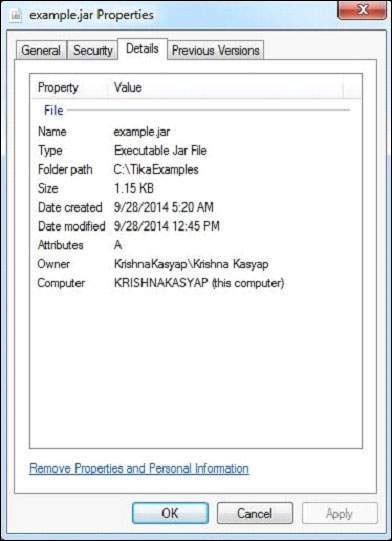
After executing the above program you will get the following output.
Contents of the document:
META-INF/MANIFEST.MF
Manifest-Version: 1.0
Created-By: Maven JAR Plugin 3.4.1
Build-Jdk-Spec: 21

com/tutorialspoint/tika/examples/Example.class
package com.tutorialspoint.tika.examples;
public synchronized class Example {
    public void Example();
    public static void main(String[]);
}

Metadata of the document:
X-TIKA:detectedEncoding:   ISO-8859-1
X-TIKA:encodingDetector:   UniversalEncodingDetector
Content-Type:   application/zip
Apache Tika - Extracting image file
Example - Extracting Content and Metadata from a image file
Given below is the program to extract content and metadata from a image file.
TikaDemo.java
package com.tutorialspoint.tika;

import java.io.File;
import java.io.FileInputStream;
import java.io.IOException;

import org.apache.tika.exception.TikaException;
import org.apache.tika.metadata.Metadata;
import org.apache.tika.parser.ParseContext;
import org.apache.tika.parser.image.JpegParser;
import org.apache.tika.sax.BodyContentHandler;
import org.xml.sax.SAXException;

public class TikaDemo {

   public static void main(final String[] args) throws IOException,SAXException, TikaException {

      //detecting the file type
      BodyContentHandler handler = new BodyContentHandler();
      Metadata metadata = new Metadata();
      FileInputStream inputstream = new FileInputStream(new File("D:/projects/boy.jpg"));
      ParseContext pcontext = new ParseContext();

      //Jpeg Parse
      JpegParser  JpegParser = new JpegParser();
      JpegParser.parse(inputstream, handler, metadata,pcontext);
      System.out.println("Contents of the document:" + handler.toString());
      System.out.println("Metadata of the document:");
      String[] metadataNames = metadata.names();

      for(String name : metadataNames) {
         System.out.println(name + ": " + metadata.get(name));
      }
   }
}
Output
Given below is the snapshot of Example.jpeg −
The JPEG file has the following properties −
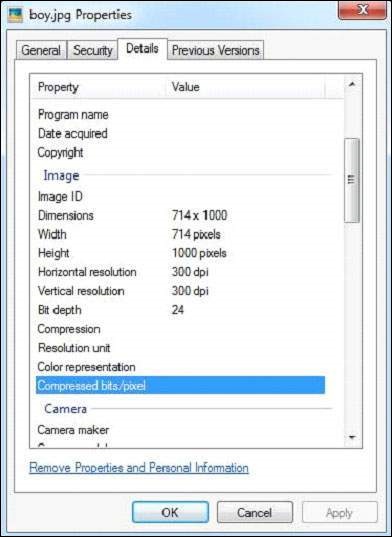
After executing the program, you will get the following output.
Contents of the document:
Metadata of the document:
Resolution Units: inch
Number of Tables: 4 Huffman tables
File Modified Date: Tue Oct 28 11:33:31 +05:30 2025
Compression Type: Baseline
Data Precision: 8 bits
Number of Components: 3
tiff:ImageLength: 435
Component 2: Cb component: Quantization table 1, Sampling factors 1 horiz/1 vert
Thumbnail Height Pixels: 0
Component 1: Y component: Quantization table 0, Sampling factors 2 horiz/2 vert
Image Height: 435 pixels
Thumbnail Width Pixels: 0
X Resolution: 96 dots
Image Width: 420 pixels
File Size: 40050 bytes
Component 3: Cr component: Quantization table 1, Sampling factors 1 horiz/1 vert
Version: 1.1
File Name: apache-tika-2559742186857137057.tmp
tiff:BitsPerSample: 8
tiff:ImageWidth: 420
Y Resolution: 96 dots
Apache Tika - Extracting MP4 file
Example - Extracting Content and Metadata from a MP4 file
Given below is the program to extract content and metadata from a MP4 file.
TikaDemo.java
package com.tutorialspoint.tika;

import java.io.File;
import java.io.FileInputStream;
import java.io.IOException;

import org.apache.tika.exception.TikaException;
import org.apache.tika.metadata.Metadata;
import org.apache.tika.parser.ParseContext;
import org.apache.tika.parser.mp4.MP4Parser;
import org.apache.tika.sax.BodyContentHandler;

import org.xml.sax.SAXException;

public class Mp4Parse {

   public static void main(final String[] args) throws IOException,SAXException, TikaException {

      //detecting the file type
      BodyContentHandler handler = new BodyContentHandler();
      Metadata metadata = new Metadata();
      FileInputStream inputstream = new FileInputStream(new File("D:/projects/example.mp4"));
      ParseContext pcontext = new ParseContext();

      //Html parser
      MP4Parser MP4Parser = new MP4Parser();
      MP4Parser.parse(inputstream, handler, metadata,pcontext);
      System.out.println("Contents of the document:  :" + handler.toString());
      System.out.println("Metadata of the document:");
      String[] metadataNames = metadata.names();

      for(String name : metadataNames) {
         System.out.println(name + ": " + metadata.get(name));
      }
   }
}
Output
Given below is the snapshot of properties of example.mp4 file.
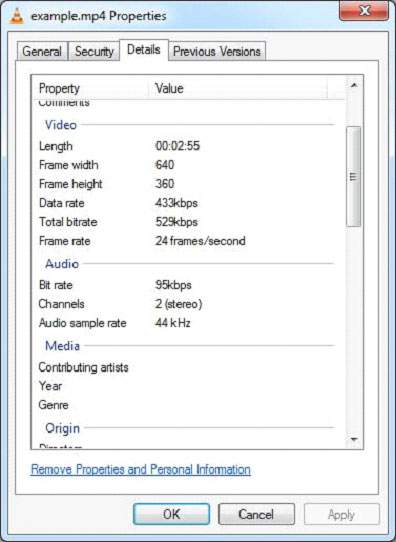
After executing the program, you will get the following output.
Contents of the document:  :
Metadata of the document:
xmp:CreatorTool: Lavf58.44.100
xmpDM:audioSampleRate: 44100
X-TIKA:EXCEPTION:warn: End of data reached.
tiff:ImageLength: 1080
dcterms:created: 1904-01-01T00:00:00Z
dcterms:modified: 1904-01-01T00:00:00Z
xmpDM:audioChannelType: Stereo
tiff:ImageWidth: 1920
xmpDM:duration: 5.76
Content-Type: video/mp4
Apache Tika - Extracting MP3 file
Example - Extracting Content and Metadata from a MP3 file
Given below is the program to extract content and metadata from a MP3 file.
TikaDemo.java
package com.tutorialspoint.tika;

import java.io.File;
import java.io.FileInputStream;
import java.io.IOException;

import org.apache.tika.exception.TikaException;
import org.apache.tika.metadata.Metadata;
import org.apache.tika.parser.ParseContext;
import org.apache.tika.parser.mp3.LyricsHandler;
import org.apache.tika.parser.mp3.Mp3Parser;
import org.apache.tika.sax.BodyContentHandler;

import org.xml.sax.SAXException;

public class TikaDemo {

   public static void main(final String[] args) throws Exception, IOException, SAXException, TikaException {

      //detecting the file type
      BodyContentHandler handler = new BodyContentHandler();
      Metadata metadata = new Metadata();
      FileInputStream inputstream = new FileInputStream(new File("D:/projects/example.mp3"));
      ParseContext pcontext = new ParseContext();

      //Mp3 parser
      Mp3Parser  Mp3Parser = new  Mp3Parser();
      Mp3Parser.parse(inputstream, handler, metadata, pcontext);
      LyricsHandler lyrics = new LyricsHandler(inputstream,handler);

      while(lyrics.hasLyrics()) {
    	  System.out.println(lyrics.toString());
      }

      System.out.println("Contents of the document:" + handler.toString());
      System.out.println("Metadata of the document:");
      String[] metadataNames = metadata.names();

      for(String name : metadataNames) {
    	  System.out.println(name + ": " + metadata.get(name));
      }
   }
}
Output
Example.mp3 file has the following properties −
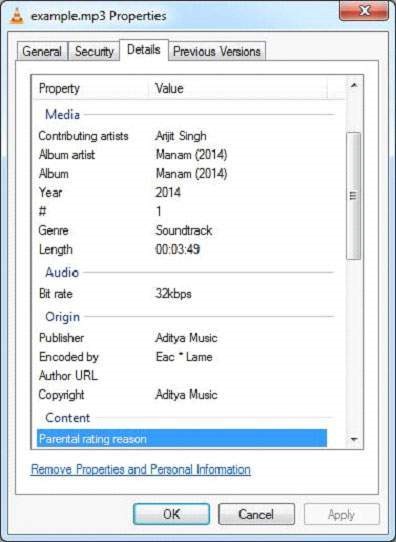
You will get the following output after executing the program. If the given file has any lyrics, our application will capture and display that along with the output.
Contents of the document:null
3.2653103

Metadata of the document:
xmpDM:audioSampleRate: 44100
channels: 2
xmpDM:audioCompressor: MP3
xmpDM:audioChannelType: Stereo
version: MPEG 3 Layer III Version 1
xmpDM:duration: 3.265310287475586
Content-Type: audio/mpeg
samplerate: 44100
