- JOGL - API for Basic Templates
- JOGL - Canvas with AWT
- JOGL - Canvas with Swing
- JOGL - GLJPanel Class
- JOGL Graphical Shapes
- JOGL - Drawing Basics
- JOGL - Drawing with GL_Lines
- JOGL - Pre-defined shapes
- JOGL Effects & Transformation
- JOGL - Transformation
- JOGL - Coloring
- JOGL - Scaling
- JOGL - Rotation
- JOGL - Lighting
- JOGL 3D Graphics
- JOGL - 3D Basics
- JOGL - 3D Triangle
- JOGL - 3D Cube
- JOGL - Appendix
- JOGL Useful Resources
- JOGL - Quick Guide
- JOGL - Useful Resources
- JOGL - Discussion
JOGL Graphical Shapes
This tutorial describes drawing a straight line and various shapes using straight line. OpenGL API has provided primitive methods for drawing basic graphical elements such as point, vertex, line etc. Using these methods, you can develop shapes such as triangle, polygon and circle. In both, 2D and 3D dimensions.
Drawing objects
To access programs which are specific to a hardware and operating system platforms, and the libraries written in other languages such as C and C++ (native applications), java uses a programming frame work called Java Native Interface (JNI). JOGL uses this interface internally to access OpenGL functions as shown in the following diagram.
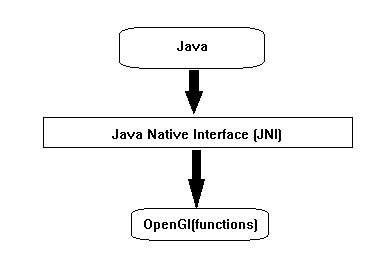
All the four methods of GLEventListener interface have the code (java JOGL methods) which internally call OpenGL functions, naming of those JOGL methods is also similar to the naming conventions of OpenGL. If the function name in OpenGL is glBegin(), it is used as gl.glBegin().
Whenever gl.glBegin() method of java JOGL is called, it internally invokes the glBegin() method of OpenGL. This is the reason for installing native library files on user system at the time of installation of JOGL.
The Display() method
This is an important method which holds the code for developing graphics. This requires GLAutoDrawable interface object as parameter.
In Display() method, initially get OpenGL context using object of GL interface (GL inherits GLBase interface which contains methods to generate all OpenGL context objects). Since this tutorial is about JOGL2 let us generate GL2 object.
Let us go through code snippet for getting GL2 Object:
//Generating GL object
GL gl=drawable.getGL();
GL gl=drawable.getGL();
//Using this Getting the Gl2 Object
//this can be written in a single line like
final GL2 gl = drawable.getGL().getGL2();
Using the object of GL2 interface, one can access the members of GL2 interface, which in turn provide access to OpenGL [1.0... 3.0] functions.
Drawing a line
GL2 interface contains huge list of methods but here three main important methods are discussed namely glBegin(), glVertex(), and glEnd().
| Sr. No. | Methods and Description |
|---|---|
| 1 |
glBegin() This method starts the process of drawing a line. It takes predefined string integer GL_LINES as a parameter, which is inherited from GL interface. |
| 2 |
glVertex3f()/glVertex2f() This method creates the vertex and we have to pass coordinates as parameters 3f and 2f, which denote 3dimentional floating point coordinates and 2dimentional floating point coordinates respectively. |
| 3 |
glEnd() ends the line |
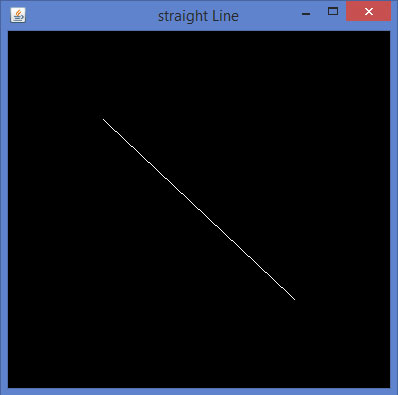
Let us go through the program to draw a line:
import javax.media.opengl.GL2;
import javax.media.opengl.GLAutoDrawable;
import javax.media.opengl.GLCapabilities;
import javax.media.opengl.GLEventListener;
import javax.media.opengl.GLProfile;
import javax.media.opengl.awt.GLCanvas;
import javax.swing.JFrame;

public class Line implements GLEventListener{
   @Override
   public void display(GLAutoDrawable drawable) {
      final GL2 gl = drawable.getGL().getGL2();
      gl.glBegin (GL2.GL_LINES);//static field
      gl.glVertex3f(0.50f,-0.50f,0);
      gl.glVertex3f(-0.50f,0.50f,0);
      gl.glEnd();
   }
   @Override
   public void dispose(GLAutoDrawable arg0) {
      //method body
   }

   @Override
   public void init(GLAutoDrawable arg0) {
      // method body
   }
   @Override
   public void reshape(GLAutoDrawable arg0, int arg1, int arg2, int arg3, int arg4) {
      // method body
   }
   public static void main(String[] args) {
      //getting the capabilities object of GL2 profile
      final GLProfile profile = GLProfile.get(GLProfile.GL2);
      GLCapabilities capabilities = new GLCapabilities(profile);
      // The canvas
      final GLCanvas glcanvas = new GLCanvas(capabilities);
      Line l = new Line();
      glcanvas.addGLEventListener(l);
      glcanvas.setSize(400, 400);
      //creating frame
      final JFrame frame = new JFrame ("straight Line");
      //adding canvas to frame
      frame.getContentPane().add(glcanvas);
      frame.setSize(frame.getContentPane().getPreferredSize());
      frame.setVisible(true);
   }//end of main
}//end of classimport javax.media.opengl.GL2;
Drawing shapes using GL_Lines
Let us go through a program to draw a triangle using GL_LINES:
import javax.media.opengl.GL2;
import javax.media.opengl.GLAutoDrawable;
import javax.media.opengl.GLCapabilities;
import javax.media.opengl.GLEventListener;
import javax.media.opengl.GLProfile;
import javax.media.opengl.awt.GLCanvas;
import javax.swing.JFrame;

public class Triangle implements GLEventListener{
   @Override
   public void display(GLAutoDrawable drawable) {
      final GL2 gl = drawable.getGL().getGL2();
      gl.glBegin (GL2.GL_LINES);
      //drawing the base
      gl.glBegin (GL2.GL_LINES);
      gl.glVertex3f(-0.50f, -0.50f, 0);
      gl.glVertex3f(0.50f, -0.50f, 0);
      gl.glEnd();
      //drawing the right edge
      gl.glBegin (GL2.GL_LINES);
      gl.glVertex3f(0f, 0.50f, 0);
      gl.glVertex3f(-0.50f, -0.50f, 0);
      gl.glEnd();
      //drawing the lft edge
      gl.glBegin (GL2.GL_LINES);
      gl.glVertex3f(0f, 0.50f, 0);
      gl.glVertex3f(0.50f, -0.50f, 0);
      gl.glEnd();
      gl.glFlush();
   }
   @Override
   public void dispose(GLAutoDrawable arg0) {
      //method body
   }
   @Override
   public void init(GLAutoDrawable arg0) {
   // method body
   }
   @Override
   public void reshape(GLAutoDrawable arg0, int arg1, int arg2, int arg3,
   int arg4) {
   // method body
   }
   public static void main(String[] args) {
      //getting the capabilities object of GL2 profile
      final GLProfile profile = GLProfile.get(GLProfile.GL2);
      GLCapabilities capabilities = new GLCapabilities(profile);
      // The canvas
      final GLCanvas glcanvas = new GLCanvas(capabilities);
      Triangle l = new Triangle();
      glcanvas.addGLEventListener(l);
      glcanvas.setSize(400, 400);
      //creating frame
      final JFrame frame = new JFrame ("Triangle");
      //adding canvas to frame
      frame.getContentPane().add(glcanvas);
      frame.setSize(frame.getContentPane().getPreferredSize());
      frame.setVisible(true);
   }//end of main
}//end of classimport javax.media.opengl.GL2;
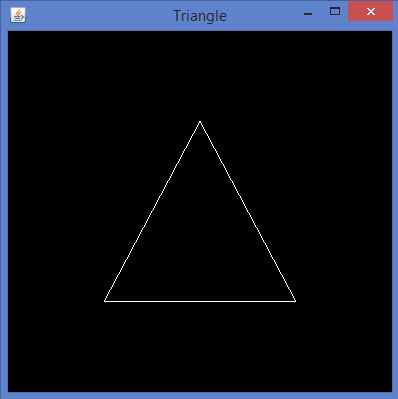
If you compile and execute the above program, the following output is generated. It shows a triangle drawn using GL_LINES of glBegin() method.
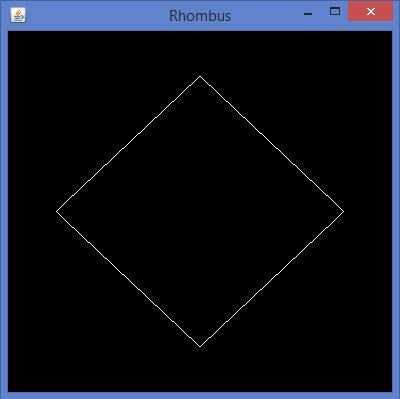
Let us go through a program to draw a rhombus using GL_LINES:
import javax.media.opengl.GL2;
import javax.media.opengl.GLAutoDrawable;
import javax.media.opengl.GLCapabilities;
import javax.media.opengl.GLEventListener;
import javax.media.opengl.GLProfile;
import javax.media.opengl.awt.GLCanvas;
import javax.swing.JFrame;

public class Rhombus implements GLEventListener{
   @Override
   public void display( GLAutoDrawable drawable ) {
      final GL2 gl = drawable.getGL().getGL2();
      //edge1
      gl.glBegin( GL2.GL_LINES );
      gl.glVertex3f( 0.0f,0.75f,0 );
      gl.glVertex3f( -0.75f,0f,0 );
      gl.glEnd();
      //edge2
      gl.glBegin( GL2.GL_LINES );
      gl.glVertex3f( -0.75f,0f,0 );
      gl.glVertex3f( 0f,-0.75f, 0 );
      gl.glEnd();
      //edge3
      gl.glBegin( GL2.GL_LINES );
      gl.glVertex3f( 0f,-0.75f, 0 );
      gl.glVertex3f( 0.75f,0f, 0 );
      gl.glEnd();
      //edge4
      gl.glBegin( GL2.GL_LINES );
      gl.glVertex3f( 0.75f,0f, 0 );
      gl.glVertex3f( 0.0f,0.75f,0 );
      gl.glEnd();
      gl.glFlush();
   }
   @Override
   public void dispose( GLAutoDrawable arg0 ) {
      //method body
   }
   @Override
   public void init(GLAutoDrawable arg0 ) {
      // method body
   }
   @Override
   public void reshape( GLAutoDrawable arg0, int arg1, int arg2, int arg3, int arg4 ) {
      // method body
   }
   public static void main( String[] args ) {
      //getting the capabilities object of GL2 profile
      final GLProfile profile = GLProfile.get( GLProfile.GL2 );
      GLCapabilities capabilities = new GLCapabilities( profile );
      // The canvas
      final GLCanvas glcanvas = new GLCanvas( capabilities );
      Rhombus rhombus = new Rhombus();
      glcanvas.addGLEventListener( rhombus );
      glcanvas.setSize( 400, 400 );
      //creating frame
      final JFrame frame = new JFrame ( "Rhombus" );
      //adding canvas to frame
      frame.getContentPane().add( glcanvas );
      frame.setSize( frame.getContentPane().getPreferredSize() );
      frame.setVisible( true );
   }//end of main
}//end of class
If you compile and execute the above program, you get following output. It shows a rhombus generated using GL_LINES of glBegin() method.
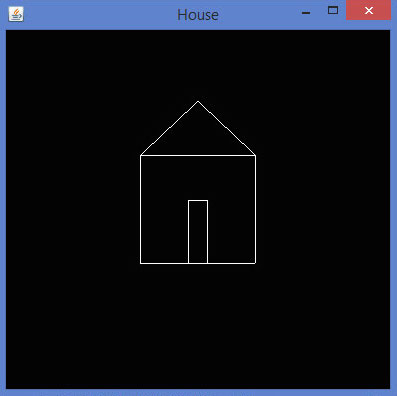
Let us go through a program to draw a house using GL_LINES:
import javax.media.opengl.GL2;
import javax.media.opengl.GLAutoDrawable;
import javax.media.opengl.GLCapabilities;
import javax.media.opengl.GLEventListener;
import javax.media.opengl.GLProfile;
import javax.media.opengl.awt.GLCanvas;
import javax.swing.JFrame;

public class House implements GLEventListener{
   @Override
   public void display( GLAutoDrawable drawable ) {
      final GL2 gl = drawable.getGL().getGL2();
      //drawing top
      gl.glBegin ( GL2.GL_LINES );
      gl.glVertex3f( -0.3f, 0.3f, 0 );
      gl.glVertex3f( 0.3f,0.3f, 0 );
      gl.glEnd();
      //drawing bottom
      gl.glBegin( GL2.GL_LINES );
      gl.glVertex3f( -0.3f,-0.3f, 0 );
      gl.glVertex3f( 0.3f,-0.3f, 0 );
      gl.glEnd();
      //drawing the right edge
      gl.glBegin( GL2.GL_LINES );
      gl.glVertex3f( -0.3f,0.3f, 0 );
      gl.glVertex3f( -0.3f,-0.3f, 0 );
      gl.glEnd();
      //drawing the left edge
      gl.glBegin( GL2.GL_LINES );
      gl.glVertex3f( 0.3f,0.3f,0 );
      gl.glVertex3f( 0.3f,-0.3f,0 );
      gl.glEnd();
      //building roof
      //building lft dia
      gl.glBegin( GL2.GL_LINES );
      gl.glVertex3f( 0f,0.6f, 0 );
      gl.glVertex3f( -0.3f,0.3f, 0 );
      gl.glEnd();
      //building rt  dia
      gl.glBegin( GL2.GL_LINES );
      gl.glVertex3f( 0f,0.6f, 0 );
      gl.glVertex3f( 0.3f,0.3f, 0 );
      gl.glEnd();
      //building door
      //drawing top
      gl.glBegin ( GL2.GL_LINES );
      gl.glVertex3f( -0.05f, 0.05f, 0 );
      gl.glVertex3f( 0.05f, 0.05f, 0 );
      gl.glEnd();
      //drawing the left edge
      gl.glBegin ( GL2.GL_LINES );
      gl.glVertex3f( -0.05f, 0.05f, 0 );
      gl.glVertex3f( -0.05f, -0.3f, 0 );
      gl.glEnd();
      //drawing the right edge
      gl.glBegin ( GL2.GL_LINES );
      gl.glVertex3f( 0.05f, 0.05f, 0 );
      gl.glVertex3f( 0.05f, -0.3f, 0 );
      gl.glEnd();
   }
   @Override
   public void dispose( GLAutoDrawable arg0 ) {
      //method body
   }
   @Override
   public void init( GLAutoDrawable arg0 ) {
      // method body
   }
   @Override
   public void reshape( GLAutoDrawable arg0, int arg1, int arg2, int arg3, int arg4 ) {
      // method body
   }
   public static void main( String[] args ) {
      //getting the capabilities object of GL2 profile
      final GLProfile profile = GLProfile.get( GLProfile.GL2 );
      GLCapabilities capabilities = new GLCapabilities( profile );
      // The canvas
      final GLCanvas glcanvas = new GLCanvas( capabilities );
      House house = new House();
      glcanvas.addGLEventListener( house );
      glcanvas.setSize(400, 400);
      //creating frame
      final JFrame frame = new JFrame( "House" );
      //adding canvas to frame
      frame.getContentPane().add( glcanvas );
      frame.setSize( frame.getContentPane().getPreferredSize() );
      frame.setVisible( true );
   }//end of main
}//end of class
If you compile and execute the above program, you get the following output. It shows a house diagram generated using GL_LINES() method.
Using parameters of glBegin() for more shapes
Other than GL_LINES predefined string parameter, glBegin() method accepts eight parameters. You can use it to draw different shapes. These are used same as GL_LINES.
The following table shows glBegin() method parameters and description:
| Sr. No. | Parameters and Description |
|---|---|
| 1 |
GL_LINES Creates each pair of vertices as an independent line segment. |
| 2 |
GL_LINE_STRIP Draws a connected group of line segments from the first vertex to the last. |
| 3 |
GL_LINE_LOOP Draws a connected group of line segments from the first vertex to the last, again back to the first. |
| 4 |
GL_TRIANGLES Treats each triplet of vertices as an independent triangle. |
| 5 |
GL_TRIANGLE_STRIP Draws a connected group of triangles. One triangle is defined for each vertex presented after the first two vertices. |
| 6 |
GL_TRIANGLE_FAN Draws a connected group of triangles. One triangle is defined for each vertex presented after the first two vertices. |
| 7 |
GL_QUADS Treats each group of four vertices as an independent quadrilateral. |
| 8 |
GL_QUAD_STRIP Draws a connected group of quadrilaterals. One quadrilateral is defined for each pair of vertices presented after the first pair. |
| 9 |
GL_POLYGON Draws a single, convex polygon. Vertices 1,,n define this polygon. |
Let us see some examples using glBegin() parameters.
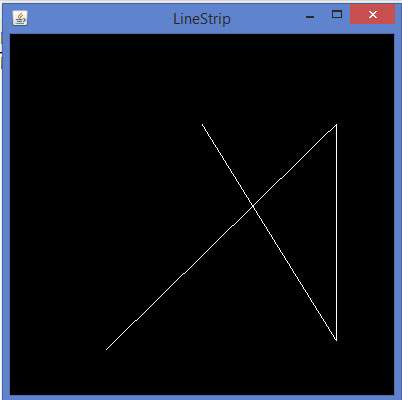
Program to draw Line Strip:
import javax.media.opengl.GL2;
import javax.media.opengl.GLAutoDrawable;
import javax.media.opengl.GLCapabilities;
import javax.media.opengl.GLEventListener;
import javax.media.opengl.GLProfile;
import javax.media.opengl.awt.GLCanvas;
import javax.swing.JFrame;

public class LineStrip implements GLEventListener{
   @Override
   public void display(GLAutoDrawable drawable) {
      final GL2 gl = drawable.getGL().getGL2();
      gl.glBegin (GL2.GL_LINE_STRIP);
      gl.glVertex3f(-0.50f,-0.75f, 0);
      gl.glVertex3f(0.7f,0.5f, 0);
      gl.glVertex3f(0.70f,-0.70f, 0);
      gl.glVertex3f(0f,0.5f, 0);
      gl.glEnd();
   }
   @Override
   public void dispose(GLAutoDrawable arg0) {
      //method body
   }
   @Override
   public void init(GLAutoDrawable arg0) {
      // method body
   }
   @Override
   public void reshape(GLAutoDrawable arg0, int arg1, int arg2, int arg3, int arg4) {
      // method body
   }
   public static void main(String[] args) {
      //getting the capabilities object of GL2 profile
      final GLProfile profile = GLProfile.get(GLProfile.GL2);
      GLCapabilities capabilities = new GLCapabilities(profile);
      // The canvas
      final GLCanvas glcanvas = new GLCanvas(capabilities);
      LineStrip r = new LineStrip();
      glcanvas.addGLEventListener(r);
      glcanvas.setSize(400, 400);
      //creating frame
      final JFrame frame = new JFrame ("LineStrip");
      //adding canvas to frame
      frame.getContentPane().add(glcanvas);
      frame.setSize(frame.getContentPane().getPreferredSize());
      frame.setVisible(true);
   }//end of main
}//end of classimport javax.media.opengl.GL2;
If you compile and execute the above code, the following output is generated:
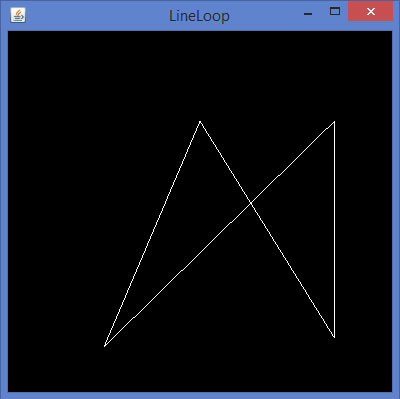
Code snippet for display() method to draw Line Loop:
public void display(GLAutoDrawable drawable) {
   final GL2 gl = drawable.getGL().getGL2();
   gl.glBegin (GL2.GL_LINE_LOOP);
   gl.glVertex3f( -0.50f, -0.75f, 0);
   gl.glVertex3f(0.7f, .5f, 0);
   gl.glVertex3f(0.70f,  -0.70f, 0);
   gl.glVertex3f(0f, 0.5f, 0);
   gl.glEnd();
}
If you replace display() method of any of the basic template programs with the above code, compile, and execute it, the following output is generated:
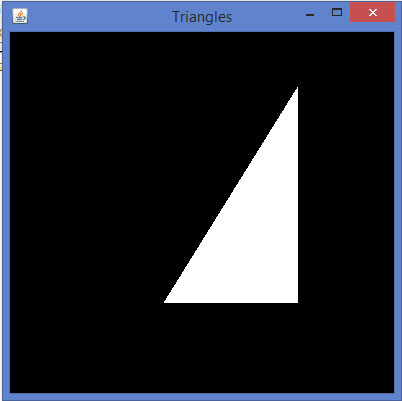
Code snippet for display() method to draw triangle using GL_TRIANGLES
public void display(GLAutoDrawable drawable) {
   final GL2 gl = drawable.getGL().getGL2();
   gl.glBegin(GL2.GL_TRIANGLES);        // Drawing Using Triangles
   gl.glVertex3f(0.5f,0.7f,0.0f);      // Top
   gl.glVertex3f(-0.2f,-0.50f,0.0f);  // Bottom Left
   gl.glVertex3f(0.5f,-0.5f,0.0f);   //Bottom Right
   gl.glEnd();
}
If you replace display method of any of the basic template programs with the above code, compile, and execute it, the following output is generated:
Code snippet for display() method to draw Triangle Strip:
public void display(GLAutoDrawable drawable) {
   final GL2 gl = drawable.getGL().getGL2();
   gl.glBegin (GL2.GL_TRIANGLE_STRIP);
   gl.glVertex3f(0f,0.5f,0);
   gl.glVertex3f(-0.50f,-0.75f,0);
   gl.glVertex3f(0.28f,0.06f,0);
   gl.glVertex3f(0.7f,0.5f,0);
   gl.glVertex3f(0.7f,-0.7f,0);
   gl.glEnd();
}
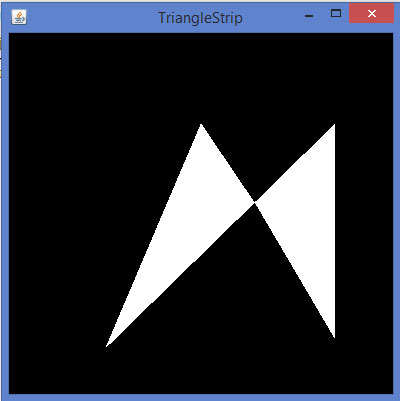
If you replace display method of any of the basic template programs with the above code, compile and execute it, the following output is generated:
Code snippet for display() method to draw Quadrilateral:
public void display(GLAutoDrawable drawable) {
   final GL2 gl = drawable.getGL().getGL2();
   gl.glBegin(GL2.GL_QUADS);
   gl.glVertex3f( 0.0f,0.75f,0);
   gl.glVertex3f(-0.75f,0f,0);
   gl.glVertex3f(0f,-0.75f,0);
   gl.glVertex3f(0.75f,0f,0);
   gl.glEnd();
}
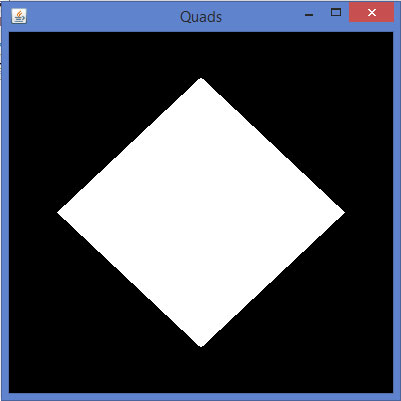
If you replace display method of any of the basic template programs with the above code, compile, and execute it, the following output is generated:
Code snippet for display() method to draw a polygon:
public void display(GLAutoDrawable drawable) {
   final GL2 gl = drawable.getGL().getGL2();
   gl.glBegin(GL2.GL_POLYGON);
   gl.glVertex3f(0f,0.5f,0f);
   gl.glVertex3f(-0.5f,0.2f,0f);
   gl.glVertex3f(-0.5f,-0.2f,0f);
   gl.glVertex3f(0f,-0.5f,0f);
   gl.glVertex3f(0f,0.5f,0f);
   gl.glVertex3f(0.5f,0.2f,0f);
   gl.glVertex3f(0.5f,-0.2f,0f);
   gl.glVertex3f(0f,-0.5f,0f);
   gl.glEnd();
}
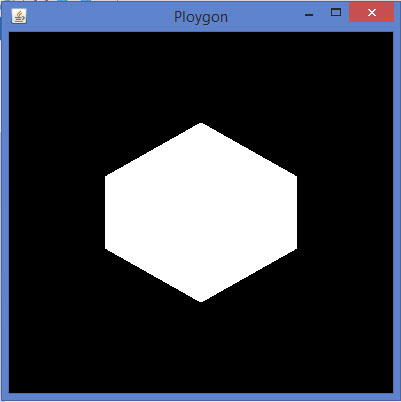
If you replace display() method of any of the basic template programs with the above code, compile, and execute it, the following output is generated