
- HTML Canvas - Home
- HTML Canvas - Introduction
- Environmental Setup
- HTML Canvas - First Application
- HTML Canvas - Drawing 2D Shapes
- HTML Canvas - Path Elements
- 2D Shapes Using Path Elements
- HTML Canvas - Colors
- HTML Canvas - Adding Styles
- HTML Canvas - Adding Text
- HTML Canvas - Adding Images
- HTML Canvas - Canvas Clock
- HTML Canvas - Transformations
- Composting and Clipping
- HTML Canvas - Basic Animations
- Advanced Animations
- HTML Canvas API Functions
- HTML Canvas - Element
- HTML Canvas - Rectangles
- HTML Canvas - Lines
- HTML Canvas - Paths
- HTML Canvas - Text
- HTML Canvas - Colors and Styles
- HTML Canvas - Images
- HTML Canvas - Shadows and Transformations
- HTML Canvas Useful Resources
- HTML Canvas - Quick Guide
- HTML Canvas - Useful Resources
- HTML Canvas - Discussion
HTML Canvas - strokeText() Method
The HTML Canvas strokeText() method of the CanvasRenderingContext2D interface is called by the context object to stroke text onto the Canvas element.
Syntax
Following is the syntax of HTML Canvas strokeText() method −
CanvasRenderingContext2D.strokeText(text, x, y, text_width);
Parameters
Following is the list of parameters of this method −
| S.No | Parameter & Description |
|---|---|
| 1 | text
The text string to be rendered onto the Canvas element. |
| 2 | x
x co-ordinate of the point from which text is to be drawn in the Canvas element. |
| 3 | y
y co-ordinate of the point from which text is to be drawn in the Canvas element. |
| 4 | text_width
Width of the text to be drawn in pixels. |
Return values
The method strokeText() adds strokes to the text and renders it on the Canvas element.
Example 1
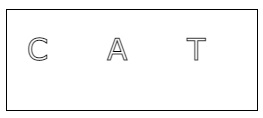
The following example adds strokes to a letter to the Canvas element using HTML Canvas strokeText() method.
<!DOCTYPE html>
<html lang="en">
<head>
   <title>Reference API</title>
   <style>
      body {
         margin: 10px;
         padding: 10px;
      }
   </style>
</head>
<body>
   <canvas id="canvas" width="250" height="100" style="border: 1px solid black;"></canvas>
   <script>
      var canvas = document.getElementById('canvas');
      var context = canvas.getContext('2d');
      context.font = '30px Verdana'
      context.strokeText('C', 20, 50);
      context.strokeText('A', 100, 50);
      context.strokeText('T', 180, 50);
   </script>
</body>
</html>
Output
The output returned by the above code on the webpage as −
Example 2
The following example adds strokes to a word which is in the Canvas element at the specified co-ordinates as passed by parameters using the method strokeText().
<!DOCTYPE html>
<html lang="en">
<head>
   <title>Reference API</title>
   <style>
      body {
         margin: 10px;
         padding: 10px;
      }
   </style>
</head>
<body>
   <canvas id="canvas" width="400" height="100" style="border: 1px solid black;"></canvas>
   <script>
      var canvas = document.getElementById('canvas');
      var context = canvas.getContext('2d');
      context.font = '30px Verdana'
      context.strokeText('This is a stroked text.', 35, 50);
   </script>
</body>
</html>
Output
The output returned by the above code on the webpage as −

